Short answer: Replit wins when you want one cloud workspace where an agent plans, builds, tests in a real browser and hosts the app, with no setup and room for non-developers. GitHub Copilot wins when your code, issues and reviews already live on GitHub, and developers want AI in their IDE plus a cloud agent that opens pull requests.
Your team wants AI help building software, and the shortlist has Replit and GitHub Copilot on it. They look alike in demos: type a request, get code. They are built around different centers of gravity. Replit is where your app runs. Copilot is where your code lives. This page referees the choice with each vendor's docs.
In this comparison:
- Replit and GitHub Copilot at a glance
- Feature comparison
- Cost model by team size
- Where Replit wins and where GitHub Copilot wins
- Switching from one to the other
Use the table to decide; use the rest to check.
Replit and GitHub Copilot at a glance
Changes in 2026
- Replit launched Agent 4 with a USD 400M Series D at a USD 9B valuation (Dealroom, March 11, 2026). Agent 4 combines design and code and runs tasks in parallel.
- GitHub Copilot now describes plans in GitHub AI Credits, with a new Copilot Max tier above Pro+; request-based billing is legacy. A new "Copilot in the cloud" experience reached paid plans on October 28, 2026. Enterprise AI Controls and the agent control plane went generally available on February 26, 2026.
Replit
Replit is a cloud development platform whose Agent "takes action" to set up projects, build apps, check its work and fix problems. Plan mode produces a task list for you to approve first. App Testing lets Agent click through the app in a real browser and fix issues. Checkpoints let you roll back. You publish as Autoscale, Reserved VM, Static or Scheduled deployments, with custom domains. Teams get SAML SSO, SCIM, groups and admin policies on who can build, which models are available and how apps publish.
GitHub Copilot
GitHub Copilot is an AI assistant built into GitHub.com, GitHub Mobile, IDEs, the Copilot CLI, Windows Terminal and a desktop app for parallel agent sessions. In IDE agent mode, "Copilot will determine which files to make changes to" and asks approval for changes and terminal commands. The cloud agent can research a repository and "create an implementation plan," then work in a GitHub Actions-based environment or cloud sandbox and open a pull request. Copilot reviews pull requests on paid plans. Models come from OpenAI, Anthropic, Google, Microsoft, Moonshot AI and xAI, and Claude and Codex agents are listed on Pro+ and Max.
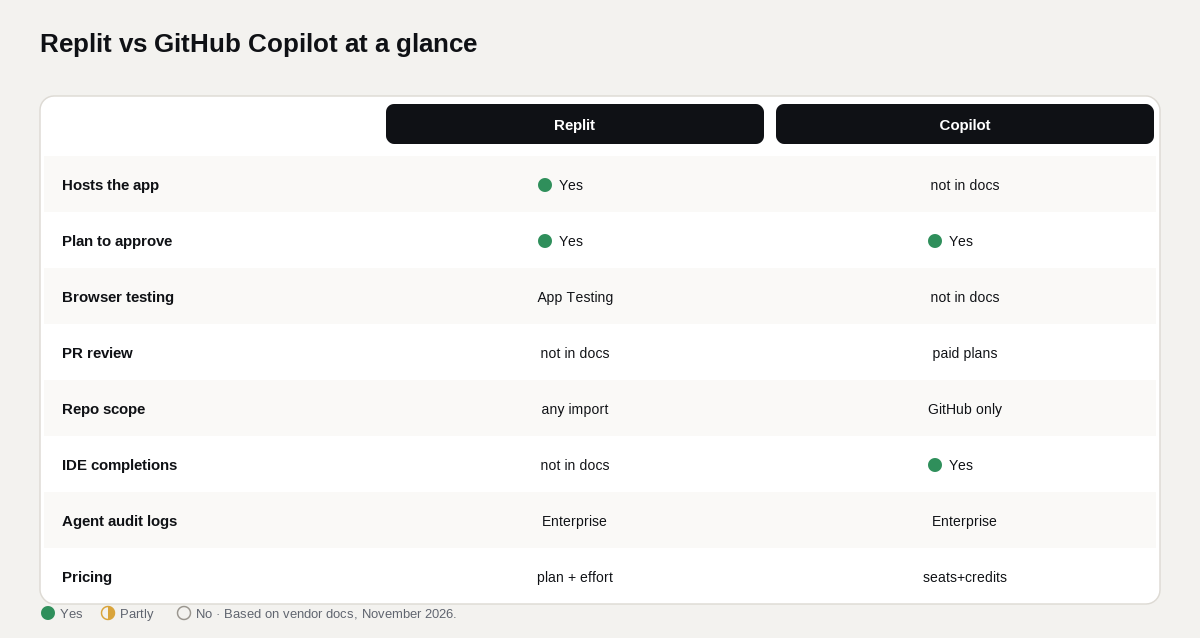
Feature comparison
| Aspect | Replit | GitHub Copilot | Source |
|---|---|---|---|
| Where it runs | Replit cloud workspace in the browser | GitHub.com, IDEs, CLI, desktop app, GitHub Mobile | Replit Agent; Copilot features |
| Planning / spec | Plan mode: task list to approve | Cloud agent researches the repo and writes an implementation plan | Replit Agent; Copilot features |
| Agent autonomy | Agent builds, checks and fixes; parallel tasks (1 on Core, up to 10 on Pro) | One repo, one branch, one PR per cloud agent task | Replit pricing docs; Copilot cloud agent |
| Testing / review | App Testing in a real browser (JS full-stack, Streamlit) | Pull request code review on paid plans | Replit App Testing; Copilot plans |
| Deploy / hosting | Autoscale, Reserved VM, Static, Scheduled; custom domains | Not covered in the Copilot docs we checked | Replit publish |
| Code and repos | Import GitHub repos; Git pane pushes to a provider | Cloud agent works only on GitHub-hosted repos | Replit import; Copilot cloud agent |
| Team / admin | SSO, SCIM, groups; Enterprise: private deployments, security scans, SBOMs | Policies, usage data, audit logs (Enterprise); AI Controls and agent audit | Replit Enterprise; Copilot AI Controls |
| Model choice | Auto picks a model per paid task; Enterprise model controls | Many providers; availability by plan and surface | Replit Agent; Copilot models |
| Pricing model | Plans plus effort-based Agent charges | Per seat (org) or individual tiers, with AI Credits | Replit pricing docs; Copilot plans docs |
Cost model by team size
| Team size | Replit | GitHub Copilot |
|---|---|---|
| 1 person | Starter (free) with a limited Free Mode allowance; Core USD 20 a month with USD 20 of credits | Free: 2,000 completions a month, limited chat and agent use; Pro, Pro+ or Max with monthly credit allowances |
| 5 people | Pro USD 100 a month, up to 15 collaborators | Business USD 19 per granted seat a month, pooled credits |
| 25 people | Enterprise (custom): SSO, SCIM, audit logs, single-tenant and private networking options | Enterprise USD 39 per granted seat a month; usage beyond the pool at USD 0.01 per credit |
Prices are from Replit's pricing page and GitHub's Copilot plans, as of November 2026. Watch the meters: Replit's Plan mode can incur charges even without changing code, and Copilot's coding agent and PR review are not on the Free plan. Devfab (Beta), for reference, logs cost after each run, per task and per project.
Where Replit wins
- You want the app running, not just written. Build, test and host in one place.
- Non-developers build. Agent handles setup, building, checking and fixing.
- The agent tests the UI. App Testing clicks through your app in a real browser.
- Varied runtimes. Always-on VMs, scheduled jobs or autoscale without a separate cloud account.
Where GitHub Copilot wins
- Your work already lives on GitHub. Issues, PRs and reviews stay where they are.
- Developers code in many IDEs. Completions, chat and agent mode across editors.
- Low per-seat cost at scale. Business and Enterprise seats with pooled credits.
- Agent governance. AI Controls, an AI administrator role and agent activity in audit logs.
Copilot's own docs add a caution: it "can produce incorrect or suboptimal code, including code that contains security vulnerabilities," and branch protection can block its pull requests unless granted a bypass.
Switching from one to the other
GitHub to Replit. Use Replit's guided import (replit.com/import), which works for public and private repos. Replit detects your stack, installs dependencies and configures run commands. Secrets, environment variable values and database data are not imported.
Replit to GitHub and Copilot. In Replit's Git pane, link a hosted Git provider, add your GitHub repo as the remote and push. From there, assign issues to Copilot's cloud agent. Keep Replit pointed at the same repo and pull merged changes back if you still host there.
Where Devfab fits
Replit builds and hosts the app. Copilot speeds up developers inside GitHub. Neither runs the full delivery for a client: researching the domain, a plan someone approves, tickets across a team of agents, tested user journeys and a deploy to the client's server.
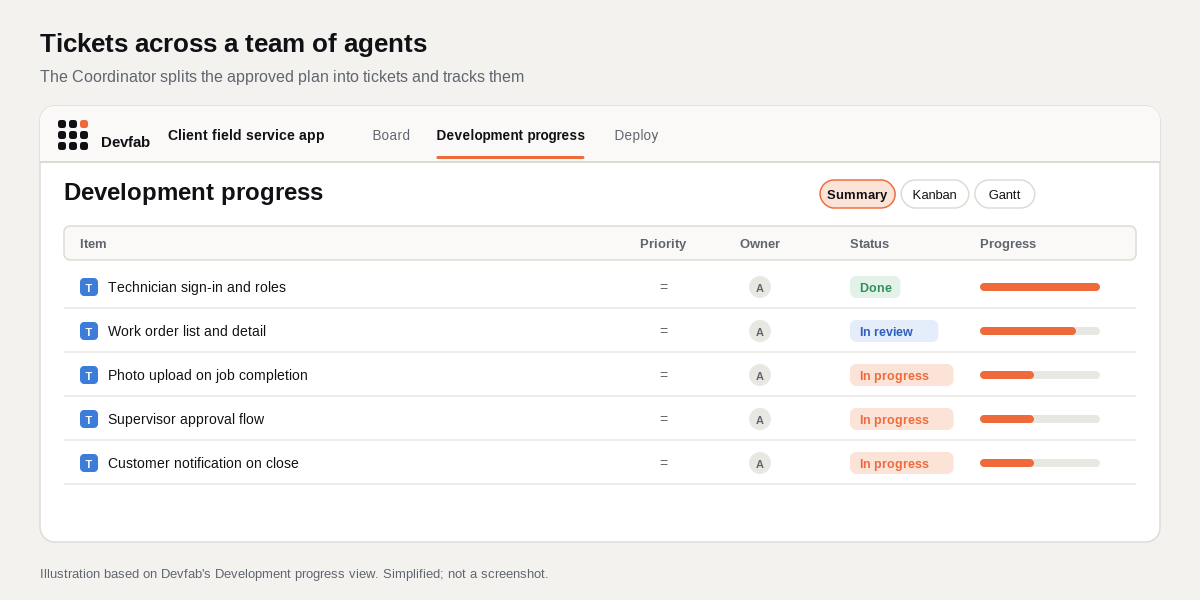
Coding agents automate the developer. Devfab automates the development lifecycle. Devfab's Researcher maps the domain before the Planner writes. A person approves the plan, and the Coordinator splits it into tickets. On existing repos, ChainFlow maps which functions and APIs call each other, so dev agents see the impact of a change. The QA agent runs UI, flow and logic tests, and Deploy ships to your own server.
Devfab's honest limits: it is new and in Beta, with a smaller community and fewer integrations. It is not an editor for hands-on coding, so developers who want inline completions should use Copilot. It needs a GitHub account. See Devfab vs GitHub Copilot.
FAQ
Can I use Replit and GitHub Copilot on the same project?
Yes, through GitHub. Replit's Git pane links your app to a hosted Git provider, pushes commits and publishes branches. Copilot's cloud agent then works on that GitHub repo and opens pull requests. Replit can pull the merged changes back.
Does GitHub Copilot host my app?
Not in the Copilot docs we checked. Copilot works on code: completions, chat, agent mode in the IDE, a cloud agent that opens pull requests, and code review. Replit hosts apps as Autoscale, Reserved VM, Static or Scheduled deployments.
Which is better for a non-developer?
Replit. Its Agent sets up the project, builds the app, checks its work, tests it in a browser and publishes it. GitHub Copilot is built for developers working in GitHub, IDEs and the terminal.
How does each one charge for AI?
Copilot plans now use GitHub AI Credits, where 1 credit equals USD 0.01; chat and agent work use credits, while completions do not. Replit uses effort-based pricing for paid Agent work, based on request complexity and confirmed before it starts. Check both pricing pages.
Read next
- What is an AI software factory?
- Devfab vs GitHub Copilot
- GitHub Copilot alternatives
- Replit vs Cursor
- AI software factory vs AI coding tools
Need delivery, not just code? Try Devfab Beta
Sources (checked November 13, 2026): Replit Agent overview; Replit pricing and plans (docs); Replit pricing; Replit App Testing; Replit: publish your app; Replit: import from GitHub; Replit Git interface; Replit Teams; Replit Enterprise; Dealroom: Replit Series D and Agent 4 (Mar 11, 2026); GitHub Copilot plans; GitHub Docs: Copilot plans; GitHub Docs: Copilot features; GitHub Docs: Copilot cloud agent; GitHub Docs: supported models; GitHub Changelog: Enterprise AI Controls GA (Feb 26, 2026).
Frequently asked questions
Can I use Replit and GitHub Copilot on the same project?
Yes, through GitHub. Replit's Git pane links your app to a hosted Git provider, pushes commits and publishes branches. Copilot's cloud agent then works on that GitHub repo and opens pull requests. Replit can pull the merged changes back.
Does GitHub Copilot host my app?
Not in the Copilot docs we checked. Copilot works on code: completions, chat, agent mode in the IDE, a cloud agent that opens pull requests, and code review. Replit hosts apps as Autoscale, Reserved VM, Static or Scheduled deployments.
Which is better for a non-developer?
Replit. Its Agent sets up the project, builds the app, checks its work, tests it in a browser and publishes it. GitHub Copilot is built for developers working in GitHub, IDEs and the terminal.
How does each one charge for AI?
Copilot plans now use GitHub AI Credits, where 1 credit equals USD 0.01; chat and agent work use credits, while completions do not. Replit uses effort-based pricing for paid Agent work, based on request complexity and confirmed before it starts. Check both pricing pages.