Short answer: Replit wins when you want to describe an app, have an agent build and test it, and publish it from the same cloud workspace without setting up hosting. Cursor wins when developers already own a codebase, a stack and a deploy pipeline, and want an AI editor and cloud agents that open pull requests.
Your founder wants a working app on a URL. Your developers want AI inside the repo they already trust. One camp says Replit is all you need: describe it, the Agent builds it, click publish. The other says Cursor is the serious tool, because real software lives in a codebase with reviews. Both camps are right about different jobs. This page acts as the referee and uses vendor docs and dated reviews, not opinions.
In this comparison:
- Replit and Cursor at a glance
- Feature comparison
- Cost model by team size
- Where Replit wins and where Cursor wins
- Where Devfab fits
Pick the sections that match the decision in front of you.
Replit and Cursor at a glance
Replit is a cloud development platform with a built-in agent. Agent 4 is the current version; Replit launched it alongside a Series D round in March 2026, and it combines design and code and runs tasks in parallel. The Agent works inside Replit's browser workspace: it sets up projects, builds apps, checks its own work and fixes problems. It can also produce designs and slides. Teams use Replit Workspaces for internal tools, customer-facing apps and dashboards. Hosting is part of the product, so the app you build is the app you publish.
Cursor is an AI code editor plus a coding agent. It runs as a desktop editor, a CLI, cloud agents, a mobile app and SDKs. The status change that matters: SpaceX agreed to buy Cursor's maker, Anysphere, in a deal confirmed on June 16, 2026, and Cursor's August 14, 2026 post says the acquisition has officially closed. Cursor now operates as a wholly owned subsidiary, and its plans bundle Grok products. Cursor's user is a developer who reviews code and owns the delivery process around it.
The short version: Replit is where the app is built and lives. Cursor is where developers write the code that lives somewhere else.
Feature comparison
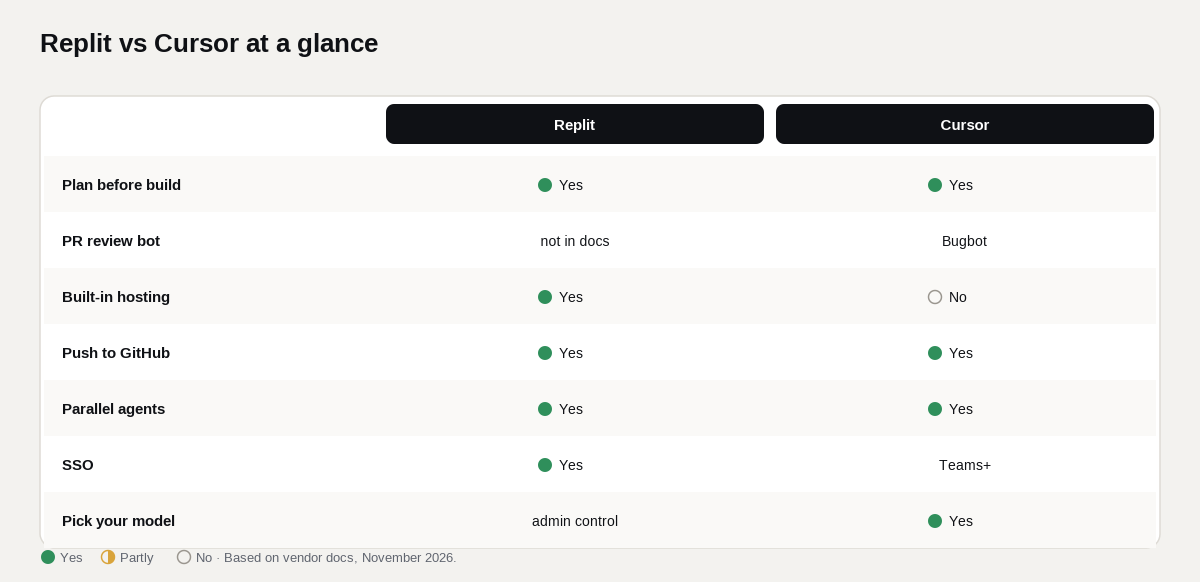
| Aspect | Replit | Cursor | Source |
|---|---|---|---|
| Where it runs | Browser workspace in Replit's cloud | Desktop editor, CLI, cloud agents, mobile, SDKs | Replit Agent · Cursor docs |
| Planning / spec | Plan mode writes a task list you approve before Agent changes code or data | Plan Mode asks clarifying questions, researches the codebase and drafts an editable plan | Replit Agent · Cursor Plan Mode |
| Agent autonomy | Agent builds, checks and fixes; checkpoints for rollback; parallel tasks by plan | Cloud agents run in isolated VMs, many in parallel, each on its own branch | Replit pricing docs · Cursor cloud agents |
| Testing | App Testing clicks through the app in a real browser (Full Stack JavaScript and Streamlit apps; Power/Max modes) | Bugbot reviews pull requests for bugs, security and quality issues | Replit App Testing · Cursor Bugbot |
| Deploy / hosting | Autoscale, Reserved VM, Static and Scheduled deployments; custom domains | Not included; you bring hosting and a database | Replit publish · Zapier review |
| Code ownership / export | Git pane links the app to GitHub and pushes commits | Works in your repo on GitHub, GitLab, Bitbucket or Azure DevOps | Replit Git · Cursor cloud agents |
| Team / admin | SAML SSO, optional SCIM, admin policies for building, models and publishing | SSO on Teams and Enterprise; SCIM and audit logs on Enterprise | Replit teams · Cursor enterprise |
| Model choice | Auto picks a model per paid task; Enterprise admins control model access | Models from several providers plus Cursor's own | Replit Agent · Cursor docs |
| Pricing model | Plans plus effort-based Agent pricing, confirmed before work starts | Subscription with a usage pool; third-party models billed by usage; Teams per seat | Replit pricing docs · Cursor pricing |
Cost model by team size
| Team size | Replit | Cursor | Devfab |
|---|---|---|---|
| 1 person | Free Starter plan to try; Core or Pro for more Agent work; paid Agent work billed by effort | Free tier with limited agent and chat requests; individual tiers include a usage pool; cloud agents need Premium or higher | Cost logged per task and per project (Beta) |
| 5 people | Pro covers up to 15 collaborators and up to 10 parallel Agent tasks | Teams plan, priced per seat, plus usage beyond the pool | Cost logged per task and per project (Beta) |
| 25 people | Enterprise (custom): SSO, SCIM, audit logs, private deployments | Teams per seat, or Enterprise (custom) for SCIM, audit logs and model access controls | Cost logged per task and per project (Beta) |
Replit's bill includes hosting; Cursor's does not. Zapier's May 2026 review makes the same point: with Cursor, hosting and databases cost extra. One more Replit detail: Plan mode can incur charges even when no code changes. Check Replit's pricing page and Cursor's pricing page for current amounts; we list models only.
Where Replit wins
- Non-developers who need a live app. The Agent sets up the project, builds, checks its work and publishes, all in one browser tab.
- Apps that need a runtime shape without a cloud account: an always-on VM, a scheduled job, autoscale or a static site.
- Internal tools that pull from company services. Agent can query connected services such as BigQuery, Linear, Slack and Notion from chat.
- Admins who want guardrails on who builds and publishes. Enterprise admins can require private deployments, ban public apps and mandate security scans.
Where Cursor wins
- Developers who code by hand every day and want AI in the editor, with Plan Mode for each task.
- Existing codebases with a real review process. Cloud agents open branches and pull requests; Bugbot reviews them and Autofix can push fixes.
- Model choice. Cursor lists models from several providers alongside its own.
- Your own Git host and infrastructure. Cloud agents support GitHub, GitLab, Bitbucket and Azure DevOps, and Self-Hosted Machines can run agent tools on hardware you manage.
Switching from one to the other
Replit to Cursor. Open Replit's Git pane (Tools, then Git), initialize a repository if needed, link it to GitHub and push your commits. Clone that repository locally and open the folder in Cursor. Then set up the hosting and database the app used on Replit, because Cursor won't host it.
Cursor to Replit. Replit's Git pane has no import button; its docs say to run git clone with your repository URL in the Replit Shell. Then let the Agent configure a deployment type.
Many teams use both in sequence: Replit to validate the idea, Cursor to harden the code.
Where Devfab fits
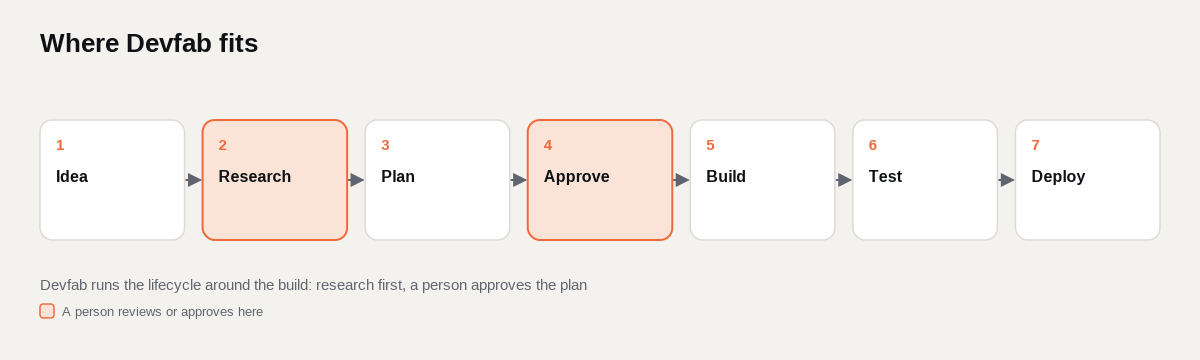
Replit and Cursor both speed up building. Neither is designed to run the project around the build: researching the domain, getting a plan approved by the client, splitting it into tickets, testing user journeys and shipping to the client's own server with docs.
Coding agents automate the developer. Devfab automates the development lifecycle.
Devfab is an AI software factory. Its research step maps your domain first: key terms, best practices for that kind of app and competitors, then suggests a prototype. A person approves the plan before the Coordinator creates tickets. On an existing repo, ChainFlow maps which functions and APIs call each other, so a change to checkout shows its impact on payments, inventory and notifications before it ships. The QA agent runs UI and flow tests plus logic tests, and cost is logged after each run, per task and per project.
Devfab's honest limits: it is new and in Beta, with a smaller community and fewer integrations than Replit or Cursor. It is not an editor for hands-on coding, it needs a GitHub account, and it deploys to your own server rather than hosting the app for you. See how it compares directly in Devfab vs Cursor.
FAQ
Can I use Replit and Cursor on the same project?
Yes. Connect the Replit app to a GitHub repository from Replit's Git pane and push, then clone that repository and open it in Cursor. Zapier's May 2026 review suggests exactly this order: build and validate in Replit, then productionize in Cursor.
Which is better for someone who doesn't code?
Replit. Its Agent sets up the project, builds the app, checks its work and publishes it from the same workspace. Cursor assumes someone can read and review code and set up hosting and a database.
Does Cursor host the app it helps build?
No hosting is included. Zapier's 2026 review notes you set up your own hosting and database with Cursor. Replit includes Autoscale, Reserved VM, Static and Scheduled deployments with custom domains.
Did the SpaceX acquisition change Cursor?
Cursor says it is now a wholly owned subsidiary of SpaceX. Its plans now bundle Grok products, and its August 14, 2026 post gave no plan or pricing specifics. Check Cursor's pricing page before you buy seats.
Read next
- What is an AI software factory?
- Lovable vs Replit
- Cursor alternatives for teams that ship to production
- AI app builder vs AI coding agent
Want the plan, tests and deploy handled as one process? Try Devfab Beta
Sources (checked November 13, 2026): Replit Agent overview; Replit pricing and plans (docs); Replit pricing; Replit App Testing; Replit Enterprise; Replit: publish your app; Replit Teams; Replit Git interface; Dealroom: Replit Series D and Agent 4 (Mar 11, 2026); Cursor docs; Cursor Plan Mode; Cursor cloud agents; Cursor Bugbot; Cursor Enterprise; Cursor pricing; Cursor: Joining SpaceX; The Next Web: SpaceX makes Cursor takeover official; Zapier: Replit vs Cursor (May 27, 2026).
Frequently asked questions
Can I use Replit and Cursor on the same project?
Yes. Connect the Replit app to a GitHub repository from Replit's Git pane and push, then clone that repository and open it in Cursor. Zapier's May 2026 review suggests exactly this order: build and validate in Replit, then productionize in Cursor.
Which is better for someone who doesn't code?
Replit. Its Agent sets up the project, builds the app, checks its work and publishes it from the same workspace. Cursor assumes someone can read and review code and set up hosting and a database.
Does Cursor host the app it helps build?
No hosting is included. Zapier's 2026 review notes you set up your own hosting and database with Cursor. Replit includes Autoscale, Reserved VM, Static and Scheduled deployments with custom domains.
Did the SpaceX acquisition change Cursor?
Cursor says it is now a wholly owned subsidiary of SpaceX. Its plans now bundle Grok products, and its August 14, 2026 post gave no plan or pricing specifics. Check Cursor's pricing page before you buy seats.