Short answer: Gemini CLI wins for enterprises with Gemini Code Assist licenses or paid API keys that want an open-source, scriptable terminal agent they can audit and run in CI. Cursor wins for most other developers, because Google stopped serving Gemini CLI to individual Pro, Ultra and free users in June 2026 and moved them to Antigravity CLI.
You may have picked Gemini CLI because it was open source, free to start, and lived in the terminal. Then Google changed who it serves. Cursor fans say an editor beats a CLI anyway. Terminal fans say an auditable agent beats a closed editor. Both have a point. This page sorts out who can still use Gemini CLI and when each tool is the right pick.
In this comparison:
- Cursor and Gemini CLI at a glance
- Feature comparison
- Cost model by team size
- Where Cursor wins
- Where Gemini CLI wins
The status change decides a lot, so it comes first.
Cursor and Gemini CLI at a glance
Gemini CLI is moving to Antigravity CLI for individuals. On May 19, 2026, Google announced that Gemini CLI is "transitioning" to Antigravity CLI. Since June 18, 2026, Gemini CLI no longer serves requests for Google AI Pro or Ultra users or for free Gemini Code Assist for individuals. Code Assist Standard and Enterprise customers and paid API key users keep access (Google Developers Blog). Business users do not need to change anything (TechRadar). FOSS Force called the move a "bait and switch" and notes Antigravity CLI "won't be open source" (FOSS Force).
Gemini CLI is Google's open-source terminal agent, built on Gemini models, under Apache-2.0, with about 107k GitHub stars (GitHub).
Cursor is active and owned by SpaceX. The deal for Anysphere, Cursor's maker, was confirmed on June 16, 2026 (The Next Web). Cursor is an AI code editor plus a coding agent that also runs in a CLI (including headless and CI use), as cloud agents, on mobile and through SDKs (Cursor docs).
Feature comparison
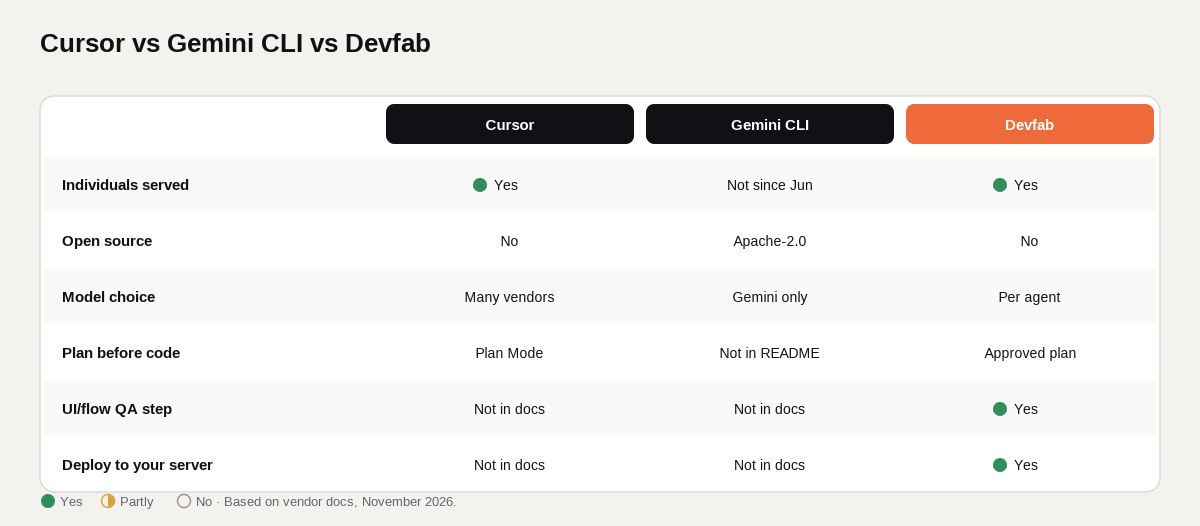
| Aspect | Cursor | Gemini CLI | Source |
|---|---|---|---|
| Who can use it | Anyone, from the free tier up | Code Assist Standard/Enterprise and paid API key users | Cursor pricing; Google blog |
| Where it runs | Editor, CLI, cloud agents, mobile, SDKs | Terminal; headless mode outputs text, JSON or stream-JSON | Cursor docs; GitHub |
| Planning | Plan Mode drafts an editable plan before code | Per-project GEMINI.md context files; a plan mode is not covered in the README | Cursor Plan Mode; GitHub |
| Background work | Cloud agents in isolated VMs, many in parallel | Checkpointing to save and resume conversations | Cursor cloud agents; GitHub |
| GitHub automation | Start agents from @cursor comments; Bugbot reviews PRs | run-gemini-cli Action for PR reviews, issue triage and mentions | Cursor cloud agents; GitHub |
| Safety | Self-Hosted Machines for cloud-agent tools; enforced Privacy Mode | Sandboxing | Cursor Enterprise; GitHub |
| Model choice | Claude, Gemini, GPT, Grok, Composer and others | Gemini models only | Cursor docs; GitHub |
| Open source | No | Yes, Apache-2.0 | GitHub |
| Deploy your app | Not covered in the docs we checked | Not covered in the docs we checked | — |
| Pricing model | Free tier, monthly tiers with a usage pool, Teams per seat | API key usage billing or Vertex AI / Code Assist licenses | Cursor pricing; GitHub |
Cost model by team size
| Team size | Cursor | Gemini CLI | Devfab |
|---|---|---|---|
| 1 person | Free; Plus USD 8 per month (Grok models only); Premium USD 30 per month | Paid Gemini API key, billed by usage; individual Pro, Ultra and free Code Assist users no longer served | Cost logged per task and per project (Beta) |
| 5 people | Teams from USD 30 per user per month | API key usage billing, or Gemini Code Assist Standard licenses | Cost logged per task and per project (Beta) |
| 25 people | Teams, or Enterprise (custom) | Gemini Code Assist Enterprise or Vertex AI | Cost logged per task and per project (Beta) |
Cursor prices as of November 2026 from Cursor pricing. Gemini CLI access and billing from the GitHub README and Google's announcement; check Google Cloud pricing for license amounts. Devfab is in Beta and offers predictable cost: cost is logged after each run, per task and per project.
Where Cursor wins
- You are an individual developer. Gemini CLI no longer serves Google AI Pro, Ultra or free Code Assist users.
- You want an editor, not only a terminal. Cursor has tab completion, chat, Plan Mode and agents in one IDE.
- You want to switch models. Cursor lists Claude, Gemini, GPT, Grok and its own Composer.
- You want parallel cloud agents that run in isolated VMs and push to separate branches.
- You want PR reviews that also fix. Bugbot flags issues and Autofix pushes fixes.
Where Gemini CLI wins
- You need to audit or fork the agent. It is Apache-2.0 open source; Cursor is not.
- You already pay for Gemini Code Assist Standard or Enterprise. Your access continues, and business users need no changes.
- You script agents into CI. Headless mode and the GitHub Action fit pipelines.
- You want Gemini's long context. The repo cites a 1M-token context window for Gemini 3.
- Your team standardized on Google Cloud and Vertex AI billing.
Switching from one to the other
From Gemini CLI to Cursor. Your code is already in your repo. Install Cursor and move project context from GEMINI.md into Cursor rules or an AGENTS.md file, which Cursor reads (Cursor rules). Re-add MCP servers in Cursor's settings.
From Gemini CLI to Antigravity CLI. If you are an individual user, this is Google's path. Extensions are now called Antigravity plugins, and Google warns there will not be "1:1 feature parity right out of the gate" (Google Developers Blog).
Where Devfab fits
Imagine a school portal for a district: enrollment, timetables, parent messages and grade reports. A terminal agent or an AI editor helps developers write that code. In the docs we checked, neither researches the school domain first, sends the project plan to a person for approval, runs a QA step on parent and teacher journeys, or deploys the app.
Coding agents automate the developer. Devfab automates the development lifecycle. The Researcher maps terms such as term dates and guardian roles before the Planner writes a plan. A person approves it. The QA agent runs UI and flow tests (screens, buttons and journeys clicked end to end) plus logic tests. Deploy ships to your own server, and the code sits in your own GitHub account.
Devfab is in Beta, with a smaller community and fewer integrations, and it is not an editor or a CLI. See Devfab vs Gemini CLI.
FAQ
Can I still use Gemini CLI?
Only on some plans. Since June 18, 2026, Gemini CLI no longer serves requests for Google AI Pro or Ultra users or for free Gemini Code Assist for individuals. Gemini Code Assist Standard and Enterprise customers and paid Gemini API key users keep access.
What is Antigravity CLI?
Google's replacement for Gemini CLI for individual users, launched May 19, 2026. It is built in Go, shares a harness with the Antigravity 2.0 desktop app, and supports skills, hooks, subagents and plugins. Google says it won't have full feature parity at first, and FOSS Force reports it won't be open source.
Is Gemini CLI free?
The agent is open source under Apache-2.0. Usage needs a Gemini API key with usage-based billing, or a Vertex AI or Gemini Code Assist license. The README still lists a free Google sign-in tier, but Google's blog says free individual Code Assist users lost access on June 18, 2026.
Which is better for CI pipelines?
Both can run headless. Gemini CLI has a headless mode with text or JSON output and a GitHub Action for PR reviews and issue triage. Cursor's CLI also supports headless and CI use, and its cloud agents can be started from GitHub comments, Slack, Linear or the API.
Read next
- What is an AI software factory?
- Gemini CLI alternatives for teams that ship to production
- Cursor alternatives for teams that ship to production
- Gemini CLI vs OpenCode
Want a plan approved and tested before anything ships? Try Beta
Sources (checked November 2026): Google Developers Blog: Transitioning Gemini CLI to Antigravity CLI (May 19, 2026); google-gemini/gemini-cli on GitHub; TechRadar: Google is making Gemini CLI users switch (May 20, 2026); FOSS Force: Gemini CLI's short life (May 22, 2026); Cursor docs; Cursor pricing; Cursor Plan Mode; Cursor cloud agents; Cursor Enterprise; Cursor rules; The Next Web: SpaceX makes its Cursor takeover official.
Frequently asked questions
Can I still use Gemini CLI?
Only on some plans. Since June 18, 2026, Gemini CLI no longer serves requests for Google AI Pro or Ultra users or for free Gemini Code Assist for individuals. Gemini Code Assist Standard and Enterprise customers and paid Gemini API key users keep access.
What is Antigravity CLI?
Google's replacement for Gemini CLI for individual users, launched May 19, 2026. It is built in Go, shares a harness with the Antigravity 2.0 desktop app, and supports skills, hooks, subagents and plugins. Google says it won't have full feature parity at first, and FOSS Force reports it won't be open source.
Is Gemini CLI free?
The agent is open source under Apache-2.0. Usage needs a Gemini API key with usage-based billing, or a Vertex AI or Gemini Code Assist license. The README still lists a free Google sign-in tier, but Google's blog says free individual Code Assist users lost access on June 18, 2026.
Which is better for CI pipelines?
Both can run headless. Gemini CLI has a headless mode with text or JSON output and a GitHub Action for PR reviews and issue triage. Cursor's CLI also supports headless and CI use, and its cloud agents can be started from GitHub comments, Slack, Linear or the API.