Short answer: goose wins for individuals and teams that want a free, Apache 2.0 agent with any of 15+ model providers, a desktop app and Linux Foundation governance. Gemini CLI wins for enterprises already licensed for Gemini Code Assist Standard or Enterprise, or paying for Gemini API keys, that want a scriptable terminal agent with a ready GitHub Action.
You picked Gemini CLI because it was open source and free to start. Then Google changed who it serves.
Now the debate in your team is simple. Stay with Google and move to Antigravity CLI, or pick an agent no single vendor controls. This page sets out who can still use Gemini CLI, what goose offers instead, and where each one is the better tool. Every claim links to a page checked in November 2026.
In this comparison:
- Goose and Gemini CLI at a glance
- Feature comparison
- Cost model by team size
- Where Gemini CLI wins
- Switching from one to the other
The status change comes first, because it decides the rest for many readers.
Goose and Gemini CLI at a glance
Gemini CLI changed audience in 2026. On May 19, 2026, Google said Gemini CLI is "transitioning" to Antigravity CLI. Since June 18, 2026, Gemini CLI no longer serves requests for Google AI Pro and Ultra users or free Gemini Code Assist for individuals. Gemini Code Assist Standard and Enterprise customers and paid API-key users keep access (Google Developers Blog). Google also says Antigravity CLI won't have "1:1 feature parity right out of the gate" (same source). FOSS Force called the move a "bait and switch" and notes Antigravity CLI "won't be open source" (FOSS Force).
goose changed owner in 2026. It moved from Block to the Agentic AI Foundation at the Linux Foundation; the repo is now aaif-goose/goose and the docs live at goose-docs.ai (goose blog, April 7, 2026). It keeps shipping: v1.58 and v1.59 in mid-November 2026 added a context window viewer and resumable subagent delegates (goose releases).
goose is a general-purpose agent for coding, research, writing and automation, with a desktop app, a CLI and an API (goose README). Gemini CLI is Google's open-source terminal agent built on Gemini models, with about 107k GitHub stars (Gemini CLI on GitHub).
Feature comparison
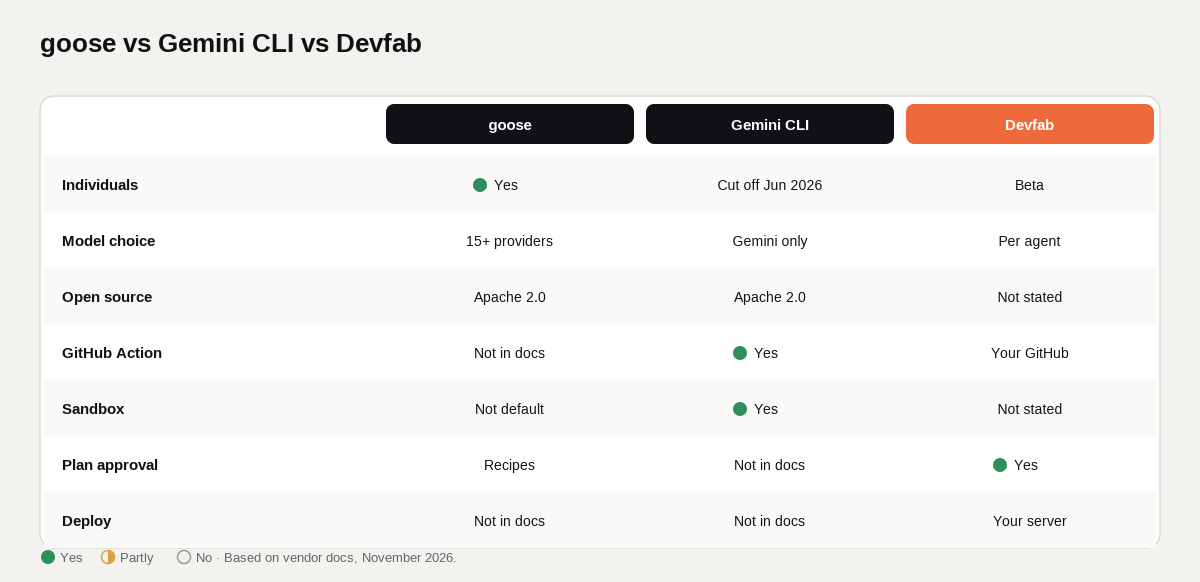
| Aspect | goose | Gemini CLI | Source |
|---|---|---|---|
| Who can use it now | Anyone; free and open source | Code Assist Standard/Enterprise customers and paid API-key users | goose docs; Google blog |
| Where it runs | Desktop app (macOS, Linux, Windows), CLI, API | Terminal; install via npm, Homebrew, MacPorts or Anaconda | goose README; Gemini CLI |
| Planning and context | YAML recipes; parallel subagents | Per-project GEMINI.md files; checkpointing to save and resume | goose docs; Gemini CLI |
| Safety | No default sandbox per run (2026 review) | Sandboxing listed as a feature | PromptQuorum; Gemini CLI |
| Automation and CI | Recipes can run in CI | Headless mode (text, JSON, stream-JSON); run-gemini-cli GitHub Action | goose docs; Gemini CLI |
| Extensions | 70+ extensions via MCP; ACP server and client | MCP support | goose README; Gemini CLI |
| Model choice | 15+ providers incl. Google, Anthropic, OpenAI, Ollama | Gemini models only; 1M-token context cited for Gemini 3 | goose README; Gemini CLI |
| License | Apache 2.0, foundation-governed | Apache 2.0; successor Antigravity CLI is not open source | goose README; FOSS Force |
| Pricing model | Free; pay your provider or run local models | Gemini API usage billing, or Code Assist / Vertex AI licenses | goose docs; Gemini CLI |
Cost model by team size
| Team size | goose | Gemini CLI | Devfab |
|---|---|---|---|
| 1 person | Free; your provider key, a Gemini or Claude subscription via ACP, or local models through Ollama | Paid Gemini API key with usage billing; Google AI Pro/Ultra no longer works | Cost logged per task and per project (Beta) |
| 5 people | Free; share recipes so everyone runs the same steps | API keys with usage billing, or Gemini Code Assist Standard licenses | Cost logged per task and per project (Beta) |
| 25 people | Free; a custom distribution can preset providers and extensions | Gemini Code Assist Enterprise or Vertex AI licenses | Cost logged per task and per project (Beta) |
goose has no vendor pricing (goose docs). Gemini CLI's README still lists a free Google-account tier, but Google's blog says free individual Code Assist users lost access on June 18, 2026; check Google's announcement before you budget. Devfab is in Beta and offers predictable cost: cost is logged after each run, per task and per project.
Where goose wins
- You are an individual developer. goose works for anyone; Gemini CLI no longer serves Pro, Ultra or free Code Assist users.
- You want more than one model family. goose supports 15+ providers, Google included.
- You want open-source governance. goose sits at a Linux Foundation project; Gemini CLI's successor is proprietary.
- You want a desktop app. goose ships native apps as well as a CLI.
- You want to brand or embed the agent. Custom distributions preset providers, extensions and branding.
Where Gemini CLI wins
- Your company already pays for Gemini Code Assist. Standard and Enterprise customers keep access with no change, and TechRadar notes business users don't need to change anything (TechRadar).
- You want a ready GitHub Action. run-gemini-cli handles PR reviews, issue triage and @gemini-cli mentions.
- You need sandboxing out of the box. Gemini CLI lists sandboxing; a 2026 review says goose has no default sandbox per run.
- You script the agent. Headless mode returns JSON or stream-JSON for pipelines.
- You work with very large contexts. The repo cites a 1M-token window for Gemini 3.
Switching from one to the other
From Gemini CLI to goose. Install goose and choose Google as the provider to keep Gemini models, or connect an existing Gemini subscription through ACP (goose README). Move your MCP servers into goose extensions. Turn GEMINI.md instructions and repeated prompts into recipes.
From goose to Gemini CLI. Confirm your account type first: you need a Code Assist Standard or Enterprise license or a paid API key. Install via npm or Homebrew, add a GEMINI.md per project, and reconnect MCP servers. If you are an individual, Google directs you to Antigravity CLI instead (Google Developers Blog).
Where Devfab fits
Say a regional ferry operator wants a ticketing app: sailings, seat holds, refunds when weather cancels a crossing. A terminal agent helps a developer write each piece. In the docs we checked, neither goose nor Gemini CLI plans the whole project for a person to approve, tests the booking journey end to end, or deploys the app.
Coding agents automate the developer. Devfab automates the development lifecycle. A person approves the plan before the Coordinator creates tickets. On later changes, ChainFlow maps which functions and APIs call each other, so a change to refunds shows its effect on seat holds, payment records and passenger emails before dev agents touch it. You can choose the model for each agent or keep Devfab's default. Devfab is in Beta, has a smaller community and fewer integrations, is not an editor, and needs a GitHub account. Compare directly: Devfab vs goose and Devfab vs Gemini CLI.
FAQ
Can I still use Gemini CLI for free?
Not as an individual on Google AI Pro, Ultra or free Gemini Code Assist. Google says Gemini CLI stopped serving those users on June 18, 2026 and points them to Antigravity CLI. Gemini Code Assist Standard and Enterprise customers and paid API-key users keep access.
Can goose use Gemini models?
Yes. goose supports 15+ providers, Google among them, and can use an existing Gemini subscription through ACP. So a developer who lost Gemini CLI access can keep Gemini models while switching the agent.
Is Antigravity CLI open source?
No, according to FOSS Force's May 2026 report, which says Antigravity CLI won't be open source. Gemini CLI remains Apache 2.0 on GitHub, and goose is Apache 2.0 under the Linux Foundation's Agentic AI Foundation.
Which is better for CI and GitHub automation?
Gemini CLI has a dedicated GitHub Action, run-gemini-cli, for PR reviews, issue triage and @gemini-cli mentions, plus a headless mode with JSON output. goose saves workflows as YAML recipes you can run in CI.
Read next
- Gemini CLI alternatives
- Goose vs Aider
- What is an AI software factory?
- AI software factory vs AI coding tools
Need the plan approved, tested and deployed, whatever agent writes the code? Try Beta
Sources (checked November 2026): Google Developers Blog: Transitioning Gemini CLI to Antigravity CLI (May 19, 2026); google-gemini/gemini-cli on GitHub; TechRadar (May 20, 2026); FOSS Force (May 22, 2026); goose moves to AAIF (Apr 7, 2026); goose docs; goose README; goose releases; PromptQuorum: goose review (Sep 12, 2026).
Frequently asked questions
Can I still use Gemini CLI for free?
Not as an individual on Google AI Pro, Ultra or free Gemini Code Assist. Google says Gemini CLI stopped serving those users on June 18, 2026 and points them to Antigravity CLI. Gemini Code Assist Standard and Enterprise customers and paid API-key users keep access.
Can goose use Gemini models?
Yes. goose supports 15+ providers, Google among them, and can use an existing Gemini subscription through ACP. So a developer who lost Gemini CLI access can keep Gemini models while switching the agent.
Is Antigravity CLI open source?
No, according to FOSS Force's May 2026 report, which says Antigravity CLI won't be open source. Gemini CLI remains Apache 2.0 on GitHub, and goose is Apache 2.0 under the Linux Foundation's Agentic AI Foundation.
Which is better for CI and GitHub automation?
Gemini CLI has a dedicated GitHub Action, run-gemini-cli, for PR reviews, issue triage and @gemini-cli mentions, plus a headless mode with JSON output. goose saves workflows as YAML recipes you can run in CI.