Short answer: Kilo Code wins when you want an open-source agent inside VS Code or JetBrains, with 500+ models at provider rates, git-worktree isolation and a cheaper team seat. Cursor wins when you want a dedicated AI editor with Plan Mode, cloud agents on several Git hosts and Bugbot reviews that push fixes.
Your developers don't want to leave their IDE, and your finance lead wants to see what models cost. Cursor asks you to switch editors and buy a usage pool. Kilo Code stays in the editor you have and passes model prices through. Both now sit inside bigger companies. Here's a fair look at what each does well, with sources for every claim.
In this comparison:
- Cursor and Kilo Code at a glance
- Feature comparison
- Cost model by team size
- Where Cursor wins
- Where Kilo Code wins
Both tools changed owners in 2026, so begin there.
Cursor and Kilo Code at a glance
Kilo Code now belongs to Anaconda. Anaconda announced the acquisition on July 15, 2026. It says Kilo "remains available today with no changes to existing products, plans, or support for current users," and plans to bring Kilo's agent features into the Anaconda Platform (Anaconda). Earlier, on April 2, 2026, Kilo rebuilt its VS Code extension on the open-source OpenCode server (Kilo blog). After Roo Code shut down, Kilo published a migration path for its users (Kilo blog).
Kilo Code is an open-source, model-agnostic coding agent for VS Code, JetBrains and the terminal, with cloud agents and code review (Kilo docs). Its pricing page also announces that Kilo Desktop is generally available (Kilo pricing).
Cursor now belongs to SpaceX. The deal for Anysphere was confirmed on June 16, 2026 (The Next Web), and Cursor says it closed in August (Cursor blog). Cursor is an AI code editor plus an agent that also runs in a CLI, as cloud agents, on mobile and through SDKs (Cursor docs).
Feature comparison
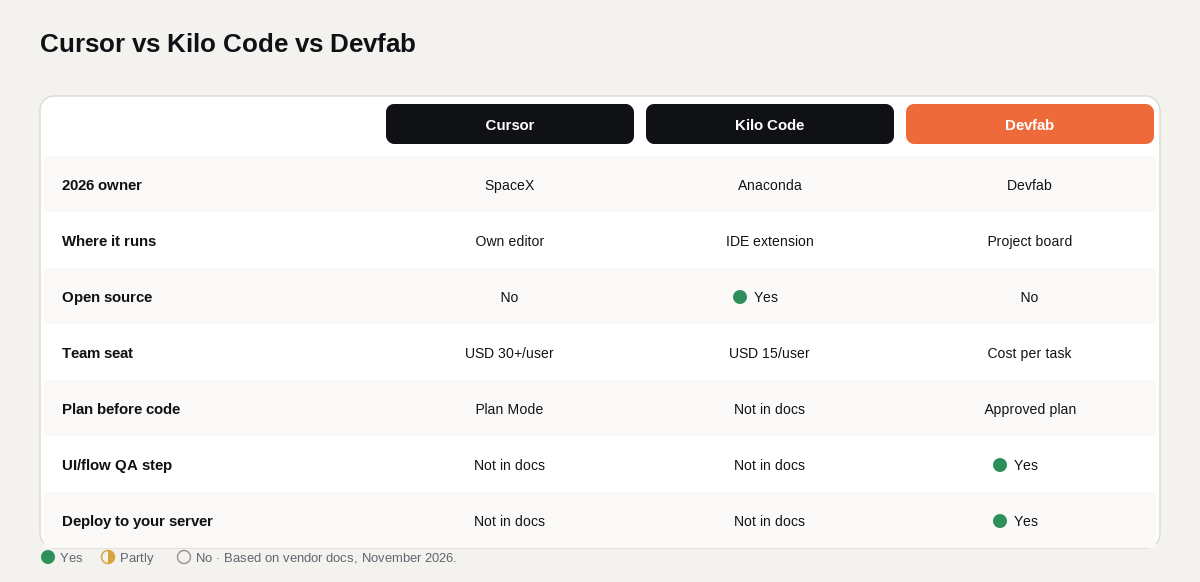
| Aspect | Cursor | Kilo Code | Source |
|---|---|---|---|
| Where it runs | Its own editor, CLI, cloud agents, mobile, SDKs | Extension for VS Code and JetBrains, Kilo CLI, cloud agents, Kilo Desktop | Cursor docs; Kilo docs; Kilo pricing |
| Planning | Plan Mode drafts an editable plan before code | Modes unified into "Agents"; a separate plan step is not covered in the pages we checked | Cursor Plan Mode; Kilo blog |
| Parallel agents | Cloud agents in isolated VMs, each on a branch | Agent Manager runs many agent tabs, isolated in git worktrees | Cursor cloud agents; Kilo blog |
| Review | Bugbot reviews PRs; Autofix pushes fixes | Diff reviewer with line comments; cloud code review | Bugbot; Kilo blog |
| Model choice | Claude, Gemini, GPT, Grok, Composer and others | 500+ models from 60+ providers, BYOK, local models; multi-model comparison | Cursor docs; Kilo pricing |
| Team and admin | SSO on Teams; SCIM, audit logs on Enterprise | Teams: usage analytics, shared agents, central billing; Enterprise: SSO/SCIM, audit logs, model limits | Cursor Enterprise; Kilo pricing |
| Open source | No | Yes | Kilo docs |
| Deploy your app | Not covered in the docs we checked | Not covered in the docs we checked | — |
| Pricing model | Subscription with a weekly usage pool; Teams per seat | Free extension; models at provider rates; Teams per seat; cloud compute billed per second | Cursor pricing; Kilo pricing |
Cost model by team size
| Team size | Cursor | Kilo Code | Devfab |
|---|---|---|---|
| 1 person | Free; Plus USD 8 per month (Grok models only); Premium USD 30 per month | Free and open source; pay models at provider rates; optional Kilo Pass from USD 19 per month | Cost logged per task and per project (Beta) |
| 5 people | Teams from USD 30 per user per month | Teams USD 15 per user per month, no credits included | Cost logged per task and per project (Beta) |
| 25 people | Teams, or Enterprise (custom) | Teams, or Enterprise (custom) with SSO, SCIM and SLAs | Cost logged per task and per project (Beta) |
Prices as of November 2026 from Cursor pricing and Kilo pricing. Kilo adds a 5% processing fee to credit purchases and bills cloud agents and code review as pay-as-you-go compute. Devfab is in Beta and offers predictable cost: cost is logged after each run, per task and per project.
Where Cursor wins
- You want one dedicated AI editor, with tab completion, Plan Mode and agents built in.
- You want unattended cloud work on GitHub, GitLab, Bitbucket Cloud or Azure DevOps.
- You want reviews that fix. Bugbot finds issues and Autofix pushes changes to a branch.
- You want a bundled usage pool instead of tracking credits and provider rates.
- You want a smaller backlog of open issues. A June 2026 review counted 1,300+ open GitHub issues for Kilo.
Where Kilo Code wins
- You stay in VS Code or JetBrains. No new editor to roll out.
- You want open source and the freedom to fork.
- You want model choice at cost. 500+ models at provider rates, plus BYOK and local models.
- You want cheaper seats. Kilo Teams lists USD 15 per user per month against Cursor's USD 30.
- You are leaving Roo Code. Kilo published a migration path for Roo users.
Switching from one to the other
Both tools work on your repository, so the code stays put.
From Cursor to Kilo Code. Install the Kilo extension in VS Code or JetBrains, or the Kilo CLI. Connect Kilo Gateway, your own keys or local models. Recreate rules as agents, and re-add MCP servers from the built-in MCP marketplace (Kilo blog).
From Kilo Code to Cursor. Install Cursor and open the repo. Move shared instructions into AGENTS.md, which Cursor reads (Cursor rules). For unattended work, pick Premium or higher, Teams or Enterprise, since Free and Plus don't include cloud agents.
Where Devfab fits
Take a B2B quote tool for an industrial supplier: sales reps build quotes, managers approve discounts, and customers accept online. Cursor or Kilo Code helps developers write the code. In the docs we checked, neither researches the domain before planning, sends a project plan to a person for approval, runs a QA step on quote-to-order journeys, or deploys the app.
Coding agents automate the developer. Devfab automates the development lifecycle. Devfab's Researcher maps terms such as price breaks and approval limits first. A person approves the plan. ChainFlow maps which functions and APIs call each other, so a change to discount rules shows its effect on approvals, invoices and order confirmation. The QA agent runs UI, flow and logic tests, and Deploy ships to your own server.
Devfab is in Beta, has a smaller community and fewer integrations, and is not an editor. See Devfab vs Kilo Code.
FAQ
Who owns Kilo Code now?
Anaconda. It announced the acquisition on July 15, 2026 and says Kilo remains available with no changes to existing products, plans or support for current users. Anaconda plans to bring Kilo's agent features into the Anaconda Platform.
Is Kilo Code cheaper than Cursor?
The Kilo extension is free and open source, and model usage is billed separately at provider rates, with a 5% processing fee on credit purchases. Teams is USD 15 per user per month with no credits included. Cursor Teams starts at USD 30 per user per month with a usage pool. Prices as of November 2026.
Can Kilo Code run inside JetBrains?
Yes. Kilo's docs describe an open-source extension for VS Code and JetBrains IDEs, plus the Kilo CLI and cloud agents. Cursor is its own editor and lists JetBrains among its integrations.
Is Kilo Code a good replacement for Roo Code?
Kilo published a migration path for Roo Code users after Roo shut down in April 2026, so Roo users have a documented route. Kilo's extension was also rebuilt on the open-source OpenCode server in April 2026.
Read next
- What is an AI software factory?
- Kilo Code alternatives for teams that ship to production
- Kilo Code vs Cline
- Cursor alternatives for teams that ship to production
Need the plan, tests and deploy, not another agent tab? Try Beta
Sources (checked November 2026): Anaconda acquires Kilo Code (Jul 15, 2026); Kilo blog: The new Kilo Code for VS Code (Apr 2, 2026); Kilo blog: Thank you, Roo (Apr 21, 2026); Kilo pricing; Kilo docs: About plans; rywalker.com: Kilo research note (Jun 2026); Cursor docs; Cursor pricing; Cursor Plan Mode; Cursor cloud agents; Cursor Bugbot; Cursor Enterprise; Cursor rules; Cursor blog: Joining SpaceX; The Next Web: SpaceX makes its Cursor takeover official.
Frequently asked questions
Who owns Kilo Code now?
Anaconda. It announced the acquisition on July 15, 2026 and says Kilo remains available with no changes to existing products, plans or support for current users. Anaconda plans to bring Kilo's agent features into the Anaconda Platform.
Is Kilo Code cheaper than Cursor?
The Kilo extension is free and open source, and model usage is billed separately at provider rates, with a 5% processing fee on credit purchases. Teams is USD 15 per user per month with no credits included. Cursor Teams starts at USD 30 per user per month with a usage pool. Prices as of November 2026.
Can Kilo Code run inside JetBrains?
Yes. Kilo's docs describe an open-source extension for VS Code and JetBrains IDEs, plus the Kilo CLI and cloud agents. Cursor is its own editor and lists JetBrains among its integrations.
Is Kilo Code a good replacement for Roo Code?
Kilo published a migration path for Roo Code users after Roo shut down in April 2026, so Roo users have a documented route. Kilo's extension was also rebuilt on the open-source OpenCode server in April 2026.