Short answer: Gemini CLI wins when your company already holds Gemini Code Assist Standard or Enterprise licenses or a paid Gemini API key and wants an Apache-licensed agent wired into GitHub Actions. OpenCode wins for everyone else: it is MIT-licensed, free, and works with 200+ model providers, local models and existing ChatGPT or Copilot plans.
You picked a terminal agent so your developers could stay in the shell. Then Google changed who Gemini CLI is for. If you were on a personal Google AI plan, it simply stopped answering.
One side says Gemini CLI is still Google's open-source agent with a huge context window. The other says OpenCode is the safer bet because no single model vendor controls it. This page referees, using the vendors' own pages checked in November 2026.
In this comparison:
- Gemini CLI and OpenCode at a glance
- Feature comparison
- Cost model by team size
- Where Gemini CLI wins
- Where OpenCode wins
Read the status section first. It changes the answer for many readers.
Gemini CLI and OpenCode at a glance
Gemini CLI is now an enterprise and API-key product. On May 19, 2026, Google announced that Gemini CLI is "transitioning" to Antigravity CLI. Since June 18, 2026, Gemini CLI no longer serves Google AI Pro or Ultra users or free Gemini Code Assist for individuals. Code Assist Standard and Enterprise customers and paid API-key users keep access (Google Developers Blog). Google also says Antigravity CLI will not have "1:1 feature parity right out of the gate" (same source). FOSS Force called the move a "bait and switch" because Antigravity CLI "won't be open source" (FOSS Force, May 22, 2026).
What Gemini CLI is: Google's open-source terminal agent built on Gemini models, under the Apache License 2.0, with about 107k GitHub stars (GitHub). It is for teams with Code Assist licenses or paid API keys.
OpenCode is active and growing. Its repository moved from sst/opencode to anomalyco/opencode, under Anomaly, the team behind SST (GitHub). It is an MIT-licensed agent with a terminal UI, a desktop app (beta), mobile clients and an SDK (OpenCode). Kilo Code's VS Code extension is now built on the OpenCode server (Kilo blog). It is for developers who want one agent across many models.
Feature comparison
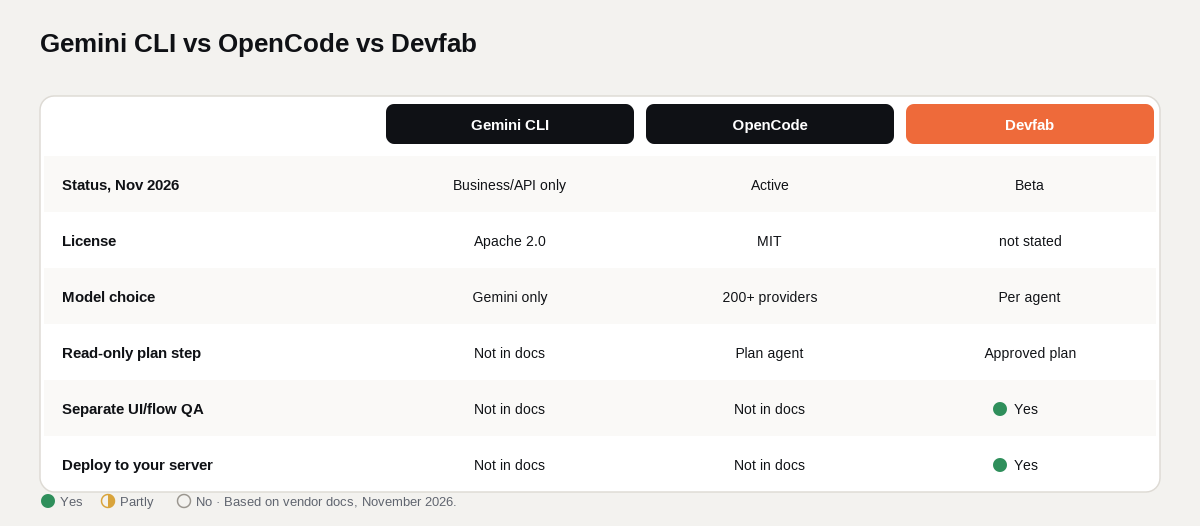
| Aspect | Gemini CLI | OpenCode | Source |
|---|---|---|---|
| Where it runs | Terminal; install via npx/npm, Homebrew, MacPorts or Anaconda; headless mode outputs text, JSON or stream-JSON | Terminal UI, desktop app (macOS, Windows, Linux), mobile app, SDK for scripts and CI | Gemini CLI repo; OpenCode |
| Planning | Not covered in the pages we checked | Built-in "plan" agent is read-only and asks before bash commands | OpenCode repo |
| Agent autonomy | Checkpointing to save and resume; sandboxing | "build" agent with full access, a "general" subagent, parallel agents on one project | Gemini CLI repo; OpenCode |
| GitHub and CI | run-gemini-cli GitHub Action for PR reviews, issue triage and @gemini-cli mentions | SDK for scripts and CI | Same as above |
| Testing | Not covered in the pages we checked | Not covered in the pages we checked | — |
| Deploy and hosting | Not covered in the pages we checked | Not covered in the pages we checked | — |
| Extensibility | MCP, per-project GEMINI.md context files | MCP, plugins, custom agents, skills, custom commands, permissions | Same as above |
| Model choice | Gemini models only; repo cites a 1M-token context window for Gemini 3 | 200+ providers via Models.dev, local models, ChatGPT Plus/Pro or Copilot subscriptions | Same as above |
| License | Apache 2.0 | MIT | Same as above |
| Pricing model | Paid Gemini API key (usage-based) or Code Assist / Vertex AI licenses | Agent free; BYOK or existing plans; OpenCode Go subscription; Zen pay-as-you-go credits | Gemini CLI repo; OpenCode; Zen docs |
A note on the free tier: the Gemini CLI README still lists a free Google-account tier with per-minute and per-day limits, but Google's blog says free individual Code Assist users lost access on June 18, 2026. Trust the blog post and test your own account before you plan around it.
Cost model by team size
| Team size | Gemini CLI | OpenCode |
|---|---|---|
| 1 person | Paid Gemini API key, billed by usage (individual Google AI plans no longer covered) | Agent free; bring your own key, free models, or OpenCode Go from USD 10 per month, as of November 2026 |
| 5 people | API keys per developer, or Gemini Code Assist Standard licenses | Same options per developer; OpenCode Zen workspaces add member invites and per-member budgets |
| 25 people | Gemini Code Assist Enterprise or Vertex AI licensing | Zen prepaid credits with auto-recharge, or company keys; enterprise compliance features are described as immature in a dated review |
Pricing models as of November 2026 from the Gemini CLI repo, Google's transition post, the OpenCode homepage and OpenCode Zen docs. Google's license prices are not on these pages; check with Google.
Where Gemini CLI wins
- You already pay for Gemini Code Assist Standard or Enterprise. Google says business users don't need to change anything (TechRadar).
- You want an agent inside GitHub. The
run-gemini-cliAction reviews PRs, triages issues and answers@gemini-climentions. - You work with very large files or repos and want the 1M-token context window the repo cites for Gemini 3.
- Your security team prefers one vendor. Gemini-only means one data agreement to review.
Where OpenCode wins
- You want model freedom. 200+ providers, local models, and reuse of ChatGPT or Copilot plans you already pay for.
- You are an individual developer. Gemini CLI no longer serves personal Google AI plans; OpenCode's agent is free.
- You want a plan step before edits. The read-only "plan" agent denies edits by default.
- You want desktop and mobile clients next to the terminal UI.
- You want shared team budgets. Zen workspaces support member invites, model enablement and per-member budgets.
Watch the trade-offs. A dated review reports 1GB+ RAM use by the TUI, frequent releases that sometimes break features and permissive default permissions (rywalker.com, Jun 2026).
Switching from one to the other
From Gemini CLI to OpenCode. Install OpenCode, connect a provider (Gemini through an API key, or any other), and turn GEMINI.md notes into project instructions. MCP servers carry over, since both support MCP. Start with the "plan" agent so nothing changes until you approve.
From OpenCode to Gemini CLI. You need a Code Assist license or a paid API key first. Copy project notes into GEMINI.md and add the run-gemini-cli Action if you want PR reviews on GitHub.
Individuals leaving Gemini CLI can also look at Google's successor, Antigravity CLI, keeping in mind it is not open source. More options are in Gemini CLI alternatives and OpenCode alternatives.
Where Devfab fits
Both tools are a single developer's agent in a terminal. Neither covers research, project plans, QA or deployment in the pages we checked. That is fine for hands-on work, and a gap for teams delivering whole apps.
Coding agents automate the developer. Devfab automates the development lifecycle. Its Researcher maps the domain before the Planner writes a plan, a person approves the plan, and the QA agent runs UI, flow and logic tests (screens, buttons and user journeys clicked end to end). You can choose the model for each agent or keep Devfab's default. Devfab is in Beta, has a smaller community, and is not an editor for hands-on coding. See Devfab vs Gemini CLI and Devfab vs OpenCode.
FAQ
Can I still use Gemini CLI for free?
Not as an individual on Google AI Pro, Ultra or free Gemini Code Assist. Google says Gemini CLI stopped serving those users on June 18, 2026 and points them to Antigravity CLI. Gemini Code Assist Standard and Enterprise customers and paid Gemini API key users keep access.
Can OpenCode use Gemini models?
OpenCode works with 200+ model providers through Models.dev, including local models, and it can reuse ChatGPT Plus or Pro and GitHub Copilot subscriptions. Check the provider list in OpenCode for the exact Gemini models and the key you need.
Are both tools open source?
Yes. Gemini CLI is under the Apache License 2.0 and OpenCode is under the MIT license. Note that Antigravity CLI, which Google now offers individuals in place of Gemini CLI, will not be open source, according to a FOSS Force report.
Which one is better for a company?
If your company already pays for Gemini Code Assist Standard or Enterprise, Gemini CLI is covered and supported for you. If you want one agent across many model vendors, with per-member budgets through OpenCode Zen, OpenCode is the more flexible choice.
Read next
- What is an AI software factory?
- Gemini CLI alternatives
- OpenCode alternatives
- Single-agent vs multi-agent coding
Need more than a terminal agent for your next client app? Try Beta
Sources (checked November 2026): Google Developers Blog: Transitioning Gemini CLI to Antigravity CLI (May 19, 2026); google-gemini/gemini-cli on GitHub; TechRadar: Google is making Gemini CLI users switch (May 20, 2026); FOSS Force (May 22, 2026); OpenCode homepage; anomalyco/opencode on GitHub; OpenCode Zen docs; rywalker.com: OpenCode (Jun 2026); Kilo blog: The new Kilo for VS Code (Apr 2, 2026).
Frequently asked questions
Can I still use Gemini CLI for free?
Not as an individual on Google AI Pro, Ultra or free Gemini Code Assist. Google says Gemini CLI stopped serving those users on June 18, 2026 and points them to Antigravity CLI. Gemini Code Assist Standard and Enterprise customers and paid Gemini API key users keep access.
Can OpenCode use Gemini models?
OpenCode works with 200+ model providers through Models.dev, including local models, and it can reuse ChatGPT Plus or Pro and GitHub Copilot subscriptions. Check the provider list in OpenCode for the exact Gemini models and the key you need.
Are both tools open source?
Yes. Gemini CLI is under the Apache License 2.0 and OpenCode is under the MIT license. Note that Antigravity CLI, which Google now offers individuals in place of Gemini CLI, will not be open source, according to a FOSS Force report.
Which one is better for a company?
If your company already pays for Gemini Code Assist Standard or Enterprise, Gemini CLI is covered and supported for you. If you want one agent across many model vendors, with per-member budgets through OpenCode Zen, OpenCode is the more flexible choice.