Short answer: Gemini CLI wins when a developer with a Code Assist Standard or Enterprise license or a paid API key wants an open-source, scriptable terminal agent for CI and quick changes. Devfab wins when a team ships whole client projects and needs research, an approved plan, QA tests, deployment and cost per task.
You built your workflow around a free, open-source agent in the terminal. Then Google moved individual users to a new, closed CLI. If you run client projects, the bigger question was always there: who runs everything outside the terminal, from the plan to the deploy?
One camp says a strong terminal agent plus good habits is enough. The other says client work needs the whole delivery line. This page referees, using Google's own posts and repo, checked on November 20, 2026.
In this comparison:
- What each tool is built for
- Switching triggers
- Moving from Gemini CLI to Devfab
- Where Gemini CLI is the better choice
- Where Devfab is the better choice
The status change comes first.
What each tool is built for
Gemini CLI
Status: in transition. On May 19, 2026, Google announced that Gemini CLI is "transitioning" to Antigravity CLI. Since June 18, 2026, Gemini CLI no longer serves requests for Google AI Pro and Ultra users or for free Gemini Code Assist for individuals. Gemini Code Assist Standard and Enterprise customers and paid API-key users keep access (Google Developers Blog). Google says Antigravity CLI will not have "1:1 feature parity right out of the gate," and business users do not need to change anything (TechRadar).
What Gemini CLI is today (GitHub):
- A terminal agent installed via npx, npm, Homebrew, MacPorts or Anaconda, with a headless mode that outputs text, JSON or stream-JSON for scripts.
- Open source under Apache 2.0, with about 107k GitHub stars.
- Context and safety: per-project GEMINI.md files, MCP support, checkpointing to save and resume conversations, and sandboxing.
- GitHub automation: the
run-gemini-cliGitHub Action handles PR reviews, issue triage and@gemini-climentions. - Models: Gemini only; the repo cites a 1M-token context window for Gemini 3.
Its main user now is an enterprise developer on a Code Assist license, or a developer paying for API keys.
Devfab
Devfab is an AI software factory, in the Autonomous Software Lifecycle category. A project moves through seven agents: Researcher, Planner, Coordinator, Developers, Blueprint, QA agent and Deploy.
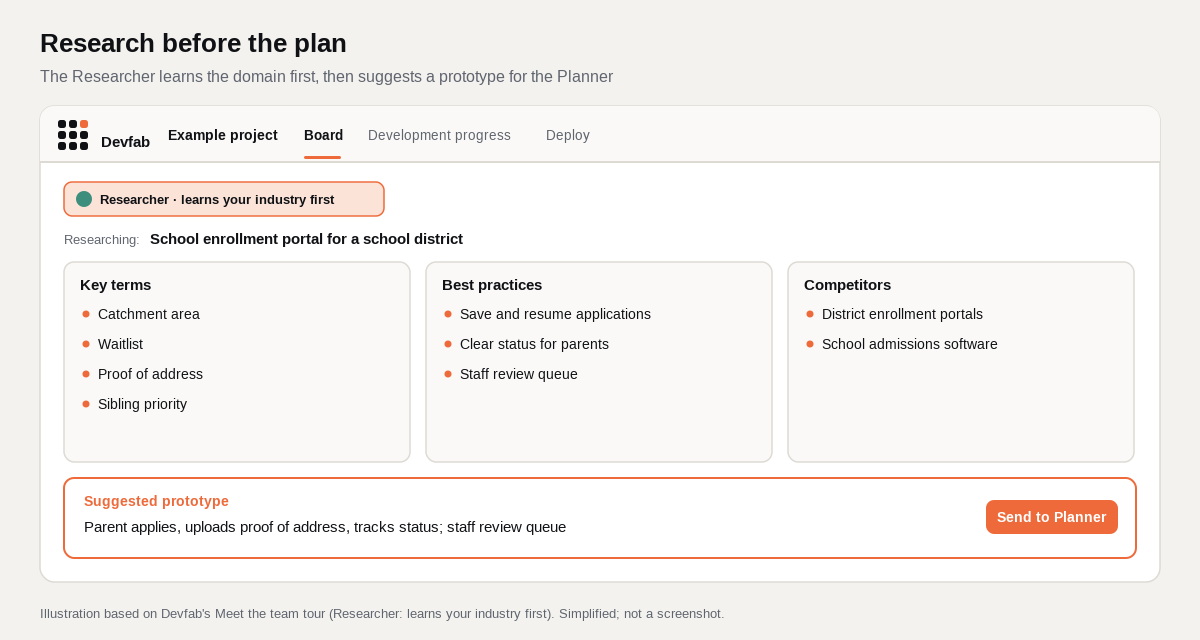
- Research before the plan. The Researcher maps the domain first: key terms, best practices for that kind of app, and competitors. Then it suggests a prototype.
- A person approves the plan. The Planner publishes it; the Coordinator creates tickets only after approval.
- ChainFlow maps which functions and APIs call each other and what is deployed, so dev agents see the impact of a change before they make it.
- The QA agent runs UI and flow tests (screens, buttons and user journeys clicked end to end) plus logic tests.
- Deploy ships to your own server. Code lives in your own GitHub account or your organization's.
Coding agents automate the developer. Devfab automates the development lifecycle.
Switching triggers
| Trigger | Gemini CLI | Devfab | Source |
|---|---|---|---|
| Lost access on a personal Google plan | No longer serves Google AI Pro/Ultra or free Code Assist users since Jun 18, 2026 | Not tied to a Google plan | Google Developers Blog |
| Successor is not open source | Antigravity CLI "won't be open source," affecting the extension community | Not open source either; code it writes lives in your GitHub | FOSS Force, May 22, 2026 |
| Successor lacks some features at launch | No "1:1 feature parity right out of the gate" | Not applicable | Google Developers Blog |
| Need models beyond one vendor | Gemini models only | Choose the model per agent or keep Devfab's default | GitHub |
| Client wants a plan, a test report and a deployed app | A terminal agent; project planning, QA reports and deploy not covered in the docs we checked | Research, approved plan, QA agent, Deploy | GitHub |
| Code Assist for GitHub closed to new installs | Stopped accepting new installations on Jun 18, 2026 for affected users | Works on any repo in your GitHub account | Google Developers Blog |
Cost model by team size
| Team size | Gemini CLI | Devfab |
|---|---|---|
| 1 person | Paid Gemini API key with usage-based billing; the free Google-account path no longer serves individual Code Assist users | Cost logged per task and per project (Beta) |
| 5 people | API keys per developer, or Gemini Code Assist Standard licenses | Cost logged per task and per project (Beta) |
| 25 people | Gemini Code Assist Standard or Enterprise, or Vertex AI | Cost logged per task and per project (Beta) |
Gemini CLI's pricing model as of November 2026, from its GitHub README and Google's transition post. The CLI itself is free and open source; you pay for model access. Check Google's Code Assist and Gemini API pages for current amounts. Devfab: predictable cost; cost is logged after each run, per task and per project; Devfab is in Beta.
Moving from Gemini CLI to Devfab
Gemini CLI already works in your repository, so there is nothing to export.
- Make sure the code is on GitHub, in your own account or your organization's.
- In Devfab, choose "Work on an existing project" and pick the repo.
- Leave the change box empty. ChainFlow maps the code first (which functions and APIs call each other and what is deployed) and suggests three small first tickets.
- Keep your GEMINI.md notes. Paste the project rules into the description or attach them as a doc, so the Planner sees them.
- Approve the plan. The Coordinator then creates tickets and assigns dev agents.
- Turn on "QA agent · review before Done" so the QA agent runs UI, flow and logic tests before a ticket closes.
Where Gemini CLI is the better choice
- You hold Code Assist Standard or Enterprise licenses and want a terminal agent your company already pays for.
- You must read, fork or audit the agent. Gemini CLI is Apache 2.0; Devfab is not open source.
- You script agents in CI. Headless mode and the GitHub Action fit pipelines and bots.
- You need a very large context on Gemini models for one-off questions about a big codebase.
- The job is a quick fix, not a project. A plan and QA run are more process than a one-line change needs.
Where Devfab is the better choice
- New projects start with research. For a school enrollment portal, the Researcher maps terms such as catchment areas and waitlists, best practices and similar products before any plan.
- Clients approve plans. A person approves the plan before tickets exist, in Human in the loop mode by default.
- Changes must not break connected features. ChainFlow shows what a change touches across functions, APIs and deployed code.
- You need proof of testing. The QA agent clicks through screens and journeys and runs logic tests.
- The app must run on your server, with docs such as blueprints and user manuals.
- You bill per project. Cost is logged after each run, per task and per project.
Devfab's honest limits: it is in Beta, with a smaller community and fewer integrations than mature platforms. It is not an editor or terminal for hands-on coding, and it needs a GitHub account.
FAQ
Is Gemini CLI being discontinued?
Not for everyone. Google announced on May 19, 2026 that Gemini CLI is transitioning to Antigravity CLI. Since June 18, 2026 it no longer serves Google AI Pro or Ultra users or free Gemini Code Assist users. Code Assist Standard and Enterprise customers and paid API-key users keep access.
Is Devfab a terminal tool like Gemini CLI?
No. Devfab is a software factory with a web workspace. Its agents research the domain, write a plan a person approves, build on tickets, run UI, flow and logic tests, and deploy to your own server. It is not an editor or terminal for hands-on coding.
Can I keep using Gemini CLI alongside Devfab?
Yes, if your license still covers it. Devfab works on a repository in your own GitHub account or your organization's. Developers can keep using Gemini CLI on the same repo for quick fixes and scripts outside the approved plan.
Can I choose the AI model in Devfab?
Yes. In Devfab you can choose the model for each agent or keep Devfab's default. Gemini CLI is tied to one model family. Devfab logs cost after each run, per task and per project, so you can see what each choice costs.
Read next
- What is an AI software factory?
- Gemini CLI alternatives for teams that ship to production (2026)
- OpenAI Codex vs Gemini CLI
- Build a school enrollment portal
Bring one client project and watch the full line run. Try Beta
Sources (checked November 2026): Google Developers Blog: Transitioning Gemini CLI to Antigravity CLI (May 19, 2026); google-gemini/gemini-cli on GitHub; TechRadar: Google is making Gemini CLI users switch to Antigravity 2.0 (May 20, 2026); FOSS Force: Gemini CLI's short life (May 22, 2026).
Frequently asked questions
Is Gemini CLI being discontinued?
Not for everyone. Google announced on May 19, 2026 that Gemini CLI is transitioning to Antigravity CLI. Since June 18, 2026 it no longer serves Google AI Pro or Ultra users or free Gemini Code Assist users. Code Assist Standard and Enterprise customers and paid API-key users keep access.
Is Devfab a terminal tool like Gemini CLI?
No. Devfab is a software factory with a web workspace. Its agents research the domain, write a plan a person approves, build on tickets, run UI, flow and logic tests, and deploy to your own server. It is not an editor or terminal for hands-on coding.
Can I keep using Gemini CLI alongside Devfab?
Yes, if your license still covers it. Devfab works on a repository in your own GitHub account or your organization's. Developers can keep using Gemini CLI on the same repo for quick fixes and scripts outside the approved plan.
Can I choose the AI model in Devfab?
Yes. In Devfab you can choose the model for each agent or keep Devfab's default. Gemini CLI is tied to one model family. Devfab logs cost after each run, per task and per project, so you can see what each choice costs.