Short answer: Choose Appsmith when developers need admin panels, dashboards and CRUD screens on existing databases, self-hosted under an Apache-2.0 licence. Choose Devfab when you deliver a custom app to a client: domain research, an approved plan, agents that build and test, and deployment to the client's server.
Your team builds internal tools for clients. Some are admin screens on a database. Some are real products with users, flows and edge cases. Appsmith is excellent at the first kind. The question is what happens when a client asks for the second kind, with a test report and code they own. This page is the referee: it states where each tool wins, with a source for every Appsmith fact.
In this comparison:
- What each tool is built for
- Switching triggers
- Moving from Appsmith to Devfab
- Where Appsmith is the better choice
The sections follow in that order.
What each tool is built for
Appsmith
Appsmith is an open-source low-code platform for building "admin panels, internal tools, and dashboards" that connect to "25+ databases and any API". It is licensed Apache-2.0 and has about 41,000 GitHub stars. You build in a browser IDE and run it on Appsmith Cloud or self-host it with Docker, Kubernetes or an AWS AMI.
2026 status changes worth knowing:
- The separate Appsmith Agents product is labeled Legacy and closed to new sign-ups. Appsmith says agent capabilities will be folded into an upcoming update.
- The Appsmith AI datasource was removed on September 30, 2026, and the release note names no replacement.
- Appsmith 2.3 (August 2026) added Ask AI, an assistant for JavaScript and queries, to the Community Edition, plus an AI Copilot for custom widgets.
Other parts that matter for teams:
- Git: apps connect to a repository over SSH (GitHub, GitLab, Bitbucket and others), with branches and commits.
- Auth: Free and Business plans offer Google and GitHub OAuth; Enterprise adds SAML and OIDC.
- Hosting extras: an air-gapped edition and managed hosting are Enterprise add-ons.
Appsmith's main user is a developer or technical ops person wiring screens to data that already exists.
Devfab
Devfab is an AI software factory. It runs a whole project with seven agents. The Researcher maps the domain first: key terms, best practices and competitors, then suggests a prototype. The Planner writes the plan and a person approves it. The Coordinator turns it into tickets for the Developers, who use ChainFlow to see which functions and APIs a change affects. Blueprint draws screens, the QA agent runs UI and flow tests plus logic tests, and Deploy ships to your own server.
Code lives in your own GitHub account (or your organization's), and each project gets docs such as blueprints, sequence flows and user manuals.
Coding agents automate the developer. Devfab automates the development lifecycle. Low-code builders like Appsmith speed up the screens; Devfab covers the steps around them.
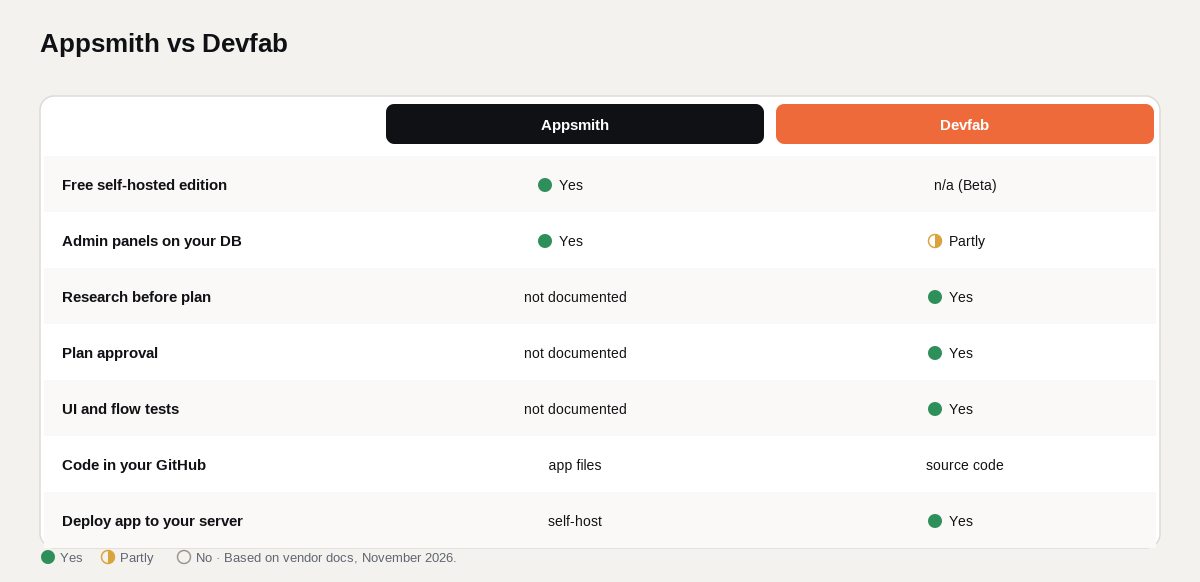
Switching triggers
| Trigger | Appsmith | Devfab | Source |
|---|---|---|---|
| The client wants a custom product, not admin screens | Built for admin panels, internal tools and dashboards | Research, approved plan, tickets, QA and deploy for any web app or API | Appsmith GitHub |
| AI features you relied on were retired | AI datasource removed Sep 30, 2026; Appsmith Agents is Legacy | Agents are the core of the product (Beta) | Appsmith 2.3 notes, Appsmith Agents page |
| Code review on Git is hard | Visual apps are saved as text files where changes may not be obvious | Agents write ordinary source code in your repo | Appsmith Git guide |
| Data-heavy apps feel slow | A competitor's review cites G2 users calling it "slow or buggy at times" | Stack picked per app; you can choose languages | Superblocks review (competitor, Sep 2026) |
| You need a test report | Testing is not covered in the docs we checked | QA agent runs UI, flow and logic tests | Appsmith pricing, GitHub |
| Self-hosted upgrades need care | Instances older than v1.96 must step through v1.99 before 2.x | Your app deploys to your own server, with deploy history | Appsmith 2.1 notice |
Cost model by team size
| Team size | Appsmith | Devfab |
|---|---|---|
| 1 person | Free self-hosted Community Edition, or the cloud Free plan | Cost logged per task and per project (Beta) |
| 5 people | Cloud Free plan is capped at five users; Business is priced per user per month | Cost logged per task and per project (Beta) |
| 25 people | Business per user, or Enterprise as a flat monthly base covering a block of users | Cost logged per task and per project (Beta) |
Appsmith counts a user as any member added to a workspace, and says "there is no additional charge for developers". Its pricing page lists no AI features on any plan. Check Appsmith's pricing page for current amounts.
Moving from Appsmith to Devfab
Most teams don't move an Appsmith app. They keep it for admin screens and use Devfab for the next client product. When you do rebuild one:
- Keep your data where it is. Appsmith connects to your existing databases and APIs, so the data is already outside Appsmith.
- Use the Git repo as a reference. If the app is connected to Git, its files describe the Appsmith app. They run inside Appsmith, so treat them as a spec, not as code to continue.
- If backend code exists, connect it. In Devfab choose "Work on an existing project", pick the GitHub repo and leave the change box empty. ChainFlow maps the code first and suggests three small first tickets.
- Otherwise start a new project. Describe the app and attach screenshots and the database schema.
- Approve the plan. Human in the loop is the default, so nothing is built until a person approves.
- Let the QA agent test screens, user journeys and logic, then deploy to the client's server.
Where Appsmith is the better choice
- You want open source you can modify. Apache-2.0 is permissive, and the free self-hosted edition has no licence fee.
- The job is many CRUD screens on existing databases. A widget editor bound to queries is the right tool for that.
- Many people build. Appsmith doesn't charge extra for developers, which suits a large internal team.
- You need the builder itself air-gapped or fully self-managed. Appsmith documents self-hosting and an air-gapped edition; Devfab deploys your app to your server, not the platform.
- Developers want hands-on control of every query and widget in a visual IDE.
Where Devfab is the better choice
- The client needs a full app, with roles, flows and business rules, not only an admin panel.
- The domain is new to your team. The Researcher maps terms, best practices and competitors before the plan.
- The client signs off on scope. A person approves the plan before any ticket exists.
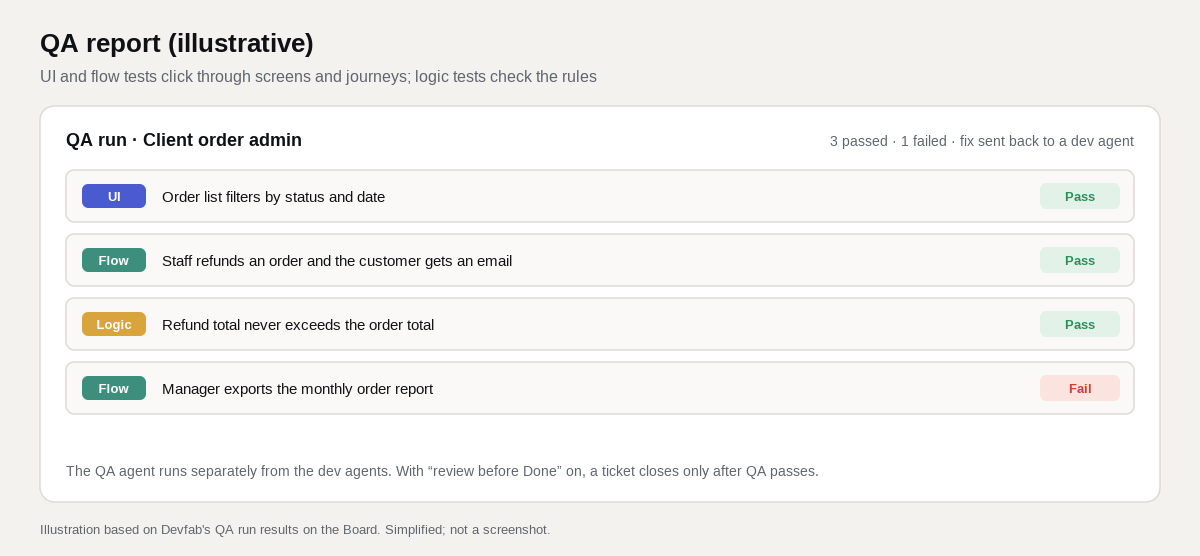
- You need proof. The QA agent runs UI and flow tests end to end plus logic tests, with optional review before Done.
- You change a live codebase. ChainFlow shows what a change touches before it ships.
- You report per project: QA report, user manual, Team Delivery Report and cost per task.
Devfab's honest limits: it is new and in Beta, with a smaller community and fewer integrations than Appsmith. It is not an editor for hands-on coding or a visual widget builder. It needs a GitHub account. For a quick admin screen on a database you already have, Appsmith is less process.
FAQ
Is Appsmith still adding AI features in 2026?
Yes, but the direction changed. Appsmith 2.3 (August 2026) brought Ask AI to the Community Edition and an AI Copilot for custom widgets. The Appsmith AI datasource was removed on September 30, 2026, and the separate Appsmith Agents product is labeled Legacy with no new sign-ups.
Can Appsmith and Devfab work on the same project?
Yes. A common split is Appsmith for the internal admin screens on top of a database, and Devfab for the customer-facing app or API that writes to that database. Devfab keeps its code in your own GitHub account.
Which is cheaper for a large team?
Appsmith has a free, self-hosted Community Edition and does not charge extra for developers, so it is hard to beat on licence cost for internal tools. Devfab is in Beta with predictable cost: cost is logged after each run, per task and per project.
Does Appsmith store apps in Git?
Yes. Appsmith connects an app to a Git repository over SSH, with branches and commits. Appsmith's own guide notes the visual app is saved as text files where it may not be obvious what changed. Those files describe an Appsmith app, which runs inside Appsmith.
Read next
- What is an AI software factory?
- Appsmith alternatives for teams that ship to production (2026)
- Retool vs Appsmith: which should your team use in 2026?
- Low-code vs AI software factory: what's the difference?
See a client app planned, tested and deployed. Book a Devfab demo
Sources (checked November 13, 2026): appsmithorg/appsmith on GitHub; Appsmith pricing; Appsmith Agents (Legacy); Appsmith 2.1: Ask AI, security updates and upgrade notice (Jun 2026); Appsmith 2.3 released; AI datasource EOL (Aug 2026); Git in Appsmith: a practical guide (Appsmith, Nov 2023); Appsmith Review 2026 (Superblocks, a competitor, Sep 2026).
Frequently asked questions
Is Appsmith still adding AI features in 2026?
Yes, but the direction changed. Appsmith 2.3 (August 2026) brought Ask AI to the Community Edition and an AI Copilot for custom widgets. The Appsmith AI datasource was removed on September 30, 2026, and the separate Appsmith Agents product is labeled Legacy with no new sign-ups.
Can Appsmith and Devfab work on the same project?
Yes. A common split is Appsmith for the internal admin screens on top of a database, and Devfab for the customer-facing app or API that writes to that database. Devfab keeps its code in your own GitHub account.
Which is cheaper for a large team?
Appsmith has a free, self-hosted Community Edition and does not charge extra for developers, so it is hard to beat on licence cost for internal tools. Devfab is in Beta with predictable cost: cost is logged after each run, per task and per project.
Does Appsmith store apps in Git?
Yes. Appsmith connects an app to a Git repository over SSH, with branches and commits. Appsmith's own guide notes the visual app is saved as text files where it may not be obvious what changed. Those files describe an Appsmith app, which runs inside Appsmith.