Short answer: UI Bakery wins when you need an internal admin panel, dashboard or CRUD tool on databases you already run, with self-hosting and React code export. Devfab wins when you deliver a complete client application as code, with domain research, an approved plan, UI and flow tests, and deployment to your own server.
An insurance client has claims sitting in a Postgres database and staff who approve them by email. They want two things. First, a back-office console where adjusters see, filter and approve claims. Second, a customer-facing claims portal where policyholders upload photos and follow status.
Those are different jobs. One reads data that exists. The other creates a new product with its own users, rules and tests. UI Bakery is built for the first. Devfab is built for the second. This page shows where each one stops, using UI Bakery's own pages checked in November 2026.
In this comparison:
- What each tool is built for
- Switching triggers
- Cost model by team size
- Where UI Bakery is the better choice
- Where Devfab is the better choice
Split the request first. The tool choice follows.
What each tool is built for
UI Bakery
Status, November 2026: active. The homepage carries a "UI Bakery Self-Hosted 2.0" banner (UI Bakery). It is a low-code platform for internal tools, admin panels and portals that sit on data you already have.
- Who uses it. Internal tool builders, operations and finance teams and developers. Listed use cases are admin panels, CRUD apps, dashboards, customer portals and embedded apps (UI Bakery).
- AI Development Agent. It builds apps from chat prompts and deploys them; the vendor markets generation as very fast (UI Bakery).
- Data first. More than 45 connectors, including PostgreSQL, MySQL, MongoDB, SQL Server, Snowflake, Oracle, GraphQL, OpenAPI, MCP and HTTP APIs (UI Bakery).
- Code stays reachable. You can use any React component, edit code directly and export readable React code to continue in your own IDE (UI Bakery).
- Where it runs. UI Bakery cloud, or self-hosted in a private network, on-prem, via Docker or air-gapped (UI Bakery).
- Governance. Git version control, RBAC, audit logs, MFA and SOC 2 Type 2. Custom SSO (SAML, OpenID, OAuth2) is Enterprise-only (UI Bakery pricing).
Devfab
Devfab is an AI software factory in the Autonomous Software Lifecycle category. A project moves through seven agents: Researcher, Planner, Coordinator, Developers, Blueprint, QA agent and Deploy.
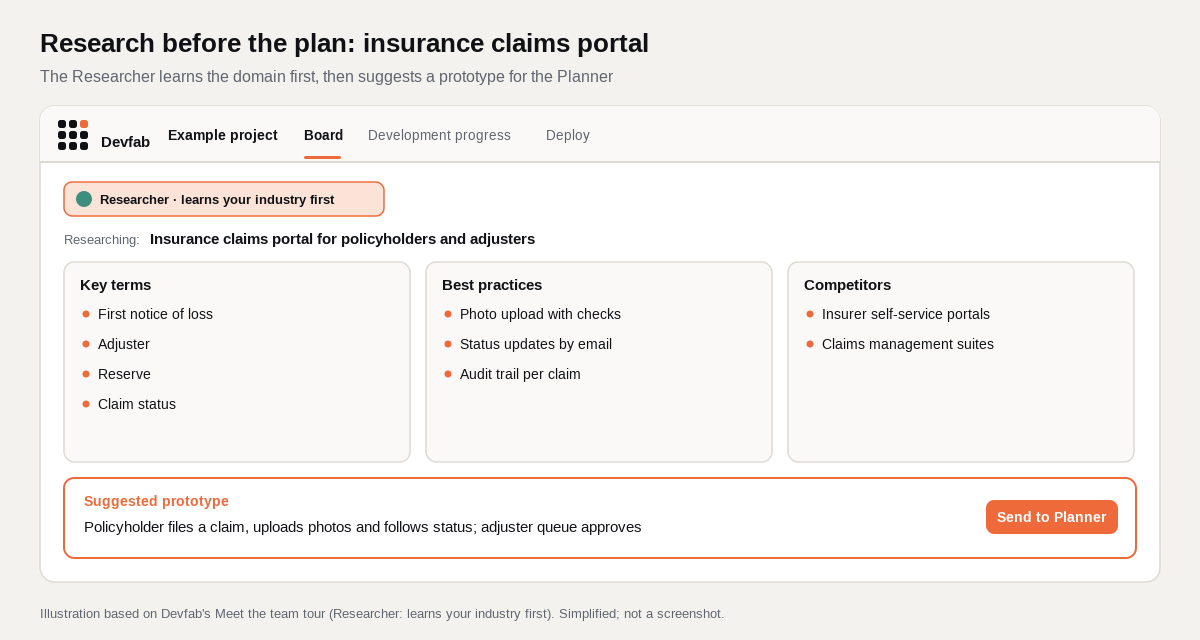
- The Researcher works before the Planner. For a claims portal it maps key terms (first notice of loss, adjuster, reserve), best practices for claims apps and competing products, then suggests a prototype.
- The Planner publishes a plan and a person approves it. The Coordinator turns it into tickets for dev agents.
- Developers use ChainFlow, which maps which functions and APIs call each other and what is deployed. A change to claim status can touch notifications, the adjuster queue and payout records, and the agents see that before they edit.
- The QA agent runs UI and flow tests (screens, buttons and user journeys clicked end to end) plus logic tests. Deploy ships to your own server. The code lives in your own GitHub account or your organization's.
App builders automate the first version. Devfab automates the development lifecycle.
Switching triggers
These are documented limits or pricing rules that push teams to look beyond UI Bakery. They are facts from UI Bakery's pages, not complaints we invented.
| Trigger | UI Bakery | Devfab | Source |
|---|---|---|---|
| Air-gapped install | Enterprise plan only | Deploys the app it builds to your own server; the builder itself is a hosted Beta | UI Bakery pricing |
| Company SSO for builders | Custom SSO (SAML, OpenID, OAuth2) is Enterprise-only | Not stated | UI Bakery pricing |
| AI usage when self-hosted | Self-hosted AI credits are drawn from the cloud workspace that generated the license key | You can choose the model for each agent or keep Devfab's default | UI Bakery pricing |
| Bring your own model key | On the self-hosted table, a BYO model key is Enterprise | Model choice per agent | UI Bakery pricing |
| Automation volume | Executions are metered; extra executions cost USD 50 per 5,000 | Cost logged per task and per project | UI Bakery pricing |
| Seat count on free self-hosted | Pricing page is inconsistent ("Unlimited seats" vs 50 viewer seats) | Not applicable | UI Bakery pricing |
| App is a new product, not a view on existing data | Built around connectors to existing sources | Research, plan, data model, tests and deploy in one run | UI Bakery |
Cost model by team size
| Team size | UI Bakery (cloud) | Devfab |
|---|---|---|
| 1 person | Free USD 0, or Builder USD 25 per developer per month (USD 20 billed annually) | Cost logged per task and per project (Beta) |
| 5 people | Team USD 40 per developer per month (USD 35 billed annually), charged for each developer seat | Cost logged per task and per project (Beta) |
| 25 people | Team per developer, or Enterprise (custom) for SSO and air-gapped installs | Cost logged per task and per project (Beta) |
UI Bakery prices as of November 2026 from UI Bakery pricing. Self-hosted Team is also USD 40 per developer per month (USD 35 billed annually). AI credits are included per plan and automation executions are metered. Devfab never quotes a price here: it offers predictable cost, logged after each run.
Moving from UI Bakery to Devfab
You don't have to move a working admin panel. Most teams keep it and use Devfab for the product that sits next to it. If you do want the codebase in Devfab:
- Export the React code from UI Bakery and push it to a repository in your GitHub account or your organization's (UI Bakery). If the app uses UI Bakery connectors, note which database and API calls you will need to rewire.
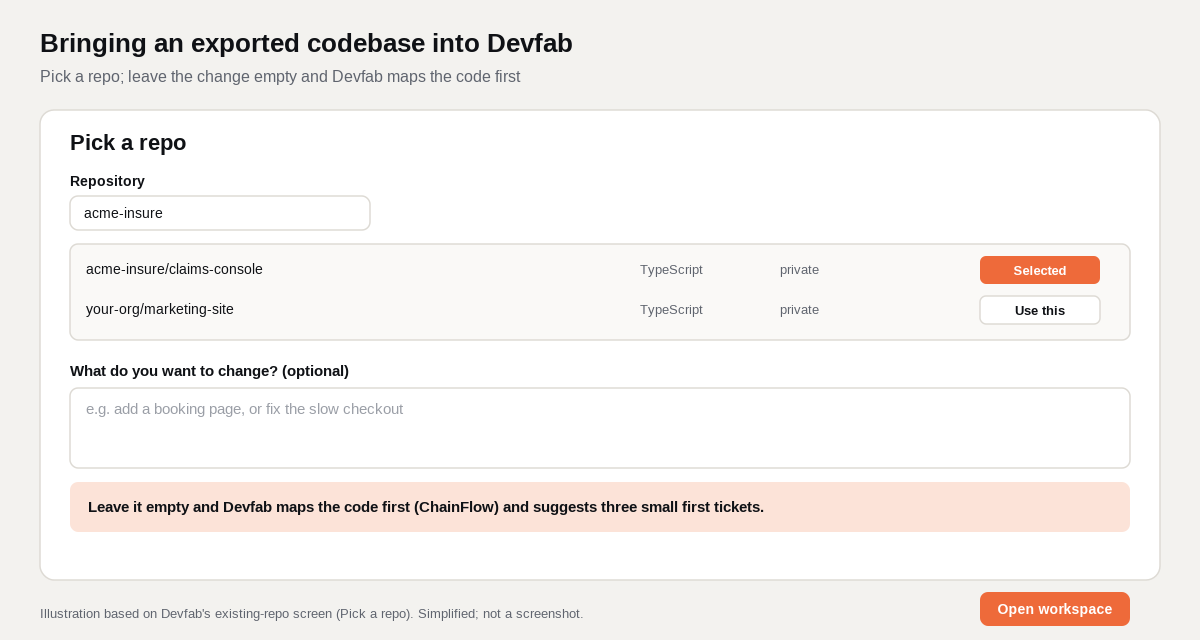
- In Devfab, choose Work on an existing project and pick that repository.
- Leave the change box empty. ChainFlow maps the code first and suggests three small first tickets.
- Read the plan and approve it. The Coordinator creates tickets and dispatches dev agents.
- The QA agent runs UI, flow and logic tests on the result. Then Deploy ships it to your own server.
Where UI Bakery is the better choice
- The data already exists. Your app is a view, filter or form on Postgres, Snowflake or an internal API. UI Bakery's 45+ connectors make that its home ground.
- The builder must sit inside your network. UI Bakery itself can be self-hosted on-prem or air-gapped (Enterprise), next to the databases it reads.
- Developers want a head start, not a hand-off. The AI agent scaffolds the panel and you export React code to keep editing in your IDE.
- Low seat cost for a few builders. A handful of developers making CRUD tools on SQL fits the per-developer plans.
- Operations teams maintain it. Non-specialist builders can adjust the screens without a development pipeline.
Where Devfab is the better choice
- The deliverable is a full application. A claims portal needs its own data model, roles, uploads and notifications. Devfab's Researcher maps the domain and suggests a prototype before the plan, so the plan starts from how claims work.
- A person approves the plan. Clients see what will be built before agents write code.
- Changes don't break connected features. ChainFlow shows dev agents what a change touches. Changing checkout, for example, can affect payments, inventory, order confirmation and notifications.
- User journeys get tested. The QA agent runs UI and flow tests, clicking screens, buttons and journeys end to end, plus logic tests.
- Handover is clean. Code in the client's GitHub, deployment to their own server, and docs such as blueprints, sequence flows and user manuals.
- Cost is visible. Predictable cost, logged per task and per project.
Honest limits. Devfab is in Beta, with a smaller community and fewer integrations than a mature platform like UI Bakery. It is not an editor for hands-on coding or a drag-and-drop builder. It needs a GitHub account.
FAQ
Is UI Bakery a no-code tool or a code tool?
It sits in between. UI Bakery is a low-code platform with a visual builder and an AI Development Agent that generates apps from chat. You can use any React component, edit code directly and export readable React code to keep working in your own editor.
Can UI Bakery run on our own servers?
Yes. UI Bakery runs in its cloud or self-hosted: in a private network, on-prem, via Docker or air-gapped. Air-gapped deployment and custom SSO are on the Enterprise plan. Devfab also deploys the apps it builds to your own server.
Should an agency build client apps in UI Bakery or Devfab?
Use UI Bakery when the client needs an internal admin panel or dashboard on databases it already runs. Use Devfab when the deliverable is a full application with its own data model, user journeys and tests, delivered as a repository in the client's GitHub.
How does pricing compare?
UI Bakery charges per developer seat. As of November 2026, Builder is USD 25 per developer per month and Team is USD 40 per developer per month on cloud, with a free tier. Devfab is in Beta with predictable cost: cost is logged after each run, per task and per project.
Read next
- What is an AI software factory?
- UI Bakery alternatives
- UI Bakery vs Retool
- Internal tool builder vs custom app
- Devfab vs DronaHQ
Keep the admin panel. Hand the client product to a factory. Try Beta
Sources (checked November 2026): UI Bakery homepage; UI Bakery pricing.
Frequently asked questions
Is UI Bakery a no-code tool or a code tool?
It sits in between. UI Bakery is a low-code platform with a visual builder and an AI Development Agent that generates apps from chat. You can use any React component, edit code directly and export readable React code to keep working in your own editor.
Can UI Bakery run on our own servers?
Yes. UI Bakery runs in its cloud or self-hosted: in a private network, on-prem, via Docker or air-gapped. Air-gapped deployment and custom SSO are on the Enterprise plan. Devfab also deploys the apps it builds to your own server.
Should an agency build client apps in UI Bakery or Devfab?
Use UI Bakery when the client needs an internal admin panel or dashboard on databases it already runs. Use Devfab when the deliverable is a full application with its own data model, user journeys and tests, delivered as a repository in the client's GitHub.
How does pricing compare?
UI Bakery charges per developer seat. As of November 2026, Builder is USD 25 per developer per month and Team is USD 40 per developer per month on cloud, with a free tier. Devfab is in Beta with predictable cost: cost is logged after each run, per task and per project.