Short answer: Firebase Studio is the better choice only for finishing or exporting work you already have there, because new sign-ups closed on June 22, 2026 and it shuts down on March 22, 2027. Devfab is the better choice for new client projects that need research, an approved plan, UI and flow tests and deployment to your own server.
Your agency used Firebase Studio to show clients a working prototype fast. It was free, ran in the browser and published to Firebase. Now Google has set an end date, and the data is deleted after it. You need a home for those projects and a process for the next ones.
Google points you to its own tools. Other vendors point to theirs. This page sets out the facts, checked on November 20, 2026, so you can choose by fit rather than by default.
In this comparison:
- What each tool is built for
- Switching triggers
- Moving from Firebase Studio to Devfab
- Where Firebase Studio is the better choice
- Where Devfab is the better choice
The sections follow that order.
What each tool is built for
Firebase Studio
Status: sunsetting. "Firebase Studio is sunsetting on March 22, 2027," Google's docs say. Since June 22, 2026, "new workspace creation and new user signup for Firebase Studio are disabled." After shutdown, remaining data "is permanently deleted" (Firebase Studio docs; migration guide). Until then, Google continues security patches and Gemini model updates (Firebase blog, Mar 19, 2026).
Firebase Studio is Google's browser-based cloud dev environment. It combined Project IDX with AI agents and Gemini (Firebase Studio docs). What it offered:
- An App Prototyping agent that built web apps, such as Next.js apps, from text, image and other prompts, and set up Firestore and Firebase Auth.
- Gemini chat for code generation, test writing and bug fixing.
- Templates for Next.js, React, Angular, Flutter, Android, Flask and Go, with Nix-based environment setup.
- Publishing to Firebase App Hosting, plus the Local Emulator Suite.
- Imports from an archive, a Git repo or Figma.
Access was "available at no cost," though some integrations like App Hosting may need a Cloud Billing account. It was labeled Preview, "not subject to any SLA or deprecation policy."
Devfab
Devfab is an AI software factory in the Autonomous Software Lifecycle category. Its unit of work is a project, run by seven agents: Researcher, Planner, Coordinator, Developers, Blueprint, QA agent and Deploy.
- The Researcher maps the domain before the Planner writes anything: key terms, best practices and competitors. Then it suggests a prototype.
- The Planner publishes the plan, and a person approves it. The Coordinator turns it into tickets for dev agents.
- Developers work with ChainFlow, which maps which functions and APIs call each other and what is deployed, so a change doesn't break connected features.
- The QA agent runs UI and flow tests (screens, buttons and user journeys clicked end to end) plus logic tests.
- Deploy ships to your own server, with an optional custom domain. Code lives in your own GitHub account or your organization's.
Coding agents automate the developer. Devfab automates the development lifecycle.
Switching triggers
| Trigger | Firebase Studio | Devfab | Source |
|---|---|---|---|
| Can I start a new project? | No: new workspaces and sign-ups disabled since June 22, 2026 | Yes: "Start a new project" or "Work on an existing project" | Firebase Studio docs |
| What happens to my data? | Permanently deleted after March 22, 2027 | Code stays in your GitHub account | Migration guide |
| Is there an SLA? | Preview, "not subject to any SLA or deprecation policy" | In Beta | Firebase Studio docs |
| Does chat history come along? | Not included in the ZIP export | The plan, tickets and progress live on the Devfab workspace board | Migration guide |
| Where can I deploy? | Firebase App Hosting; Google's paths lead to AI Studio, Antigravity or the Firebase CLI | Your own server, optional custom domain | Migration guide |
| Who checks the app works? | Gemini can write tests and fix bugs on request | QA agent runs UI, flow and logic tests | Firebase Studio docs |
Cost model by team size
| Team size | Firebase Studio | Devfab |
|---|---|---|
| 1 person | No cost for existing users until shutdown; App Hosting may need Cloud Billing | Cost logged per task and per project (Beta) |
| 5 people | Same; no new members can sign up | Cost logged per task and per project (Beta) |
| 25 people | Same; no new members can sign up | Cost logged per task and per project (Beta) |
Firebase Studio access model from the Firebase Studio docs. Firebase services you deploy to, such as App Hosting, are billed under your Google Cloud account. Devfab offers predictable cost: cost is logged after each run, per task and per project.
Moving from Firebase Studio to Devfab
- Export the workspace. Google's migration guide lists a ZIP export (chat history is not included), or moving to Google AI Studio, which can sync to GitHub (migration guide).
- Put the code in GitHub. Create a repository in your own GitHub account or your client's organization and push the exported code.
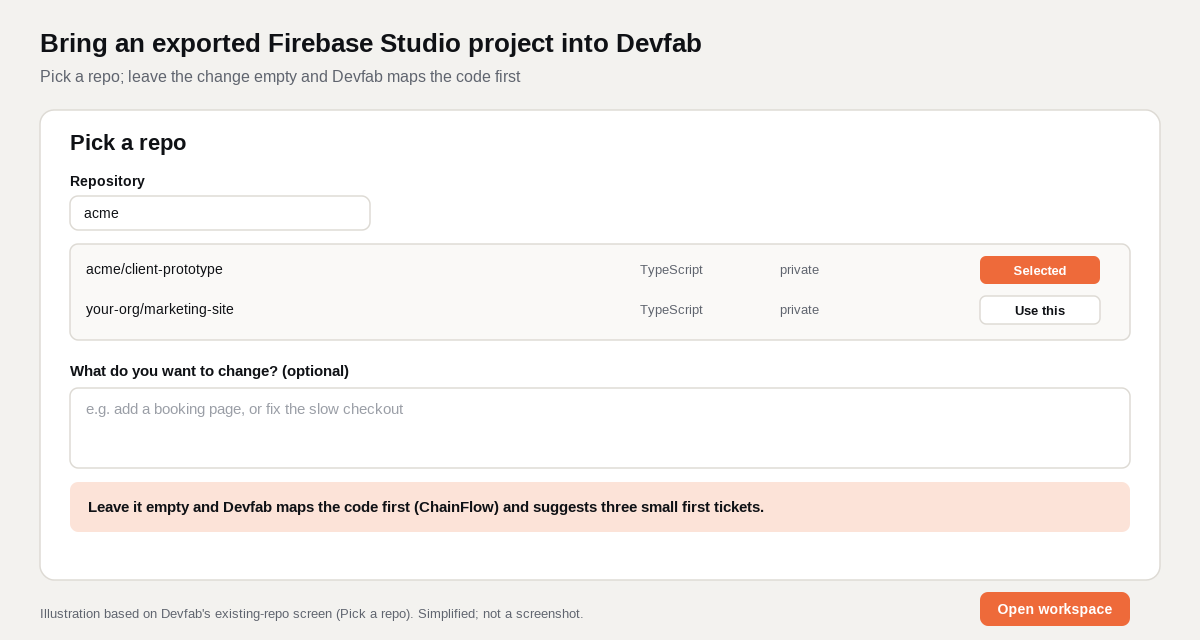
- Open Devfab and choose "Work on an existing project." Pick the repository.
- Leave the change box empty. Devfab's ChainFlow maps the code first and suggests three small first tickets.
- Review and approve the plan. The Coordinator then creates tickets and assigns dev agents.
- Let the QA agent test. It runs UI, flow and logic tests, then Deploy ships to your own server.
Keep your Firestore and Authentication setup. Google says those services keep working after Firebase Studio closes.
Where Firebase Studio is the better choice
- Finishing work already in progress before March 22, 2027, if you have an existing workspace and don't want to move mid-project.
- Staying fully on Google. If your client wants Google tooling, Google's own paths (AI Studio or Antigravity) keep you in that stack.
- Free, browser-only prototyping for current users, with ready templates for Flutter, Android, Angular and Go.
- Importing from Figma. Firebase Studio listed Figma import; Devfab accepts attached specs, docs or screenshots instead.
Where Devfab is the better choice
- New client projects. Firebase Studio can't create new workspaces. Devfab can start from a plain description or a GitHub repo.
- Research before the plan. Take a permit tracker for a city office: Devfab's Researcher maps terms like permit types and inspections, common practices and competing products before the plan.
- A plan the client signs off. In Human in the loop mode, a person approves the plan before tickets are created.
- Changes that don't break things. ChainFlow shows which functions, APIs and deployed parts a change touches.
- Tested journeys. The QA agent clicks screens, buttons and user journeys end to end, plus logic tests.
- Deploy and docs. Ship to your own server; Devfab produces blueprints, prototypes, sequence flows and user manuals.
Devfab's honest limits: it is new and in Beta, has a smaller community, fewer integrations than mature platforms, is not an editor for hands-on coding, and needs a GitHub account.
FAQ
When does Firebase Studio shut down?
Google's docs say Firebase Studio is sunsetting on March 22, 2027. New workspace creation and new sign-ups were disabled on June 22, 2026. After shutdown, remaining data is permanently deleted, so export your workspaces before that date.
Will my deployed Firebase apps stop working?
No. Google says Firestore, Authentication, App Hosting and other Firebase services keep working, and apps you already deployed keep running. Only the Firebase Studio workspace and its agent go away.
Can Devfab import a Firebase Studio project?
Yes, through GitHub. Export the workspace as a ZIP or push it to a repository, put that repository in your GitHub account, then choose Work on an existing project in Devfab. Leave the change box empty and ChainFlow maps the code first and suggests three small first tickets.
Is Devfab free like Firebase Studio was?
Devfab is in Beta, and this page lists no Devfab price. Devfab offers predictable cost: cost is logged after each run, per task and per project, so you can see what each client project used.
Read next
- What is an AI software factory?
- Firebase Studio alternatives
- Google AI Studio vs Firebase Studio
- How to deploy an AI-built app to your own server
Moving client projects off Firebase Studio? Start with a mapped repo and an approved plan. Try Beta
Sources (checked November 2026): Firebase Studio docs; Firebase Studio sunset and project migration; Firebase blog: AI Studio and Firebase integration (Mar 19, 2026).
Frequently asked questions
When does Firebase Studio shut down?
Google's docs say Firebase Studio is sunsetting on March 22, 2027. New workspace creation and new sign-ups were disabled on June 22, 2026. After shutdown, remaining data is permanently deleted, so export your workspaces before that date.
Will my deployed Firebase apps stop working?
No. Google says Firestore, Authentication, App Hosting and other Firebase services keep working, and apps you already deployed keep running. Only the Firebase Studio workspace and its agent go away.
Can Devfab import a Firebase Studio project?
Yes, through GitHub. Export the workspace as a ZIP or push it to a repository, put that repository in your GitHub account, then choose Work on an existing project in Devfab. Leave the change box empty and ChainFlow maps the code first and suggests three small first tickets.
Is Devfab free like Firebase Studio was?
Devfab is in Beta, and this page lists no Devfab price. Devfab offers predictable cost: cost is logged after each run, per task and per project, so you can see what each client project used.