Short answer: Google AI Studio wins for anything new: its Build mode creates full-stack web apps and native Android apps from prompts, syncs with GitHub and deploys to Cloud Run. Firebase Studio wins only if you need a full cloud IDE with Nix environments and Flutter or Go templates until it shuts down on March 22, 2027.
You opened Firebase Studio this week and saw the banner. Google wants you somewhere else, and AI Studio is the first name on the list. It is a fair question whether that move is like-for-like. It isn't quite. One is a full cloud workspace with an editor and terminal. The other is a prompt-first builder inside Google's Gemini console.
This page lays the two side by side, using Google's own docs checked in November 2026, so you can see what moves cleanly.
In this comparison:
- Google AI Studio and Firebase Studio at a glance
- Feature comparison
- Where Firebase Studio wins
- Switching from one to the other
Use it as a checklist for the move.
Google AI Studio and Firebase Studio at a glance
Firebase Studio is sunsetting. Google announced the sunset on March 19, 2026, together with Firebase built into AI Studio (Firebase blog). New workspaces and new sign-ups were disabled on June 22, 2026. The service shuts down on March 22, 2027, after which remaining data "is permanently deleted" (migration guide). Firestore, Authentication, App Hosting and deployed apps keep working.
Firebase Studio is a browser-based cloud workspace that combined Project IDX with AI agents and Gemini. It offered an App Prototyping agent, Gemini chat for code, tests and bug fixes, templates and the Local Emulator Suite (Firebase Studio docs).
Google AI Studio is active and growing. On March 18, 2026, Google relaunched its Build mode for full-stack "vibe coding" around the Antigravity coding agent, with a Firebase backend, multiplayer apps, secrets and Next.js support (Google blog). Build mode supports "web apps with full-stack runtimes" and "native Android apps with Kotlin and Jetpack Compose" (Build mode docs).
In short: Firebase Studio was an IDE with AI inside. AI Studio's Build mode is an AI builder with code you can open.
Feature comparison
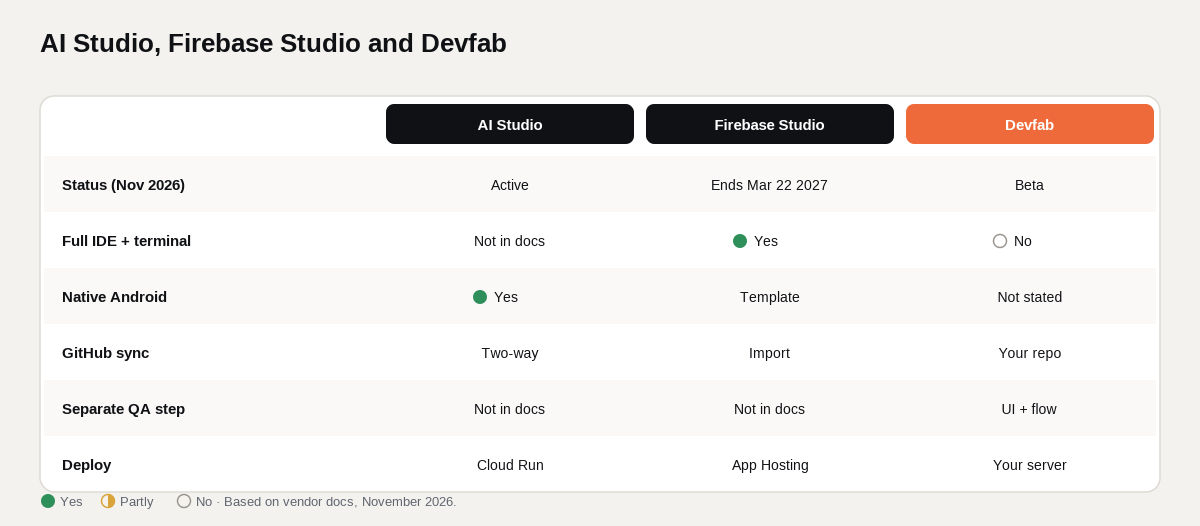
| Aspect | Google AI Studio (Build mode) | Firebase Studio | Source |
|---|---|---|---|
| Status | Active; named successor | Closed to new users; ends Mar 22, 2027 | Migration guide |
| Where it runs | Browser, inside Google AI Studio | Browser cloud workspace (Project IDX base) | Build mode docs; Firebase Studio docs |
| Agent | Antigravity Agent, manages many files and keeps project context | App Prototyping agent plus Gemini chat | Build mode docs; Firebase Studio docs |
| App types | Web (React default; Next.js, Angular) with Node.js runtime; native Android | Next.js, React, Angular, Flutter, Android, Flask, Go templates | Build mode docs; Firebase Studio docs |
| Backend | Agent provisions Firestore and Firebase Auth after approval | Prototyping agent set up Firestore and Firebase Auth | Same sources |
| Testing | Not covered in the Build mode docs we checked | Gemini test writing; Local Emulator Suite | Firebase Studio docs |
| Deploy | Cloud Run; Android to Play Store internal testing | Firebase App Hosting | Same sources |
| GitHub | Two-way sync with new or existing repo; ZIP export | Import from Git, archive or Figma | Same sources |
| Team and admin | Sharing with view, fork and edit; no team, SSO or roles described | Not covered in the docs we checked | Build mode docs |
| Pricing model | Gemini API Free plan; paid tier per 1M tokens | No cost; some integrations need Cloud Billing | Gemini API pricing; Firebase Studio docs |
Cost model by team size
| Team size | Google AI Studio | Firebase Studio |
|---|---|---|
| 1 person | Free tier with usage limits; content on the free tier may be used to improve Google products | Free for existing users; no new sign-ups |
| 5 people | Free or paid Gemini API tier billed per 1M tokens; shared apps' API calls count toward the owner's usage | Free for existing users; no new sign-ups |
| 25 people | Enterprise, custom pricing; Cloud Run costs for deployed apps | Not available for new teams |
Pricing models as of November 2026 from Gemini API pricing and the Build mode docs; AI Studio has no per-month plan prices. Firebase Studio is "available at no cost," though App Hosting may need a Cloud Billing account.
Where Google AI Studio wins
- It is where Google is investing. Build mode got the Antigravity agent, Firebase, multiplayer and secrets in March 2026.
- Secrets stay server-side. API keys are injected on the server and "never included in client-side code."
- Google Workspace apps are easy. Gmail, Sheets, Docs, Drive and Calendar connect with OAuth handled for you.
- You want an Android app from a prompt. Build mode creates Kotlin and Jetpack Compose apps and publishes to Play Store internal testing.
- Your repo stays in sync. Two-way GitHub sync works with an existing repository.
Where Firebase Studio wins
- You need a full IDE with a terminal, Nix-based environment customization and the Local Emulator Suite.
- Your app is Flutter, Flask or Go. Firebase Studio had templates for those; AI Studio's docs list React, Next.js, Angular and native Android.
- You need time. Existing workspaces keep working, free, until March 22, 2027, with security patches and Gemini updates.
- Your storage is local to the workspace. AI Studio apps run in a Cloud Run container, so storage must be connected externally.
Switching from one to the other
Google's guide gives three routes (migration guide):
- To Google AI Studio. Use "Move now", then publish with App Hosting (with GitHub sync) or Cloud Run.
- To Google Antigravity, the local agent-first IDE, if you want to keep an editor.
- ZIP export, then deploy yourself with the Firebase CLI.
Chat history is not included in the export. Note that AI Studio offers no real-time co-editing; Google suggests GitHub for collaboration (Build mode docs). Apps are auto-reviewed and may be removed for policy violations.
Where Devfab fits
Both Google tools are built to get a Gemini-powered app running fast. In the docs we checked, neither researches the domain before a plan, asks a person to approve a project plan, or runs a separate QA step on user flows.
App builders automate the first version. Devfab automates the development lifecycle. If your Firebase Studio app is turning into a real product, say a permit tracker for a city office, push it to GitHub and open it in Devfab with "Work on an existing project". ChainFlow maps which functions and APIs depend on each other before agents change anything, and the QA agent runs UI, flow and logic tests. Devfab deploys to your own server. It is in Beta, with fewer integrations than Google's platform. See Devfab vs Google AI Studio.
FAQ
Is Google AI Studio replacing Firebase Studio?
Yes, for most users. Google's migration guide names Google AI Studio as a destination, alongside Google Antigravity and a ZIP export you deploy yourself with the Firebase CLI. Firebase Studio closed to new users on June 22, 2026 and shuts down on March 22, 2027.
What happens to my Firebase backend when Firebase Studio shuts down?
It keeps running. Google says Firestore, Authentication, App Hosting and other Firebase services are not affected, and already deployed apps keep running. Only the Firebase Studio workspace and its remaining data go away after March 22, 2027.
Is Google AI Studio free?
AI Studio access is part of the Gemini API Free plan, with usage limits. Paid models can incur costs, API calls from apps you share count toward your usage, and deploying to Cloud Run may add Cloud Run charges. The Gemini API paid tier bills per million tokens.
Can Google AI Studio work with an existing GitHub repository?
Yes. Build mode supports two-way sync with a new or existing GitHub repository and shows a conflict resolution dialog when changes collide. You can also export a ZIP of the project.
Read next
- What is an AI software factory?
- Google AI Studio alternatives
- Firebase Studio alternatives
- Replit vs Firebase Studio
- Devfab vs Google AI Studio
Turning a Gemini prototype into a product? Give it a plan, tests and your own server. Try Beta
Sources (checked November 2026): Google AI Studio: Build mode docs; Gemini API pricing; Google blog: full-stack vibe coding in AI Studio (Mar 18, 2026); Firebase blog: AI Studio + Firebase integration (Mar 19, 2026); Firebase Studio docs; Firebase Studio sunset and project migration.
Frequently asked questions
Is Google AI Studio replacing Firebase Studio?
Yes, for most users. Google's migration guide names Google AI Studio as a destination, alongside Google Antigravity and a ZIP export you deploy yourself with the Firebase CLI. Firebase Studio closed to new users on June 22, 2026 and shuts down on March 22, 2027.
What happens to my Firebase backend when Firebase Studio shuts down?
It keeps running. Google says Firestore, Authentication, App Hosting and other Firebase services are not affected, and already deployed apps keep running. Only the Firebase Studio workspace and its remaining data go away after March 22, 2027.
Is Google AI Studio free?
AI Studio access is part of the Gemini API Free plan, with usage limits. Paid models can incur costs, API calls from apps you share count toward your usage, and deploying to Cloud Run may add Cloud Run charges. The Gemini API paid tier bills per million tokens.
Can Google AI Studio work with an existing GitHub repository?
Yes. Build mode supports two-way sync with a new or existing GitHub repository and shows a conflict resolution dialog when changes collide. You can also export a ZIP of the project.