Short answer: Firebase Studio shuts down on March 22, 2027. For prompt-driven web prototyping, Google's own pick is Google AI Studio; for code-first local work, Google Antigravity. If your exported app now needs an approved plan, UI and flow tests and deployment to your own server, Devfab fits. Replit and Lovable suit fresh builds.
You have a Firebase Studio workspace with an app that works. Google has set an end date. Since June 22, 2026, nobody can create new workspaces, and on March 22, 2027 the remaining data is deleted. Your Firebase backend is safe. Your development environment is not. The job now is to pick where the code goes next, and to do it while the workspace still opens.
In this guide, you'll learn:
- Why teams leave Firebase Studio
- How five alternatives compare
- Where each alternative fits
- Where Firebase Studio is still the better choice
- How to choose
The order below follows a typical migration.
Why teams leave Firebase Studio
Status first: Firebase Studio is sunsetting. Google announced the sunset on March 19, 2026. On June 22, 2026, new workspace creation and new sign-ups were disabled. Firebase Studio shuts down on March 22, 2027, and Google says remaining data "is permanently deleted" after that.
What this means in practice:
- Every project needs a new home before the deadline. You can keep working in existing workspaces until then, but anything you want to keep must be migrated.
- Only the creator can use "Move now." Shared workspaces must be duplicated or exported manually.
- Chat history doesn't travel. The export ZIP holds your source code, not the agent chat. Google says you can zip the
.idx/aifolder separately, and Prototyper prompts appear in thegit log. - Your backend is unaffected. Firestore, Authentication, App Hosting and other Firebase services keep working, and deployed apps keep running.
- It was always Preview. Firebase Studio was labeled Preview, "not subject to any SLA or deprecation policy." Until the sunset, Google still ships security patches and Gemini model updates.
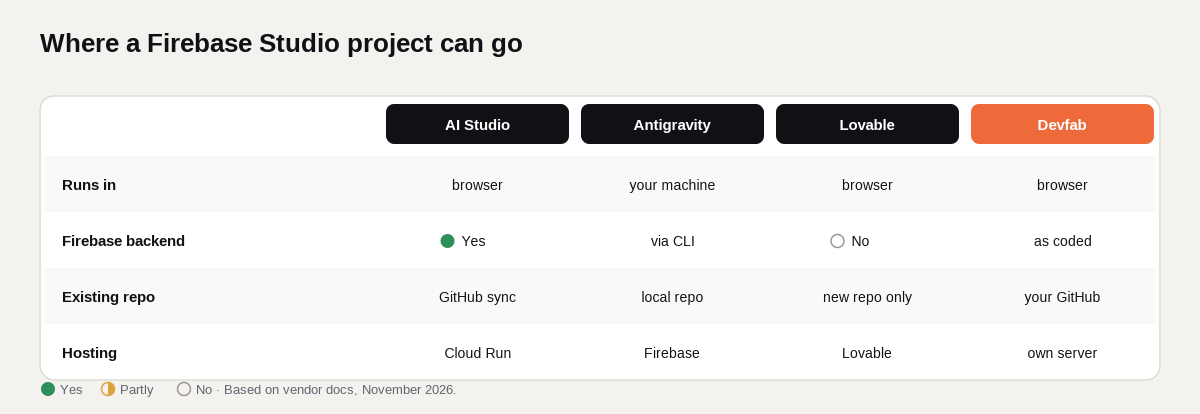
Quick comparison
| Tool | Type | Where it runs | Keeps Firebase backend | Code and Git | Pricing model |
|---|---|---|---|---|---|
| Firebase Studio (baseline) | Cloud IDE with app-prototyping agent | Browser workspace | Yes | Import from Git; ZIP export | No cost (some integrations need Cloud Billing) |
| Google AI Studio | AI app builder (Build mode) | Browser | Yes: Firestore and Firebase Auth | Two-way GitHub sync; ZIP | Gemini API Free plan; paid models and Cloud Run may cost |
| Google Antigravity | Agent-first desktop IDE, CLI and SDK | Your machine | Yes, via Firebase CLI | Local repo | Free Individual plan; AI Pro and Ultra; business via Google Cloud |
| Replit | Cloud IDE and agent | Browser | Not covered in the docs we checked | Workspace; checkpoints | Plans plus effort-based Agent pricing |
| Lovable | AI app builder | Browser | No; built-in backend or Supabase | Git sync creates a new repo | Monthly credits |
| Devfab | AI software factory | Browser workspace; deploys to your own server | Keeps whatever the code uses | Normal codebase in your GitHub | Cost logged per task and per project (Beta) |
The alternatives
1. Google AI Studio
Verdict: the default move for web prototypes that should stay on Google and Firebase. Best for: prompt-driven web apps and Gemini-powered features with almost no setup. Trade-off: no team, SSO or role features described in the Build mode docs. Pricing: AI Studio access is part of the Gemini API Free plan; usage limits apply, paid models may cost money, and Cloud Run pricing may apply when you deploy.
- Google's migration flow is built in: "Move now," then "Prepare for AI Studio," then "Move to Google AI Studio."
- Build mode creates full-stack web apps (React by default, Next.js and Angular supported) and native Android apps in Kotlin and Jetpack Compose.
- After approval, its agent can provision Firestore and Firebase Authentication, and API keys are injected server-side.
- Two-way GitHub sync and Cloud Run deployment. To keep your old URL, Google describes connecting the GitHub repo to App Hosting.
Compare it directly in Devfab vs Google AI Studio.
2. Google Antigravity
Verdict: Google's pick for developers who want to work locally with agents. Best for: code-first teams who will keep shipping to Firebase from their own machines. Trade-off: you need a local setup, and it's an IDE, not a delivery process. Pricing: a free Individual plan with basic weekly rate limits; Google AI Pro and Ultra raise limits; organizations can buy through Google Cloud, where Gemini Enterprise Standard and Plus plans start at USD 30 per seat per month (as of November 2026), or use pay-as-you-go.
- Migration needs the Antigravity IDE, Node.js 20+ and Firebase CLI 15.10.0+. You export the project and run Google's
@fbs-to-agy-exportagent prompt, or usefirebase-tools studio:export. - Antigravity 2.0 (May 19, 2026) added a desktop app focused on running several agents at once, a CLI built in Go, an SDK and scheduled background tasks.
- It connects natively to Google AI Studio, Firebase and Android, per The Next Web's launch report.
3. Devfab
Verdict: the best next step when the exported app has to become a maintained production system. Best for: teams and agencies that want a reviewed plan, UI and flow tests and their own server, not another prototyping tool. Trade-off: it doesn't host your app or recreate the Firebase Studio IDE. Pricing: predictable cost: cost is logged after each run, per task and per project. Devfab is in Beta.
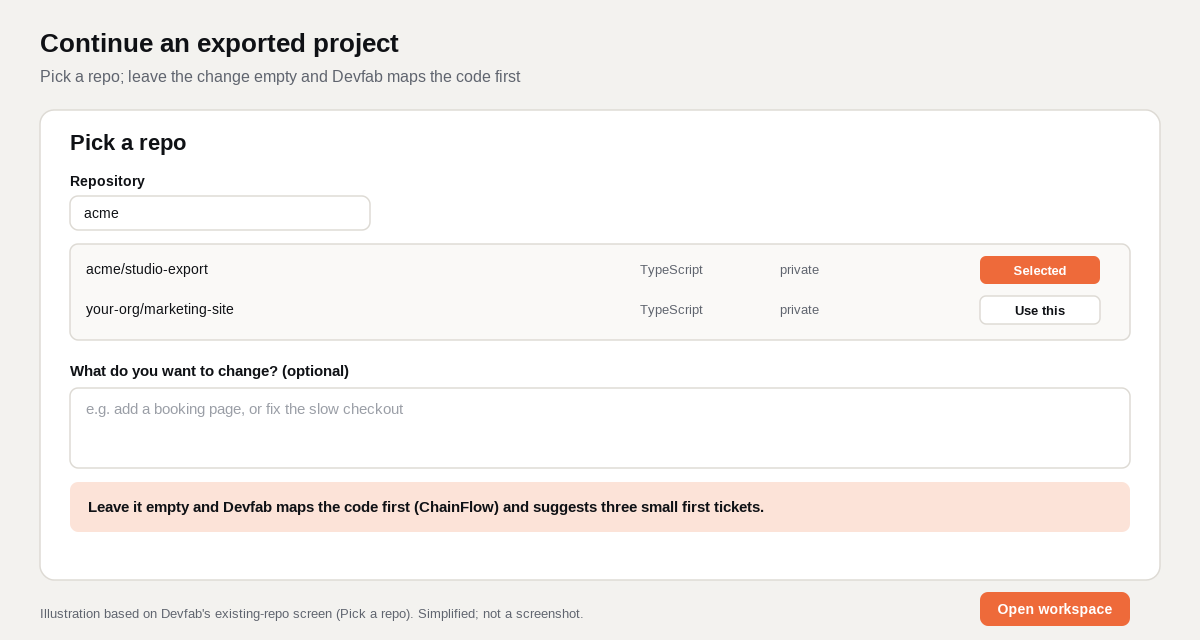
Devfab is an AI software factory. Once the exported code is in your GitHub, choose "Work on an existing project," pick the repo and leave the change box empty. Devfab maps the code first with ChainFlow, its code-intelligence layer, and suggests three small first tickets. ChainFlow maps which functions and APIs call each other and what is deployed, so agents can see, for example, that changing sign-in also touches profile pages and emails.
From there, a Planner writes the plan and a person approves it. The QA agent runs UI and flow tests (screens, buttons and user journeys clicked end to end) plus logic tests. Deploy ships to your own server. For new features, Devfab's research step maps the domain before planning: key terms, best practices and competitors.
Coding agents automate the developer. Devfab automates the development lifecycle.
Devfab's honest limits:
- It's new and in Beta, with a smaller community than Google's tools.
- It has fewer integrations and no Gemini-specific "AI Chips" like AI Studio.
- It isn't an editor for hands-on coding; use your own editor on the repo.
- It needs a GitHub account, and you are responsible for the server.
4. Replit
Verdict: a good home if you liked a browser IDE with an agent and built-in hosting. Best for: builders who want a cloud workspace, an agent and several deployment types in one place. Trade-off: paid Agent work is effort-based, so cost varies by request. Pricing: Starter (free), Core, Pro and Enterprise; as of November 2026 Replit's pricing page lists Core at USD 20 per month with USD 20 in credits.
- Plan mode produces a task list to approve before Agent changes code or data.
- App Testing lets Agent click through the app in a real browser, for Full Stack JavaScript and Streamlit Python apps.
- Autoscale, Reserved VM, Static and Scheduled deployments, with custom domains.
5. Lovable
Verdict: best for starting a new web app fresh, not for continuing a Firebase Studio codebase. Best for: founders who want hosting, database and login in one credit bill. Trade-off: no framework, database or model choice. Pricing: credit-based plans (Free, Pro, Business, Enterprise).
- Lovable's Git sync always creates a new repository and cannot link an existing one, so your exported repo can't be connected as-is.
- New apps use TanStack Start; backend options are Lovable's built-in backend, Supabase or third-party APIs.
- Plan mode writes a plan for approval before changing the project.
Where Firebase Studio is still the better choice
These hold only until March 22, 2027:
- Finishing work in flight. Existing workspaces keep working, so you can wrap up a feature before you move.
- Cost. Access to Firebase Studio is available at no cost, and it still gets security patches and Gemini model updates until the sunset.
- A ready environment. Its Nix-based setup, templates and Local Emulator Suite are configured; rebuilding that locally takes setup work.
- The built-in move to AI Studio. Google's "Move now" flow is the easiest path for prompt-built web apps.
How to choose
- Prompt-built web app, staying on Firebase? Google AI Studio.
- You write code locally and want agents in your editor? Google Antigravity.
- The app is going to real users and needs a plan, tests and your own server? Devfab. Read What is an AI software factory? and How to deploy an AI-built app to your own server.
- Want a hosted browser IDE again? Replit.
- Starting over with a new web app? Lovable.
Whatever you pick: export the ZIP now, push it to a GitHub repo, and keep .env out of the commit.
FAQ
When does Firebase Studio shut down?
Google's migration page says Firebase Studio shuts down on March 22, 2027, and remaining data is then permanently deleted. New workspaces and sign-ups have been disabled since June 22, 2026. Existing workspaces still work until the shutdown.
Will my deployed Firebase app stop working?
No. The sunset covers only the Firebase Studio development environment. Firestore, Authentication, App Hosting and other Firebase services keep working, and apps you already deployed keep running.
How do I export a Firebase Studio project?
Use Move now, then Zip and Download, or move to Google AI Studio or Antigravity with Google's tools. Agent chat history is not included in the ZIP; Google says you can zip it separately from the workspace's .idx/ai folder.
What is the official replacement for Firebase Studio?
Google names two: Google AI Studio for web-based, prompt-driven prototyping, and Google Antigravity for code-first, local, agent-driven development. You can also export a ZIP and deploy anywhere.
Can Devfab continue a Firebase Studio project?
Yes, once the code is in a GitHub repository. Choose Work on an existing project, pick the repo and leave the change box empty. Devfab maps the code with ChainFlow and suggests three small first tickets for you to approve.
Read next
- What is an AI software factory?
- Devfab vs Google AI Studio
- How to deploy an AI-built app to your own server
- Prototype vs MVP vs production app
Moving your Firebase Studio app to production? Try the Devfab Beta
Sources (checked November 13, 2026): Firebase Studio sunset and project migration; Firebase Studio docs; Firebase blog: AI Studio integration (Mar 2026); Build apps in Google AI Studio; Gemini API pricing; Google blog: full-stack vibe coding in AI Studio (Mar 2026); Google Antigravity pricing; The Next Web: Antigravity 2.0 with desktop app, CLI and SDK (May 2026); Replit Agent overview; Replit pricing; Replit pricing and plans (docs); Replit App Testing; Replit: Publish your app; Lovable FAQ; Lovable GitHub integration.
Frequently asked questions
When does Firebase Studio shut down?
Google's migration page says Firebase Studio shuts down on March 22, 2027, and remaining data is then permanently deleted. New workspaces and sign-ups have been disabled since June 22, 2026. Existing workspaces still work until the shutdown.
Will my deployed Firebase app stop working?
No. The sunset covers only the Firebase Studio development environment. Firestore, Authentication, App Hosting and other Firebase services keep working, and apps you already deployed keep running.
How do I export a Firebase Studio project?
Use Move now, then Zip and Download, or move to Google AI Studio or Antigravity with Google's tools. Agent chat history is not included in the ZIP; Google says you can zip it separately from the workspace's .idx/ai folder.
What is the official replacement for Firebase Studio?
Google names two: Google AI Studio for web-based, prompt-driven prototyping, and Google Antigravity for code-first, local, agent-driven development. You can also export a ZIP and deploy anywhere.
Can Devfab continue a Firebase Studio project?
Yes, once the code is in a GitHub repository. Choose Work on an existing project, pick the repo and leave the change box empty. Devfab maps the code with ChainFlow and suggests three small first tickets for you to approve.