Short answer: GitHub Copilot wins when a team works across many editors and wants agents, reviews and governance tied to GitHub repos and pull requests. JetBrains Junie wins when the team lives in JetBrains IDEs and wants an agent that uses the IDE's index, test runners and debugger, with any model through bring-your-own-key.
Your Java and Kotlin developers will not leave IntelliJ. Your front-end people live in VS Code. Your managers want one AI tool and one bill. So the question lands on your desk: Copilot everywhere, or Junie where it fits best?
One camp says pick the tool with the widest reach. The other says pick the one that knows the IDE. This page referees, using vendor pages checked on November 20, 2026.
In this comparison:
- GitHub Copilot and JetBrains Junie at a glance
- Feature comparison
- Where GitHub Copilot wins
- Where JetBrains Junie wins
- Switching from one to the other
Each section stands alone, so skip to what you need.
GitHub Copilot and JetBrains Junie at a glance
JetBrains Junie left beta in 2026. JetBrains announced in June 2026 that Junie is generally available, adding Plan mode, agentic debugging and code review (JetBrains blog). Junie CLI, a standalone agent that runs without an IDE and in CI, entered beta in March 2026 (JetBrains blog). It runs in all JetBrains IDEs, in the terminal on Mac, Linux and Windows, and in GitHub Actions or GitLab CI/CD (Junie).
Junie is for developers who already work in JetBrains IDEs and teams that want a model-agnostic agent.
GitHub Copilot is active and broad. It runs on GitHub.com, GitHub Mobile, IDEs, Copilot CLI, Windows Terminal and a desktop app, with a cloud agent that takes assigned work and opens pull requests (GitHub Docs). A new "Copilot in the cloud" experience reached paid plans on October 28, 2026 (GitHub Docs).
Copilot is for developers and organizations whose code, issues and reviews run through GitHub.
Feature comparison
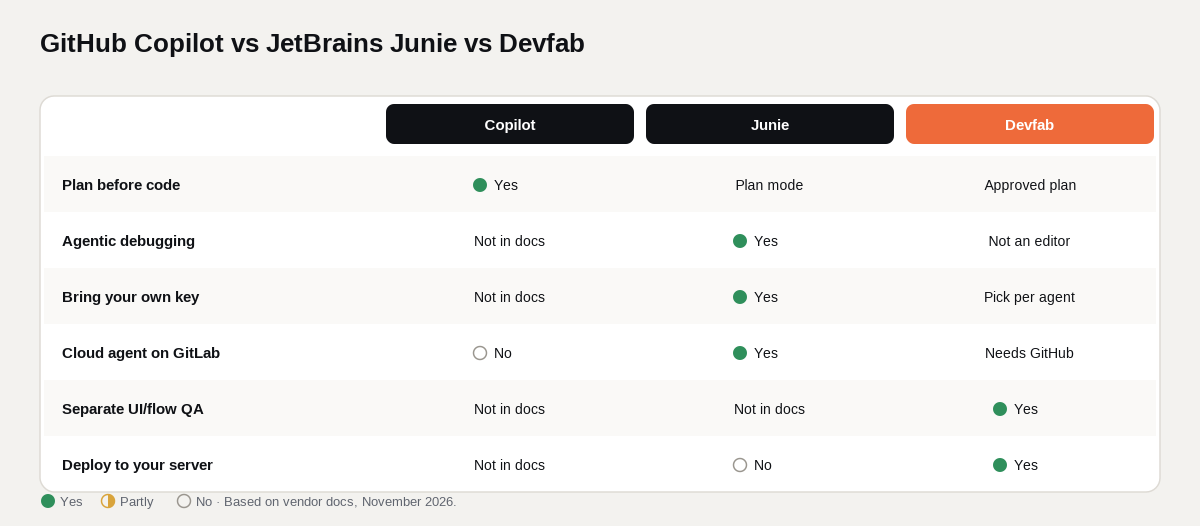
| Aspect | GitHub Copilot | JetBrains Junie | Source |
|---|---|---|---|
| Where it runs | GitHub.com, Mobile, IDEs, CLI, desktop app | All JetBrains IDEs, Junie CLI, GitHub Actions, GitLab CI/CD | Copilot features; Junie |
| Planning | Cloud agent researches the repo and creates an implementation plan | Plan mode writes requirements, technical design and delivery stages; saved in .junie/plans | Copilot features; JetBrains blog |
| Agent autonomy | IDE agent asks approval for changes and commands; cloud agent opens PRs | Default, Plan, Goal and Debug modes; Safe, Auto and Brave confirmation levels | Copilot features; Junie help |
| Testing and debugging | PR code review on paid plans | Agentic debugging with breakpoints; uses IDE test runners; code review of diffs | Copilot plans; JetBrains blog |
| Deploy and hosting | Not covered in the docs we checked | No deploy or hosting features described | Junie |
| Repo hosts | Cloud agent works only with GitHub repos | GitHub and GitLab, including on-prem GitLab | Copilot cloud agent; JetBrains blog |
| Team and admin | Policies, usage data, audit logs; agent control plane GA Feb 26, 2026 | Plans for individuals and organizations; vendor states SOC 2 | GitHub changelog; Junie |
| Model choice | OpenAI, Anthropic, Google, Microsoft, Moonshot AI, xAI | BYOK for Anthropic, OpenAI, Google; local Ollama, LM Studio, LiteLLM | Copilot models; JetBrains blog |
| Pricing model | Tiers and seats plus GitHub AI Credits | Free start (Junie Lite, BYOK); paid AI Pro and AI Ultimate with AI Credits | Copilot plans; Junie |
Cost model by team size
| Team size | GitHub Copilot | JetBrains Junie | Devfab |
|---|---|---|---|
| 1 person | Free USD 0; Pro USD 10 per user per month; Pro+ USD 39 | Free to start with Junie Lite and BYOK at provider rates; or a per-user AI Pro or AI Ultimate subscription | Cost logged per task and per project (Beta) |
| 5 people | Business USD 19 per granted seat per month, pooled credits | Per-user AI subscriptions with monthly AI Credits, plus top-ups | Cost logged per task and per project (Beta) |
| 25 people | Business, or Enterprise USD 39 per granted seat per month | Organization plans; BYOK billed at provider rates with no markup | Cost logged per task and per project (Beta) |
Copilot prices as of November 2026 from GitHub Copilot plans. Junie's page lists AI Pro and AI Ultimate prices but does not say which billing period they reflect, so check Junie pricing for current amounts. Devfab is in Beta with predictable cost: cost is logged after each run, per task and per project.
Where GitHub Copilot wins
- Your team uses many editors. Copilot covers VS Code, JetBrains, Xcode and Eclipse, plus GitHub.com and mobile.
- Work should start from GitHub issues and PRs. The cloud agent picks up assigned work and opens a pull request.
- You need agent governance at scale. Enterprise AI Controls add an AI administrator role and agent activity in audit logs.
- You want third-party agents in one plan. Claude and Codex agents are listed on Pro+ and Max.
- You want inline completions that don't use credits. Completions and next edit suggestions do not consume AI credits.
Where JetBrains Junie wins
- Your developers live in IntelliJ, PyCharm or Rider. Junie uses the IDE's semantic index, build configs, test runners and debugger.
- You debug more than you write. Debug mode sets breakpoints and inspects runtime state (IntelliJ IDEA Ultimate 2026.1.1+).
- You want plans as files. Plan mode saves plans in
.junie/plans, so they can be committed and reviewed. - You need model freedom. BYOK and local runtimes are supported, with no markup on provider rates.
- Your repos sit on GitLab, including on-prem. Junie runs from GitLab CI/CD; Copilot's cloud agent needs GitHub.
Switching from one to the other
From Copilot to Junie. Install Junie in your JetBrains IDE or set up Junie CLI. Move Copilot custom instructions into Junie guidelines; Junie also supports custom agents, skills, commands and MCP (JetBrains blog). For PR automation, add the Junie GitHub Action.
From Junie to Copilot. Install Copilot in the IDE, then copy guidelines into Copilot custom instructions or prompt files. Plans in .junie/plans stay in the repo as reference. Make sure the repo is on GitHub if you want the cloud agent.
Where Devfab fits
Copilot and Junie both help a developer write, review and debug code. Neither, in the pages we checked, researches the business domain before planning, tests user journeys in a separate QA step, or deploys the finished app; Junie's page describes no deploy features at all.
Coding agents automate the developer. Devfab automates the development lifecycle. The Researcher maps the domain before the Planner writes a plan, and a person approves it before tickets exist. The QA agent then runs UI and flow tests plus logic tests, and Deploy ships to your own server. Devfab is in Beta, with a smaller community and fewer integrations, and it is not an editor for hands-on coding. See Devfab vs JetBrains Junie and Devfab vs GitHub Copilot.
FAQ
Is JetBrains Junie still in beta?
No. JetBrains announced in June 2026 that Junie is out of beta and generally available, adding Plan mode, agentic debugging and code review. Junie CLI, the standalone terminal agent, entered beta in March 2026.
Can I use GitHub Copilot inside JetBrains IDEs?
Yes. Copilot works in IDEs including JetBrains, with chat, inline suggestions, next edit suggestions and agent mode. Junie goes deeper inside JetBrains tools: it uses the IDE's semantic index, build configurations, test runners and debugger.
Which one lets me bring my own model keys?
Junie is LLM-agnostic, with bring-your-own-key for Anthropic, OpenAI and Google and local runtimes such as Ollama and LM Studio. BYOK usage is billed at provider rates with no markup. Copilot offers models from six providers through its own plans and credits.
How is Junie priced compared with Copilot?
Junie is free to start with Junie Lite and BYOK. Paid JetBrains AI Pro and AI Ultimate subscriptions include monthly AI Credits; check JetBrains' pricing page for current amounts. Copilot Pro is USD 10 per user per month and Business USD 19 per granted seat per month, as of November 2026.
Read next
Both tools help the developer. Try one that runs the project around them. Try Beta
Sources (checked November 2026): Junie by JetBrains; JetBrains blog: Junie out of beta; JetBrains blog: Junie CLI in beta; Junie agent help; GitHub Copilot plans; GitHub Docs: Copilot features; GitHub Docs: About Copilot cloud agent; GitHub Docs: Supported AI models; GitHub Changelog: Enterprise AI Controls GA.
Frequently asked questions
Is JetBrains Junie still in beta?
No. JetBrains announced in June 2026 that Junie is out of beta and generally available, adding Plan mode, agentic debugging and code review. Junie CLI, the standalone terminal agent, entered beta in March 2026.
Can I use GitHub Copilot inside JetBrains IDEs?
Yes. Copilot works in IDEs including JetBrains, with chat, inline suggestions, next edit suggestions and agent mode. Junie goes deeper inside JetBrains tools: it uses the IDE's semantic index, build configurations, test runners and debugger.
Which one lets me bring my own model keys?
Junie is LLM-agnostic, with bring-your-own-key for Anthropic, OpenAI and Google and local runtimes such as Ollama and LM Studio. BYOK usage is billed at provider rates with no markup. Copilot offers models from six providers through its own plans and credits.
How is Junie priced compared with Copilot?
Junie is free to start with Junie Lite and BYOK. Paid JetBrains AI Pro and AI Ultimate subscriptions include monthly AI Credits; check JetBrains' pricing page for current amounts. Copilot Pro is USD 10 per user per month and Business USD 19 per granted seat per month, as of November 2026.