Short answer: For an agent that still runs inside JetBrains IDEs, pick Claude Code or Kilo Code. For teams whose work lives on GitHub, GitHub Copilot is the closest swap. For free, open-source agents, Cline or OpenCode. If the gap is the lifecycle around the code (research, approved plan, QA, deploy), look at Devfab.
Your team lives in IntelliJ, PyCharm or Rider, and Junie came built in. It's good. But three things keep coming up. JetBrains' own docs warn that once the context window fills, "the agent may lose track of earlier parts of the session." Debug mode needs IntelliJ IDEA Ultimate. And Junie stops at the code: no app building or deploy features are described.
This list covers seven tools, which IDEs each runs in, and where Junie still wins. All facts come from vendor docs checked in November 2026.
In this guide, you'll learn:
- Why teams leave JetBrains Junie
- Seven alternatives side by side
- Where JetBrains Junie is still the better choice
- How to choose
Use the sections below as your shortlist.
Why teams leave JetBrains Junie
First, the status. Junie is active and generally available. JetBrains took it out of beta in June 2026 and added Plan mode, agentic debugging and code review (JetBrains blog). Junie CLI, a standalone agent for the terminal and CI, entered beta in March 2026 (JetBrains blog). Nobody is leaving because Junie is going away.
The reasons are narrower:
- Long sessions lose context. The docs warn the agent may lose track of earlier parts of a session once the context window fills (Junie help).
- Some features need specific IDEs. Debug mode is limited to IntelliJ IDEA Ultimate 2026.1.1+ (same source).
- It is a developer-side agent. Junie's product page describes no deploy, hosting or app-building features (junie.jetbrains.com).
- Credits are one more meter. Paid JetBrains AI plans include a monthly AI Credits allowance with top-ups; BYOK is billed at provider rates (junie.jetbrains.com). Teams already paying for another AI seat may want one bill.
- Mixed-editor teams. When half the team uses VS Code, one agent across both is simpler.
Quick comparison
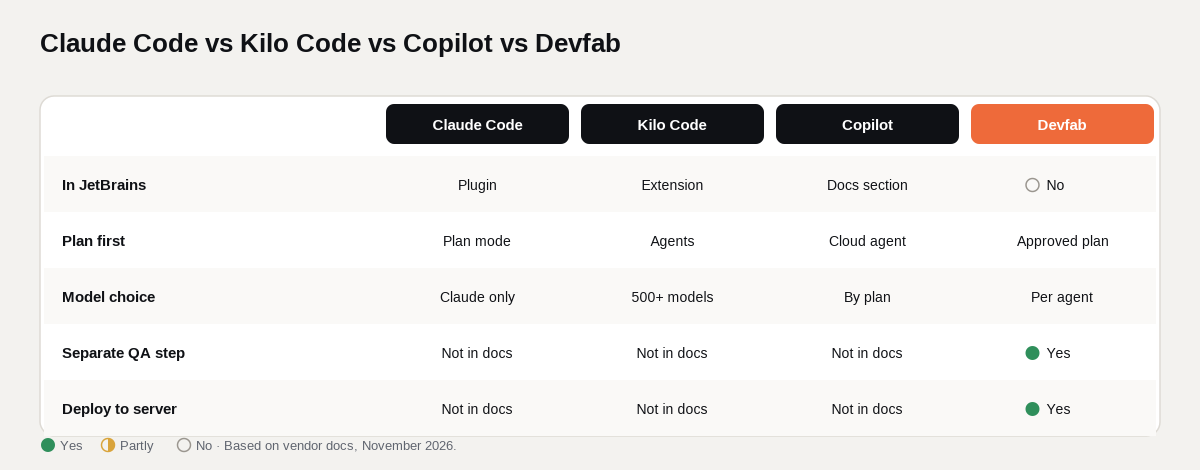
| Tool | Runs in JetBrains IDEs | Other surfaces | Plan before code | Model choice | Pricing model |
|---|---|---|---|---|---|
| Claude Code | Yes, plugin | Terminal, VS Code, desktop, web, mobile | Plan mode | Claude models only | Paid Claude plans; API pay-as-you-go |
| GitHub Copilot | Docs have a "Copilot in JetBrains" section | GitHub.com, VS Code, CLI, desktop app | Cloud agent can plan first | Several vendors, by plan | Seats plus AI Credits |
| Kilo Code | Yes, extension | VS Code, CLI, cloud agents, Desktop | Agents and subagents | 500+ models, BYOK, local | Free; usage billed; Teams per seat |
| Cline | Yes, plugin (Enterprise on pricing page) | VS Code, CLI, desktop, Kanban | Plan mode | Any key, local, ClinePass | Free; pay inference |
| Cursor | Listed as an integration | Own editor, CLI, cloud agents | Plan Mode | Several vendors | Subscription plus usage |
| OpenCode | Not covered in the docs we checked | Terminal, desktop, mobile | Read-only plan agent | 200+ providers, local | Free; optional Go plan |
| Devfab | No (not an editor) | Web workspace on your GitHub repo | Research, then a plan a person approves | Choose per agent or keep the default | Cost logged per task and per project (Beta) |
Sources for each row are in the tool sections below.
The alternatives
Claude Code
Verdict: the strongest single-vendor agent that also runs in JetBrains. Best for: teams happy with Claude models who want one agent in JetBrains, the terminal and the browser. Trade-off: Claude models only; usage limits are shared across Claude apps. Pricing: included in paid Claude plans; Pro is USD 20 per month and Team Standard is USD 25 per user per month, as of November 2026 (Claude pricing).
- Runs in the terminal, VS Code, a JetBrains plugin, a desktop app, the web and mobile (Claude Code docs).
- Plan mode explores the codebase and proposes an approach for approval before editing (Claude Code costs docs).
- Creates branches, writes commits and opens pull requests; managed Code Review runs several agents per GitHub PR (overview; Code Review docs).
- Code Review reads the diff without building or running it (Code Review docs).
GitHub Copilot
Verdict: the natural pick when issues, PRs and reviews already live on GitHub. Best for: organizations that want AI in the IDE plus a cloud agent that opens PRs, under GitHub's admin controls. Trade-off: the cloud agent only works with repos hosted on GitHub, and each Actions-based task changes one repo and opens one PR (GitHub Docs). Pricing: Business USD 19 and Enterprise USD 39 per granted seat per month, with pooled AI Credits, as of November 2026 (Copilot plans).
- Runs on GitHub.com, Mobile, IDEs, Copilot CLI and a desktop app; GitHub's docs include a "Copilot in JetBrains" section (Copilot features).
- The cloud agent can research a repo and create an implementation plan before changes (same source).
- PR code review is included on paid plans (Copilot plans).
- Enterprise AI Controls and the agent control plane went GA on February 26, 2026 (GitHub Changelog).
Kilo Code
Verdict: the open-source pick for mixed JetBrains and VS Code teams that want seat-level governance. Best for: teams that want hundreds of models at provider rates plus SSO and audit logs. Trade-off: new owner. Anaconda acquired Kilo Code (announced July 15, 2026) and plans to fold its agent features into the Anaconda Platform; Anaconda says current plans and support continue (Anaconda). Pricing: free extension with usage billed separately; Teams USD 15 per user per month; Enterprise custom, as of November 2026 (Kilo pricing).
- Open-source extension for VS Code and JetBrains IDEs, plus the Kilo CLI and cloud agents (Kilo docs).
- Agent Manager runs several agents, each isolated in a git worktree if you choose (Kilo blog).
- Kilo Gateway offers 500+ models from 60+ providers, or BYOK and local models (Kilo pricing).
Cline
Verdict: the best fit if you want to approve every single action. Best for: developers who want an open-source agent with full model freedom and inference at cost. Trade-off: approval on every step is slower for multi-ticket work; Cline's pricing page lists JetBrains among Enterprise features. Pricing: free; pay for inference; Enterprise is custom. No plan prices are shown as of November 2026 (Cline pricing).
- VS Code extension, JetBrains plugin, CLI, desktop app, SDK and Kanban (Cline docs).
- Plan mode reads without editing; Act mode carries out the plan; Checkpoints roll back (Plan & Act).
- In January 2026, OpenAI hired at least seven Cline staff, reported as a continuity challenge (TEXXR).
Cursor
Verdict: the pick if your team is willing to leave JetBrains for an AI-first editor. Best for: developers who want Plan Mode, cloud agents and Bugbot reviews in one product. Trade-off: it is its own editor; Cursor is now owned by SpaceX, with the deal closed per Cursor's August 14, 2026 post (Cursor blog). Pricing: Teams from USD 30 per user per month; individual plans from Free to USD 200 per month, as of November 2026 (Cursor pricing).
- Plan Mode drafts an editable plan before writing code (Cursor Plan Mode).
- Cloud agents run in isolated VMs, many in parallel, on GitHub, GitLab, Bitbucket Cloud or Azure DevOps (Cursor cloud agents).
- Lists JetBrains among its integrations (Cursor docs).
OpenCode
Verdict: the free terminal-first option with the widest model menu. Best for: developers who want an MIT-licensed agent outside any IDE, on desktop or phone too. Trade-off: a June 2026 review reports 1GB+ RAM use by the TUI, permissive default permissions and immature enterprise compliance features (rywalker.com). Pricing: agent free; OpenCode Go from USD 10 per month, as of November 2026 (opencode.ai).
- Terminal UI, desktop app (beta), mobile app and SDK (opencode.ai).
- 200+ providers via Models.dev, local models, and existing ChatGPT or Copilot subscriptions (same source).
- Built-in "plan" agent is read-only and asks before bash commands (GitHub).
Devfab
Verdict: not a Junie replacement in the editor; a fit when the problem is the project, not the keystrokes. Best for: agencies and enterprise teams that need research, an approved plan, QA and deployment in one place. Trade-off: in Beta, with a smaller community and fewer integrations; not an editor for hands-on coding; needs a GitHub account. Pricing: predictable cost. Cost is logged after each run, per task and per project; Devfab is in Beta.
Coding agents automate the developer. Devfab automates the development lifecycle. The Researcher maps the domain, key terms, best practices and competitors before the Planner writes a plan, and a person approves it. Dev agents work with ChainFlow, which maps which functions and APIs call each other and what is deployed. In a clinic booking app, a change to the booking step shows its links to reminders, billing and the calendar view. The QA agent runs UI and flow tests plus logic tests, and Deploy ships to your own server.
Many teams keep Junie in the IDE for hands-on fixes and use Devfab on the same GitHub repo for planned work. See Devfab vs JetBrains Junie.
Where JetBrains Junie is still the better choice
- You want an agent that uses the IDE's own brain: semantic index, build configurations, test runners and the debugger (JetBrains blog).
- You debug at runtime. Junie starts debug sessions, sets breakpoints and inspects runtime state. We did not find the same in the docs we checked for the tools above.
- You want plans as files. Plan mode saves requirements, design and delivery stages in
.junie/plans, so you can commit them (same source). - You want model freedom inside JetBrains: BYOK for Anthropic, OpenAI and Google, plus local runtimes such as Ollama and LM Studio (same source).
- You run code review in GitLab on-prem. Junie reviews code through GitHub Actions or GitLab, including on-prem (same source).
How to choose
- Staying in JetBrains, one vendor is fine: Claude Code.
- Staying in JetBrains, open source and many models: Kilo Code or Cline.
- Everything already on GitHub: GitHub Copilot. Compare the two directly in GitHub Copilot vs JetBrains Junie.
- Willing to switch editors: Cursor. See JetBrains Junie vs Cursor.
- Terminal first, free: OpenCode.
- You need the plan, QA report and deploy around the code: Devfab.
Run your top two on the same small task in the same repo. Compare the diffs, what each asked you, and how easy the result was to review.
FAQ
Which Junie alternatives still work inside JetBrains IDEs?
Claude Code has a JetBrains plugin, Kilo Code offers an open-source extension for JetBrains IDEs, and Cline lists a JetBrains plugin (its pricing page also lists JetBrains under Enterprise, so check your plan). GitHub's docs have a Copilot in JetBrains section. Cursor is its own editor, though it lists JetBrains among its integrations.
Is JetBrains Junie still in beta?
No. JetBrains announced that Junie left beta and became generally available in June 2026, adding Plan mode, agentic debugging and code review. Junie CLI, which runs without an IDE, entered beta in March 2026.
What is the cheapest alternative to Junie?
Cline, Kilo Code and OpenCode are free, open-source agents where you pay only for the models you use, and all three support local models. Junie itself is also free to start with its Junie Lite model and bring-your-own-key at provider rates.
Does any Junie alternative deploy the app?
Among the coding agents here, deployment is not covered in the docs we checked. Devfab is different: it plans, builds and tests the app with AI agents, then its Deploy agent ships it to your own server.
Should I leave Junie if my team uses IntelliJ IDEA?
Not necessarily. Junie uses the IDE's semantic index, test runners and debugger, and Debug mode needs IntelliJ IDEA Ultimate. If that depth matters most, Junie is hard to beat. Look elsewhere if you need a different model vendor's agent, PR review on GitHub, or a whole delivery lifecycle.
Read next
Keep Junie for the keystrokes. Let Devfab run the project. Try Beta
Sources (checked November 2026): Junie by JetBrains; Junie coding agent out of beta (JetBrains blog); Junie CLI is now in beta (JetBrains blog); Junie agent, AI Assistant Help; Claude Code overview; Claude Code costs; Claude Code Code Review; Claude pricing; GitHub Copilot plans; GitHub Docs: Copilot features; GitHub Docs: Copilot cloud agent; GitHub Changelog: Enterprise AI Controls GA; Kilo pricing; Kilo docs: About Plans; The New Kilo Code for VS Code (Kilo blog); Anaconda Acquires Kilo Code; Cline docs overview; Cline Plan & Act; Cline pricing; TEXXR: OpenAI hires seven employees from Cline; Cursor docs; Cursor pricing; Cursor Plan Mode; Cursor cloud agents; Cursor blog: Joining SpaceX; OpenCode homepage; anomalyco/opencode on GitHub; OpenCode research note (rywalker.com, Jun 2026).
Frequently asked questions
Which Junie alternatives still work inside JetBrains IDEs?
Claude Code has a JetBrains plugin, Kilo Code offers an open-source extension for JetBrains IDEs, and Cline lists a JetBrains plugin (its pricing page also lists JetBrains under Enterprise, so check your plan). GitHub's docs have a Copilot in JetBrains section. Cursor is its own editor, though it lists JetBrains among its integrations.
Is JetBrains Junie still in beta?
No. JetBrains announced that Junie left beta and became generally available in June 2026, adding Plan mode, agentic debugging and code review. Junie CLI, which runs without an IDE, entered beta in March 2026.
What is the cheapest alternative to Junie?
Cline, Kilo Code and OpenCode are free, open-source agents where you pay only for the models you use, and all three support local models. Junie itself is also free to start with its Junie Lite model and bring-your-own-key at provider rates.
Does any Junie alternative deploy the app?
Among the coding agents here, deployment is not covered in the docs we checked. Devfab is different: it plans, builds and tests the app with AI agents, then its Deploy agent ships it to your own server.
Should I leave Junie if my team uses IntelliJ IDEA?
Not necessarily. Junie uses the IDE's semantic index, test runners and debugger, and Debug mode needs IntelliJ IDEA Ultimate. If that depth matters most, Junie is hard to beat. Look elsewhere if you need a different model vendor's agent, PR review on GitHub, or a whole delivery lifecycle.