Short answer: JetBrains Junie wins when your team already works in IntelliJ, PyCharm or another JetBrains IDE and wants an agent that uses its debugger, test runners and index, with any model through BYOK. Cursor wins when developers will switch editors for an AI-first one with cloud agents, Bugbot review and many Git hosts.
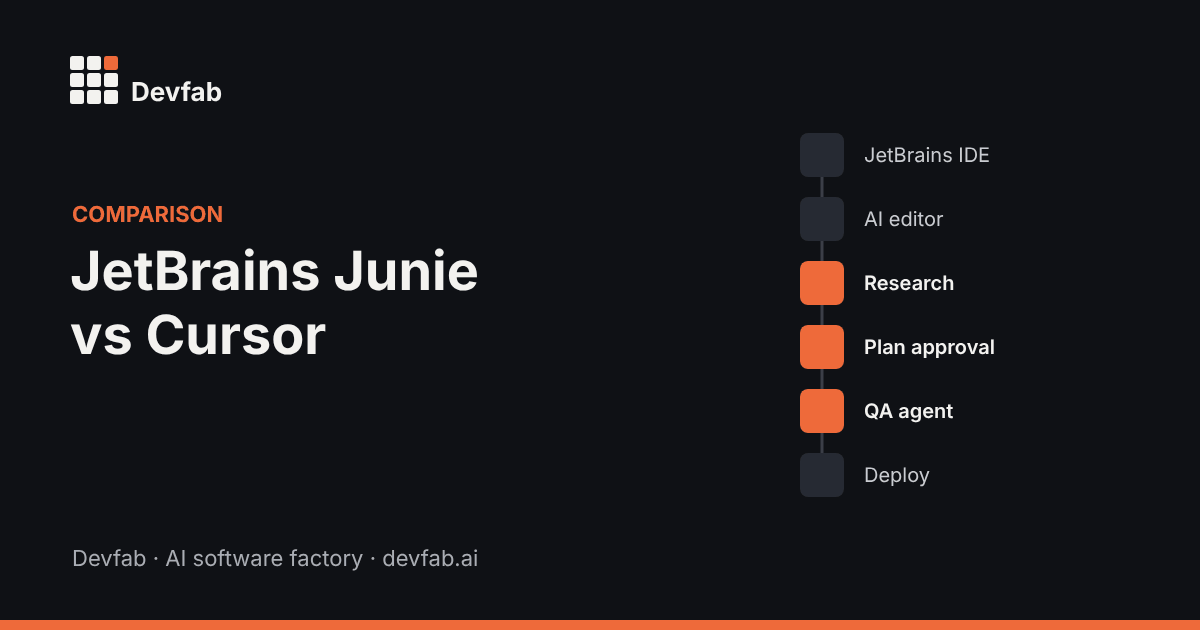
Your team lives in JetBrains IDEs. Every few months someone asks whether you should move to Cursor. Cursor fans point to cloud agents and a fast editor. JetBrains fans say a good agent should use the debugger and test runners you already trust. In 2026 both sides got stronger: Junie left beta, and Cursor changed owners. This page referees the choice with sourced facts.
In this comparison:
- JetBrains Junie and Cursor at a glance
- Feature comparison
- Cost model by team size
- Where JetBrains Junie wins and where Cursor wins
- Where Devfab fits
The sections below act as your referee.
JetBrains Junie and Cursor at a glance
Status changes in 2026. Junie CLI entered beta in March 2026 as a standalone agent for the terminal and CI (JetBrains blog). In June, Junie left beta and became generally available, adding Plan mode, agentic debugging and code review (JetBrains blog). Cursor's maker Anysphere was acquired by SpaceX; Cursor's August 14 post says the deal has officially closed (Cursor blog). Cursor's plans now bundle Grok products, and the entry Plus tier is limited to Grok models (Cursor pricing).
JetBrains Junie is JetBrains' AI coding agent. It works in all JetBrains IDEs, in the terminal through Junie CLI, and in CI through a GitHub Action and GitLab CI/CD (Junie). It has four modes: Default, Plan, Goal (works on its own toward a configured goal) and Debug, which uses the IDE debugger and is limited to IntelliJ IDEA Ultimate (JetBrains help).
Cursor is an AI code editor and coding agent, also offered as a CLI, cloud agents, mobile access and SDKs (Cursor docs). Plan Mode asks clarifying questions, researches the codebase and drafts a plan you can edit before it builds (Cursor Plan Mode).
Feature comparison
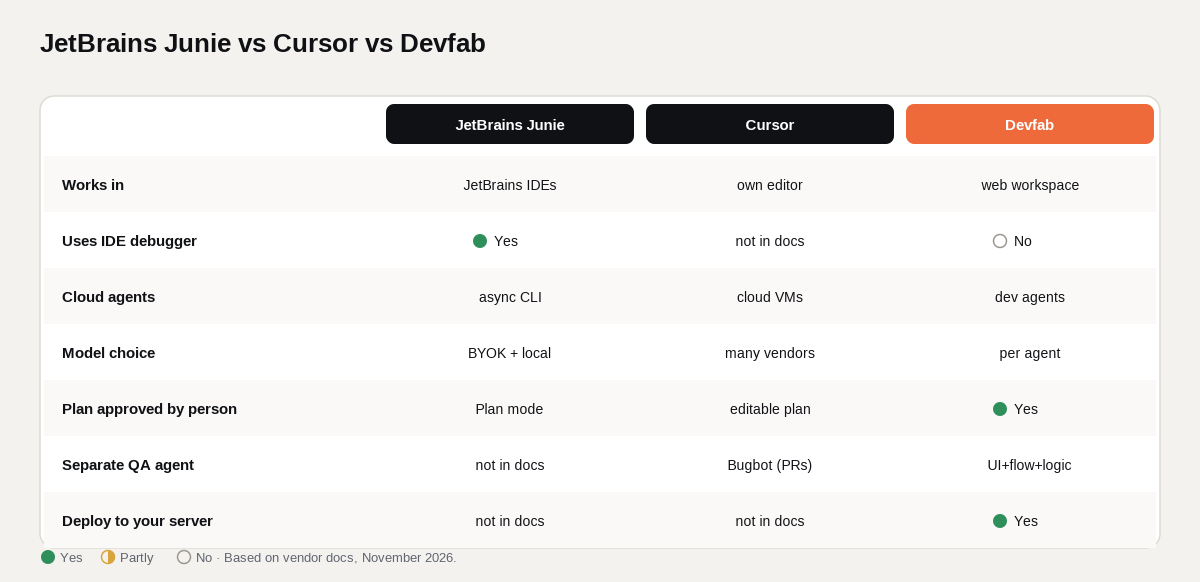
| Aspect | JetBrains Junie | Cursor | Source |
|---|---|---|---|
| Where it runs | All JetBrains IDEs, Junie CLI, GitHub Action, GitLab CI/CD including on-prem | Desktop editor, CLI, cloud agents, mobile, SDKs | JetBrains blog; Cursor docs |
| Planning | Plan mode writes requirements, technical design and delivery stages; saved in .junie/plans | Plan Mode with clarifying questions and an editable plan | JetBrains blog; Cursor Plan Mode |
| Agent autonomy | Safe, Auto or Brave confirmation levels; Goal mode; async CLI tasks with a web view | Cloud agents in isolated VMs, many in parallel, one branch each | JetBrains help; Cursor cloud agents |
| Testing and review | Agentic debugging with breakpoints; review of staged, unstaged or branch diffs | Bugbot reviews PRs; Autofix can push fixes | JetBrains blog; Bugbot |
| Deploy and hosting | Not covered in the docs we checked | Not covered in the docs we checked | — |
| Git hosts | GitHub and GitLab | GitHub, GitLab, Bitbucket and Azure DevOps for cloud agents | Junie; Cursor cloud agents |
| Team and admin | Plans for organizations; SOC 2 (vendor statement) | SSO on Teams; SCIM, audit logs and model restrictions on Enterprise | Junie; Cursor Enterprise |
| Model choice | BYOK for Anthropic, OpenAI and Google; Ollama, LM Studio, LiteLLM | Claude, Gemini, GPT, Grok, Composer; Plus tier is Grok only | JetBrains blog; Cursor pricing |
| Pricing model | Free Junie Lite; per-user AI subscriptions with monthly AI Credits; BYOK with no markup | Tiers with a usage pool; third-party models at API list price; Teams per user | Junie; Cursor pricing |
Cost model by team size
| Team size | JetBrains Junie | Cursor | Devfab |
|---|---|---|---|
| 1 person | Free with Junie Lite; BYOK at provider rates; AI Pro USD 8.33 (10 AI Credits a month); AI Ultimate USD 25 (35 AI Credits) | Free; Plus USD 8 (Grok only, no cloud agents); Premium USD 30 with cloud agents, Bugbot and third-party models | Cost logged per task and per project (Beta) |
| 5 people | AI Pro or AI Ultimate per user, with top-ups; or BYOK | Teams from USD 30 per user, with SSO and centralized billing | Cost logged per task and per project (Beta) |
| 25 people | Organization plans; prices not listed separately on the page we checked | Teams, or custom Enterprise with SCIM, audit logs and spend controls | Cost logged per task and per project (Beta) |
Prices per user per month as of November 2026 from Junie and Cursor pricing. Junie's page has monthly and annual toggles but does not say which period its listed prices use; check before you budget. Devfab is in Beta and offers predictable cost: cost is logged after each run, per task and per project.
Where JetBrains Junie wins
- You don't want to change editors. Junie works in every JetBrains IDE and uses its index, build configurations and test runners.
- You debug with the agent. Junie starts debug sessions, sets breakpoints and inspects runtime state.
- You want any model at cost. BYOK for Anthropic, OpenAI and Google with no markup, plus local runtimes.
- Plans belong in the repo. Plan mode saves plans in
.junie/plans, so you can commit and review them. - You want control over confirmations. Safe, Auto and Brave settings decide what runs without asking, and you can roll back per file.
Where Cursor wins
- You want cloud agents. Many agents run in parallel in isolated VMs and push their own branches.
- Your repos are on Bitbucket or Azure DevOps. Cursor's cloud agents support both, plus GitHub and GitLab.
- You want reviews that fix things. Bugbot reviews pull requests, and Autofix can push fixes.
- You want to start work from anywhere. Cloud agents start from Slack, GitHub or Bitbucket comments, Linear, the iOS app or the API.
- Admins need SCIM and audit logs. Cursor Enterprise includes both, plus model access restrictions.
Switching from one to the other
From Cursor to Junie. JetBrains' help page says Junie reads AGENTS.md in the project root (JetBrains help). Move what matters from .cursor/rules into AGENTS.md, open the project in your JetBrains IDE, and start in Plan mode with the Safe setting until you trust the agent.
From Junie to Cursor. Cursor reads AGENTS.md in the project root and subdirectories (Cursor rules), so shared rules carry over. Plans in .junie/plans are plain files you can keep in the repo. Budget for Premium or Teams if you want cloud agents and third-party models.
Where Devfab fits
Junie and Cursor both make developers faster on code they already own. In the docs we checked, neither researches the domain before planning, routes a project plan to a person for approval, runs UI and flow tests as a separate QA step, or deploys the app.
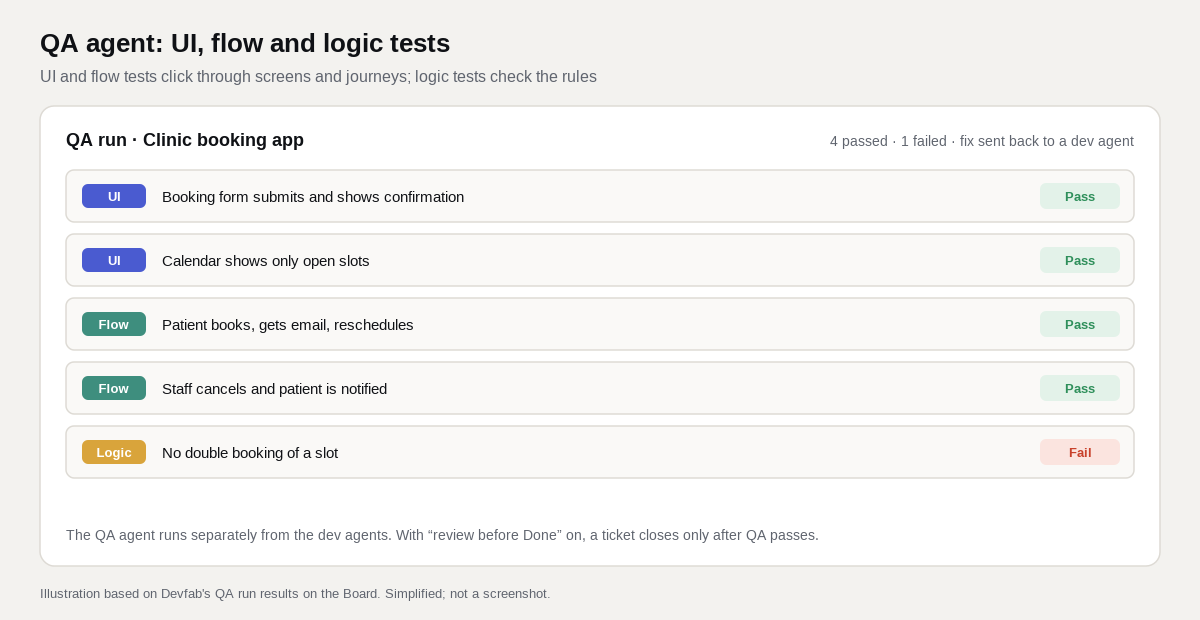
Coding agents automate the developer. Devfab automates the development lifecycle. The Researcher maps terms, best practices and competitors before the Planner writes a plan; a person approves it; dev agents work with ChainFlow so changes don't break connected features; and the QA agent runs UI, flow and logic tests before Deploy ships to your own server.
Honest limits: Devfab is new and in Beta, with fewer integrations and a smaller community. It is not an IDE, so developers who debug by hand will keep JetBrains or Cursor. It needs a GitHub account. See Devfab vs JetBrains Junie and Devfab vs Cursor.
FAQ
Do I have to leave IntelliJ or PyCharm to use Junie?
No. Junie runs inside all JetBrains IDEs and uses the IDE's semantic index, build configurations, test runners and debugger. There is also a Junie CLI for the terminal and CI. Moving to Cursor, by contrast, means adopting a different editor.
Which is cheaper for one developer?
As of November 2026, Junie starts free with the Junie Lite model, and its product page lists AI Pro at USD 8.33 and AI Ultimate at USD 25 per user a month, with BYOK at provider rates. Cursor has a free tier, Plus at USD 8 (Grok models only) and Premium at USD 30, which adds cloud agents, Bugbot and third-party models.
Does Junie have cloud agents like Cursor?
Not in the same form. Junie runs tasks asynchronously through the CLI, with progress in a web app, and runs from GitHub issues and pull requests or GitLab issues and merge requests. Cursor's cloud agents run in isolated cloud VMs, each on its own branch, and can be started from Slack, GitHub, Linear or the API.
Can both tools use the same instruction file?
Yes. JetBrains' help page says Junie reads AGENTS.md in the project root, and Cursor reads AGENTS.md in the project root and subdirectories. Keep shared rules there.
Read next
Want a tested, deployed app and not only faster coding? Try Beta
Sources (checked November 13, 2026): Junie by JetBrains; JetBrains blog: Junie out of beta (Jun 2026); JetBrains blog: Junie CLI beta (Mar 2026); JetBrains help: Junie agent; Cursor docs; Cursor pricing; Cursor Plan Mode; Cursor cloud agents; Cursor Bugbot; Cursor Enterprise; Cursor rules; Cursor blog: Joining SpaceX.
Frequently asked questions
Do I have to leave IntelliJ or PyCharm to use Junie?
No. Junie runs inside all JetBrains IDEs and uses the IDE's semantic index, build configurations, test runners and debugger. There is also a Junie CLI for the terminal and CI. Moving to Cursor, by contrast, means adopting a different editor.
Which is cheaper for one developer?
As of November 2026, Junie starts free with the Junie Lite model, and its product page lists AI Pro at USD 8.33 and AI Ultimate at USD 25 per user a month, with BYOK at provider rates. Cursor has a free tier, Plus at USD 8 (Grok models only) and Premium at USD 30, which adds cloud agents, Bugbot and third-party models.
Does Junie have cloud agents like Cursor?
Not in the same form. Junie runs tasks asynchronously through the CLI, with progress in a web app, and runs from GitHub issues and pull requests or GitLab issues and merge requests. Cursor's cloud agents run in isolated cloud VMs, each on its own branch, and can be started from Slack, GitHub, Linear or the API.
Can both tools use the same instruction file?
Yes. JetBrains' help page says Junie reads AGENTS.md in the project root, and Cursor reads AGENTS.md in the project root and subdirectories. Keep shared rules there.