Short answer: GitHub Spark closed to new users and new apps on August 4, 2026. GitHub's own path is Copilot in VS Code, the Copilot CLI or the Copilot app. For a prompt-to-hosted-app builder like Spark, try Replit or Lovable. To keep working in your exported repo with a real process, look at v0, Google AI Studio or Devfab.
You built a small app in Spark because everything was included: data, AI calls, hosting and GitHub sign-in. Then GitHub retired it. New apps stopped on August 4, the export window closed on August 31, and llm() calls broke even earlier. Your deployed app may still run, but you can't change it in Spark anymore. The next tool decides whether it stays a toy or becomes a product.
In this guide, you'll learn:
- Why teams leave GitHub Spark
- Quick comparison
- The alternatives
- Where GitHub Spark is still the better choice
- How to choose
The sections below follow that order.
Why teams leave GitHub Spark
The status change comes first. GitHub's changelog of August 4, 2026 says: "Beginning August 4, 2026, GitHub Spark no longer accepts new users or allows the creation of new apps." Existing users could keep access until August 31, 2026 to export apps, by opening the Spark workbench, selecting "…" and then Create repository. "Apps you've already deployed will continue to work after GitHub Spark is retired."
Spark launched in public preview for Copilot Pro+ on July 23, 2025. It promised "data, LLM inference, hosting, deployments, and GitHub auth all included out-of-the-box", with one-click repositories set up with GitHub Actions and Dependabot. That bundle is exactly what Spark users now need to rebuild.
What pushes people to move:
- No more edits. Without Spark access, the only way to keep changing an app is the exported repository.
- AI features broke. GitHub Models retired on July 30, 2026, and "calls to
llm()no longer work." GitHub's advice is to "replace it with your own inference provider", so you now bring your own API key and billing. - No direct successor. GitHub points builders to Copilot in VS Code, Copilot CLI and the Copilot app, not to another app builder.
- Hosting, data and sign-in must be rebuilt. Those came from Spark. Most alternatives offer their own versions, but they are not drop-in.
How we compared
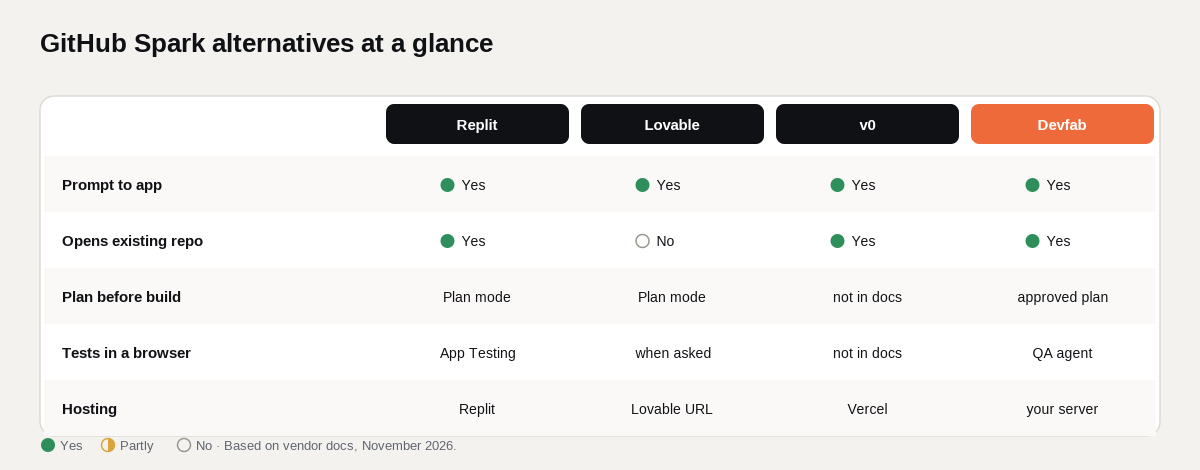
We used vendor docs, pricing pages and dated reviews, checked on November 13, 2026. We did not run hands-on tests. We describe pricing models rather than prices. The test that matters most for a Spark user: can the tool open the repository you exported, and how does it handle AI calls inside the app?
Quick comparison
| Tool | Opens your exported repo | Hosting | AI features in your app | Pricing model |
|---|---|---|---|---|
| GitHub Copilot | Yes, it works in GitHub repos | Not described in Copilot docs | Bring your own provider | Free tier; AI credits; per-seat business plans |
| Replit | Yes, imports public and private GitHub repos | Yes, several deployment types | Not covered in docs we checked | Free Starter; paid tiers with credits; effort-based Agent pricing |
| Lovable | No, Git sync always creates a new repo | Yes, publish to a URL | Covered by the shared credit balance | Monthly credits, not seats |
| Bolt.new | Yes, imports GitHub repos | Yes, Bolt Cloud | Not covered in docs we checked | Tokens per plan; Teams per member |
| v0 | Yes, imports existing repos | Yes, one-click Vercel deploy | Vercel AI Gateway or your own keys | Per-user plans with monthly credits |
| Google AI Studio | Yes, two-way sync with a new or existing repo | Cloud Run | Gemini features, keys kept server-side | Part of the Gemini API free plan; paid usage may apply |
| Devfab | Yes, "Work on an existing project" | Deploy to your own server | You choose; code is yours | Beta; cost logged per task and per project |
The alternatives
1. GitHub Copilot
Verdict: GitHub's official path, and the least disruption if your exported app now lives in a GitHub repo. Best for: Developers who want to keep the Spark repo, its Actions and Dependabot, and keep editing with AI help. Trade-off: It is a coding assistant, not an app builder. Hosting is not described in the Copilot docs we checked, so you bring your own. Pricing: Free tier with limited chat and agent use. All plans use GitHub AI Credits; Business and Enterprise are per seat. Check GitHub's plans page.
- Runs on GitHub.com, in IDEs, in Copilot CLI and in the GitHub Copilot desktop app.
- The cloud agent can research a repository and "create an implementation plan" before it changes code, then open a pull request.
- The cloud agent "only works with repositories hosted on GitHub", which suits an exported Spark repo.
- GitHub warns that Copilot "can produce incorrect or suboptimal code", so review still matters.
2. Replit
Verdict: The closest all-in-one replacement: describe, build, test and host in one cloud workspace. Best for: Builders who liked Spark's "everything included" model and want to import their exported repo. Trade-off: Existing database data is not migrated on import, and App Testing covers only full-stack JavaScript and Streamlit web apps. Pricing: Free Starter plan, paid Core and Pro tiers with credits, and effort-based pricing for paid Agent work. Check Replit's pricing page.
- The guided GitHub import "supports public and private repositories". Secrets must be added again.
- Plan mode produces a task list to approve before Agent changes code or data.
- App Testing lets Agent click through the app in a real browser and fix issues.
- Deploy as Autoscale, Reserved VM, Static or Scheduled, with custom domains.
3. Lovable
Verdict: The easiest prompt-to-app experience for non-developers, but start fresh rather than import. Best for: Rebuilding a small Spark app from a description, with hosting, database and login included. Trade-off: Git sync "always creates a new repository and cannot link an existing one", so your exported Spark repo can't be connected. No framework, database or model choice. Pricing: Free, Pro, Business and Enterprise plans, priced by monthly credits rather than seats. Check Lovable's plans page.
- Plan mode writes a plan for your approval before changes.
- Built-in backend with managed PostgreSQL, login and file storage, or Supabase.
- One credit balance covers building, chat, hosting, the built-in backend and in-app AI, which can stand in for Spark's
llm(). - Publish deploys a snapshot to its own HTTPS URL; custom domains are on paid plans.
4. Bolt.new
Verdict: A good browser-only option that can import your exported repo and host it. Best for: Solo builders who want zero setup, bundled hosting, and the option to import a GitHub repo or a Figma frame. Trade-off: A Bolt project stays on main and can't switch branches, and if hosting usage runs out, the site stops displaying publicly until usage resets. Pricing: Token-based, with Free, Pro, Teams (per member) and Enterprise plans. Check Bolt's pricing page.
- Starts from a prompt, a Figma frame, Google Stitch designs, a GitHub repo or a Lovable project.
- Plan mode works through the approach without generating code.
- Bolt Cloud includes hosting, databases, auth with Google sign-in, file storage and Stripe payments.
- Auto-commits each non-breaking change to GitHub.
5. v0
Verdict: The best developer-grade option if your app is (or can become) Next.js on Vercel. Best for: Teams that want AI changes as pull requests on a branch, with a preview per branch. Trade-off: The full experience assumes Vercel, and branch protection can block v0's merges. Pricing: Per-user plans (Free, Plus, Business, Enterprise) with monthly credits. Check v0's pricing page.
- Imports existing repos, works on a working branch, opens and merges pull requests, and "never pushes directly to
main". - Generated apps use Vercel AI Gateway by default, or your own API keys, a clean replacement for
llm(). - One-click deploy to Vercel; you can also export code and deploy elsewhere.
- v0's docs warn that output "may be incomplete" and may contain bugs.
6. Google AI Studio
Verdict: The low-cost way to rebuild Spark's AI features, with a free starting point. Best for: Apps whose main feature is an AI call, and teams already on Google Cloud and Firebase. Trade-off: No real-time collaborative editing, and no team, SSO or role features are described in the Build mode docs. Pricing: AI Studio access is part of the Gemini API free plan; usage limits apply and paid models or Cloud Run may cost extra.
- Build mode makes full-stack web apps and native Android apps from prompts.
- Two-way GitHub sync with a new or existing repo, plus ZIP export.
- API keys live in a Secrets Manager and are "never included in client-side code".
- Deploys to Cloud Run, and can provision Firestore and Firebase Authentication after your approval.
7. Devfab
Verdict: Not a Spark clone. The right pick when a Spark app needs to grow into a production app with a plan, tests and your own server. Best for: Teams and agencies turning a prototype into software real users depend on. Trade-off: Devfab is new and in Beta, with a smaller community and fewer integrations. It is not an editor for hands-on coding, and it needs a GitHub account. Pricing: Predictable cost: cost is logged after each run, per task and per project. Devfab is in Beta.
App builders automate the first version. Devfab automates the development lifecycle.
- Research before the plan. The Researcher maps the domain (key terms, best practices, competitors) and suggests a prototype before the Planner writes anything.
- ChainFlow maps which functions and APIs call each other, so replacing
llm()or reworking data doesn't quietly break connected features. - QA agent runs UI and flow tests (screens and user journeys clicked end to end) plus logic tests.
- A person approves the plan by default. Code stays in your own GitHub account or your organization's, and you deploy to your own server. You can choose the model for each agent or keep Devfab's default.
Where GitHub Spark is still the better choice
Spark is closed to new work, but there are cases where you shouldn't move yet:
- Your deployed app works and doesn't call
llm(). GitHub says deployed apps keep working and apps withoutllm()are not affected. If nobody needs changes, leave it alone. - It was a personal micro-app. Spark bundled data, inference, hosting and sign-in under a Copilot plan you already paid for. No alternative here bundles all of that inside your GitHub plan.
- Your team already lives in GitHub. If you exported the repo, staying with Copilot keeps the same repository, Actions and Dependabot setup, with no new vendor.
How to choose
| Your situation | Pick |
|---|---|
| You exported the repo and you're a developer | GitHub Copilot, or v0 for Next.js apps |
| You want the same all-in-one feel | Replit |
| You'd rather rebuild from a description | Lovable or Bolt.new |
| The app is mostly an AI feature | Google AI Studio, or v0 with your own keys |
| The app must become a production app on your server | Devfab |
| It works and nobody needs changes | Leave the deployed Spark app running |
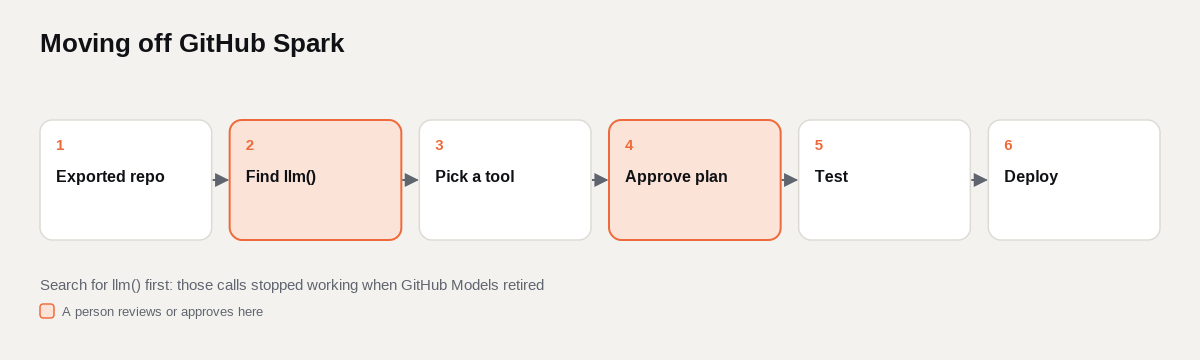
Whatever you pick, search your code for llm() first. That is the part that broke.
FAQ
Is GitHub Spark shut down?
For new work, yes. Since August 4, 2026, GitHub Spark no longer accepts new users or allows new apps. Existing users could export their apps until August 31, 2026. Apps that were already deployed keep working.
Why did the llm() calls in my Spark app stop working?
Spark's llm() function relied on GitHub Models, which retired on July 30, 2026. GitHub says to replace llm() with your own inference provider, which means bringing your own API key and handling billing. Apps that never called llm() are not affected.
What does GitHub recommend instead of Spark?
GitHub points builders to GitHub Copilot in the environments where they already work: VS Code, Copilot CLI and the GitHub Copilot app. It did not name a direct prompt-to-app replacement.
Can I import my exported Spark app into another builder?
Usually, once it is in a GitHub repository. Replit can import public and private GitHub repos, v0 and Bolt.new can import repos, Google AI Studio can sync with an existing repo, and Devfab works on an existing repo. Lovable's Git sync always creates a new repository, so it cannot link your exported one.
Is Devfab a drop-in replacement for Spark?
No. Spark built small apps from a prompt in one place. Devfab is an AI software factory for planned, tested projects: research, an approved plan, QA tests and deployment to your own server. It fits when a Spark app needs to become a production app.
Read next
- What is an AI software factory?
- AI software factory vs AI coding tools: which does your team need?
- Devfab vs GitHub Copilot
- Lovable vs Replit
- Bolt.new alternatives
- Prototype vs MVP vs production app: what's the difference?
Turn your Spark prototype into a planned, tested app. Try Beta
Sources (checked November 13, 2026): Upcoming deprecation of GitHub Spark on github.com (GitHub Changelog, Aug 4, 2026); GitHub Community discussion #203602; GitHub Spark in public preview for Copilot Pro+ (Jul 23, 2025); GitHub Copilot features; About Copilot cloud agent; Plans for GitHub Copilot; Replit: import from a provider; Replit Agent overview; Replit App Testing; Publish your Replit app; Replit pricing and plans; Lovable FAQ; Lovable GitHub sync; Lovable plans and credits; Intro to Bolt; Bolt glossary; Bolt Git integration; What is Bolt Cloud?; Bolt pricing; v0 FAQs; v0 GitHub; v0 AI models; v0 pricing; Build apps in Google AI Studio; Gemini API pricing.
Frequently asked questions
Is GitHub Spark shut down?
For new work, yes. Since August 4, 2026, GitHub Spark no longer accepts new users or allows new apps. Existing users could export their apps until August 31, 2026. Apps that were already deployed keep working.
Why did the llm() calls in my Spark app stop working?
Spark's llm() function relied on GitHub Models, which retired on July 30, 2026. GitHub says to replace llm() with your own inference provider, which means bringing your own API key and handling billing. Apps that never called llm() are not affected.
What does GitHub recommend instead of Spark?
GitHub points builders to GitHub Copilot in the environments where they already work: VS Code, Copilot CLI and the GitHub Copilot app. It did not name a direct prompt-to-app replacement.
Can I import my exported Spark app into another builder?
Usually, once it is in a GitHub repository. Replit can import public and private GitHub repos, v0 and Bolt.new can import repos, Google AI Studio can sync with an existing repo, and Devfab works on an existing repo. Lovable's Git sync always creates a new repository, so it cannot link your exported one.
Is Devfab a drop-in replacement for Spark?
No. Spark built small apps from a prompt in one place. Devfab is an AI software factory for planned, tested projects: research, an approved plan, QA tests and deployment to your own server. It fits when a Spark app needs to become a production app.