Short answer: Cursor wins for teams that want an AI editor with Plan Mode, cloud agents that open pull requests, Bugbot reviews and admin controls. Aider wins for solo developers who want a free, open-source terminal tool, any model including local ones, a commit for every change and no vendor account.
You're a developer who cares where your code goes and what each change costs. Cursor fans say it saves the most time. Aider fans say it gives the most control. Both are right about their own tool, and the gap between them grew in 2026. Cursor added cloud agents and a new owner. Aider shipped a single release all year. This page compares both fairly, using docs and dated reviews checked on November 20, 2026.
In this comparison:
- Cursor and Aider at a glance
- Feature comparison
- Cost model by team size
- Where Cursor wins
- Where Aider wins
The sections below answer the questions in that order.
Cursor and Aider at a glance
Cursor: active, now owned by SpaceX. The deal for Anysphere, Cursor's maker, was confirmed on June 16, 2026 (The Next Web), and Cursor's August 14 post says the acquisition has officially closed (Cursor blog). Plans now bundle Grok products (Cursor pricing). Cursor is an AI code editor plus a coding agent that also runs in a CLI, cloud agents, mobile and SDKs (Cursor docs). It is built for developers who want AI inside the editor.
Aider: active, but slow-moving. The latest PyPI release is 0.86.2, from February 12, 2026, and the one before it was in August 2025 (PyPI). The release history lists unreleased main-branch work that adds newer models (Aider history). A dated review calls the project effectively "dormant" and flags a solo-maintainer risk (CodeMySpec, 2026). Aider is an open-source AI pair programmer for the terminal that edits files in your local git repo using almost any model (Aider docs).
In one line: Cursor brings AI into a full editor and the cloud. Aider brings AI into your terminal and stays out of the way.
Feature comparison
| Aspect | Cursor | Aider | Source |
|---|---|---|---|
| Where it runs | Desktop editor, CLI (incl. headless/CI), cloud agents, mobile, SDKs | Terminal or browser; watch mode reacts to AI comments in your editor | Cursor docs; Aider docs |
| Planning | Plan Mode drafts an editable plan before code | Architect, code, ask and help chat modes | Cursor Plan Mode; Aider docs |
| Agent autonomy | Cloud agents in isolated VMs, many in parallel, each on its own branch | Not autonomous; you confirm each step | Cursor cloud agents; CodeMySpec |
| Testing and review | Bugbot reviews PRs; Autofix pushes fixes | Lints and tests after each change and fixes errors | Cursor Bugbot; Aider on GitHub |
| Git | Cloud agents on GitHub, GitLab, Bitbucket Cloud and Azure DevOps | Commits every change automatically; repo map for context | Cursor cloud agents; Aider on GitHub |
| Deploy and hosting | Not covered in the docs we checked | Not covered in the docs we checked | — |
| Team and admin | SSO on Teams; SCIM, audit logs, model restrictions on Enterprise | No team or collaboration features | Cursor Enterprise; CodeMySpec |
| Model choice | Claude, Gemini, GPT, Grok, Cursor Composer and others | OpenAI, Anthropic, Gemini, DeepSeek, Bedrock, OpenRouter, Ollama, LM Studio and any OpenAI-compatible API | Cursor docs; Aider docs |
| Extensibility | Rules, skills, subagents, hooks, plugins, MCP | No native MCP support | Cursor docs; CodeMySpec |
| Pricing model | Subscription tiers with a weekly usage pool; third-party models at API list price | Free and open source; you pay your model provider | Cursor pricing; CodeMySpec |
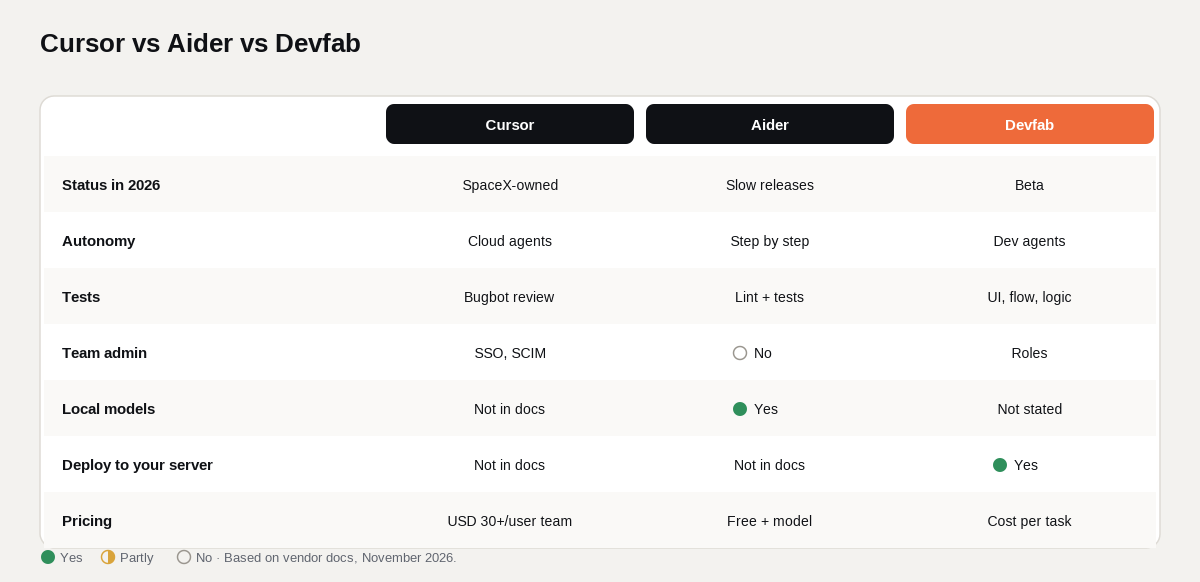
Two details stand out. Aider's test loop is built in: after each change it lints and runs tests, then fixes errors. And Aider proves its own approach: the project says 88% of the new code in its last release was written by Aider itself (Aider on GitHub). On the other side, a dated Cursor review reports output that needs line-by-line review and "opaque" credit pricing (DEV Community, Apr 2026).
Cost model by team size
| Team size | Cursor | Aider | Devfab |
|---|---|---|---|
| 1 person | Free; Plus USD 8 per month (Grok models only); Premium USD 30 per month (needed for cloud agents) | Free; you pay your model provider, or nothing extra with local models | Cost logged per task and per project (Beta) |
| 5 people | Teams USD 30+ per user per month | Free per developer; each person manages their own keys | Cost logged per task and per project (Beta) |
| 25 people | Teams, or Enterprise (custom) with group spend limits | Free per developer; no central billing or admin | Cost logged per task and per project (Beta) |
Cursor prices as of November 2026 from Cursor pricing. Aider has no pricing page; it is free and open source, and model costs depend on your provider (PyPI). Devfab offers predictable cost: cost is logged after each run, per task and per project; Devfab is in Beta.
Where Cursor wins
- You want agents that work while you don't. Cloud agents run in parallel VMs and push to separate branches.
- You want a plan before code. Plan Mode asks questions, reads the codebase and drafts a plan you can edit.
- Your team needs admin. SSO, SCIM, audit logs and model restrictions, by plan.
- You start work from where the team talks: Slack, GitHub or Bitbucket comments, Linear or the API.
- You want a steady release pace, with features and models shipping through 2026.
Where Aider wins
- Cost matters most. No subscription; you pay only for the model you choose.
- You need local or air-gapped models. Ollama and LM Studio work with no vendor account.
- You want a clean audit trail. Every change is a git commit you can read, revert or squash.
- You want full control. Aider confirms each step and stays in your terminal, beside whatever editor you use.
- You want to read the source. Apache-2.0 code, about 49.8k GitHub stars.
Switching from one to the other
From Aider to Cursor. Your work already lives in git, so open the repo in Cursor. If you used VS Code alongside Aider, Cursor's one-click import brings extensions, settings and keybindings (Cursor VS Code migration). Move any conventions you gave Aider into Cursor rules.
From Cursor to Aider. Install Aider with a supported Python version, 3.10 to 3.12 (PyPI). Add your model key, start it in the repo root, and let it build its repo map. Expect to add files to the chat yourself, since context management is manual (CodeMySpec).
Where Devfab fits
Cursor and Aider both help one developer change code. Neither, in the pages we checked, researches the domain before planning, routes a project plan to a person for sign-off, tests full user journeys in a separate QA step or deploys the app.
Coding agents automate the developer. Devfab automates the development lifecycle. Take a property maintenance app: tenants report issues, a manager assigns vendors, and tenants get updates. Devfab's Researcher maps maintenance terms and how similar tools work, then suggests a prototype. The Planner writes the plan, and a person approves it. The QA agent clicks through the tenant report and vendor assignment journeys end to end and runs logic tests, such as urgent requests always reaching a manager. Deploy ships to your own server. You can choose the model for each agent or keep Devfab's default.
Devfab is in Beta, with a smaller community and fewer integrations. It is not an editor, and it needs a GitHub account; Cursor or Aider can stay on the same repo. See Devfab vs Cursor and Devfab vs Aider.
FAQ
Is Aider still maintained in 2026?
Slowly. The latest PyPI release is 0.86.2 from February 12, 2026, and the one before it came out in August 2025. The release history shows unreleased work on the main branch, including support for newer models. One dated review calls the project effectively dormant.
Is Aider really free?
Yes. Aider is open source under Apache-2.0, with no subscription. You bring your own model key and pay the provider directly, or run local models through Ollama or LM Studio at no model cost beyond your hardware.
Can Aider work inside my editor like Cursor?
Partly. Aider runs in the terminal or a browser, and its watch mode responds to AI comments you add in your own editor. It is not an editor itself. Cursor is a full editor with AI built in, plus a CLI and cloud agents.
Which is better for a team of 25?
Cursor, in most cases. It offers Teams and Enterprise plans with SSO, and Enterprise adds SCIM, audit logs and model restrictions. A dated review notes Aider has no team or collaboration features, so each developer runs it alone.
Read next
Want the plan, the tests and the deploy around the code? Try Beta
Sources (checked November 2026): Cursor docs; Cursor pricing; Cursor Plan Mode; Cursor cloud agents; Cursor Bugbot; Cursor Enterprise; Cursor VS Code migration; Cursor blog: Joining SpaceX; The Next Web: SpaceX makes its Cursor takeover official; DEV Community: Cursor 3 review (Apr 2026); Aider docs; Aider-AI/aider on GitHub; aider-chat on PyPI; Aider release history; CodeMySpec: Aider in 2026 (updated Jul 10, 2026).
Frequently asked questions
Is Aider still maintained in 2026?
Slowly. The latest PyPI release is 0.86.2 from February 12, 2026, and the one before it came out in August 2025. The release history shows unreleased work on the main branch, including support for newer models. One dated review calls the project effectively dormant.
Is Aider really free?
Yes. Aider is open source under Apache-2.0, with no subscription. You bring your own model key and pay the provider directly, or run local models through Ollama or LM Studio at no model cost beyond your hardware.
Can Aider work inside my editor like Cursor?
Partly. Aider runs in the terminal or a browser, and its watch mode responds to AI comments you add in your own editor. It is not an editor itself. Cursor is a full editor with AI built in, plus a CLI and cloud agents.
Which is better for a team of 25?
Cursor, in most cases. It offers Teams and Enterprise plans with SSO, and Enterprise adds SCIM, audit logs and model restrictions. A dated review notes Aider has no team or collaboration features, so each developer runs it alone.