Short answer: In an agentic SDLC, AI agents for software development each own one stage. A researcher maps the domain, a planner writes the plan, a person approves it, a coordinator turns it into tickets, developer agents write code with an impact map, a QA agent tests screens, flows and logic, and a deploy agent ships it.
Your developers already use AI agents. Code arrives faster. Yet releases don't, because the slow parts were never typing: deciding what to build, splitting the work, testing it end to end and shipping it safely.
An agentic SDLC puts agents on those parts too. It only works if each agent has one job, a clear input and a clear hand-off, and if people approve the decisions that matter.
In this guide, you'll learn:
- What an agentic SDLC is
- The seven agents and their hand-offs
- Where people stay in the loop
- How it differs from a single coding agent
- The honest limits today
We follow one app through every stage: a booking app for a physiotherapy clinic.
What an agentic SDLC is
The software development lifecycle (SDLC) is the path from idea to running software: requirements, design, build, test, deploy and maintain. "Agentic" means AI agents do the work at each stage and pass it on, instead of one assistant helping one developer.
The idea of a "software factory" is older than AI. In 2004, Microsoft architects Jack Greenfield and Keith Short described a software factory as a product line that configures development tools "with packaged content and guidance" for specific kinds of applications. What changed is who does the work at each station. In September 2026, Augment described its own AI software factory as moving work across requirements, tickets, pull requests and production with specialized agents at each hand-off, while humans own consequential decisions.
Spec-driven tools follow a similar order. GitHub's Spec Kit uses four phases (Specify, Plan, Tasks, Implement) and works with coding agents such as GitHub Copilot, Claude Code and Gemini CLI.
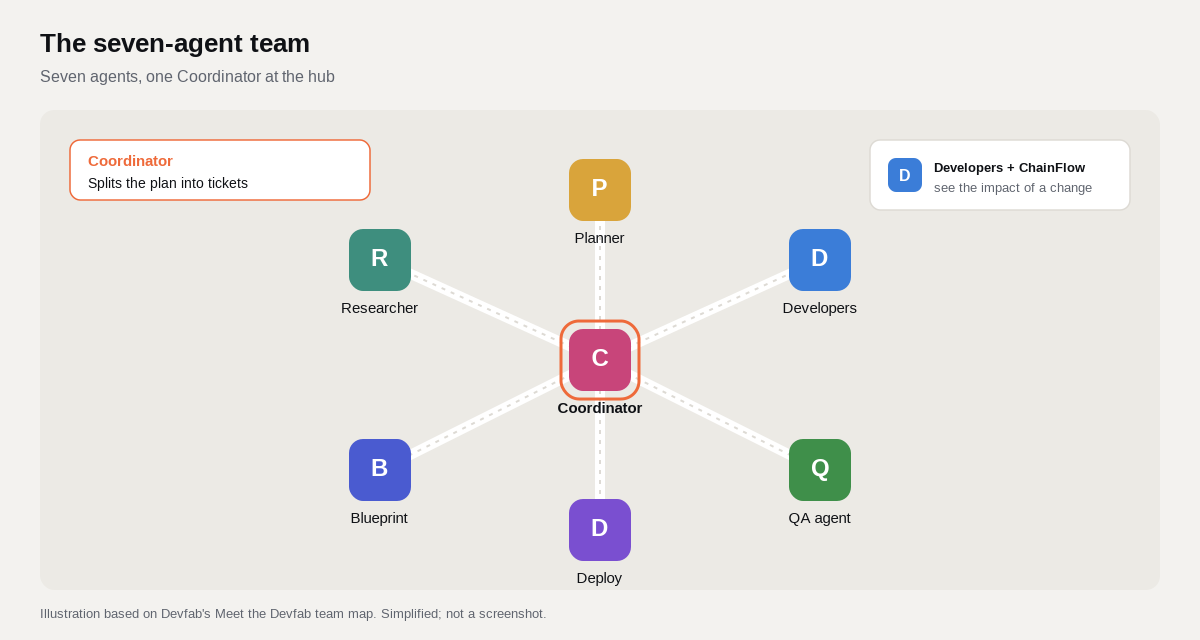
The rest of this page uses Devfab's agent team as the worked example, because we can describe it from the real product. Devfab is an AI software factory in the Autonomous Software Lifecycle category. Its team has seven agents: Researcher, Planner, Coordinator (the hub), Developers (with ChainFlow), Blueprint, QA agent and Deploy.
The seven agents at a glance
| Agent | Input | Job | Hands off to |
|---|---|---|---|
| Researcher | Your description, attachments | Maps domain terms, best practices and competitors; suggests a prototype | Planner |
| Planner | Research and description | Writes the plan; waits for a person to approve it | Coordinator |
| Coordinator | Approved plan | Splits it into tickets and assigns developer agents | Developers |
| Developers | Tickets, ChainFlow map | Write code and see what each change affects | QA agent |
| Blueprint | The app being planned | Produces screens and designs | Not stated |
| QA agent | Built work | Runs UI, flow and logic tests | Review before Done |
| Deploy | Tested build | Ships to your own server | You |
Researcher: learn the domain before the plan
Most tools start with a prompt and go straight to a plan or code. Devfab adds a step in front. The Researcher "learns your industry first": it maps key terms, best practices for that kind of app and competitors, then suggests a prototype.
Clinic example: the Researcher would surface terms such as "initial assessment" and "follow-up," practices such as reminder messages and cancellation windows, and how existing booking tools handle no-shows. Those land in the plan as questions or requirements, not as surprises after launch.
Why this matters: the cheapest bug to fix is the requirement nobody wrote. A research step gives the Planner context a short prompt never contains.
Planner: write the plan, then wait for a person
The Planner turns the description and research into a plan, grouped into epics. Then it stops. In Devfab's workspace, a banner reads: "Your turn: the Planner published the plan. Approve it so the Coordinator can create the tickets."
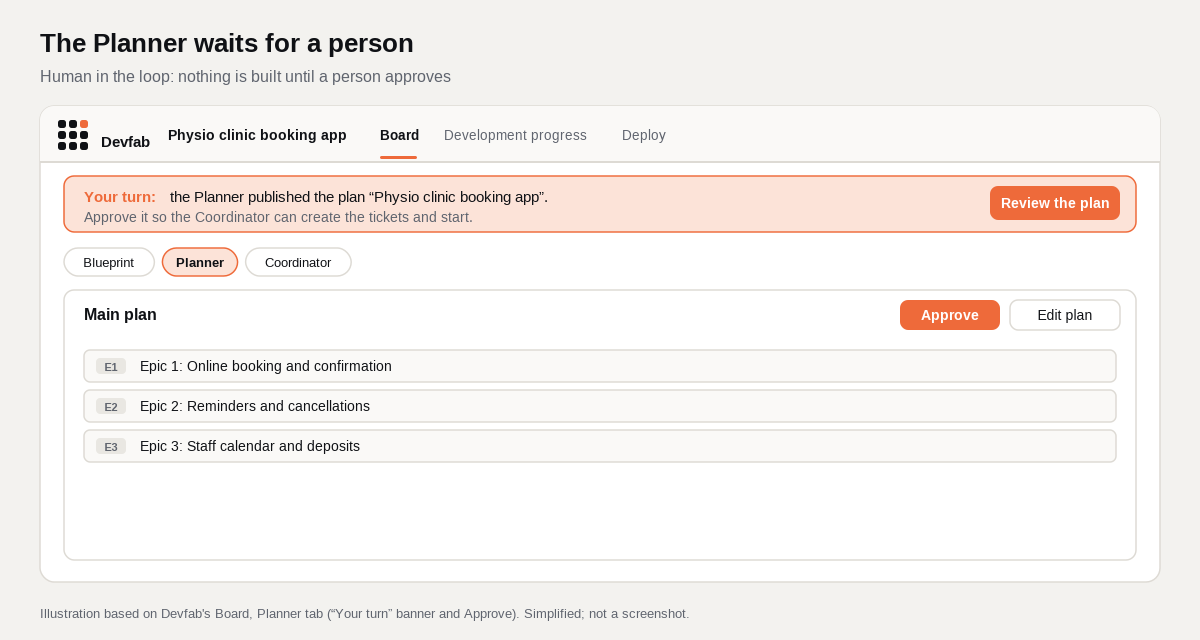
This is the main human gate. Human in the loop is the default mode: step by step, with your review and approval before the next stage. You can switch to Auto, where Devfab handles the process and asks only when needed, and switch back anytime in workspace settings.
What to check in a plan: every must-have flow appears, every rule is covered, nothing extra was added, and risky areas (payments, permissions, data deletion) have their own lines. Our guide on how to write a software spec that AI agents can build from shows how to make the input clear enough that the plan has less to guess. For more on the role itself, see What is a planner agent?.
Coordinator: turn the plan into tickets
Once a person approves the plan, the Coordinator splits it into tickets and assigns developer agents. Workers are added when the plan is approved. The Coordinator is the hub of the team map: work flows out to developers and back in from QA.
You follow progress in a development view with Summary, Kanban and Gantt tabs. Each item shows priority, owner, status, progress and due date. For a project manager, this is the familiar part: the same board, filled by agents. Read more in What is a coordinator agent?.
Clinic example: "Booking form," "Reminder messages," "Cancellation rules" and "Staff calendar" become separate tickets, each small enough to test on its own.
Developer agents: write code with an impact map
Developer agents write the code for each ticket. The risk with any coding agent is the same: it changes the file it was asked to change and doesn't see what depends on it.
Devfab's developer agents work with ChainFlow, a code-intelligence layer that maps which functions and APIs call each other and what is deployed. Agents see the impact of a change before they make it, so they don't break connected features.
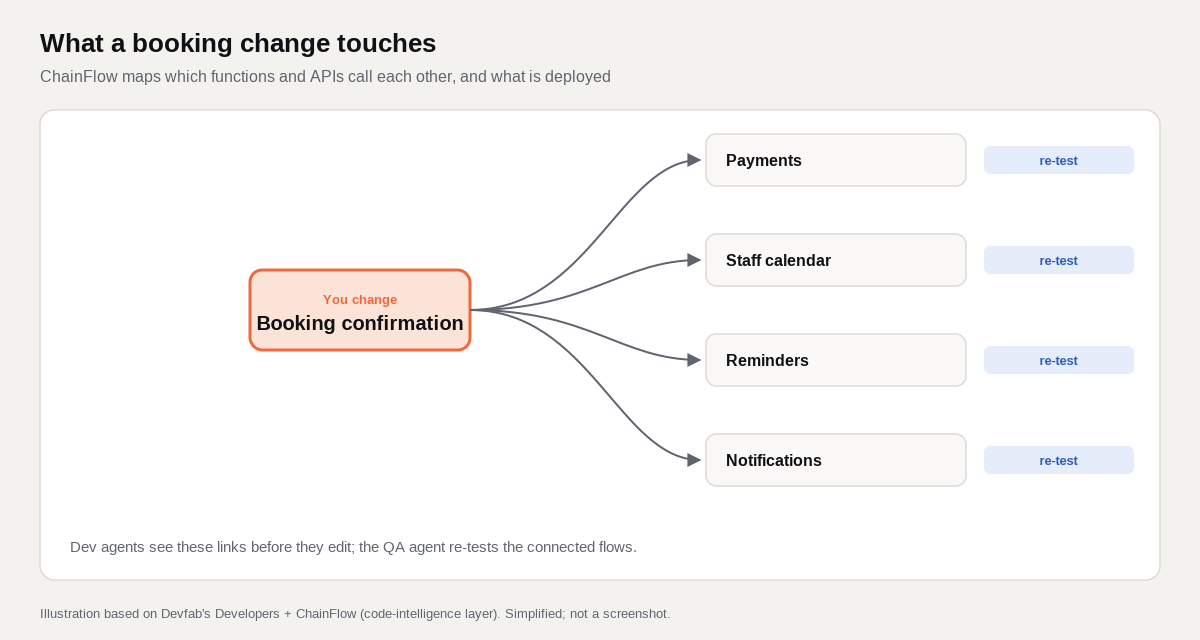
Clinic example: changing how a booking is confirmed touches payments (deposits), the staff calendar, reminder messages and notifications. ChainFlow shows those links, so the change and its tests cover all four.
On an existing repository, you start with "Work on an existing project," connect the GitHub repo, and leave the change box empty. Devfab maps the code first with ChainFlow and suggests three small first tickets.
The code lives in your own GitHub account or your organization's. By default Devfab picks a stack that fits (for example Next.js and TypeScript for a web app, Node or Python for an API), or you can pick languages yourself.
Blueprint: screens before code is final
The Blueprint agent produces the screens. Devfab's documentation output includes blueprints, high-fidelity designs, sequence flows, prototypes and user manuals. For a client or a city department, seeing screens early is often what makes a plan real enough to approve.
QA agent: test what users actually do
Unit tests check one function. Users don't use functions; they click through journeys. Devfab's QA agent runs UI and flow tests (screens, buttons and user journeys clicked end to end) plus logic tests.
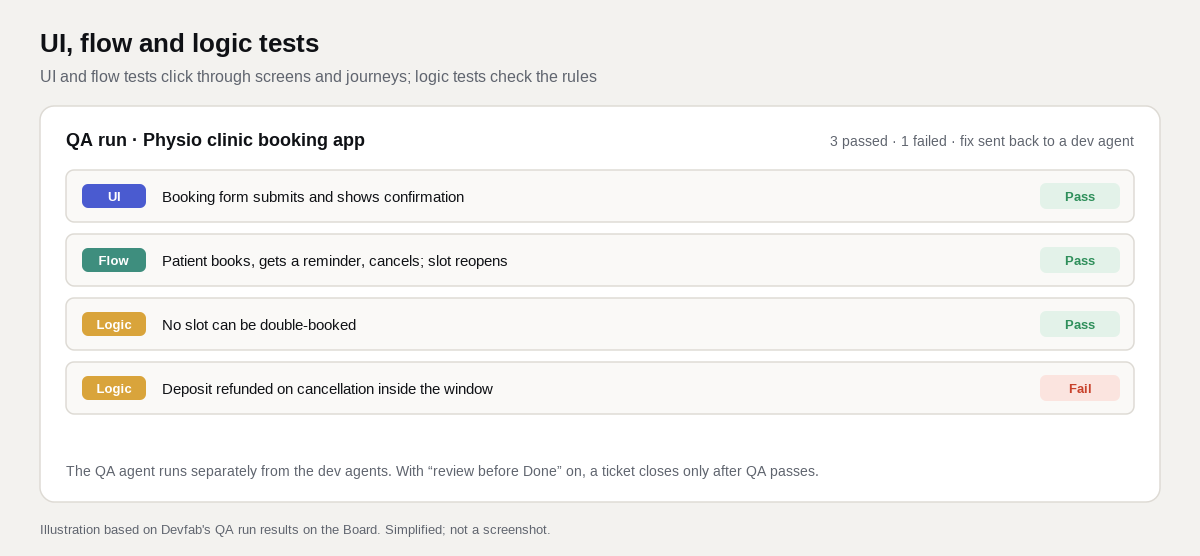
Clinic example:
- UI: the booking form submits and shows a confirmation.
- Flow: a patient books, gets a reminder, cancels and the slot opens again.
- Logic: no slot can be double-booked.
In the workspace, a switch reads "QA agent · review before Done." With it on, work isn't marked Done until it has been reviewed. For the role in detail, see What is a QA agent?.
Deploy: ship to your own server
The Deploy agent ships the tested build. Devfab's Deploy view has Overview, History and Settings, a "Ship to production" action and an optional custom domain. Apps deploy to your own server, not a vendor's hosting you can't leave.
After launch, a feedback module turns user reports into tickets and notifies the people who reported them, and the cycle starts again for the next change.
Where people stay in the loop
An agentic SDLC is not "no humans." It moves people to the decisions agents shouldn't make alone:
- Before the plan: a person describes the app and can attach a spec, doc or screenshots.
- At the plan: a person approves it before any tickets exist. This is the default.
- At QA: with "review before Done" on, work waits for review.
- At deploy: a person ships to production.
Roles and workspace permissions decide who can do what, and a Team Delivery Report shows what was delivered.
How this differs from a single coding agent
Coding agents are strong and getting stronger. They also have a defined scope. GitHub's docs describe Copilot's cloud agent working in a cloud environment scoped to one repository and opening one pull request per task. OpenAI's Codex cloud tasks check out a repo in a container, run the agent and end with a diff or pull request.
That is one stage of the lifecycle done well: the coding. Deciding what to build, splitting work, testing journeys and deploying sit around it, and someone still has to run them.
Coding agents automate the developer. Devfab automates the development lifecycle.
| Stage | Single coding agent | Agentic SDLC (Devfab) |
|---|---|---|
| Domain research | Up to the person prompting | Researcher, before the plan |
| Plan | Often a plan mode per task | Planner, approved by a person |
| Work split | One task, one PR | Coordinator creates tickets |
| Impact of changes | Depends on the tool | ChainFlow map |
| Testing | Depends on the tool and repo | QA agent: UI, flow, logic |
| Deploy | Usually separate | Deploy to your own server |
For a wider comparison, see AI software factory vs AI coding tools.
What it costs and how you see it
Agent work costs money per run, and teams need to see where it goes. Devfab gives predictable cost: cost is logged after each run, per task and per project, so you can compare what a ticket cost with what you planned. You can choose the model for each agent or keep Devfab's default.
Limits to know before you start
Being honest about where this approach stands today:
- Agents still miss things. A review on Martin Fowler's site found agents often didn't follow specs, giving a "false sense of control." Plan approval and QA exist because of this.
- The plan is only as good as the input. Vague descriptions produce vague plans.
- Devfab is in Beta, with a smaller community and fewer integrations than mature platforms.
- It isn't an editor for hands-on coding. Developers use their own editor on the repo.
- It needs a GitHub account, and you run the server you deploy to.
How to start
- Pick one real, contained app: a booking tool, an intake form, a permit tracker.
- Write a one-page description with roles, flows and rules.
- Keep Human in the loop on and review the first plan line by line.
- Turn on "QA agent · review before Done."
- Look at the cost log per task after the first runs.
Start with What is an AI software factory? if the idea is new to your team.
FAQ
What is an agentic SDLC?
It is a software development lifecycle where AI agents do the work at each stage (research, planning, splitting work into tickets, coding, testing and deploying) and hand results to the next agent, while people approve the decisions that matter, such as the plan.
How is a team of agents different from one coding agent?
A coding agent takes a task and returns code, usually as a pull request. A team of agents covers the steps around the code too: what to build, in what order, how to test it and how to ship it. Each agent has one job and a clear hand-off.
Do AI agents replace developers in software development?
No. Agents take on repeatable work, but people still decide what to build, approve the plan, review results and own the code. Developers often move toward reviewing plans, checking impact and handling the hard cases.
Where should a human approve work in an agentic SDLC?
At least at the plan, before tickets are created and code is written. That is where a wrong assumption is cheapest to fix. Teams often add reviews at QA and before production deploys as well.
Can I choose which AI model each agent uses?
In Devfab, yes: you can choose the model for each agent or keep Devfab's default. Other tools differ; check each vendor's docs for model choice and which plans include it.
Read next
See the whole team at work: describe an app, approve the plan, and watch the tickets move. Try the Devfab Beta
Sources (checked November 2026): Microsoft Learn archive: Moving to Software Factories (2004); Augment: Beyond AI coding agents (Sep 2026); GitHub Blog: Spec-driven development with AI; GitHub Docs: About Copilot coding agent; OpenAI: Codex cloud environment; martinfowler.com: Understanding spec-driven development.
Frequently asked questions
What is an agentic SDLC?
It is a software development lifecycle where AI agents do the work at each stage (research, planning, splitting work into tickets, coding, testing and deploying) and hand results to the next agent, while people approve the decisions that matter, such as the plan.
How is a team of agents different from one coding agent?
A coding agent takes a task and returns code, usually as a pull request. A team of agents covers the steps around the code too: what to build, in what order, how to test it and how to ship it. Each agent has one job and a clear hand-off.
Do AI agents replace developers in software development?
No. Agents take on repeatable work, but people still decide what to build, approve the plan, review results and own the code. Developers often move toward reviewing plans, checking impact and handling the hard cases.
Where should a human approve work in an agentic SDLC?
At least at the plan, before tickets are created and code is written. That is where a wrong assumption is cheapest to fix. Teams often add reviews at QA and before production deploys as well.
Can I choose which AI model each agent uses?
In Devfab, yes: you can choose the model for each agent or keep Devfab's default. Other tools differ; check each vendor's docs for model choice and which plans include it.