Short answer: A small agency CRM SRS sets out where leads come from, which pipeline stages a deal moves through, who owns each deal, how follow-ups are tracked, and what happens when a deal is won. Download the free one-page template, fill in the six sections, and give it to a developer or AI agent to build from.
Download
- Download the template (PDF)
- Google Doc version: Coming soon
How to fill each section
1. Problem
Write what goes wrong today in one or two sentences. For agencies it is usually leads sitting in one person's inbox, follow-ups that never happen, and no one knowing what the pipeline is worth.
2. Users and roles
List each kind of user and what they may see or change. Small agencies usually have an owner or admin, account managers who own deals, and team members who need read access to client details. Decide whether account managers can edit each other's deals.
3. Must-have flows
Write up to five flows, each from start to finish: capture a lead, move a deal through stages, log a call or meeting and set a follow-up, turn a won deal into a client, review the pipeline. Anything beyond five goes on a "later" list.
4. Data
Name the records the CRM keeps: companies, contacts, deals, stages, activities, tasks, clients, retainers, users. Note which fields are required, such as deal value or lead source, because they drive the reports.
5. Rules
This is where agency CRMs differ. Write down your pipeline stages and what moves a deal between them, whether a lost deal needs a reason, when a stalled deal is flagged, how duplicates are handled, and when renewal reminders go out.
6. Done means
For each flow, write one condition someone can test: "A lead submitted on the website form appears in the pipeline as a new deal with its source set to Website."
Filled example: 12-person digital agency
- Problem: leads arrive through the website form, email and referrals and sit in personal inboxes; follow-ups are missed; the owner can't see pipeline value without asking each account manager; two retainers lapsed this year because nobody noticed the end date.
- Users and roles: Owner (admin: all deals, settings, reassign) · Account manager (owns deals; sees all deals, edits only their own) · Team member (read-only access to client records for delivery).
- Must-have flows:
- A lead is captured from the website form or added by hand, with company, contact, source and estimated value.
- An account manager moves the deal through stages: Lead, Qualified, Proposal sent, Won, Lost.
- The account manager logs a call, email or meeting and sets a follow-up task with a due date; overdue tasks show on their home screen.
- A won deal becomes a client record with a retainer start date, end date and monthly value.
- The owner sees a pipeline view with value by stage and a list of deals with no activity for 14 days.
- Data: companies, contacts, deals, pipeline stages, activities, tasks, proposals (file links), clients, retainers, users.
- Rules: every deal has one owner; a deal can't be marked Lost without a reason; deals with no activity for 14 days are flagged; contacts are matched by email to avoid duplicates; only the owner can reassign deals; a renewal reminder goes to the account manager 30 days before a retainer ends.
- Done means: each flow works on desktop and phone; a website form lead appears as a new deal with source "Website"; no deal can be Lost without a reason; pipeline totals equal the sum of open deal values; renewal reminders fire on the right date.
The prototype built from this example
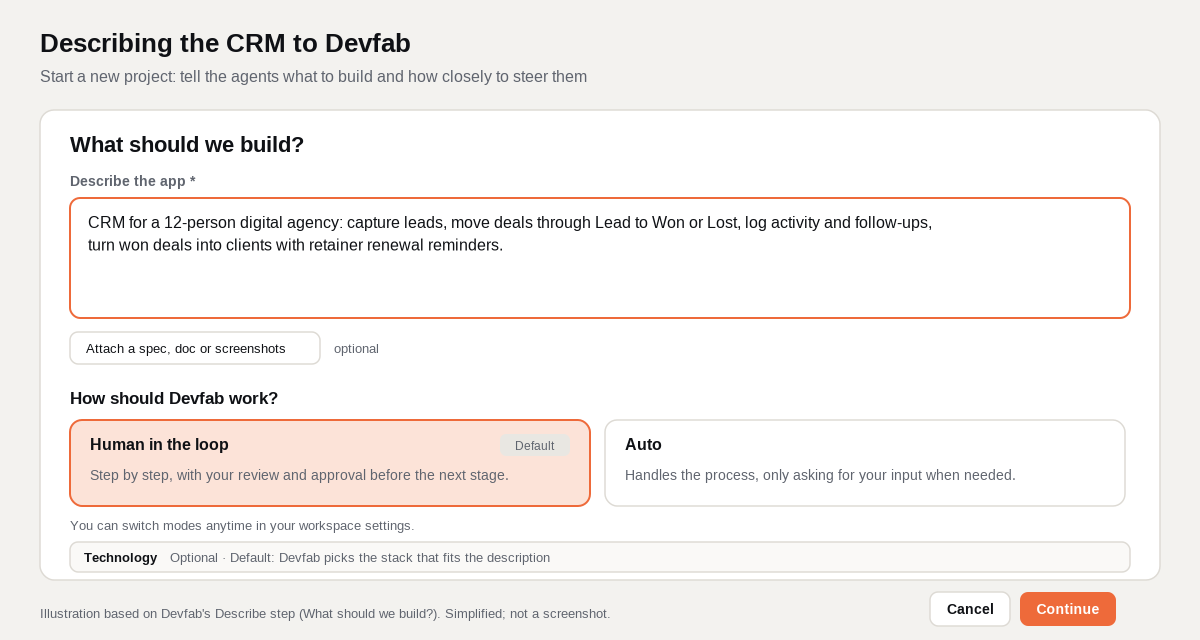
This filled example is the description for Devfab's "What should we build?" step, in Human in the loop mode, so a person approves the plan before any code is written. The build itself, with the plan, screens and planned QA tests, is on the small agency CRM build page.
FAQ
What should a CRM for a small agency include?
Leads and contacts, a deal pipeline with clear stages, activity logging, follow-up tasks with reminders, a client record for won work with retainer renewal dates, and a simple pipeline view for the owner.
Why build a CRM instead of using an off-the-shelf one?
Often you shouldn't. An off-the-shelf CRM is the better choice if it fits your process. A custom build makes sense when your pipeline, retainers and handover to delivery don't fit a standard tool, or you want the data on your own server.
Can I use this template with any developer or tool?
Yes. It's tool-neutral. Hand the filled template to a developer, an agency or an AI agent.
Read next
- Build a CRM for a small agency with AI agents
- What is an AI software factory?
- How to send a working prototype with every proposal
Turn this template into a working prototype. Try the Devfab Beta
Frequently asked questions
What should a CRM for a small agency include?
Leads and contacts, a deal pipeline with clear stages, activity logging, follow-up tasks with reminders, a client record for won work with retainer renewal dates, and a simple pipeline view for the owner.
Why build a CRM instead of using an off-the-shelf one?
Often you shouldn't. An off-the-shelf CRM is the better choice if it fits your process. A custom build makes sense when your pipeline, retainers and handover to delivery don't fit a standard tool, or you want the data on your own server.
Can I use this template with any developer or tool?
Yes. It's tool-neutral. Hand the filled template to a developer, an agency or an AI agent.