Short answer: Turn the sales call into a one-page brief, research the client's domain, generate a clickable prototype of the two or three flows that matter most, and write the proposal around it. Label it clearly as a prototype, walk the client through it, and turn their feedback into the plan they approve. Clients can then react to screens instead of paragraphs.
You wrote a careful proposal, and the client still pictured a different app. Now every review meeting turns into a scope debate.
Clients react faster to screens than to paragraphs. A clickable prototype turns vague approval into specific, early feedback.
In this guide, you'll learn:
- Why a prototype beats a longer proposal
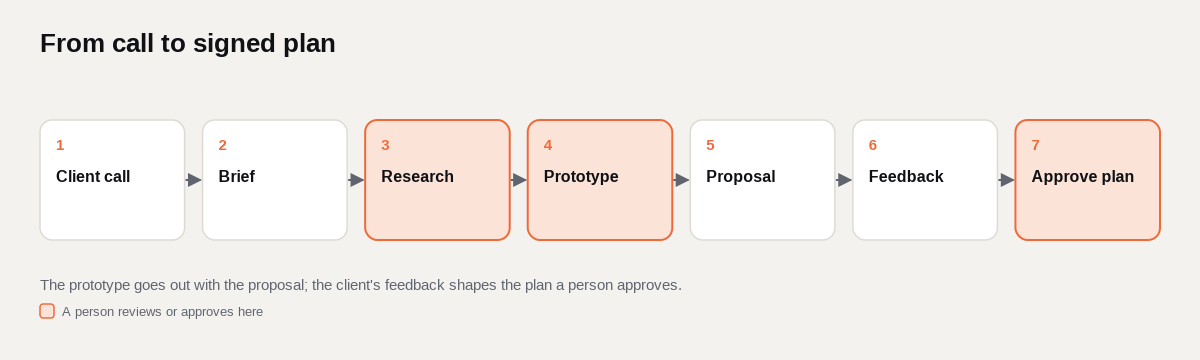
- Seven steps from sales call to approved plan
- Mistakes to avoid when you send one
- A checklist for every proposal you send
Here's the process, in order.
Why a prototype beats a longer proposal
Most proposals ask the client to imagine the software. They read a feature list, a timeline and a price, and then they try to picture the app. Each person pictures something different. The gap shows up after the contract, as change requests.
A prototype closes that gap before anyone signs. The client clicks through a booking screen or an approval flow and says "yes, that" or "no, we do it the other way." Those reactions are the most useful scope input you will get, and you get them while changes are still free.
It also changes the sales conversation. You are no longer one of several vendors describing what you could do. You are the vendor who already showed it. For agencies working with AI tools, this is the clearest way to prove that your process is real.
This guide is for agencies, outsourcing firms and freelancers who want to make a prototype a normal part of every serious proposal.
Step by step
Step 1: Write a one-page brief from the sales call
Do not start from a blank prompt. Start from what the client told you. Right after the call, write one page with six parts:
- Problem: what hurts today, in the client's words.
- Users and roles: who uses the app and what each role can do.
- Must-have flows: the two to five journeys that make the app worth paying for.
- Data: the main records (customers, orders, requests) and their key fields.
- Rules: limits, approvals, deadlines, who sees what.
- Done means: how the client will judge that it works.
If you cannot fill a part, write the question you need to ask. Those open questions go into the proposal later. A brief with honest gaps is better than one full of guesses.
Step 2: Research the domain before you design anything
A prototype that uses the wrong words loses the client in the first screen. A clinic says "patients" and "appointments", not "users" and "bookings". A city department says "service requests", not "tickets".
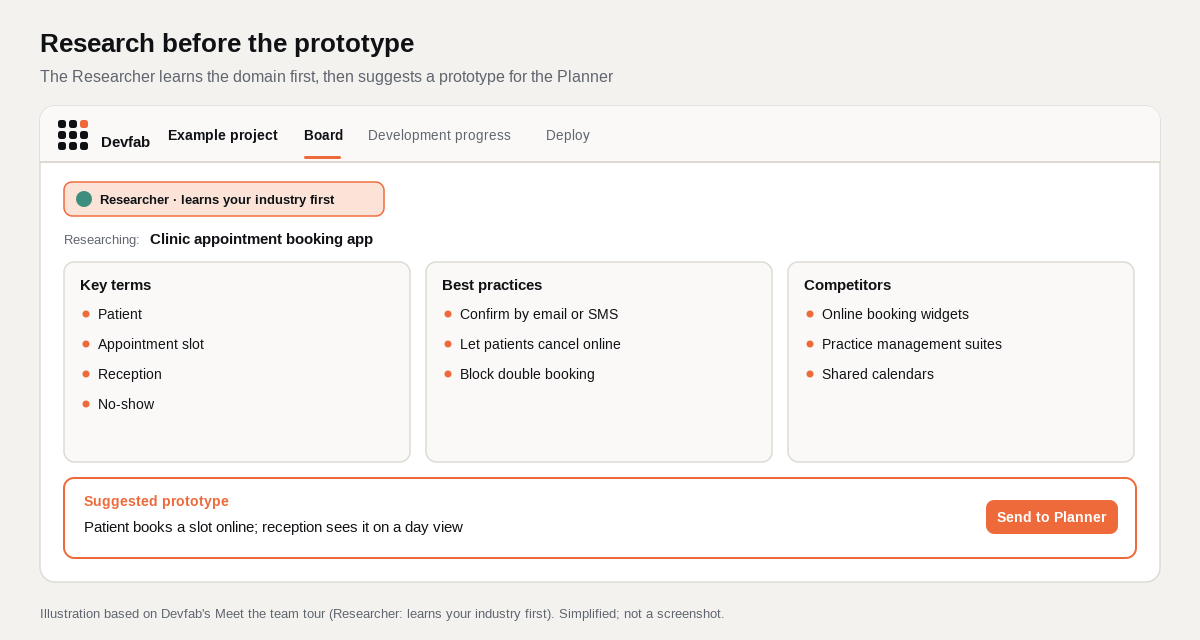
Spend some effort on the client's world before you generate screens: the key terms, the usual way this kind of app works, and what competitors or common products in that space already do. You want the client to feel that you understood their business, not just their feature list.
In Devfab, this is built in. Before any plan, the Researcher maps the domain: key terms, best practices for that kind of app and competitors. Then it suggests a prototype that fits what it found.
Step 3: Generate the prototype from the brief
Paste the brief as the app description and attach anything the client sent: a spreadsheet they use today, a screenshot of their current tool, a PDF form. Keep the technology choice open unless the client named a stack. For a proposal prototype, the stack matters less than the flows.
In Devfab, you start a new project, describe what to build under "What should we build?" and attach the brief. Leave the run mode on Human in the loop, the default, so you review each stage before the next one starts. The Blueprint agent produces the screens and the prototype from the approved direction.
Because the code lives in your own GitHub account (or your organization's), the prototype is not trapped in a tool. If the client signs, you keep building from the same repository.
Step 4: Cut the prototype down to the flows that sell
The urge is to show everything. Resist it. A prototype with twenty half-working screens looks less finished than one with five screens that tell a clear story.
Pick the flows that answer the client's main worry. For a clinic, that is "a patient books a slot and reception sees it." For a field service firm, "a technician closes a work order from a phone." Make those flows click through from start to end. Remove or grey out the rest and label them "in the full build."
Use realistic sample data in the client's language. Fake names and plausible numbers make the prototype feel real. Never use the client's actual customer data in a prototype you send by email.
Step 5: Write the proposal around the prototype
Now the proposal gets shorter, not longer. Structure it like this:
- What you told us: the problem, in two or three sentences.
- What we built to check our understanding: a link to the prototype and a list of the flows it shows.
- What the full build adds: real data, roles and permissions, security, tests, deployment, documentation.
- Open questions: the gaps from your brief.
- How we work: your process, review points and how the client approves the plan.
- Commercial terms: your pricing model and payment schedule.
The "what the full build adds" section matters most. It tells the client, in plain words, that the prototype is a picture of the app and not the app. That protects you from "it already works, why does it cost this much?"
If you use Devfab for the build, you can describe cost honestly: predictable cost, with cost logged after each run, per task and per project. Do not promise numbers your process cannot prove.
Step 6: Send it with a short walkthrough and clear labels
Do not send a bare link. Send:
- A short screen recording of you clicking through the main flow.
- A one-line label on every screen or in the header: "Prototype for discussion. Sample data only."
- Three questions you want the client to answer, such as "Is this the right order of steps?"
Better still, book a call and click through it together. Watch where the client hesitates. Those moments are scope.
Step 7: Turn feedback into the approved plan
When the client signs, their prototype feedback becomes the first input to the plan. Update the brief with every correction. Then let the plan be written from the corrected brief, and review it with the client before any build work starts.
In Devfab, the Planner publishes the plan and the board shows "Your turn: the Planner published the plan. Approve it so the Coordinator can create the tickets." A person approves the plan. Only then does the Coordinator split it into tickets for the developer agents. The client sees that what they reacted to in the prototype is what goes into the build.
Common mistakes
- Building the prototype before writing the brief. You end up showing what was easy to generate, not what the client needs.
- Using generic words. "Users", "items" and "dashboard" tell the client you did not listen.
- Showing too much. Many half-finished screens look worse than a few complete flows.
- Not labelling it as a prototype. The client assumes it is nearly done and pushes back on the price.
- Sending a link with no guide. The client clicks around, gets lost and remembers the confusion.
- Losing the feedback. If corrections stay in a call note, the plan repeats the old mistakes.
- Leaving ownership unclear. Say who owns the prototype and its code before the client asks.
Checklist
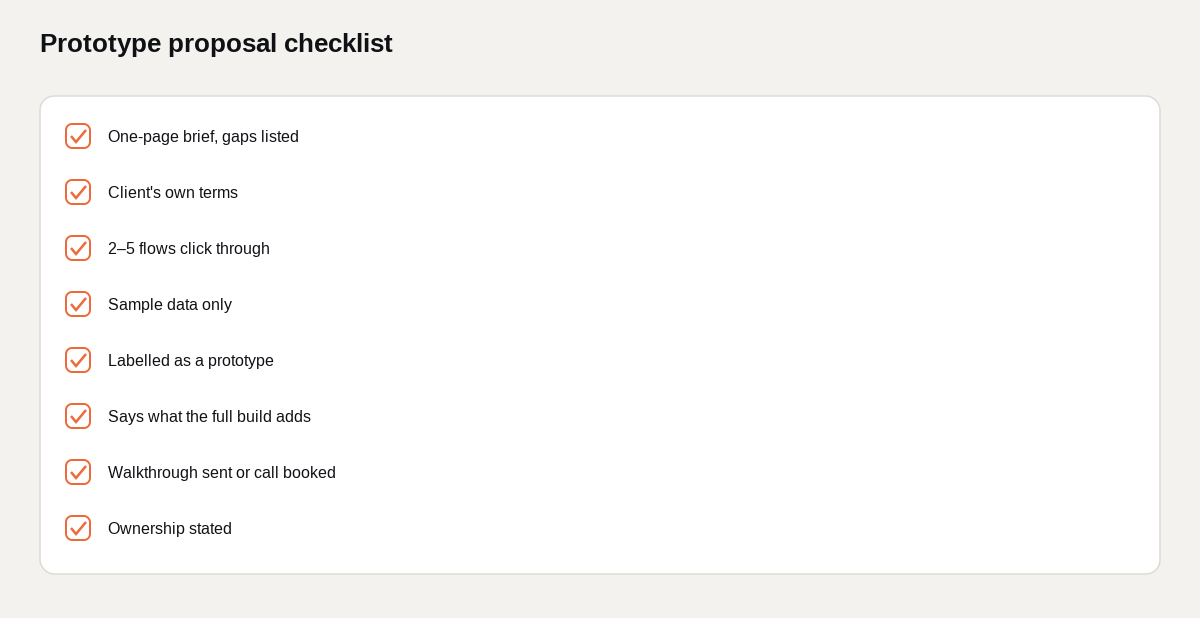
- [ ] One-page brief with problem, users, flows, data, rules and done means
- [ ] Open questions listed, not guessed
- [ ] Domain terms match the client's words
- [ ] Two to five flows click through from start to end
- [ ] Realistic sample data, no real customer data
- [ ] Every screen labelled "Prototype for discussion"
- [ ] Proposal says what the full build adds
- [ ] Short walkthrough recording or call booked
- [ ] Ownership of the prototype stated
- [ ] Feedback captured in the brief before planning
FAQ
Is a prototype the same as a free first version of the app?
No. A prototype shows screens and main flows so the client can react to them. It has no real data, no security work and no production setup. Say this clearly in the proposal so the client does not treat it as delivered work.
Should I send a prototype for every lead?
Send one for every lead that has a real budget, a clear decision maker and a problem you can describe on one page. For vague leads, send the one-page brief first and ask the client to correct it.
Does Devfab limit how many prototypes I can make?
No. Devfab does not cap the number of prototypes. Cost is logged after each run, per task and per project, so you can see what each proposal prototype used.
What if the client wants to keep the prototype?
Decide this before you send it. One simple rule: the client keeps a link to view it, and the code stays with you until the contract is signed. Write your rule into the proposal.
Read next
- What is an AI software factory?
- Prototype vs MVP vs production app: what's the difference?
- How to run a paid software pilot that converts
- Build: client portal
- AI app builder vs AI coding agent: which one do you need?
- Spec-driven development vs vibe coding: which ships better software?
Devfab is in Beta. Try it on your next proposal. Try Beta
Frequently asked questions
Is a prototype the same as a free first version of the app?
No. A prototype shows screens and main flows so the client can react to them. It has no real data, no security work and no production setup. Say this clearly in the proposal so the client does not treat it as delivered work.
Should I send a prototype for every lead?
Send one for every lead that has a real budget, a clear decision maker and a problem you can describe on one page. For vague leads, send the one-page brief first and ask the client to correct it.
Does Devfab limit how many prototypes I can make?
No. Devfab does not cap the number of prototypes. Cost is logged after each run, per task and per project, so you can see what each proposal prototype used.
What if the client wants to keep the prototype?
Decide this before you send it. One simple rule: the client keeps a link to view it, and the code stays with you until the contract is signed. Write your rule into the proposal.