Short answer: Base44 wins for non-coders who want a hosted app with database, auth, email and payments and no code in sight. Bolt.new wins for builders who want to see and edit the code, start from a Figma frame or GitHub repo, and ship web or Expo mobile apps on Bolt Cloud.
You want a real, hosted app, and you don't want to install anything. Base44 and Bolt.new both run in a browser tab and both host the result. That's where the overlap ends. One side says Base44 is simpler, because the code stays out of sight. The other says Bolt.new is more honest, because you can see and change everything. We read both vendors' docs to settle which one fits which builder.
In this comparison:
- Base44 and Bolt.new at a glance
- Feature comparison
- Cost model by team size
- Where Base44 wins and where Bolt.new wins
- Where Devfab fits
Start with the section that matches your question.
Base44 and Bolt.new at a glance
Base44 is a fully managed AI app builder. It generates a web app's frontend, backend and database from plain-language prompts and hosts it. Status: Wix acquired Base44 in June 2025; Base44 says it still runs as a standalone product with its own team and roadmap. Built in: auth with field-level access controls, file storage, email, Stripe payments, auto-generated API endpoints, hosting and custom domains.
Bolt.new comes from StackBlitz. It runs a full development environment in the browser on WebContainers, "so you don't have to install anything." Bolt's docs say "Bolt is for everyone": non-coders who change apps by chatting, developers who edit code directly, PMs, marketers and agencies. You can start from a description, a Figma frame, Google Stitch designs, a GitHub repo or a Lovable project. 2026 change: Bolt ran Forge as a research preview from September 14 to October 14, 2026, giving individual Pro users open models, with Teams and Enterprise excluded.
The trade-off in one line: Base44 is a finished kitchen; Bolt.new is a workshop with the tools on the wall.
Feature comparison
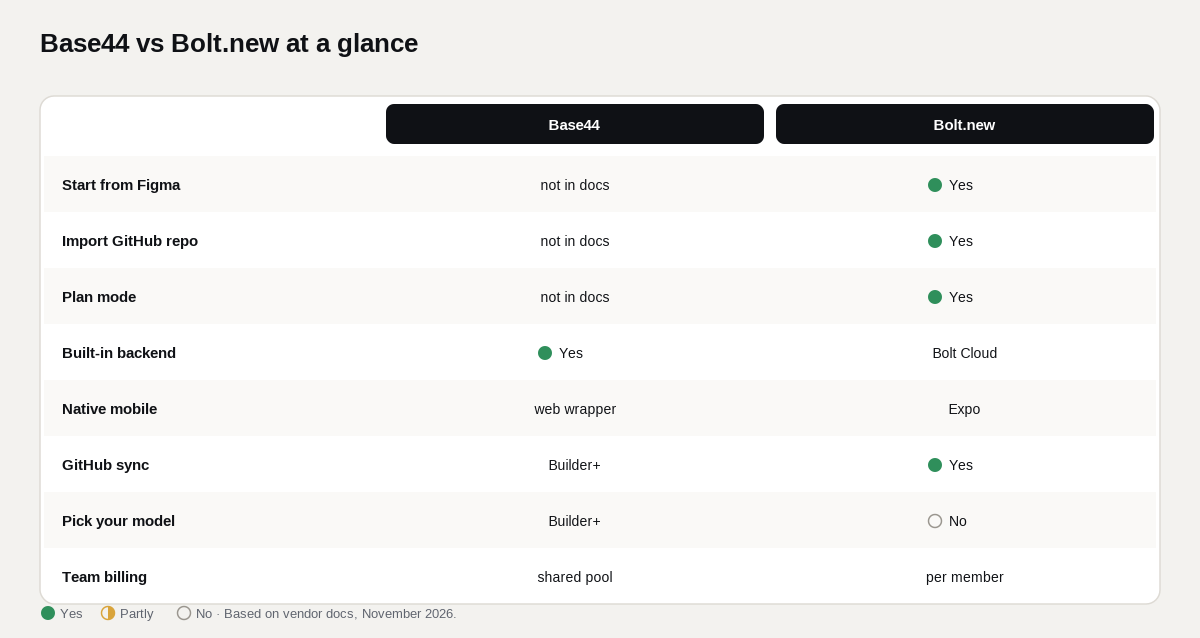
| Aspect | Base44 | Bolt.new | Source |
|---|---|---|---|
| Where it runs | Web-based builder; responsive web apps | Browser dev environment on WebContainers; nothing to install | Base44 guide · Intro to Bolt |
| Starting points | Plain-language prompt | Prompt, Figma frame, Google Stitch, GitHub repo or Lovable project | Intro to Bolt |
| Planning / spec | Not covered in the docs we checked | Plan mode works through strategy without generating code | Bolt glossary |
| Backend | Managed backend and database, auth, email, payments, API endpoints | Bolt Cloud: databases, auth incl. Google sign-in, storage, server functions, Stripe | Base44 guide · Bolt Cloud |
| Mobile | Store files for a native wrapper around the web app (Builder or higher) | Native mobile apps through Expo | Base44 app stores · Intro to Bolt |
| Deploy / hosting | Hosting and custom domains included | Free bolt.host subdomain; custom domains on paid plans | Base44 guide · Bolt Cloud |
| Code / GitHub | Two-way GitHub sync on Builder plan or higher | Import repos or create a private repo; auto-commits each non-breaking change | Base44 GitHub · Bolt Git |
| Team / admin | Workspace roles; SSO on Enterprise | Teams: central billing, access management, user provisioning; SSO and audit logs on Enterprise | Base44 workspaces · Bolt pricing |
| Model choice | AI model select on Builder, Pro and Elite | "Bolt handles model selection behind the scenes"; Standard or Max agent | Base44 pricing · Bolt agents |
| Pricing model | Message credits plus integration credits | Tokens; Teams priced per member | Base44 pricing · Bolt pricing |
Cost model by team size
| Team size | Base44 | Bolt.new | Devfab |
|---|---|---|---|
| 1 person | Free plan with monthly message and integration credits, up to 5 apps; GitHub sync from Builder | Free plan with a monthly token allowance and a daily limit; Pro removes the daily limit | Cost logged per task and per project (Beta) |
| 5 people | One workspace plan with a shared credit pool | Teams, priced per member; each member's tokens are their own, not shared | Cost logged per task and per project (Beta) |
| 25 people | Enterprise (custom) for SSO and the Admin role | Enterprise (custom) for SSO and audit logs | Cost logged per task and per project (Beta) |
The difference that bites at team size: Base44 pools credits across a workspace, while Bolt's Teams tokens belong to each member. On Bolt, paid-plan tokens roll over for up to two months. Check Base44's pricing page and Bolt's pricing page for current amounts.
Where Base44 wins
- Non-coders who never want to see code. A Tech.co comparison updated in May 2026 (sponsored by Base44) calls it the better choice for non-coders and Bolt.new better for people with some coding skill.
- Business plumbing included. Email, Stripe payments, file storage and auto-generated API endpoints are part of the platform.
- Field-level access controls in the built-in auth, useful for internal tools with different staff roles.
- Model choice on Builder plans and up, where Bolt picks the model for you.
Where Bolt.new wins
- Starting from design or existing code. Import a Figma frame, Google Stitch designs, a GitHub repo or a Lovable project.
- Native mobile. Bolt builds mobile apps through Expo. Base44's store option wraps the web app, and its docs say those apps can't sell digital content such as subscriptions.
- Seeing the code. It's a full dev environment, with Plan mode, version history and auto-commits to GitHub.
- Team admin on a self-serve plan. Teams adds central billing, access management and user provisioning before Enterprise; Bolt is SOC 2 Type II.
Watch two Bolt limits: a project stays on main and cannot switch branches, and if a plan's hosting usage runs out, the site stops displaying publicly until usage resets.
Switching from one to the other
Base44 to Bolt.new. Upgrade to Builder or higher and connect GitHub (only the app owner can; the default branch must be main). In Bolt, import that repository. The backend and data run on Base44's platform, so recreate them on Bolt Cloud or another backend and test sign-in, payments and email again.
Bolt.new to Base44. Connect Bolt to GitHub to keep the code. Base44's docs we checked don't describe importing an outside repository, so plan to rebuild the app by prompting and move data across.
Where Devfab fits
Both tools get you a working first version without a team. Neither is designed to run the project after that: research, a client-approved plan, tickets, user-journey tests and a deploy to the client's own server.
App builders automate the first version. Devfab automates the development lifecycle.
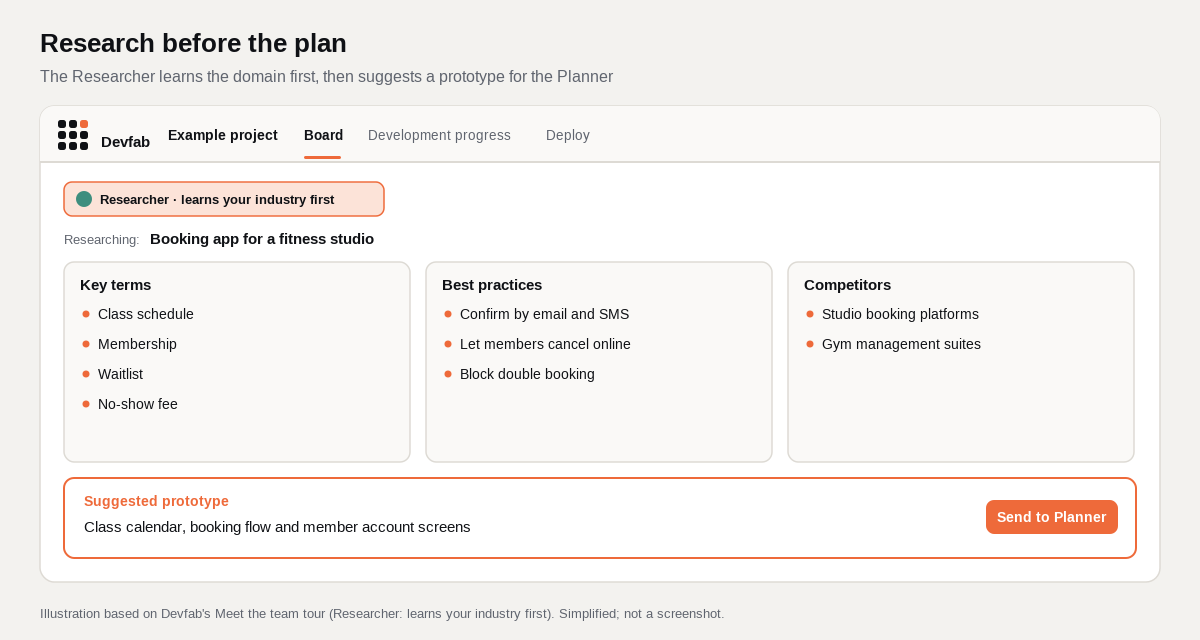
Devfab is an AI software factory. Before any plan, its research step maps your domain: key terms, best practices for that kind of app and competitors, then it suggests a prototype. A person approves the plan before the Coordinator creates tickets. The QA agent runs UI and flow tests plus logic tests, so "customer books, pays and gets a confirmation" is clicked end to end. Code lives in your own GitHub account (or your organization's), and cost is logged after each run, per task and per project.
Devfab's honest limits: it is new and in Beta, with a smaller community and fewer integrations. It is not an editor for hands-on coding, it needs a GitHub account, and it deploys to your own server instead of hosting the app for you. See the full head-to-head in Devfab vs Bolt.new.
FAQ
Which is easier for a beginner, Base44 or Bolt.new?
Base44, for most people who never want to see code. A Tech.co comparison updated in May 2026 (sponsored by Base44) reached the same verdict and said Bolt.new suits people with some coding knowledge. Bolt.new's docs say it is for everyone, including non-coders who change apps by chatting.
Can Bolt.new build mobile apps?
Yes. Bolt's docs describe native mobile apps through its Expo integration. Base44 takes a different route: on Builder or higher it generates App Store and Google Play files for "a lightweight native wrapper around your web app", which you submit from your own developer accounts.
What happens if I run out of hosting usage on Bolt?
Bolt's docs say the site stops displaying publicly until your usage resets. Plan the tier for a client app with that in mind.
Can I move a Base44 app into Bolt.new?
Partly. Connect Base44 to GitHub (Builder plan or higher), then import that repository into Bolt. The backend and data run on Base44's platform, so plan how you recreate them on Bolt Cloud or another backend.
Read next
Ready to take a first version to production? Try Devfab Beta
Sources (checked November 13, 2026): What is Base44? (Base44 guide, updated Nov 1, 2026); Base44 pricing; Base44 GitHub two-way sync; Base44 workspaces; Intro to Bolt; Bolt glossary; Bolt: choose an agent; Bolt Git integration; What is Bolt Cloud?; Bolt pricing; SD Times: Bolt.new launches Forge (Sep 17, 2026); Tech.co: Base44 vs Bolt.new (updated May 12, 2026; sponsored by Base44); Base44: uploading to app stores.
Frequently asked questions
Which is easier for a beginner, Base44 or Bolt.new?
Base44, for most people who never want to see code. A Tech.co comparison updated in May 2026 (sponsored by Base44) reached the same verdict and said Bolt.new suits people with some coding knowledge. Bolt.new's docs say it is for everyone, including non-coders who change apps by chatting.
Can Bolt.new build mobile apps?
Yes. Bolt's docs describe native mobile apps through its Expo integration. Base44 takes a different route: on Builder or higher it generates App Store and Google Play files for "a lightweight native wrapper around your web app", which you submit from your own developer accounts.
What happens if I run out of hosting usage on Bolt?
Bolt's docs say the site stops displaying publicly until your usage resets. Plan the tier for a client app with that in mind.
Can I move a Base44 app into Bolt.new?
Partly. Connect Base44 to GitHub (Builder plan or higher), then import that repository into Bolt. The backend and data run on Base44's platform, so plan how you recreate them on Bolt Cloud or another backend.