Short answer: Dyad wins when one person wants a free, open-source builder on their own computer, with any model, offline use and code that never leaves the machine. Bolt.new wins when you want nothing to install, hosting and a database included, Figma imports, and a Teams plan with admin controls.
You want a working app from a prompt, and you don't want to set up a dev machine. Two tools keep coming up. One camp says Dyad, because it is free, open source and runs on your laptop. The other says Bolt.new, because everything happens in a browser tab and the app is live when you finish. Both camps are right about different things. This page acts as the referee and checks each claim against the vendors' own pages.
In this comparison:
- Dyad and Bolt.new at a glance
- Feature comparison
- Cost model by team size
- Where Dyad wins
- Where Bolt.new wins
Read it in order, or jump to your deciding question.
Dyad and Bolt.new at a glance
Dyad is a free, open-source desktop app from Dyad Tech, Inc. It builds web apps from prompts on macOS, Windows or Linux, and it keeps projects on your own computer (Dyad). It does not host apps. You deploy to GitHub and Vercel, or to your own cloud. No acquisition or rename turned up in our check; the homepage lists v1.24.0-beta.1 as the newest release, while download links still point to v1.23.0 (Dyad). The code outside src/pro is Apache 2.0, and src/pro uses the fair-source Functional Source License 1.1 (GitHub).
Bolt.new is StackBlitz's AI builder for websites, web apps and mobile apps. It runs the whole development environment in the browser on WebContainers, "so you don't have to install anything" (Bolt docs). You can start from a prompt, a Figma frame, Google Stitch designs, a GitHub repo or a Lovable project. Bolt Cloud adds hosting, databases, auth, file storage, server functions and Stripe payments (Bolt Cloud). Bolt is SOC 2 Type II compliant.
Picture a physiotherapy clinic that wants a booking page. A founder testing the idea alone, on a tight budget, fits Dyad. A clinic group whose front-desk manager and an outside designer both need to see and change the app fits Bolt.
Feature comparison
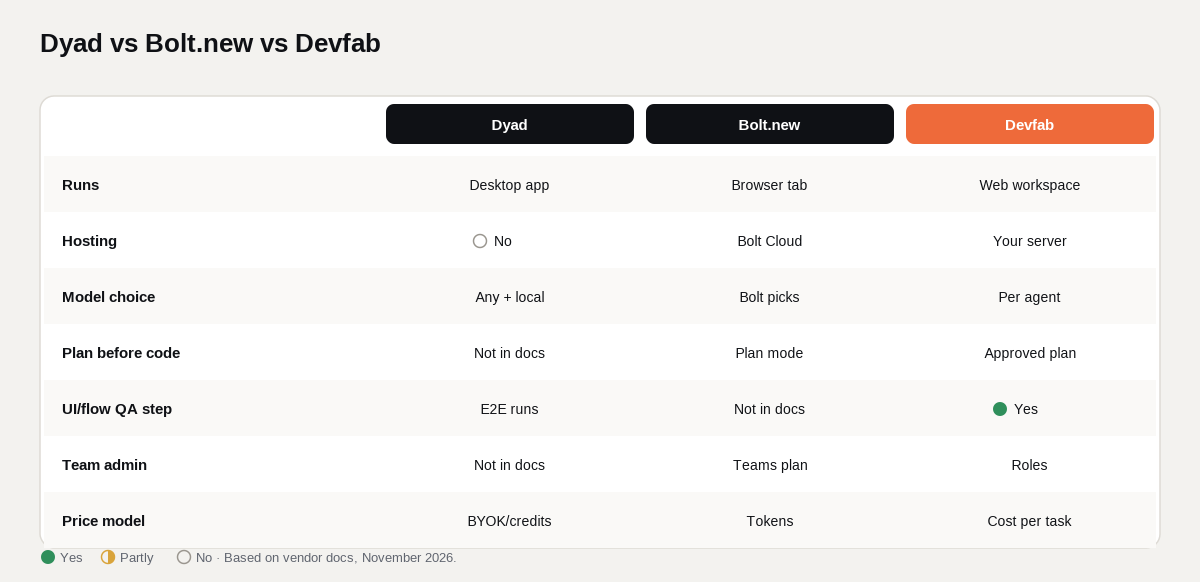
| Aspect | Dyad | Bolt.new | Source |
|---|---|---|---|
| Where it runs | Desktop app (macOS, Windows, Linux); projects stay on your computer | Browser tab on StackBlitz WebContainers | Dyad; Bolt docs |
| Planning | Not covered in the pages we checked | Plan mode works through strategy without writing code | Bolt glossary |
| Agent options | One builder; Pro modes for large codebases on paid tiers | Standard agent on all plans, Max agent on paid plans | Dyad; Bolt agents |
| Testing | Built-in security scan; parallel E2E test runs added in v1.23.0 | Version history to restore saved states | Dyad; Bolt glossary |
| Hosting | None; deploy to GitHub and Vercel or your own cloud | Bolt Cloud hosting on bolt.host; custom domains on paid plans | Dyad; Bolt Cloud |
| Backend | One-click Supabase or Neon | Built-in databases, auth, storage, Stripe | Dyad; Bolt Cloud |
| Code ownership | Standard Next.js code, "zero lock-in" | GitHub sync on main; auto-commits each non-breaking change | Dyad; Bolt Git |
| Team and admin | No SSO, roles or team admin described | Teams: central billing, access management, provisioning; SSO and audit logs on Enterprise | Dyad; Bolt pricing |
| Model choice | OpenAI, Anthropic, Google or local models; BYOK | "Bolt handles model selection behind the scenes" | Dyad; Bolt agents |
| Pricing model | Free with your own key, or credit tiers | Tokens per month; Teams billed per member | Dyad; Bolt pricing |
Cost model by team size
| Team size | Dyad | Bolt.new | Devfab |
|---|---|---|---|
| 1 person | Free (bring your own key); Pro USD 20 per month (200 credits); Max USD 79 per month (900 credits) | Free (1M tokens a month, with a daily cap); Pro USD 25 per month | Cost logged per task and per project (Beta) |
| 5 people | No shared workspace described; per-user basis of paid tiers not stated | Teams USD 30 per member per month | Cost logged per task and per project (Beta) |
| 25 people | Same as above | Teams, or Enterprise (custom) with SSO and audit logs | Cost logged per task and per project (Beta) |
Prices as of November 2026 from Dyad and Bolt pricing, billed monthly. Bolt's Teams tokens are per member and not shared. On Dyad Free you also pay your model provider directly. Devfab is in Beta and offers predictable cost: cost is logged after each run, per task and per project.
Where Dyad wins
- You want to pay the model provider directly. Free tier, no sign-up, bring your own key.
- Your code must stay on your machine. Projects live on your computer, and local models through Ollama or LM Studio allow fully offline work.
- You want to choose the model. OpenAI, Anthropic, Google or a local model, per your budget.
- You plan to keep coding in your own editor. Dyad exports standard Next.js code you can open in VS Code.
- You care about open source. Most of the code is Apache 2.0, with about 22k GitHub stars.
Where Bolt.new wins
- Nobody wants to install anything. It runs in a browser tab, which also works on machines where you can't install apps.
- You need the app live today, on one bill. Bolt Cloud bundles hosting, databases, auth, storage and payments.
- You start from a design. Figma and Google Stitch imports give you a front end to build on.
- You want a mobile prototype. Native mobile apps come through the Expo integration.
- Several people pay and work together. Teams adds central billing, access management and admin controls; Dyad describes no team features.
Watch two Bolt limits. A Bolt project stays on main and can't switch branches. And when a plan's hosting usage runs out, the site stops displaying publicly until usage resets (Bolt Git; Bolt Cloud).
Switching from one to the other
From Bolt.new to Dyad. Connect the Bolt project to GitHub (owner only; Bolt says disconnecting is permanent). Clone the repo, then open the folder in Dyad or your editor. Check that the stack fits Dyad's Next.js plus Supabase or Neon setup before you expect it to keep building on it.
From Dyad to Bolt.new. Push the Dyad project to GitHub, then use Bolt's "import a GitHub repo" starting point. Bolt will work on main and auto-commit each non-breaking change, so protect anything you don't want touched on a separate branch first.
Where Devfab fits
Both tools turn a prompt into a working app for one builder or a group of builders. In the pages we checked, neither researches the domain before planning, sends a project plan to a person for approval, or runs a separate QA step that clicks through user journeys.
App builders automate the first version. Devfab automates the development lifecycle. Its Researcher maps the domain, key terms and competitors before the Planner writes a plan, and a person approves the plan. The QA agent runs UI and flow tests (screens, buttons and user journeys clicked end to end) plus logic tests, and Deploy ships to your own server. Code stays in your own GitHub account. Devfab is in Beta, has a smaller community and fewer integrations, and is not an editor for hands-on coding. See Devfab vs Dyad and Devfab vs Bolt.new.
FAQ
Is Dyad really free?
Yes. Dyad Free costs USD 0 and needs no sign-up, but you bring your own API key and pay the model provider yourself. As of November 2026, Dyad Pro is USD 20 per month with 200 AI credits and Dyad Max is USD 79 per month with 900 AI credits.
Does Dyad host my app like Bolt.new does?
No. Dyad says it does not host apps. It deploys to GitHub and Vercel or to your own cloud. Bolt.new hosts apps on Bolt Cloud with a free bolt.host subdomain, and custom domains on paid plans.
Which one can I use offline?
Dyad. It runs as a desktop app on macOS, Windows and Linux, and supports fully offline use with local models through Ollama or LM Studio. Bolt.new runs in the browser on StackBlitz WebContainers, so it needs a connection.
Can I move a project from Bolt.new to Dyad?
Yes, through GitHub. Connect the Bolt project to a GitHub repository, then clone the repo and open it in your own tools. Bolt's docs say only the project owner can connect GitHub and that disconnecting is permanent.
Read next
Built the prototype? Let a factory take it the rest of the way. Try Beta
Sources (checked November 2026): Dyad homepage; dyad-sh/dyad on GitHub; Dyad blog: Free AI App Builders Compared; ToolDirectory.ai: Dyad review (Sep 13, 2026); Intro to Bolt; Bolt glossary; Bolt: Choose an agent; Bolt Git integration; What is Bolt Cloud?; Bolt pricing.
Frequently asked questions
Is Dyad really free?
Yes. Dyad Free costs USD 0 and needs no sign-up, but you bring your own API key and pay the model provider yourself. As of November 2026, Dyad Pro is USD 20 per month with 200 AI credits and Dyad Max is USD 79 per month with 900 AI credits.
Does Dyad host my app like Bolt.new does?
No. Dyad says it does not host apps. It deploys to GitHub and Vercel or to your own cloud. Bolt.new hosts apps on Bolt Cloud with a free bolt.host subdomain, and custom domains on paid plans.
Which one can I use offline?
Dyad. It runs as a desktop app on macOS, Windows and Linux, and supports fully offline use with local models through Ollama or LM Studio. Bolt.new runs in the browser on StackBlitz WebContainers, so it needs a connection.
Can I move a project from Bolt.new to Dyad?
Yes, through GitHub. Connect the Bolt project to a GitHub repository, then clone the repo and open it in your own tools. Bolt's docs say only the project owner can connect GitHub and that disconnecting is permanent.