Short answer: The main Base44 alternatives are Lovable (polished web apps with two-way Git sync), Bolt.new (browser-based builder with Bolt Cloud), Replit (a cloud IDE with an agent), v0 (Next.js apps deployed on Vercel), Retool (internal tools on company data) and Devfab (an AI software factory that plans, tests and deploys an app you fully own).
You built a working app in Base44, and people now rely on it. The next questions are harder: who owns the code, where it runs, who tests changes. Your answers decide whether the app grows with the business or gets rebuilt later.
In this guide, you'll learn:
- Why teams look for alternatives
- How six alternatives compare in one table
- Where Base44 is still the better choice
- Where Devfab fits
- How to choose
Start with the table if you already know your must-haves.
What Base44 does well
Base44 turns a plain-language description into a working web app. It's owned by Wix, which acquired it in June 2025, and runs as a standalone product. Its strength is that the backend comes built in: Base44 sets up the database, user sign-in and management, file storage, hosting with custom domains, email and API endpoints, so you don't have to connect Supabase or Firebase yourself. Payments run through Stripe, and you can edit code in a built-in editor or sync it to GitHub on the Builder plan and above.
Base44 says it's best for working business apps with real data and real users: client portals, internal dashboards, CRMs, booking systems and inventory trackers. For a non-developer who wants a working app with no setup, that's a strong offer.
Why teams look for alternatives
- Two credit meters. Base44 plans include message credits for building with AI and integration credits for live app actions such as AI calls, emails and file handling. Unused credits don't roll over, and reviews say that when credits run out, work pauses until the next cycle or an upgrade.
- Backend stays on Base44. You can export frontend code through GitHub or a ZIP, but reviews point out that the database and serverless backend remain on Base44's infrastructure. Moving the app means rebuilding that part.
- GitHub only on higher plans. GitHub sync starts at the Builder plan.
- Connecting to existing production data. Reviews suggest looking elsewhere when an app must work with existing company systems or needs strict permissions and audit controls.
- Prototype to production. As apps grow, teams want a plan, tests and review, not only prompts.
How we compared
We compared tools on what each is built for, using vendor pages, documentation and independent reviews as of November 2026. We did not run hands-on tests for this page. We describe pricing models (seats, credits, tokens, usage) rather than prices. Several reviews we read are written by Base44's competitors, so we checked key facts on official pages.
Shortlist with a feature table
| Tool | Best for | Code to GitHub | Backend and hosting | Pricing model |
|---|---|---|---|---|
| Base44 (baseline) | All-in-one business apps, no setup | Two-way sync on Builder and above | Built in, on Base44 | Message and integration credits |
| Lovable | Polished web apps | Two-way Git sync on all plans | Lovable, or host it yourself | Credits |
| Bolt.new | Fast prototypes in the browser | Yes | Bolt Cloud (database, hosting, domains) | Tokens |
| Replit | Browser IDE with an agent | Yes | Replit publishing | Effort-based, from credits |
| v0 | Next.js apps on Vercel | Branch, commits and PRs | Vercel, or export | Plans with usage |
| Retool | Internal tools on company data | Platform apps | Retool Cloud; self-host on Enterprise | Per builder and per user, plus AI credits |
| Devfab | Planned, tested delivery | In your GitHub from day one | Your own server | Cost logged per task and per project |
Lovable
Lovable builds full web apps from prompts. Projects created since May 2026 use the TanStack Start stack; older ones use React and Vite. Git sync works on all plans with GitHub, GitLab or Bitbucket, in both directions, and Lovable's docs explain how to host the frontend and the Supabase backend outside Lovable. Pricing is credit-based.
Best for founders and teams who want a polished web app they can later move off the platform. Limits: once you host it yourself, uptime and monitoring are on you; the quality of the plan and tests depends on whoever is prompting.
Bolt.new
Bolt, from StackBlitz, turns a prompt into a website, web app or mobile app (through Expo) in the browser. Bolt Cloud creates a database when your app needs one, manages users and sign-in, and hosts each project on a free subdomain, with custom domains on paid plans. You can connect a Supabase database, use GitHub for version control or import a repo, and import work from Figma or Lovable. Pricing is token-based.
Best for quick prototypes and demos with nothing to install. Limits: token use can be hard to predict while debugging. See Devfab vs Bolt.new.
Replit
Replit is a cloud IDE with an AI agent that builds and publishes apps. Agent billing is effort-based: each finished request creates a checkpoint, simple fixes cost less than big builds, and paid plans include monthly credits that also cover hosting, storage and databases. Plan Mode lets you plan before building on Core and Pro, and spend controls show cost per checkpoint.
Best for builders who want both an agent and a full coding environment in the browser. Limits: hosting and agent work draw from the same credits; testing discipline is up to you.
v0
v0 from Vercel builds full-stack web apps, dashboards and internal tools in Next.js, React, TypeScript and Tailwind. With GitHub connected, it works on a branch, commits each change and can open pull requests; it never pushes directly to main. Publish deploys to Vercel and respects your required checks and reviews, and you can export the code to deploy elsewhere.
Best for teams already on Next.js and Vercel. Limits: best fit is the Vercel stack; plan-level QA is up to you.
Retool
Retool builds internal tools on your company's databases and APIs. Its AI app builder creates a working app from a description, connected to live data, and every app inherits SSO, role-based access and audit logging. Pricing is per builder and per internal user, with a monthly AI credit pool; self-hosting needs Enterprise.
Best for teams building many internal tools on existing company data with strict access controls. Limits: seat-based costs grow with users. See Retool alternatives.
Devfab
Devfab is an AI software factory. Instead of building and hosting the app on its own platform, it runs a team of agents that research, plan, build, test and deploy a normal codebase in your own GitHub to your own server. See Where Devfab fits.
Where Base44 is still the better choice
- You're not a developer and want no setup at all. Database, sign-in, storage, hosting and email are already there. With Devfab you need a GitHub account and a server.
- A small business app for a small team. For a simple CRM, tracker or booking tool, Base44's all-in-one approach is hard to beat on effort.
- You don't want to run infrastructure. Base44 hosts everything. With Devfab, the server is yours, and so is the job of keeping it running.
- A quick test of an idea. For a throwaway prototype, a full plan-approve-build-test cycle is more process than you need.
- Maturity. Base44 has Wix behind it. Devfab is new and in Beta.
Where Devfab fits
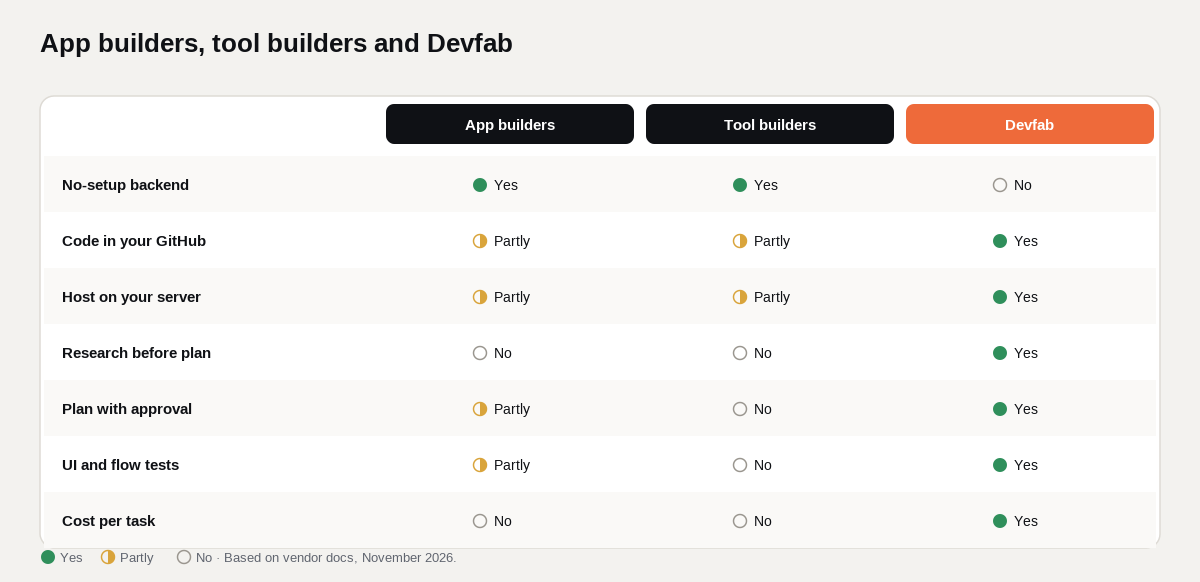
App builders like Base44 make it easy to get an app on screen. Devfab is built for the step after that: an app other people depend on. Coding agents automate the developer. Devfab automates the development lifecycle.
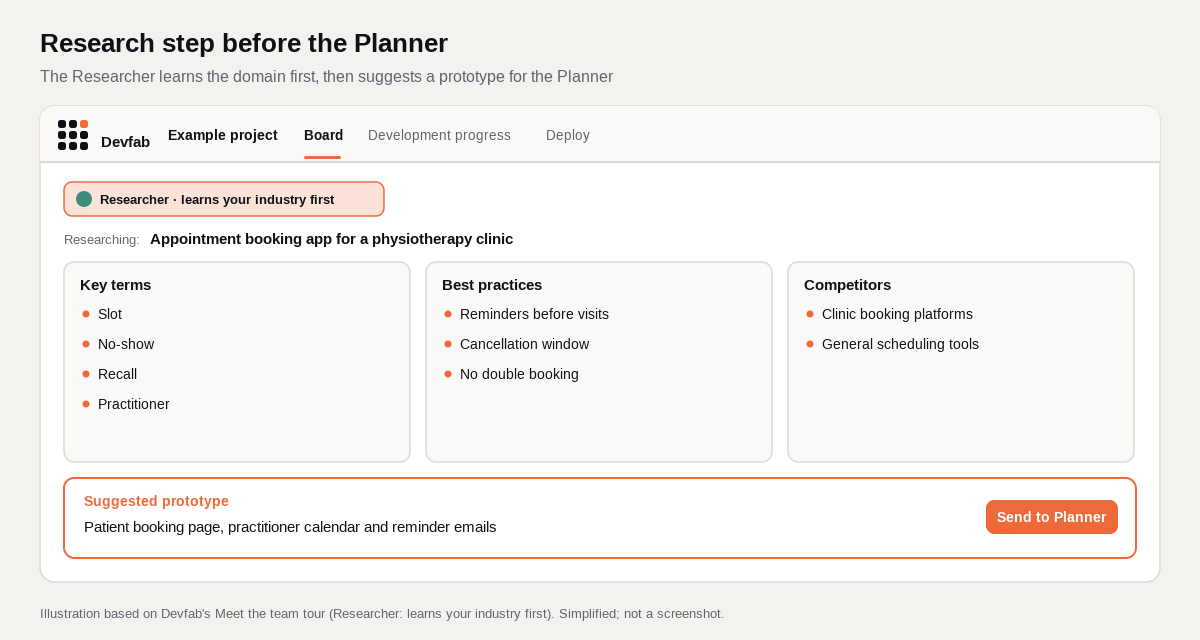
- Research before the plan. Before any plan, Devfab's research step maps the domain: key terms, best practices for that kind of app, and competitors, then suggests a prototype. For a booking app, that means cancellation rules, reminders and double-booking are on the list before the first ticket.
- A plan a person approves. The Planner publishes a plan, and a person approves it before the Coordinator creates tickets. That's the default Human in the loop mode; you can switch to Auto in workspace settings.
- ChainFlow. Devfab's code-intelligence layer maps which functions and APIs call each other and what is deployed, so developer agents see the impact of a change and don't break connected features.
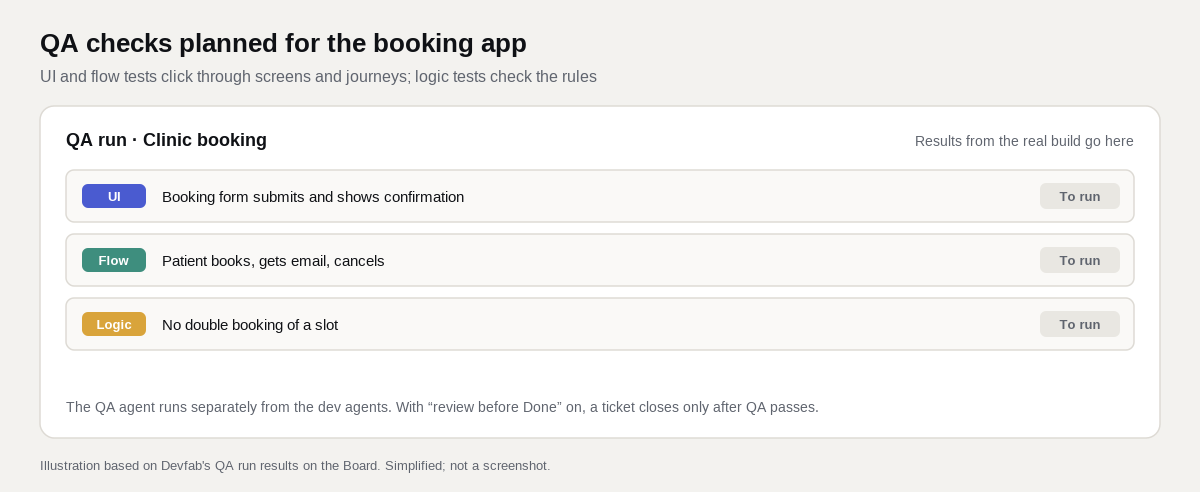
- QA agent. It runs UI and flow tests (screens, buttons and user journeys clicked end to end) plus logic tests such as "no double booking of a slot". With "QA agent · review before Done" on, nothing is marked Done before review.
Already have a Base44 app synced to GitHub? Connect that repository with "Work on an existing project". Leave the change box empty and Devfab maps the code first with ChainFlow and suggests three small first tickets. The backend you'd need to rebuild becomes part of the plan you approve.
You can choose the model for each agent or keep Devfab's default. Code lives in your own GitHub account (or your organization's), you deploy to your own server, and there's no lock-in. Cost is predictable and visible: it's logged after each run, per task and per project, rather than drawn from two monthly credit pools.
Devfab's honest limits:
- It's new and in Beta, with a smaller community than Base44 or Lovable.
- It has fewer ready-made integrations than the app builders above.
- It needs a GitHub account, and you need a server to deploy to.
- It isn't an editor for hands-on coding or a drag-and-drop builder.
- For a quick prototype, it's more process than you need.
How to choose
- Non-developer, simple app, no setup? Stay with Base44.
- Polished web app you might move later? Lovable.
- Prototype in the browser, nothing to install? Bolt.new.
- Agent plus a full coding environment? Replit.
- On Next.js and Vercel? v0.
- Many internal tools on company data? Retool.
- An app people depend on, planned, approved, tested and deployed to your own server? Devfab. See AI software factory vs AI coding tools for how this differs from a builder.
FAQ
Can I export my Base44 app?
Partly. Base44 gives you access to the code, with two-way GitHub sync on the Builder plan and above. Reviews note that the database and backend functions stay on Base44's infrastructure, so moving the whole app elsewhere means rebuilding the backend.
Who owns Base44?
Wix. Base44 says Wix acquired it in June 2025 and that it runs as a standalone product with its own team and roadmap.
What is the best Base44 alternative for internal tools?
For many small internal tools on company data, Retool. For one internal app you want to own as a normal codebase on your own server, Devfab. For a quick prototype, Lovable or Bolt.new.
How is Devfab different from Base44?
Base44 builds and hosts an app on its own platform from prompts. Devfab researches the domain, writes a plan a person approves, builds and tests the app with agents, and deploys it to your own server, with the code in your own GitHub account.
Read next
- What is an AI software factory?
- Devfab vs Bolt.new
- Best AI tools for MVP development
- Base44 vs Lovable: which should your team use in 2026?
- Base44 vs Bolt.new: which should your team use in 2026?
Ready to take your app past the prototype? Try the Devfab Beta
Sources (checked November 2026): Base44: What is Base44?; Base44 pricing; Jet Admin: Base44 pricing 2026; Lovable: Base44 vs Lovable; Lovable docs: Deploying and hosting outside Lovable; Bolt Help Center: Intro to Bolt; Replit docs: AI billing; v0 docs: FAQs; Retool pricing; Retool AI app generation.
Frequently asked questions
Can I export my Base44 app?
Partly. Base44 gives you access to the code, with two-way GitHub sync on the Builder plan and above. Reviews note that the database and backend functions stay on Base44's infrastructure, so moving the whole app elsewhere means rebuilding the backend.
Who owns Base44?
Wix. Base44 says Wix acquired it in June 2025 and that it runs as a standalone product with its own team and roadmap.
What is the best Base44 alternative for internal tools?
For many small internal tools on company data, Retool. For one internal app you want to own as a normal codebase on your own server, Devfab. For a quick prototype, Lovable or Bolt.new.
How is Devfab different from Base44?
Base44 builds and hosts an app on its own platform from prompts. Devfab researches the domain, writes a plan a person approves, builds and tests the app with agents, and deploys it to your own server, with the code in your own GitHub account.