Short answer: Pick Replit if a developer will work next to the agent in a full cloud IDE, you need autoscale, always-on or scheduled hosting, and IT wants enterprise controls. Pick Bolt.new if you want to start from Figma, GitHub or a Lovable project, get hosting, database and auth bundled, and build native mobile apps through Expo.
You need an internal tool or a client prototype, and nobody wants to set up a laptop. Replit and Bolt.new both run in the browser and both build from a prompt. One is a full cloud IDE with an agent; the other is a builder with the backend bundled in.
In this comparison:
- Replit and Bolt.new at a glance
- Feature comparison
- Cost model by team size
- Where Replit wins
- Where Bolt.new wins
Here's how each one compares, fact by fact.
Replit and Bolt.new at a glance
Changes in 2026
- Replit launched Agent 4 in March 2026, alongside a reported Series D. Agent 4 combines design and code and runs tasks in parallel: one at a time on Core, up to ten on Pro.
- Bolt.new ran Bolt Forge as a research preview from September 14 to October 14, 2026, for individual Pro users, using open models. Teams and Enterprise were excluded.
Replit
Replit is a cloud development platform. Its Agent "takes action" to set up projects, build apps, check its work and fix problems, and it can also produce designs and slides. Plan mode writes a task list you approve before Agent changes code or data. Checkpoints let you roll back.
App Testing has Agent click through the app in a real browser and fix what it finds. It works for Full Stack JavaScript and Streamlit Python web apps. Publishing offers Autoscale, Reserved VM, Static and Scheduled deployments with custom domains. Agent can query BigQuery, Linear, Slack and Notion from chat. Enterprise admins can require private deployments, ban public apps, mandate security scans and pin deployment regions.
Bolt.new
Bolt.new, from StackBlitz, runs the whole development environment in the browser on WebContainers. You can start from an idea, a Figma frame, Google Stitch designs, a GitHub repo or a Lovable project. Plan mode works through strategy before Build mode writes code.
Bolt Cloud bundles hosting on a free bolt.host subdomain, databases, auth with Google sign-in, file storage, server and edge functions, and Stripe payments. Native mobile apps come through Expo. Bolt picks the model for you across its Standard and Max agents. With GitHub connected, it auto-commits each non-breaking change, but a project stays on main and cannot switch branches.
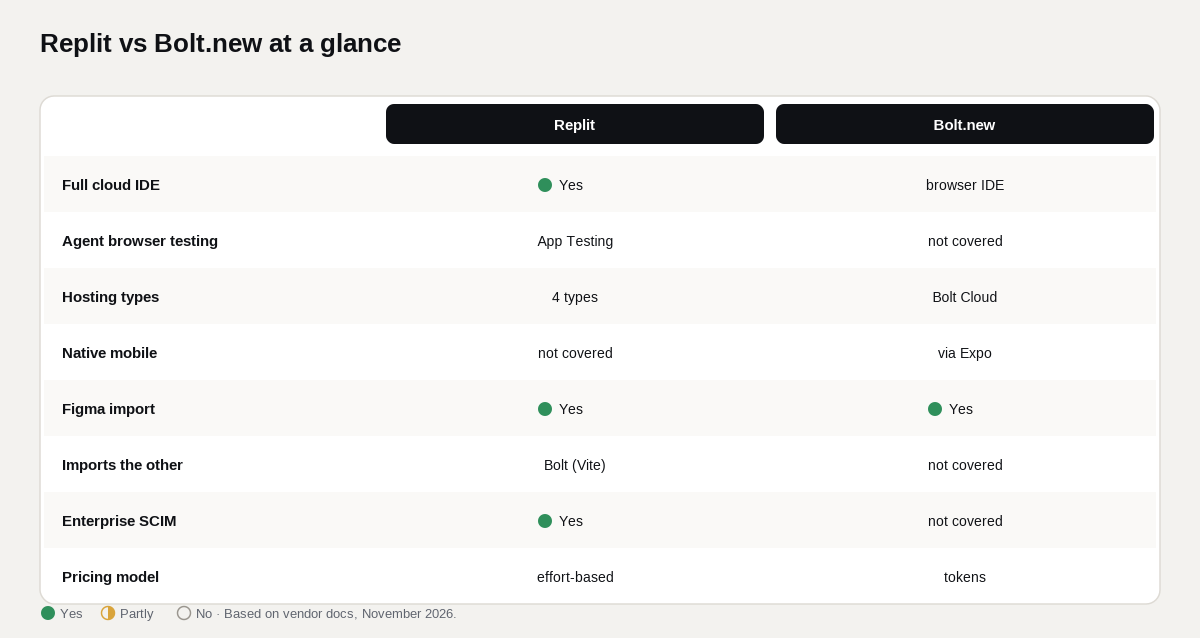
Feature comparison
| Aspect | Replit | Bolt.new | Source |
|---|---|---|---|
| Where it runs | Cloud workspace with a full IDE in the browser | Browser dev environment on WebContainers | Replit Agent; Intro to Bolt |
| Planning / spec | Plan mode writes a task list to approve | Plan mode works through strategy without code | Replit Agent; Bolt glossary |
| Agent autonomy | Free, Power and Max modes; paid actions need confirmation; parallel tasks | Standard and Max agents; Bolt picks the model | Replit Agent; Bolt agents |
| Testing | App Testing in a real browser (JS full stack, Streamlit); checkpoints | Version history to restore saved states | Replit App Testing; Bolt glossary |
| Deploy / hosting | Autoscale, Reserved VM, Static, Scheduled; custom domains | Bolt Cloud: hosting, databases, auth, functions, Stripe | Replit publish; Bolt Cloud |
| Code and imports | Imports from GitHub, Bitbucket, Vercel, Figma, Bolt, Lovable, Base44 | Imports GitHub repos, Figma, Lovable; creates a private repo; stays on main | Replit import; Bolt Git |
| Team / admin | SAML SSO, SCIM, groups; Enterprise RBAC, audit log streaming, CVE detection | Teams: central billing, access management; SSO and audit logs on Enterprise | Replit Enterprise; Bolt pricing |
| Model choice | Auto picks per paid task; Enterprise admins control model access | "Bolt handles model selection behind the scenes" | Replit Agent; Bolt agents |
| Pricing model | Effort-based Agent pricing; Starter, Core, Pro, Enterprise | Tokens; Free, Pro, Teams per member, Enterprise | Replit pricing docs; Bolt pricing |
Cost model by team size
| Team size | Replit | Bolt.new |
|---|---|---|
| 1 person | Starter is free, with a Free Mode allowance that resets every five hours plus weekly limits; Core includes monthly credits and one parallel Agent task | Free plan with a monthly token allowance and a daily limit; Pro raises tokens and drops the daily limit |
| 5 people | Pro: up to 15 collaborators and up to 10 parallel Agent tasks; each paid task's cost is confirmed before it starts | Teams: per member; each member's tokens are their own and not shared |
| 25 people | Enterprise (custom): SSO, SCIM, audit logs, single-tenant and private networking options | Enterprise (custom): SSO and audit logs |
Check Replit's pricing page and Bolt's pricing page for amounts as of November 2026. Two things to watch: Replit's Plan mode can incur charges even without changing code, and Bolt sites stop displaying publicly when a plan's hosting usage runs out. For reference, Devfab (Beta) logs cost after each run, per task and per project.
Where Replit wins
- A developer works with the agent. It's a full cloud IDE, so you can drop into code at any time.
- The app needs a specific runtime. Autoscale, an always-on VM, static hosting or scheduled jobs.
- You want the agent to test in a browser. App Testing clicks through and fixes issues.
- IT sets the rules. Admins control who can build, which models are available and how apps publish.
- You pull data from business tools. Agent queries BigQuery, Linear, Slack and Notion from chat.
Where Bolt.new wins
- You need a mobile app. Expo integration builds native apps.
- You start from a design. Import a Figma frame or Google Stitch designs.
- You want backend and payments bundled. Bolt Cloud includes databases, auth, storage, functions and Stripe.
- Non-coders lead. Bolt's docs pitch it at people who change apps by chatting as well as developers.
Switching from one to the other
From Bolt.new to Replit: export the Bolt project to GitHub, open replit.com/import, choose Bolt and select the repository. Replit supports Vite + React Bolt apps only for now. Secret values and database data are not imported, so add secrets and move data yourself.
From Replit to Bolt.new: put the code in a GitHub repository, then import it into Bolt. The Replit import pages we checked cover only the other direction, so use Replit's Git documentation for the export. Bolt will then work on main only.
Where Devfab fits
Replit and Bolt.new both turn a prompt into a running app. Teams that ship for clients then need a plan the client signs off, work split into tracked tickets, tested user journeys and an app on the client's server.
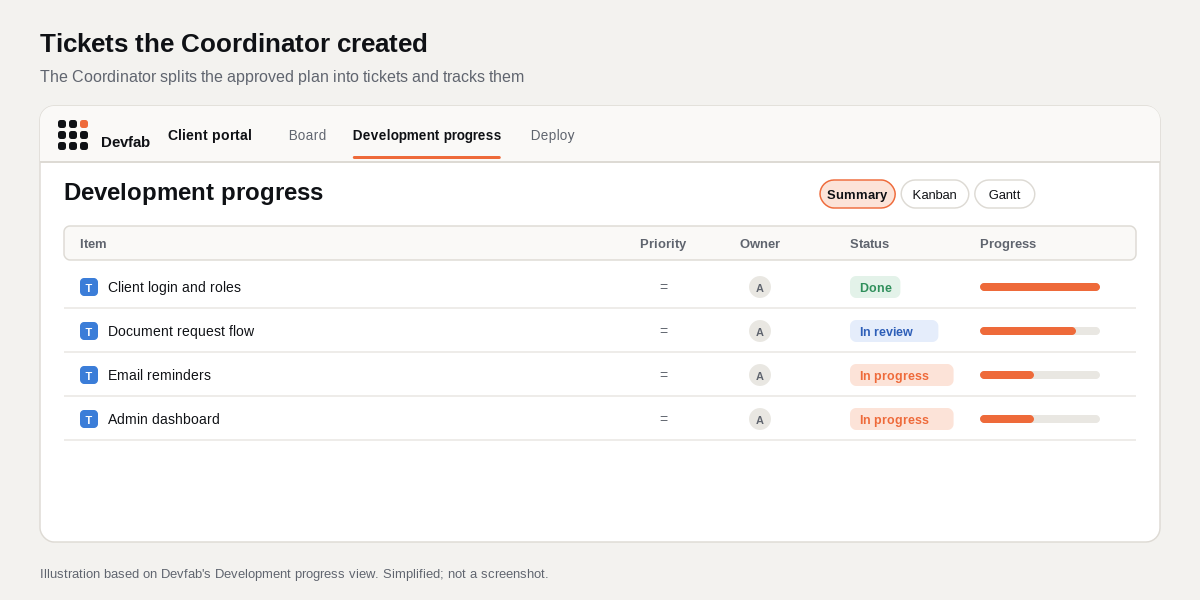
App builders automate the first version. Devfab automates the development lifecycle. The Researcher maps the domain before the Planner writes, and a person approves the plan. The Coordinator splits it into tickets and assigns dev agents; progress shows as Summary, Kanban and Gantt. The QA agent runs UI, flow and logic tests, and Deploy ships to your own server. Code stays in your own GitHub account.
Honest limits: Devfab is new and in Beta, with a smaller community and fewer integrations than Replit. It is not an IDE for hands-on coding, and it needs a GitHub account. See Devfab vs Bolt.new and How to deploy an AI-built app to your own server.
FAQ
Can I move a Bolt.new project to Replit?
Yes, with limits. Replit's docs say to export the Bolt project to GitHub, open replit.com/import, choose Bolt and select the repository. Bolt imports currently support Vite + React apps only, and secret values and database data are not imported.
Which one tests the app it builds?
Replit. Its App Testing lets Agent click through your app in a real browser and fix issues, for Full Stack JavaScript and Streamlit Python web apps in Power and Max modes. Bolt offers version history to restore earlier states; automated app testing was not covered in the Bolt docs we checked.
Which is better for a mobile app?
Bolt.new. It builds native mobile apps through its Expo integration. Replit's Agent builds web apps, internal tools, dashboards, designs and slides; native mobile builds were not covered in the Replit docs we checked.
How do Replit and Bolt.new charge?
Replit charges paid Agent work by effort, based on how complex a request is, and confirms the cost before it starts. Bolt charges by tokens, with Teams priced per member and each member's tokens kept separate. Check both pricing pages for amounts.
Read next
- What is an AI software factory?
- Devfab vs Bolt.new: which fits a team that ships client work?
- Bolt.new alternatives for teams that ship to production (2026)
- How to deploy an AI-built app to your own server
Plan, test and deploy client apps in one place. Try Devfab Beta
Sources (checked November 13, 2026): Replit Agent overview; Replit pricing and plans (docs); Replit pricing; Replit App Testing; Replit Enterprise; Replit: publish your app; Replit: import from providers; Replit: import from GitHub; Replit Teams; Dealroom: Replit Series D and Agent 4 (Mar 11, 2026); Intro to Bolt; Bolt glossary; Bolt: choose an agent; Bolt Git integration; What is Bolt Cloud?; Bolt pricing; SD Times: Bolt.new launches Forge (Sep 17, 2026).
Frequently asked questions
Can I move a Bolt.new project to Replit?
Yes, with limits. Replit's docs say to export the Bolt project to GitHub, open replit.com/import, choose Bolt and select the repository. Bolt imports currently support Vite + React apps only, and secret values and database data are not imported.
Which one tests the app it builds?
Replit. Its App Testing lets Agent click through your app in a real browser and fix issues, for Full Stack JavaScript and Streamlit Python web apps in Power and Max modes. Bolt offers version history to restore earlier states; automated app testing was not covered in the Bolt docs we checked.
Which is better for a mobile app?
Bolt.new. It builds native mobile apps through its Expo integration. Replit's Agent builds web apps, internal tools, dashboards, designs and slides; native mobile builds were not covered in the Replit docs we checked.
How do Replit and Bolt.new charge?
Replit charges paid Agent work by effort, based on how complex a request is, and confirms the cost before it starts. Bolt charges by tokens, with Teams priced per member and each member's tokens kept separate. Check both pricing pages for amounts.