Short answer: Bolt.new wins for new projects and for anyone leaving Firebase Studio, because it can import your exported code from GitHub and host it on Bolt Cloud. Firebase Studio wins only for existing workspaces until March 22, 2027, when you want a full code environment with Flutter, Android and Go templates and Firebase services.
You picked a browser-based builder so nobody had to install anything. Bolt.new and Firebase Studio both promised that. Then Google closed Firebase Studio to new users. If you have a prototype there, you now have a deadline and a decision. If you were choosing between them fresh, the decision is already made. This page covers both cases.
In this comparison:
- Bolt.new and Firebase Studio at a glance
- Feature comparison
- Cost model by team size
- Where Bolt.new wins
- Switching from one to the other
Here is what each tool is, as of November 2026.
Bolt.new and Firebase Studio at a glance
Firebase Studio is sunsetting. Google announced the change on March 19, 2026. New workspaces and sign-ups were disabled on June 22, 2026, and the product shuts down on March 22, 2027, after which remaining data "is permanently deleted" (Firebase migration guide). Google suggests moving to Google AI Studio or Google Antigravity, or exporting a ZIP and deploying it yourself with the Firebase CLI. Apps already deployed, Firestore, Authentication and App Hosting keep working.
Firebase Studio was Google's agentic cloud workspace, built on Project IDX with Gemini. Its App Prototyping agent built web apps such as Next.js from multimodal prompts and set up Firestore and Firebase Auth. Developers also got templates, Nix-based environment setup, the Local Emulator Suite and publishing to Firebase App Hosting (Firebase Studio docs). Access was free, and it was always labeled Preview with no SLA.
Bolt.new is active. Made by StackBlitz, it runs the whole dev environment in the browser on WebContainers, "so you don't have to install anything" (Intro to Bolt). You can start from an idea, a Figma frame, Google Stitch designs, a GitHub repo or a Lovable project. It has Build and Plan modes (Bolt glossary), and Bolt Cloud adds hosting, databases, auth, file storage, functions and Stripe payments (Bolt Cloud).
Imagine a B2B quote tool for a parts distributor: sales reps pick products, apply customer discounts and send a PDF quote. In Firebase Studio, a developer would have prototyped it with Firestore underneath. In Bolt, a sales manager could start from a Figma mockup and publish it on a bolt.host address.
Feature comparison
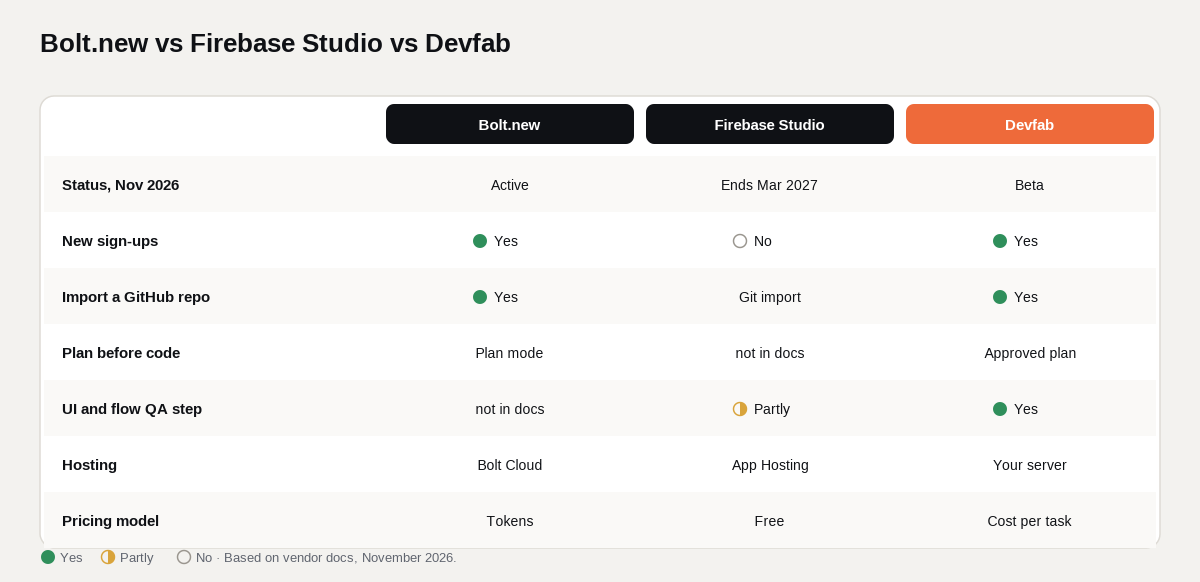
| Aspect | Bolt.new | Firebase Studio | Source |
|---|---|---|---|
| Status, Nov 2026 | Active | Closed to new users since Jun 22, 2026; shuts down Mar 22, 2027 | Intro to Bolt; Firebase migration guide |
| Where it runs | Browser, on WebContainers | Browser-based cloud workspace (Project IDX) | Intro to Bolt; Firebase Studio docs |
| Starting points | Idea, Figma, Google Stitch, GitHub repo, Lovable project | Prompt, archive, Git repo or Figma | Intro to Bolt; Firebase Studio docs |
| Planning | Plan mode works through strategy without generating code | Not covered in the docs we checked | Bolt glossary |
| Testing | Not covered in the docs we checked | Gemini writes tests and fixes bugs; Local Emulator Suite | Firebase Studio docs |
| Hosting | Bolt Cloud: free bolt.host subdomain, custom domains on paid plans, databases, auth, Stripe | Publish to Firebase App Hosting (may need Cloud Billing) | Bolt Cloud; Firebase Studio docs |
| Mobile | Native apps via Expo | Flutter and Android templates | Intro to Bolt; Firebase Studio docs |
| GitHub | Import repos or create a private repo; auto-commits each non-breaking change; main branch only | ZIP export; import from Git | Bolt Git docs; Firebase migration guide |
| Model choice | "Bolt handles model selection behind the scenes"; Standard and Max agents | Gemini | Bolt agents; Firebase Studio docs |
| Pricing model | Tokens; Free, Pro, Teams per member, Enterprise | No cost for Studio itself | Bolt pricing; Firebase Studio docs |
Cost model by team size
| Team size | Bolt.new | Firebase Studio | Devfab |
|---|---|---|---|
| 1 person | Free (1M tokens a month, 300K daily limit); Pro USD 25 per month (from 10M tokens, no daily limit) | No cost, existing users only | Cost logged per task and per project (Beta) |
| 5 people | Teams USD 30 per member per month; tokens are per member, not shared | No new workspaces | Cost logged per task and per project (Beta) |
| 25 people | Teams, or Enterprise (custom) with SSO and audit logs | Not an option for new teams | Cost logged per task and per project (Beta) |
Prices as of November 2026 from Bolt pricing (monthly billing; yearly billing "save up to 28%") and the Firebase Studio docs. Devfab is in Beta and offers predictable cost: cost is logged after each run, per task and per project.
Where Bolt.new wins
- You are starting a new project. Bolt takes new users; Firebase Studio does not.
- You are leaving Firebase Studio. Bolt imports GitHub repos, so your exported code has a place to land.
- Design comes first. Import a Figma frame or Google Stitch designs and get a working front end.
- You want hosting bundled. Bolt Cloud covers hosting, databases, auth, storage, functions and Stripe.
- Your team wants admin controls. Teams adds central billing, access management and user provisioning; Enterprise adds SSO and audit logs.
Where Firebase Studio wins
- You have a live workspace and time. It keeps working, with security patches and Gemini updates, until March 22, 2027.
- You need a full code environment. Nix-based setup and the Local Emulator Suite give developers more control than a chat-first builder.
- Your stack is Firebase. Firestore, Authentication and App Hosting keep running after Studio closes, and Google's exit routes keep you on them.
- It costs nothing. Studio itself had no fee; Bolt's free tier has token limits.
Switching from one to the other
From Firebase Studio to Bolt.new.
- Export your project as a ZIP from Firebase Studio. Chat history is not included (Firebase migration guide).
- Push the code to a GitHub repository.
- In Bolt, import the GitHub repo. Only the project owner can connect GitHub, the project stays on
main, and disconnecting GitHub is permanent (Bolt Git docs). - Decide whether data stays in Firestore or moves to a Bolt Cloud database. Firebase services keep running either way.
From Bolt.new to Firebase Studio. Not possible for new users.
Where Devfab fits
Both tools are prototyping environments. A move is a good moment to ask what happens after the prototype: who approves changes, who tests the quote flow, and where the app runs.
App builders automate the first version. Devfab automates the development lifecycle. With your exported code in your own GitHub repository, choose "Work on an existing project" in Devfab and leave the change box empty. ChainFlow maps which functions and APIs call each other and what is deployed, then suggests three small first tickets. A person approves the plan. The QA agent runs UI, flow and logic tests, for example that a discount rule changes the quote total and the PDF matches the screen. Deploy ships to your own server. Devfab is in Beta, with a smaller community and fewer integrations, and it is not an editor. See Devfab vs Bolt.new and Devfab vs Firebase Studio.
FAQ
Can I move a Firebase Studio project to Bolt.new?
Yes, through GitHub. Export your Firebase Studio project as a ZIP, push it to a GitHub repository, and import that repo into Bolt. Chat history does not come across. Bolt works on the main branch only, and only the project owner can connect GitHub.
When does Firebase Studio shut down?
On March 22, 2027. New workspaces and new sign-ups have been disabled since June 22, 2026. Google keeps shipping security patches until the shutdown, and Firebase services such as Firestore, Authentication and App Hosting keep running after it.
Is Bolt.new free like Firebase Studio?
Bolt has a Free plan with 1M tokens a month and a 300K daily limit. As of November 2026, Pro is USD 25 per month and Teams is USD 30 per member per month, billed monthly. Firebase Studio itself was free, but it no longer takes new users.
Which one is better for mobile apps?
Bolt builds native mobile apps through its Expo integration and is open to new projects. Firebase Studio offered Flutter and Android templates, but you can no longer create new workspaces there.
Read next
Taking a prototype to production? Start with a plan you approve. Try Beta
Sources (checked November 2026): Firebase Studio docs; Firebase Studio sunset and project migration; Firebase blog: AI Studio integration (Mar 19, 2026); Intro to Bolt; Bolt glossary; Bolt: Choose an agent; Bolt Git integration; What is Bolt Cloud?; Bolt pricing.
Frequently asked questions
Can I move a Firebase Studio project to Bolt.new?
Yes, through GitHub. Export your Firebase Studio project as a ZIP, push it to a GitHub repository, and import that repo into Bolt. Chat history does not come across. Bolt works on the main branch only, and only the project owner can connect GitHub.
When does Firebase Studio shut down?
On March 22, 2027. New workspaces and new sign-ups have been disabled since June 22, 2026. Google keeps shipping security patches until the shutdown, and Firebase services such as Firestore, Authentication and App Hosting keep running after it.
Is Bolt.new free like Firebase Studio?
Bolt has a Free plan with 1M tokens a month and a 300K daily limit. As of November 2026, Pro is USD 25 per month and Teams is USD 30 per member per month, billed monthly. Firebase Studio itself was free, but it no longer takes new users.
Which one is better for mobile apps?
Bolt builds native mobile apps through its Expo integration and is open to new projects. Firebase Studio offered Flutter and Android templates, but you can no longer create new workspaces there.