Short answer: v0 wins for anyone starting now: it is active, builds Next.js apps from prompts, works in your GitHub repo through pull requests and deploys to Vercel or elsewhere. Firebase Studio only wins for existing users finishing work before the March 22, 2027 shutdown, because Google closed new sign-ups and new workspaces on June 22, 2026.
If you searched this comparison to pick a tool for a new project, the decision was made for you in June. Firebase Studio no longer accepts new users. If you already have workspaces there, your question is different: where should this code live next, and is v0 the right home?
Both readers get an answer here. We cover what each tool actually did and does, where Firebase Studio still has an edge for its remaining users, and the migration steps from Google's own docs, checked in November 2026.
In this comparison:
- v0 and Firebase Studio at a glance
- Feature comparison
- Where v0 wins
- Where Firebase Studio wins
- Switching from one to the other
Start with the dates, because they shape everything else.
v0 and Firebase Studio at a glance
Firebase Studio is sunsetting. Google announced the sunset on March 19, 2026, alongside Firebase's integration into Google AI Studio (Firebase blog). Since June 22, 2026, "new workspace creation and new user signup for Firebase Studio are disabled." The service shuts down on March 22, 2027, and any remaining data "is permanently deleted" (Firebase Studio migration). Until then, security patches and Gemini model updates continue.
Firebase Studio was Google's browser-based, agentic cloud workspace, built on Project IDX. Its App Prototyping agent built web apps such as Next.js from multimodal prompts and set up Firestore and Firebase Auth. It also offered templates for React, Angular, Flutter, Android, Flask and Go, a Nix-based environment, the Local Emulator Suite and publishing to Firebase App Hosting (Firebase Studio docs). It was labeled Preview and "not subject to any SLA or deprecation policy."
v0 is active. Vercel's agent builds Next.js apps and agents from prompts at v0.app, with a live preview, a built-in VS Code-style editor and an iOS app (v0 docs). The default stack is Next.js, React, TypeScript, Tailwind CSS and shadcn/ui (v0 FAQs). The older Premium plan is being phased out and is closed to new users (v0 FAQs).
Feature comparison
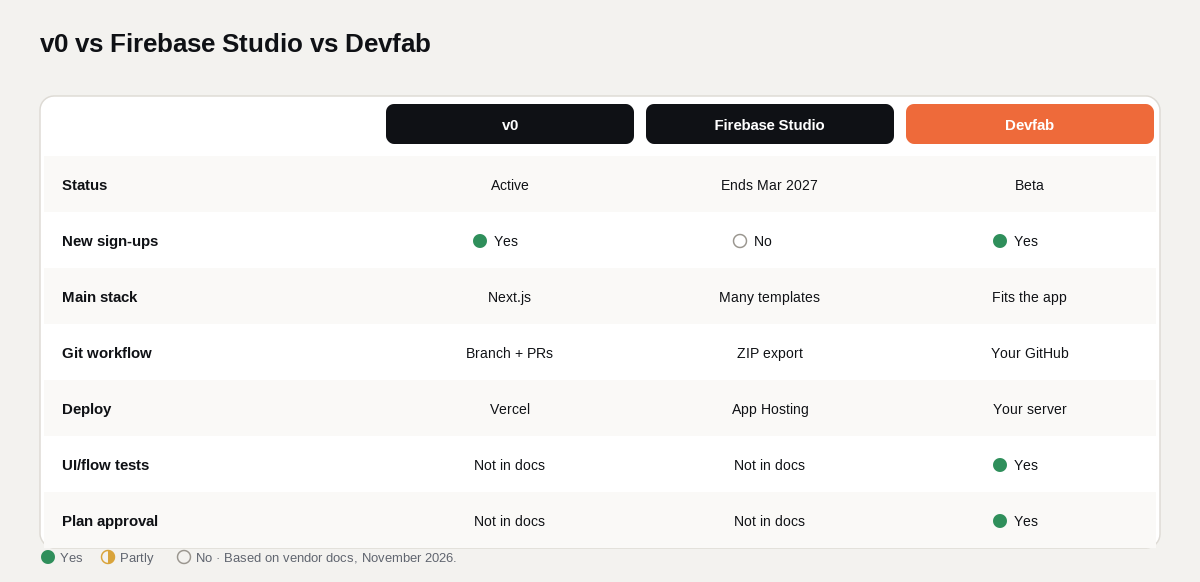
| Aspect | v0 | Firebase Studio | Source |
|---|---|---|---|
| Status | Active | Closed to new users since Jun 22, 2026; shuts down Mar 22, 2027 | v0 FAQs; Firebase migration |
| Where it runs | Web app with live preview and code editor; iOS app | Browser-based cloud workspace (Project IDX plus agents) | v0 docs; Firebase Studio docs |
| Stacks | Next.js, React, TypeScript, Tailwind, shadcn/ui | Templates for Next.js, React, Angular, Flutter, Android, Flask, Go | v0 FAQs; Firebase Studio docs |
| Agent | Web search, site inspection, error fixing, tool integration | App Prototyping agent; Gemini chat, tests and bug fixes | v0 docs; Firebase Studio docs |
| Visual editing | Design Mode writes style edits back to code | Import from Figma | v0 Design Mode; Firebase Studio docs |
| Backend | Previews run API routes and database connections | Sets up Firestore and Firebase Auth; Local Emulator Suite | v0 FAQs; Firebase Studio docs |
| Git | Imports repos, works on a branch, opens PRs, never pushes to main | Import from Git repo or archive; ZIP export | v0 GitHub; Firebase migration |
| Deploy | One-click to Vercel; export to deploy elsewhere | Firebase App Hosting | v0 docs; Firebase Studio docs |
| Team and admin | Plus links to a Vercel team; Enterprise adds roles and SAML SSO | Not covered in the docs we checked | v0 Teams |
| Pricing model | Per-user plans with monthly credits, token-metered | No cost; App Hosting may need Cloud Billing | v0 pricing; Firebase Studio docs |
Cost model by team size
| Team size | v0 | Firebase Studio | Devfab |
|---|---|---|---|
| 1 person | Free (7 messages a day) or Plus USD 30 per user per month | No cost for existing users; closed to new ones | Cost logged per task and per project (Beta) |
| 5 people | Plus USD 30 or Business USD 100 per user per month, shared credit pool | Same; no new workspaces | Cost logged per task and per project (Beta) |
| 25 people | Business, or Enterprise (custom) with SAML SSO and roles | Same; plan migration before Mar 22, 2027 | Cost logged per task and per project (Beta) |
v0 prices as of November 2026 from v0 pricing; paid seats include monthly credits plus daily login credits, and extra credits can be bought. Firebase Studio access is "available at no cost," though integrations such as App Hosting may need a Cloud Billing account (Firebase Studio docs). Devfab is in Beta and offers predictable cost: cost is logged after each run, per task and per project.
Where v0 wins
- You can actually start. New projects are possible; Firebase Studio refuses new workspaces.
- Your code goes through pull requests. v0 works on a branch with per-branch previews and never pushes to
main(v0 GitHub). - Designers can adjust UI visually. Design Mode writes style edits back to code (v0 Design Mode).
- Team features exist. Shared credit pools, roles and SAML SSO on higher plans.
- The code is yours. "Vercel doesn't own the code generated," and you can export to deploy elsewhere (v0 FAQs).
Where Firebase Studio wins
These apply only to existing users before the shutdown:
- No cost for the workspace. You pay only for linked services such as App Hosting.
- Broader stack choice. Flutter, Android, Angular, Flask and Go templates, while v0 centers on Next.js.
- Firebase is wired in. The agent set up Firestore and Firebase Auth, and the Local Emulator Suite runs them locally.
- A full cloud dev environment. Nix-based configuration lets you shape the workspace like a remote machine.
One honest caution on v0 too: its docs warn output "may be incomplete" and may contain bugs, and agents can fail repeatedly while consuming credits (v0 FAQs).
Switching from one to the other
From Firebase Studio to v0.
- Export the project as a ZIP. Chat history is not included (Firebase migration).
- Push the code to a GitHub repository you own.
- In v0, import that repository. v0 works on a branch and opens pull requests (v0 GitHub).
- Keep the backend where it is: Firestore, Authentication and App Hosting are not affected by the sunset.
Google's own suggested paths are Google AI Studio (with GitHub sync or Cloud Run), Google Antigravity, or self-deploying the ZIP with the Firebase CLI. If your app isn't Next.js, one of those may fit better.
From v0 to Firebase Studio. Not possible since June 22, 2026. Export from v0 and use Google AI Studio instead if you want Google's stack.
Where Devfab fits
Consider a permit tracker for a county: residents apply, inspectors schedule visits, and clerks issue permits. v0 can generate the screens, and Firebase Studio could once scaffold the backend. In the docs we checked, neither researched permit workflows before planning, sent a plan for approval, or ran flow tests on an applicant's journey from form to issued permit.
App builders automate the first version. Devfab automates the development lifecycle. The Researcher maps the domain first, a person approves the plan, ChainFlow maps which functions and APIs call each other so a change to inspection scheduling doesn't break fee notices, and the QA agent runs UI, flow and logic tests. Code lives in your GitHub, and Deploy ships to your own server. Devfab is in Beta, has a smaller community and fewer integrations, and needs a GitHub account. See Devfab vs v0 and Devfab vs Firebase Studio.
FAQ
Can I still sign up for Firebase Studio?
No. Since June 22, 2026, new workspace creation and new user sign-up for Firebase Studio are disabled. Existing users keep access until the service shuts down on March 22, 2027, after which remaining data is permanently deleted. Google recommends moving to Google AI Studio or Google Antigravity.
Can I move a Firebase Studio project to v0?
Yes, through Git. Firebase Studio offers a ZIP export (chat history is not included). Push the code to a GitHub repository, then import that repo in v0, which works on a branch and opens pull requests. Firestore, Authentication and App Hosting keep running after the sunset, so the backend can stay where it is.
Is v0 free?
There is a free plan with 7 messages a day, as of November 2026. Paid plans are Plus at USD 30 per user per month and Business at USD 100 per user per month, each with monthly credits; Enterprise is custom. Usage is metered by tokens.
Do my deployed Firebase Studio apps stop working on March 22, 2027?
Google says no. Apps already deployed keep running, and Firestore, Authentication, App Hosting and other Firebase services are not affected. What disappears is the Firebase Studio workspace itself and any data left in it.
Read next
- What is an AI software factory?
- Firebase Studio alternatives
- v0 alternatives
- Google AI Studio vs Firebase Studio
Moving off Firebase Studio and want a plan, tests and deploy this time? Try Beta
Sources (checked November 2026): Firebase Studio docs; Firebase Studio sunset and project migration; Firebase blog: AI Studio integration (Mar 19, 2026); v0 docs; v0 FAQs; v0 pricing; v0 GitHub; v0 Design Mode; v0 Teams.
Frequently asked questions
Can I still sign up for Firebase Studio?
No. Since June 22, 2026, new workspace creation and new user sign-up for Firebase Studio are disabled. Existing users keep access until the service shuts down on March 22, 2027, after which remaining data is permanently deleted. Google recommends moving to Google AI Studio or Google Antigravity.
Can I move a Firebase Studio project to v0?
Yes, through Git. Firebase Studio offers a ZIP export (chat history is not included). Push the code to a GitHub repository, then import that repo in v0, which works on a branch and opens pull requests. Firestore, Authentication and App Hosting keep running after the sunset, so the backend can stay where it is.
Is v0 free?
There is a free plan with 7 messages a day, as of November 2026. Paid plans are Plus at USD 30 per user per month and Business at USD 100 per user per month, each with monthly credits; Enterprise is custom. Usage is metered by tokens.
Do my deployed Firebase Studio apps stop working on March 22, 2027?
Google says no. Apps already deployed keep running, and Firestore, Authentication, App Hosting and other Firebase services are not affected. What disappears is the Firebase Studio workspace itself and any data left in it.