Short answer: Replit wins for any new project: it is active, its Agent builds, tests and publishes apps, and it has plans for teams. Firebase Studio wins only for people already inside a workspace who need it for a few more months, free, while they move out. It closed to new users on June 22, 2026.
You built a prototype in Firebase Studio, and the clock is now running. Google stopped new sign-ups in June, and the shutdown date is set. Most Replit vs Firebase Studio reviews were written before that news. They compare two live cloud IDEs.
The real question has changed. It is no longer which tool to adopt. It is where your Firebase Studio work should go next, and whether Replit is the right landing spot. This page answers that with vendor docs checked in November 2026.
In this comparison:
- Replit and Firebase Studio at a glance
- Feature comparison
- Where Firebase Studio wins
- Switching from one to the other
The status facts come first, because they decide most of this.
Replit and Firebase Studio at a glance
Firebase Studio is sunsetting. Google announced it on March 19, 2026. Since June 22, 2026, "new workspace creation and new user signup for Firebase Studio are disabled." The product shuts down on March 22, 2027, and remaining data "is permanently deleted" after that (Firebase Studio migration guide). Until then, Google keeps shipping security patches and Gemini model updates (Firebase blog, Mar 19, 2026). Firestore, Authentication, App Hosting and already deployed apps are not affected.
Firebase Studio is a browser-based cloud workspace that combined Project IDX with AI agents and Gemini. Its App Prototyping agent built web apps such as Next.js from prompts and set up Firestore and Firebase Auth (Firebase Studio docs). It was always labeled Preview, "not subject to any SLA or deprecation policy."
Replit is active. Its current agent is Agent 4, launched in March 2026 alongside a Series D round; Agent 4 combines design and code and runs tasks in parallel (Dealroom, Mar 11, 2026). In Replit's cloud workspace, the Agent sets up projects, builds apps, checks its work and fixes problems (Replit Agent overview). A November 6, 2026 update lets the Agent troubleshoot support issues in the conversation and, on Pro, file a support ticket (Replit changelog).
Replit serves individuals and teams building internal tools, customer apps and dashboards. Firebase Studio now serves only existing users on their way out.
Feature comparison
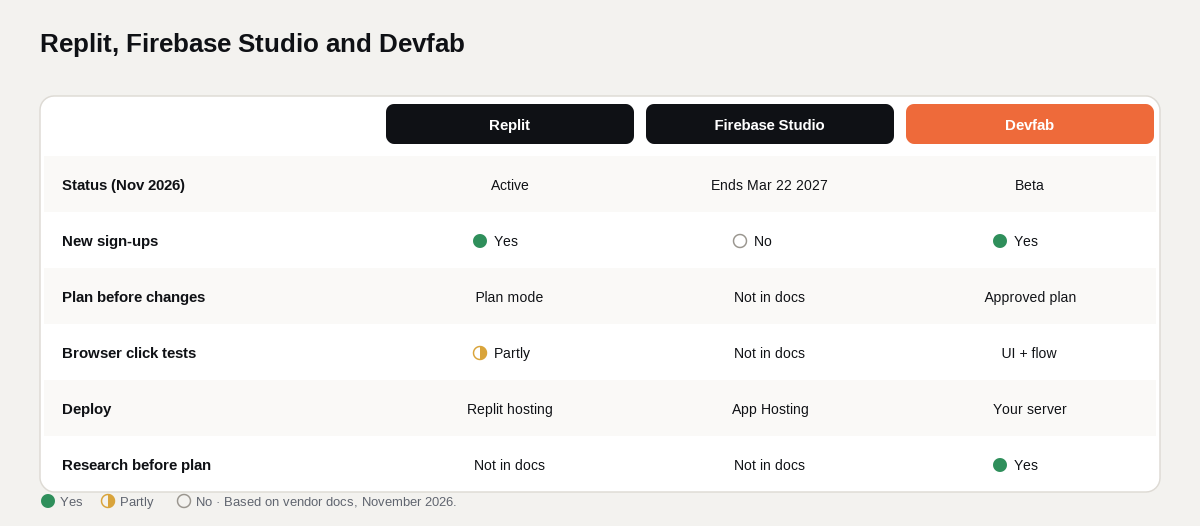
| Aspect | Replit | Firebase Studio | Source |
|---|---|---|---|
| Status | Active (Agent 4) | Closed to new users; shuts down Mar 22, 2027 | Replit Agent; Firebase migration |
| Where it runs | Browser cloud workspace | Browser cloud workspace (Project IDX base) | Replit Agent; Firebase Studio docs |
| Planning | Plan mode writes a task list to approve before changes | Not covered in the docs we checked | Replit Agent |
| Agent | Agent with Free, Power and Max modes; checkpoints for rollback | App Prototyping agent plus Gemini chat for code, tests and bug fixes | Replit Agent; Firebase Studio docs |
| Testing | App Testing clicks through the app in a real browser (Full Stack JS and Streamlit) | Gemini can write tests; Local Emulator Suite | Replit App Testing; Firebase Studio docs |
| Deploy and hosting | Autoscale, Reserved VM, Static and Scheduled deployments; custom domains | Publish to Firebase App Hosting | Replit publish; Firebase Studio docs |
| Templates and stacks | Agent picks the setup from your request | Next.js, React, Angular, Flutter, Android, Flask, Go; Nix customization | Firebase Studio docs |
| Team and admin | SAML SSO, SCIM, groups, admin policies; Enterprise RBAC and audit log streaming | Not covered in the docs we checked | Replit Teams; Replit Enterprise |
| Pricing model | Plans plus effort-based Agent pricing | Free; some integrations need Cloud Billing | Replit pricing; Firebase Studio docs |
Cost model by team size
| Team size | Replit | Firebase Studio |
|---|---|---|
| 1 person | Starter USD 0 with a limited Agent allowance; Core USD 20 per month (USD 18 billed annually), includes USD 20 in credits | No cost for existing users; new sign-ups closed |
| 5 people | Pro USD 100 per month (USD 90 billed annually), USD 100 in credits, up to 15 collaborators | No cost for existing users; new sign-ups closed |
| 25 people | Enterprise, custom pricing, with SSO, SCIM and audit logs | Not available for new teams |
Replit prices as of November 2026 from Replit pricing; plans are priced per account, not stated per user. Paid Agent work is priced by effort. Firebase Studio access is "available at no cost," though App Hosting may need a Cloud Billing account (Firebase Studio docs).
Where Replit wins
- You are starting something new. Replit accepts new users and projects; Firebase Studio does not.
- You want a plan before changes. Plan mode produces a task list you approve before the Agent touches code or data.
- You need different runtime shapes. Always-on VMs, scheduled jobs, autoscale and static sites all deploy from one place.
- Your company needs admin controls. SSO, SCIM, groups and policies on models and publishing are documented.
- You want the app clicked through in a browser. App Testing does that for supported stacks.
Where Firebase Studio wins
- You already have a workspace and no budget. Access stays free until March 22, 2027.
- Your stack is Flutter, Android or Go. Firebase Studio shipped templates for those, plus Nix-based environment setup.
- You are staying on Firebase. Firestore, Auth and App Hosting keep running after the shutdown, and Google's migration paths keep you in its ecosystem.
- You rely on the Local Emulator Suite to test Firebase services before you move.
Switching from one to the other
From Firebase Studio to Replit. Export the workspace as a ZIP, or push it to a Git repository; chat history is not included in the export (Firebase migration guide). In Replit, go to replit.com/import and choose ZIP or GitHub. ZIP files must be 200 MB or smaller, so delete node_modules and build folders first. Secrets, database data and custom domains are not imported, and imports that need Agent work can use credits (Replit import docs).
If you want to stay with Google. The migration guide names Google AI Studio ("Move now", then publish with App Hosting or Cloud Run) and Google Antigravity, a local agent-first IDE. See Google AI Studio vs Firebase Studio for that route.
From Replit to Firebase Studio is not possible for new users.
Where Devfab fits
A forced migration is a good moment to ask what the app needs next. Both tools help you build inside a cloud workspace. In the docs we checked, neither researches the domain before planning or runs a separate QA agent on every ticket before deployment to your own server.
App builders automate the first version. Devfab automates the development lifecycle. Push your Firebase Studio export to GitHub, choose "Work on an existing project", and leave the change box empty. ChainFlow maps which functions and APIs call each other, then suggests three small first tickets. A person approves the plan, and the QA agent runs UI, flow and logic tests. Devfab is in Beta and is not an editor for hands-on coding. See Devfab vs Firebase Studio.
FAQ
Is Firebase Studio shutting down?
Yes. Google announced the sunset on March 19, 2026. New workspace creation and new sign-ups were disabled on June 22, 2026, and Firebase Studio shuts down on March 22, 2027. Remaining data is permanently deleted after that. Firestore, Authentication, App Hosting and already deployed apps keep working.
Can I still start a new project in Firebase Studio?
No. Since June 22, 2026, Firebase Studio no longer allows new workspaces or new sign-ups. Existing users can keep working until the shutdown, and Google points them to Google AI Studio, Google Antigravity or a ZIP export they deploy with the Firebase CLI.
How do I move a Firebase Studio project to Replit?
Export the workspace as a ZIP or push it to a Git repository first. Then go to replit.com/import and choose ZIP or GitHub. ZIP files must be 200 MB or smaller, and secrets, database data and custom domains are not imported. Chat history from Firebase Studio is not included in the export.
Is Replit free?
Replit has a free Starter plan with a limited Agent allowance. As of November 2026, Core is USD 20 per month and Pro is USD 100 per month, each with the same amount in monthly credits, and Enterprise is custom. Paid Agent work is priced by effort.
Read next
- What is an AI software factory?
- Firebase Studio alternatives
- Replit alternatives
- Google AI Studio vs Firebase Studio
- Devfab vs Firebase Studio
Moving off Firebase Studio anyway? Move to a process, not just a new editor. Try Beta
Sources (checked November 2026): Firebase Studio docs; Firebase Studio sunset and project migration; Firebase blog: AI Studio + Firebase integration (Mar 19, 2026); Replit Agent overview; Replit pricing; Replit pricing and plans (docs); Replit App Testing; Replit: Publish your app; Replit Teams; Replit Enterprise; Replit: Import from GitHub or ZIP; Replit changelog (Nov 6, 2026); Dealroom: Replit Series D and Agent 4 (Mar 11, 2026).
Frequently asked questions
Is Firebase Studio shutting down?
Yes. Google announced the sunset on March 19, 2026. New workspace creation and new sign-ups were disabled on June 22, 2026, and Firebase Studio shuts down on March 22, 2027. Remaining data is permanently deleted after that. Firestore, Authentication, App Hosting and already deployed apps keep working.
Can I still start a new project in Firebase Studio?
No. Since June 22, 2026, Firebase Studio no longer allows new workspaces or new sign-ups. Existing users can keep working until the shutdown, and Google points them to Google AI Studio, Google Antigravity or a ZIP export they deploy with the Firebase CLI.
How do I move a Firebase Studio project to Replit?
Export the workspace as a ZIP or push it to a Git repository first. Then go to replit.com/import and choose ZIP or GitHub. ZIP files must be 200 MB or smaller, and secrets, database data and custom domains are not imported. Chat history from Firebase Studio is not included in the export.
Is Replit free?
Replit has a free Starter plan with a limited Agent allowance. As of November 2026, Core is USD 20 per month and Pro is USD 100 per month, each with the same amount in monthly credits, and Enterprise is custom. Paid Agent work is priced by effort.