Short answer: Claude Code wins for most individuals and teams in late 2026: it runs in the terminal, IDEs, desktop and web, with plan mode, managed code review and team admin. Gemini CLI wins when your company already has Gemini Code Assist Standard or Enterprise licenses, or you need an open-source (Apache 2.0) agent you can fork and audit.
You picked a terminal agent because you like working in the shell. Then the ground moved. Google is steering individual users from Gemini CLI to a new, closed Antigravity CLI. Claude Code, meanwhile, spread to desktop, web and mobile. Which one you can still use now depends on what you pay for.
Some developers back Gemini CLI for its open license and long context. Others back Claude Code for its tooling. This page referees with status facts and docs checked on November 20, 2026.
In this comparison:
- Claude Code and Gemini CLI at a glance
- Feature comparison
- Where Claude Code wins
- Where Gemini CLI wins
- Switching from one to the other
Here is how the two compare.
Claude Code and Gemini CLI at a glance
Gemini CLI's audience changed in 2026. On May 19, 2026, Google announced that Gemini CLI is "transitioning" to Antigravity CLI. Since June 18, 2026, Gemini CLI no longer serves Google AI Pro or Ultra users, or free Gemini Code Assist for individuals. Code Assist Standard and Enterprise customers and paid API-key users keep access (Google Developers Blog, May 19, 2026). Google says the new CLI will not have "1:1 feature parity right out of the gate." FOSS Force called the move a "bait and switch," noting that Antigravity CLI "won't be open source" (FOSS Force, May 22, 2026).
Gemini CLI itself is an open-source terminal agent built on Gemini models, licensed under Apache 2.0, with about 107k GitHub stars (GitHub).
Claude Code is active and widening. Anthropic's agentic coding tool reads your codebase, edits files, runs commands and opens pull requests. It runs in the terminal, VS Code and JetBrains, a desktop app, the web and the Claude mobile apps (Claude Code docs). It is aimed at developers and engineering organizations.
Feature comparison
| Aspect | Claude Code | Gemini CLI | Source |
|---|---|---|---|
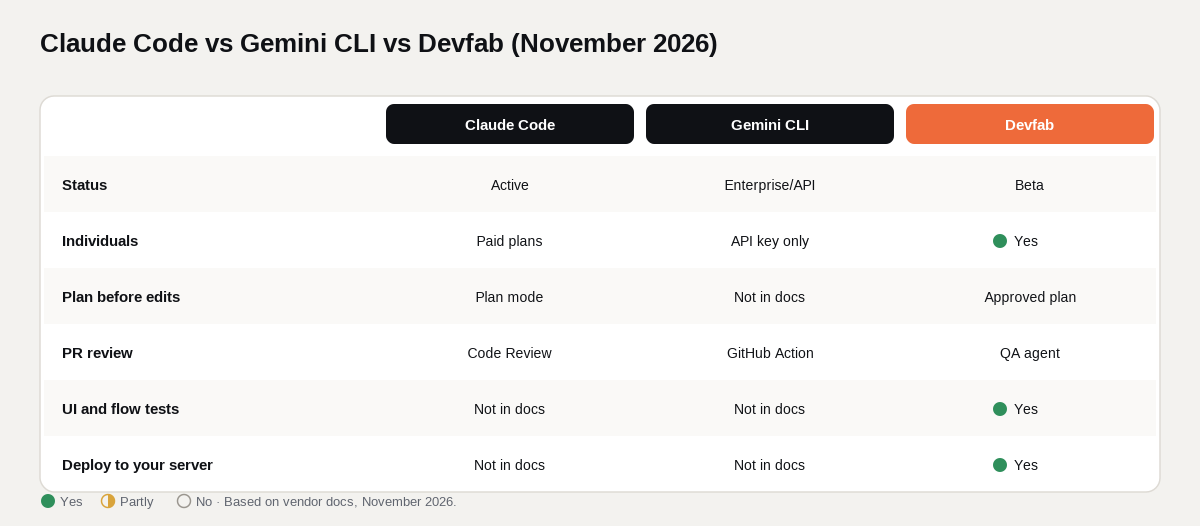
| Status (Nov 2026) | Active | Transitioning to Antigravity CLI; individuals cut off Jun 18, 2026 | Claude Code docs; Google blog |
| Where it runs | Terminal, VS Code, JetBrains, desktop, web, mobile | Terminal (npm, Homebrew, MacPorts, Anaconda); headless mode with text or JSON output | Claude Code docs; GitHub |
| Planning | Plan mode explores the code and proposes an approach for approval | Not covered in the docs we checked | Claude Code costs |
| Agents | Subagents, background agents, experimental agent teams | Checkpointing to save and resume; subagents not covered in the docs we checked | Claude Code docs; GitHub |
| Code review | Managed Code Review on GitHub PRs (Team and Enterprise) | run-gemini-cli GitHub Action for PR reviews and issue triage | Code Review; GitHub |
| Project instructions | CLAUDE.md or AGENTS.md, skills, hooks, MCP | GEMINI.md context files, MCP, sandboxing | Claude Code docs; GitHub |
| Team and admin | SSO, managed settings, spend limits, analytics | Through Code Assist Standard or Enterprise licenses | Enterprise deployment; GitHub |
| Model choice | Claude models only, switchable with /model | Gemini models only; 1M-token context cited for Gemini 3 | Claude Code costs; GitHub |
| Open source | Not described as open source | Apache 2.0 | GitHub |
| Pricing model | Included in paid Claude plans; API pay-as-you-go | Paid API key by usage, or Code Assist and Vertex AI licenses | Claude pricing; GitHub |
Cost model by team size
| Team size | Claude Code | Gemini CLI |
|---|---|---|
| 1 person | Pro USD 20 per month (USD 17 billed annually); Max USD 100; Ultra USD 200 | Paid Gemini API key, billed by usage (Pro, Ultra and free Code Assist no longer served) |
| 5 people | Team Standard USD 25 per user per month (USD 20 annual); Premium USD 125 (USD 100 annual) | Gemini Code Assist Standard or Enterprise licenses, or paid API keys |
| 25 people | Team, or Enterprise at USD 20 per seat per month billed annually (20-seat minimum) plus usage at API rates | Code Assist Enterprise or Vertex AI |
Claude prices as of November 2026 from Claude pricing. Gemini CLI access rules from the Google Developers Blog; Code Assist license prices were not on the pages we opened, so check Google's pricing page.
Where Claude Code wins
- You are an individual developer. Gemini CLI no longer serves Google AI Pro, Ultra or free Code Assist users; Claude Code works on any paid Claude plan.
- You want more than a terminal. Claude Code also runs in IDEs, a desktop app, the web and mobile, and from Slack.
- You want a plan before edits. Plan mode has Claude explore the code and propose an approach you approve.
- You need managed PR review. Code Review runs several agents on each GitHub PR and posts severity-ranked comments.
- Admins need controls. Spend limits, analytics, OpenTelemetry export and managed permissions are documented.
Where Gemini CLI wins
- Your company already pays for Gemini Code Assist Standard or Enterprise. Google says business users don't need to change anything (TechRadar).
- You must fork or audit the agent. Gemini CLI is Apache 2.0; Claude Code is not described as open source.
- You want a large context window on very large files, with the 1M-token window the repo cites for Gemini 3.
- You run it in CI with JSON output. Headless mode emits text, JSON or stream-JSON for scripts.
Switching from one to the other
From Gemini CLI to Claude Code. Move the rules in your GEMINI.md files into CLAUDE.md or AGENTS.md, which Claude Code reads. Re-add MCP servers; both tools support MCP. Replace the run-gemini-cli GitHub Action with Claude Code's GitHub Actions integration or managed Code Review.
From Claude Code to Gemini CLI. Check access first: you need Code Assist Standard or Enterprise or a paid API key. Copy CLAUDE.md rules into GEMINI.md. If you are an individual, Google points you to Antigravity CLI instead, which supports Agent Skills, Hooks, Subagents and plugins (Google Developers Blog).
Where Devfab fits
Both tools help a developer change code in a repo. Neither, in the docs we checked, researches the business domain first, routes a project plan to a client for approval, or ships the app to a server.
Coding agents automate the developer. Devfab automates the development lifecycle. On an existing repo, Devfab's ChainFlow maps which functions and APIs call each other and what is deployed. So a change to a warehouse picking app's "confirm pick" step shows its impact on stock counts, reorder alerts and the packing screen before dev agents touch it. A person approves the plan, and the QA agent runs UI, flow and logic tests.
Devfab is in Beta, with a smaller community, fewer integrations, no hands-on editor, and it needs a GitHub account. See Devfab vs Claude Code and Devfab vs Gemini CLI.
FAQ
Is Gemini CLI being discontinued?
Not for everyone. Google announced on May 19, 2026 that Gemini CLI is transitioning to Antigravity CLI. Since June 18, 2026 it no longer serves Google AI Pro or Ultra users or free Gemini Code Assist for individuals. Code Assist Standard and Enterprise customers and paid API-key users keep access.
Is Gemini CLI open source and Claude Code not?
Gemini CLI is open source under Apache 2.0. The Claude Code docs we checked do not describe it as open source; it is included in paid Claude plans. Google has said its successor, Antigravity CLI, will not be open source.
Which is cheaper for one developer?
For individuals, Gemini CLI now means a paid Gemini API key billed by usage, since Pro, Ultra and free Code Assist users were cut off. Claude Code comes with paid Claude plans, starting with Pro at USD 20 per month as of November 2026.
Can I move my GEMINI.md instructions to Claude Code?
Yes, by hand. Gemini CLI reads per-project GEMINI.md files. Claude Code reads CLAUDE.md or AGENTS.md. Copy the rules into one of those files, then re-add any MCP servers, since both tools support MCP.
Read next
Need more than a terminal agent? Run research, plan, QA and deploy in one place. Try Beta
Sources (checked November 2026): Claude Code docs: Overview; Claude Code docs: Manage costs; Claude Code docs: Code Review; Claude Code docs: Enterprise deployment; Claude pricing; google-gemini/gemini-cli on GitHub; Google Developers Blog: Transitioning Gemini CLI to Antigravity CLI (May 19, 2026); TechRadar (May 20, 2026); FOSS Force (May 22, 2026).
Frequently asked questions
Is Gemini CLI being discontinued?
Not for everyone. Google announced on May 19, 2026 that Gemini CLI is transitioning to Antigravity CLI. Since June 18, 2026 it no longer serves Google AI Pro or Ultra users or free Gemini Code Assist for individuals. Code Assist Standard and Enterprise customers and paid API-key users keep access.
Is Gemini CLI open source and Claude Code not?
Gemini CLI is open source under Apache 2.0. The Claude Code docs we checked do not describe it as open source; it is included in paid Claude plans. Google has said its successor, Antigravity CLI, will not be open source.
Which is cheaper for one developer?
For individuals, Gemini CLI now means a paid Gemini API key billed by usage, since Pro, Ultra and free Code Assist users were cut off. Claude Code comes with paid Claude plans, starting with Pro at USD 20 per month as of November 2026.
Can I move my GEMINI.md instructions to Claude Code?
Yes, by hand. Gemini CLI reads per-project GEMINI.md files. Claude Code reads CLAUDE.md or AGENTS.md. Copy the rules into one of those files, then re-add any MCP servers, since both tools support MCP.