Short answer: OpenAI Codex wins for most teams in November 2026: it comes with ChatGPT plans, runs in the cloud, IDE, CLI and GitHub, and serves individuals and companies alike. Gemini CLI wins for companies already on Gemini Code Assist Standard or Enterprise, or developers on paid Gemini API keys, who want a scriptable open-source terminal agent.
A year ago this was a fair fight between two open-source terminal agents. Then Google cut off individual users, and OpenAI folded Codex into the ChatGPT app. Many comparisons online still describe the old matchup. Who can use each tool is now the first question.
One side says a free CLI on Gemini is the better deal. The other says Codex's cloud agents are worth the plan. This page referees with sources checked on November 20, 2026.
In this comparison:
- OpenAI Codex and Gemini CLI at a glance
- Feature comparison
- Cost model by team size
- Where OpenAI Codex wins
- Where Gemini CLI wins
The status changes come first.
OpenAI Codex and Gemini CLI at a glance
Gemini CLI is in transition. Google announced on May 19, 2026 that Gemini CLI is "transitioning" to Antigravity CLI. Since June 18, 2026 it no longer serves requests for Google AI Pro and Ultra users or free Gemini Code Assist for individuals; Code Assist Standard and Enterprise customers and paid API-key users keep access (Google Developers Blog). FOSS Force called the move a "bait and switch," noting that Antigravity CLI "won't be open source" (FOSS Force).
Gemini CLI itself is a terminal agent under Apache 2.0, with about 107k GitHub stars, GEMINI.md context files, MCP, checkpointing and sandboxing (GitHub).
OpenAI Codex is active and moved house. On July 9, 2026, OpenAI folded the Codex desktop app into a combined ChatGPT desktop app alongside Chat and Work; Codex "remains focused on software development" (The New Stack). Codex docs now live under ChatGPT docs (ChatGPT + Codex docs). It runs in the ChatGPT apps, the Codex CLI, an IDE extension, Codex Cloud environments, GitHub and Slack.
Codex is for engineering teams and individual builders. Gemini CLI, after June 2026, is for enterprise and API customers.
Feature comparison
| Aspect | OpenAI Codex | Gemini CLI | Source |
|---|---|---|---|
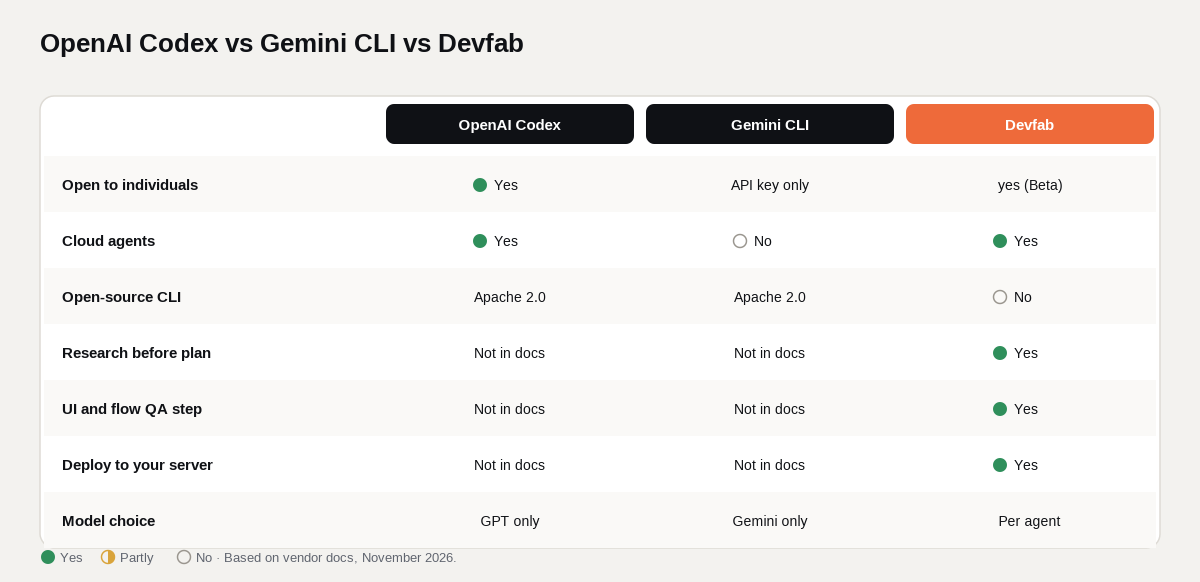
| Who can use it, Nov 2026 | Anyone on a ChatGPT plan, from Free up | Code Assist Standard/Enterprise and paid API-key users | Codex pricing docs; Google Developers Blog |
| Where it runs | ChatGPT desktop, web and mobile; CLI; IDE extension; cloud environments; GitHub; Slack | Terminal; headless mode for scripts; GitHub Action | ChatGPT + Codex docs; GitHub |
| Agent autonomy | Parallel agents; cloud tasks keep running after you close your laptop | Local terminal agent with checkpointing | Codex; GitHub |
| Testing and review | Checks its own work with computer and browser tools; automatic PR review | PR reviews and issue triage through the GitHub Action | Codex; GitHub |
| Safety | Sandboxing (including Windows), approvals and permissions | Sandboxing | ChatGPT + Codex docs; GitHub |
| Deploy and hosting | Not covered in the docs we checked | Not covered in the docs we checked | — |
| Open source | Codex CLI under Apache 2.0 | Apache 2.0 | openai/codex; GitHub |
| Team and admin | Business: admin controls, SAML SSO, MFA; Enterprise: SCIM, EKM, RBAC, audit logs | Through Gemini Code Assist or Vertex AI licenses | Codex pricing docs; GitHub |
| Model choice | OpenAI GPT models | Gemini models only | Codex pricing docs; GitHub |
| Pricing model | Included in ChatGPT plans; credits after limits; or API key at API rates | Usage-based API billing, or Code Assist/Vertex AI licenses | Codex pricing docs; GitHub |
Cost model by team size
| Team size | OpenAI Codex | Gemini CLI | Devfab |
|---|---|---|---|
| 1 person | Plus USD 20 per month; Free and Go (USD 8 per month) get limited desktop access; Pro from USD 100 per month | Paid Gemini API key, billed by usage | Cost logged per task and per project (Beta) |
| 5 people | Business USD 20 per user per month billed annually, or USD 25 billed monthly | API keys, or Gemini Code Assist Standard licenses | Cost logged per task and per project (Beta) |
| 25 people | Business, or Enterprise via sales with flexible credit pricing | Gemini Code Assist Standard or Enterprise, or Vertex AI | Cost logged per task and per project (Beta) |
Codex prices as of November 2026 from the ChatGPT + Codex pricing docs; OpenAI says its usage estimates "are not fixed message limits." Gemini CLI's pricing model is from its GitHub README and Google's transition post; check Google's Code Assist pages for current amounts. Devfab is in Beta and offers predictable cost: cost is logged after each run, per task and per project.
Where OpenAI Codex wins
- You are an individual or a new team. Codex works on any ChatGPT plan; Gemini CLI no longer serves personal Google plans.
- You want work to continue in the cloud. Cloud tasks keep running after you close your laptop and can be picked up from your phone.
- You run several tasks at once. Codex runs multiple agents in parallel and checks its own work with computer and browser tools.
- You already pay for ChatGPT. Codex comes with the plan at no extra seat cost.
- You want admin controls in one place, with SAML SSO on Business and SCIM, RBAC and audit logs on Enterprise.
Where Gemini CLI wins
- Your company holds Gemini Code Assist Standard or Enterprise licenses. Business users keep access and need not change anything.
- You want a lean, scriptable terminal agent. Headless mode outputs text, JSON or stream-JSON for pipelines.
- You work on very large codebases with Gemini. The repo cites a 1M-token context window for Gemini 3.
- You bill everything through Google Cloud and prefer Vertex AI for model access.
Switching from one to the other
From Gemini CLI to Codex. Both work in your repo. Move project rules from GEMINI.md into AGENTS.md, which Codex reads (ChatGPT + Codex docs). Re-add your MCP servers. Swap the run-gemini-cli Action for the Codex GitHub Action, and note that GitHub code review needs a ChatGPT plan, not an API key (Codex pricing docs).
From Codex to Gemini CLI. Confirm you have a Code Assist Standard or Enterprise license or a paid API key first. Then copy AGENTS.md guidance into GEMINI.md and install via npm or Homebrew.
Where Devfab fits
Both tools help developers write and review code. In the docs we checked, neither researches the domain before planning, routes a project plan to a person for approval, runs a separate QA step that clicks through user journeys, or deploys the app to your server.
Coding agents automate the developer. Devfab automates the development lifecycle. Picture a B2B quote tool: the Researcher maps pricing rules, approval steps and similar products; the Planner writes the plan and a person approves the plan; dev agents build with ChainFlow, which shows that changing a discount rule also touches quote PDFs, approvals and invoices; the QA agent runs UI, flow and logic tests. Devfab is in Beta, with fewer integrations, and is not an editor. See Devfab vs Gemini CLI.
FAQ
Can I still use Gemini CLI on a personal Google account?
Mostly not. Since June 18, 2026, Gemini CLI no longer serves Google AI Pro or Ultra users or free Gemini Code Assist users; Google moved them to Antigravity CLI. Gemini Code Assist Standard and Enterprise customers and developers with paid Gemini API keys keep access.
Are both CLIs open source?
Yes. The Codex CLI repository (openai/codex) and the Gemini CLI repository (google-gemini/gemini-cli) are both under the Apache 2.0 license. Gemini CLI's successor for individual users, Antigravity CLI, is not open source.
Is Codex free?
Codex is included in ChatGPT plans, including Free and Go, which get limited access to the desktop app. As of November 2026, Plus is USD 20 per month and adds Codex on the web, CLI, IDE extension and iOS. Usage limits apply on every plan.
Which one is better for CI pipelines?
Both have GitHub Actions. Gemini CLI has a headless mode that outputs text, JSON or stream-JSON and a run-gemini-cli Action. Codex has a GitHub Action and automatic PR review, but with an API key instead of a ChatGPT plan, GitHub code review is not available.
Read next
- What is an AI software factory?
- Gemini CLI alternatives for teams that ship to production (2026)
- Claude Code vs OpenAI Codex
- OpenAI Codex vs Devin
Need more than a coding agent for your next client app? Try Beta
Sources (checked November 2026): OpenAI Codex; ChatGPT + Codex docs; ChatGPT + Codex docs: pricing; GitHub: openai/codex; The New Stack: Codex joins ChatGPT desktop app (Jul 9, 2026); google-gemini/gemini-cli on GitHub; Google Developers Blog: Transitioning Gemini CLI to Antigravity CLI (May 19, 2026); FOSS Force (May 22, 2026).
Frequently asked questions
Can I still use Gemini CLI on a personal Google account?
Mostly not. Since June 18, 2026, Gemini CLI no longer serves Google AI Pro or Ultra users or free Gemini Code Assist users; Google moved them to Antigravity CLI. Gemini Code Assist Standard and Enterprise customers and developers with paid Gemini API keys keep access.
Are both CLIs open source?
Yes. The Codex CLI repository (openai/codex) and the Gemini CLI repository (google-gemini/gemini-cli) are both under the Apache 2.0 license. Gemini CLI's successor for individual users, Antigravity CLI, is not open source.
Is Codex free?
Codex is included in ChatGPT plans, including Free and Go, which get limited access to the desktop app. As of November 2026, Plus is USD 20 per month and adds Codex on the web, CLI, IDE extension and iOS. Usage limits apply on every plan.
Which one is better for CI pipelines?
Both have GitHub Actions. Gemini CLI has a headless mode that outputs text, JSON or stream-JSON and a run-gemini-cli Action. Codex has a GitHub Action and automatic PR review, but with an API key instead of a ChatGPT plan, GitHub code review is not available.