Short answer: Kilo Code wins for nearly every team today: it is active, now owned by Anaconda, runs in VS Code, JetBrains and the CLI, and published a migration path for Roo users. Roo Code wins only if you must stay on its final, unmaintained release while you rebuild custom modes elsewhere.
You ran Roo Code across your developers' VS Code setups. Then the README changed to "shut down." Kilo Code, the project that started as a Roo fork, answered with a migration path for Roo users.
Then Kilo itself changed owners in July 2026. So the real question is not which fork has better modes. It is which tool you can trust with the next year of work. We referee with the vendors' own pages, checked in November 2026.
In this comparison:
- Kilo Code and Roo Code at a glance
- Feature comparison
- Cost model by team size
- Where Kilo Code wins
- Where Roo Code wins
Two status changes drive everything below.
Kilo Code and Roo Code at a glance
Roo Code shut down on May 15, 2026. The README says so, and the repo is archived and read-only (GitHub). The shutdown was announced on April 21, 2026, when Roo had 3 million installs; the team moved to a cloud agent called Roomote (Kilo blog). As of May 2026 Roomote had no public release, per Kilo's comparison page (kilo.ai). Roo was a VS Code extension with Code, Architect, Ask, Debug and custom modes, Apache-2.0, with 24.3k stars on the archived repo (GitHub). It gets no fixes for new VS Code versions, model APIs or security issues (Morph).
Kilo Code was acquired by Anaconda. Anaconda announced the deal on July 15, 2026 and says Kilo "remains available today with no changes to existing products, plans, or support for current users." It plans to bring Kilo's agent features into the Anaconda Platform (Anaconda press release). Kilo is an open-source agent for VS Code and JetBrains, with the Kilo CLI and cloud agents (Kilo docs; Kilo blog). Its VS Code extension was rebuilt on the open-source OpenCode server and became the default on April 2, 2026 (Kilo blog). The pricing page also announces that Kilo Desktop is generally available (Kilo pricing).
Feature comparison
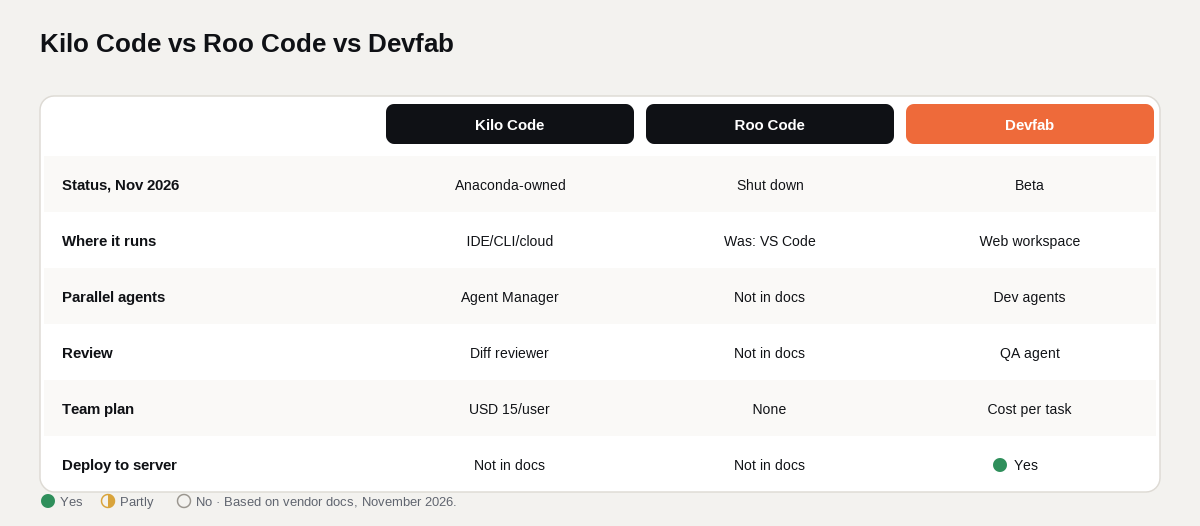
| Aspect | Kilo Code | Roo Code | Source |
|---|---|---|---|
| Status, November 2026 | Active; owned by Anaconda since July 2026 | Shut down May 15, 2026; archived | Anaconda; GitHub |
| Where it runs | VS Code, JetBrains, Kilo CLI, cloud agents, Desktop | Was: VS Code only | Kilo docs; Kilo pricing; GitHub |
| Planning and modes | Modes unified into "Agents"; custom subagents | Was: Code, Architect, Ask, Debug, custom modes | Kilo blog; GitHub |
| Parallel work | Agent Manager tabs, git worktree isolation, parallel subagents | Not covered in the pages we checked | Kilo blog |
| Review | Diff reviewer with line comments; cloud code review | Not covered in the pages we checked | Kilo blog; Kilo pricing |
| Deploy and hosting | Not covered in the docs we checked | Not covered in the pages we checked | — |
| Team and admin | Teams: usage analytics, shared agents, central billing; Enterprise: SSO/OIDC/SCIM, audit logs, model limits | Not applicable | Kilo pricing |
| Model choice | 500+ models from 60+ providers via Kilo Gateway, BYOK, local via Ollama/LM Studio | Not applicable for new setups | Kilo pricing |
| Pricing model | Free extension; usage at provider rates plus 5% on credit purchases; Teams per seat | Not applicable | Kilo pricing |
Cost model by team size
| Team size | Kilo Code | Roo Code |
|---|---|---|
| 1 person | Free & Open Source USD 0, usage billed separately; optional Kilo Pass Starter USD 19, Pro USD 49 or Expert USD 199 per month | Not sold; last release free but unmaintained |
| 5 people | Teams USD 15 per user per month; no credits included | Not sold |
| 25 people | Teams, or Enterprise (custom) with SSO/SCIM, audit logs and model limits | Not sold |
Kilo prices as of November 2026 from Kilo pricing. Cloud agents and code review are billed pay-as-you-go by compute time (Kilo docs).
Where Kilo Code wins
- It is maintained, with a 2026 rebuild, a Desktop app and an owner that says current plans and support continue.
- It runs beyond VS Code: JetBrains, the CLI, and cloud agents, with sessions carried between CLI and VS Code (Kilo blog).
- You want parallel agents. Agent Manager can isolate each agent in its own git worktree.
- You want team controls. Teams and Enterprise add analytics, shared BYOK, SSO, SCIM and audit logs (Kilo pricing).
- You want a guided move. Kilo published a Roo-to-Kilo migration path (Kilo blog).
Weigh the risks too. A June 2026 review notes a crowded market, a broad product range and 1,300+ open GitHub issues (rywalker.com). Anaconda's stated direction is deeper links to its own platform, which may shape the roadmap.
Where Roo Code wins
- You must not change tools this quarter. The final release still sits on the VS Code Marketplace (kilo.ai).
- You want Roo's exact modes, and the community fork Zoo Code keeps that shape under Apache-2.0 (Morph).
- You prefer a tool with no vendor at all, and you will patch a fork yourself.
Switching from one to the other
From Roo Code to Kilo Code. Code stays in your repo. Install Kilo in VS Code or JetBrains, follow Kilo's Roo migration notes, and pick a model route: Kilo Gateway, your own key, or a local model (Kilo pricing). Roo's modes map to Kilo's "Agents"; recreate custom ones as custom agents or subagents. Test with one repo before rolling out to the team.
From Kilo Code to Roo Code. Not advised, since Roo is shut down. If you want Roo's shape, look at Zoo Code instead.
Where Devfab fits
Both tools focus on a developer changing code in an editor. In the docs we checked, neither researches the domain before planning, gets a project plan approved by a person, or deploys.
Coding agents automate the developer. Devfab automates the development lifecycle. For a school portal, Devfab's Researcher maps enrollment terms, best practices and similar portals, then suggests a prototype. A person approves the plan. Dev agents work with ChainFlow, which maps how functions and APIs connect, so a change to sign-up doesn't break class lists or parent emails. The QA agent runs UI, flow and logic tests.
Devfab is in Beta, with a smaller community and fewer integrations, and it is not an editor. See Devfab vs Kilo Code.
FAQ
Is Kilo Code a fork of Roo Code?
Kilo Code originally began as a Roo Code fork. Since April 2, 2026, its VS Code extension has been rebuilt on the open-source OpenCode server, so today it is a different codebase with features Roo never had, such as Agent Manager and cloud agents.
Who owns Kilo Code now?
Anaconda announced it acquired Kilo Code on July 15, 2026. Anaconda says Kilo remains available with no changes to existing products, plans or support for current users, and plans to bring Kilo's agent features into the Anaconda Platform.
How much does Kilo Code cost?
As of November 2026, the extension is free and open source with usage billed separately at provider rates. Teams costs USD 15 per user per month, Enterprise is custom, and optional Kilo Pass credit plans start at USD 19 per month. A 5% fee applies to credit purchases.
Is there an official way to move from Roo Code to Kilo Code?
Kilo published a Roo-to-Kilo migration path after Roo announced its shutdown in April 2026. Roo's own archived README instead recommends Zoo Code and Cline, so compare all three before you move.
Read next
- What is an AI software factory?
- Kilo Code alternatives for teams that ship to production (2026)
- Roo Code alternatives for teams that ship to production (2026)
- Cline vs Roo Code: which should your team pick?
Pick a tool that plans, tests and ships, not just one that edits. Try Beta
Sources (checked November 2026): Anaconda Acquires Kilo Code (Jul 15, 2026); Kilo pricing; Kilo docs: About Plans; The New Kilo Code for VS Code (Kilo blog, Apr 2, 2026); Thank you, Roo (Kilo blog, Apr 21, 2026); Kilo research note (rywalker.com, Jun 2026); RooCodeInc/Roo-Code on GitHub (archived); Roo Code shutdown and Roomote (kilo.ai); Roo Code (2026): Shut Down May 15 (Morph, Oct 25, 2026).
Frequently asked questions
Is Kilo Code a fork of Roo Code?
Kilo Code originally began as a Roo Code fork. Since April 2, 2026, its VS Code extension has been rebuilt on the open-source OpenCode server, so today it is a different codebase with features Roo never had, such as Agent Manager and cloud agents.
Who owns Kilo Code now?
Anaconda announced it acquired Kilo Code on July 15, 2026. Anaconda says Kilo remains available with no changes to existing products, plans or support for current users, and plans to bring Kilo's agent features into the Anaconda Platform.
How much does Kilo Code cost?
As of November 2026, the extension is free and open source with usage billed separately at provider rates. Teams costs USD 15 per user per month, Enterprise is custom, and optional Kilo Pass credit plans start at USD 19 per month. A 5% fee applies to credit purchases.
Is there an official way to move from Roo Code to Kilo Code?
Kilo published a Roo-to-Kilo migration path after Roo announced its shutdown in April 2026. Roo's own archived README instead recommends Zoo Code and Cline, so compare all three before you move.