Short answer: Choose Budibase when an IT team needs self-hosted internal apps, automations and AI agents, with approval policies and an open-source core. Choose Devfab when you deliver custom software to a client: research before the plan, a person approves the plan, agents build and test, and the app deploys to the client's server.
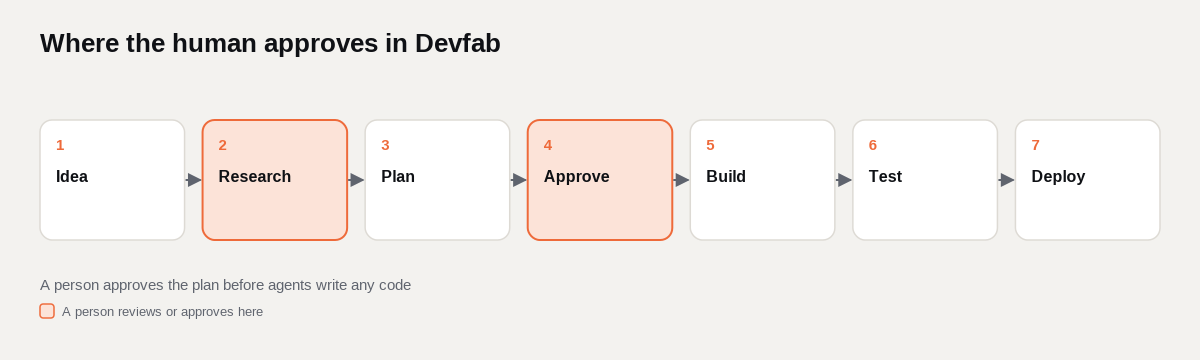
Both products say "a human approves". That sounds like the same promise. It isn't. Budibase puts the approval on agents at work: an agent handling a request stops and asks a person. Devfab puts it on the build: nobody writes code until a person approves the plan. If you run IT for a regulated organization, or deliver apps to one, knowing which layer you need saves a wrong purchase.
In this comparison:
- What each tool is built for
- Switching triggers
- Cost model by team size
- Where Budibase is the better choice
Read it as a referee's notes, with sources.
What each tool is built for
Budibase
Budibase is an open-source platform for IT teams to build AI agents, apps and automations around existing systems. Its homepage says "Built for regulated enterprises" and has pages for the public sector, finance, utilities and manufacturing.
Status: Budibase 4.0 was announced on November 10, 2026. Budibase's 2026 roadmap had set Agents Beta and Chat Alpha for February 2026. Version 4.0 moved agents to "ready for real-world operations". Its plans also appear to have been restructured: a review dated September 2026 listed different tiers from the current pricing page.
What 4.0 includes:
- Agents run Operations with their own instructions, tools, escalation logic and permissions.
- Approval Policies decide when a human must step in. Tool-level permissions let a tool run as the requester or as Admin.
- Testing tools and agent audit logs for the agents.
- Approvals and file submission through Slack and Teams.
- Models through LiteLLM, including open-source models and major public providers.
The wider platform:
- Hosting: Budibase Cloud, or self-host on a private cloud, on-premise or air-gapped, using Docker, Docker Compose, Kubernetes, DigitalOcean or Portainer.
- Licence: the core is GPL v3, client libraries are MPL, and paid features use the Business Source License. The repo has about 28,300 GitHub stars.
- Admin: granular roles, SSO and SCIM; Enterprise adds enforceable SSO and SCIM directory sync.
- Compliance: ISO 27001, Iron Bank container images and GDPR deployment support.
Budibase's main user is an IT team running internal services on its own infrastructure.
Devfab
Devfab is an AI software factory. Its unit of work is a client project, run by seven agents. The Researcher maps the domain first: key terms, best practices and competitors, then suggests a prototype. The Planner writes the plan and a person approves it before the Coordinator creates tickets. Developers work with ChainFlow, which maps which functions and APIs call each other so a change doesn't break connected features. Blueprint draws screens, the QA agent runs UI and flow tests plus logic tests, and Deploy ships to your own server.
Code lives in your own GitHub account (or your organization's). Coding agents automate the developer. Devfab automates the development lifecycle.
Switching triggers
| Trigger | Budibase | Devfab | Source |
|---|---|---|---|
| The client wants a custom product, not an internal tool | Agents, apps and automations around existing systems | Research, approved plan, tickets, QA and deploy for a custom app | Budibase homepage |
| Usage caps stop work | Cloud "actions" are hard monthly limits; a competitor's review says work halts until reset or upgrade | Cost logged after each run, per task and per project | Budibase pricing; Jet Admin review (competitor, Sep 2026) |
| End-user pricing grows with the audience | Cloud charges for added end users; a competitor's review flags this for larger audiences | The app runs on your own server; Devfab logs cost per task and per project | Budibase pricing; Jet Admin review |
| The free edition is too narrow | Community has one workspace, short automation log retention, and no Budibase AI | Workspaces per client project, with roles and permissions | Budibase pricing |
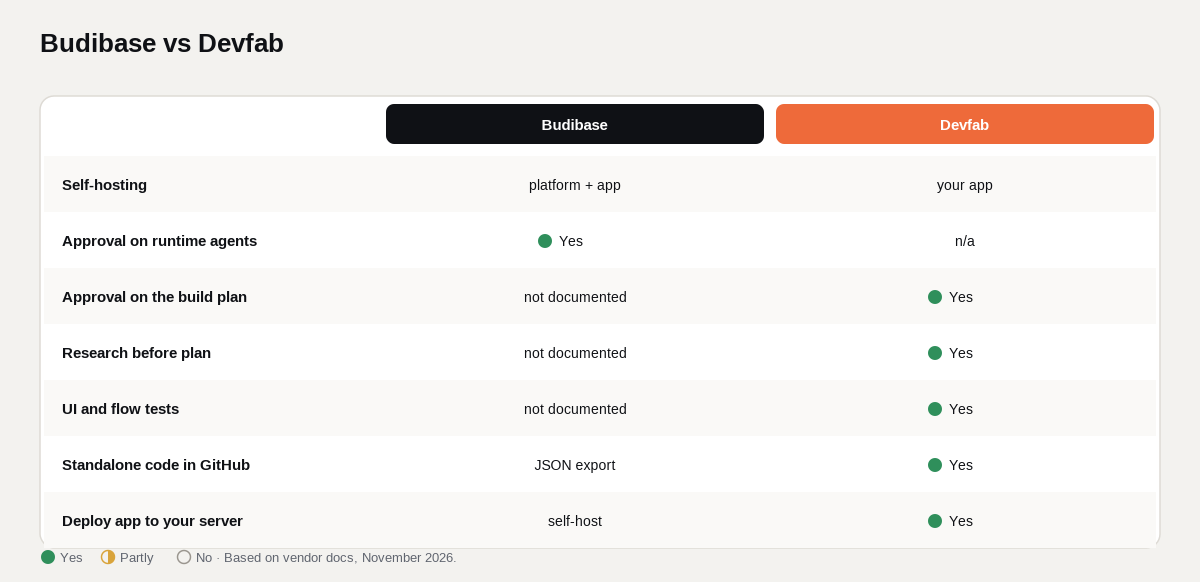
| You need standalone code | Exports are JSON files that import into another Budibase install | Source code in your own GitHub account | Budibase docs |
| Self-hosted and Cloud differ | A competitor's review says feature availability may differ between them | One delivery workflow; Deploy ships to your own server | Jet Admin review |
Cost model by team size
| Team size | Budibase | Devfab |
|---|---|---|
| 1 person | Free self-hosted Community plan, bring your own AI key; or a Cloud subscription | Cost logged per task and per project (Beta) |
| 5 people | Cloud subscription with included creators, end users, actions and AI credits; add-on creators and end users | Cost logged per task and per project (Beta) |
| 25 people | Cloud with add-ons and credit packs, or custom Enterprise (self-hosted, air-gapped option, Budibase AI) | Cost logged per task and per project (Beta) |
The Community plan allows unlimited users, apps, agents and automations when you self-host. Check Budibase's pricing page for current amounts, since the plans changed during 2026.
Moving from Budibase to Devfab
Most teams keep Budibase for internal operations and use Devfab for client products. To rebuild one Budibase app as standalone code:
- Export the workspace. In Budibase, Settings > General > Export gives a JSON file with screens, query configs and, optionally, table rows. Treat it as sensitive, since data source settings are included.
- Pick your path in Devfab. If the app's backend or API already lives in GitHub, choose "Work on an existing project", pick the repo and leave the change box empty. ChainFlow maps the code first and suggests three small first tickets. Otherwise choose "Start a new project".
- Describe the app and attach screenshots and the data model from the export as the spec.
- Review the research, then approve the plan. Human in the loop is the default.
- Let the QA agent test UI, user flows and logic, with review before Done if you turn it on.
- Deploy to the client's own server, with a custom domain if needed.
Where Budibase is the better choice
- The platform must be self-hosted, even air-gapped, with an open-source core and ISO 27001 behind it.
- You need agents that handle requests with rules for when a person signs off, inside Slack or Teams.
- IT wants its own models, such as open-source models behind an OpenAI-compatible endpoint through LiteLLM.
- Many internal users and no budget. The self-hosted Community plan has unlimited users.
- The work is internal operations: service portals, approvals and data tables on existing systems.
Where Devfab is the better choice
- You deliver custom software to clients and want the same steps every time: research, approved plan, tickets, QA, deploy, docs.
- The approval you need is on scope. A client approves the plan before agents build.
- You need a test report. The QA agent clicks through screens and user journeys and runs logic tests.
- The client keeps the code in their GitHub, and the app runs on their server.
- You change an existing codebase. ChainFlow shows what a change touches, such as checkout affecting payments and notifications.
- You track delivery: Kanban and Gantt views, a Team Delivery Report and cost per task.
Devfab's honest limits: it is new and in Beta, with a smaller community and fewer integrations than Budibase. It is a delivery tool, not a runtime for internal agents in Slack or Teams, and it is not an editor for hands-on coding. It needs a GitHub account. For an internal approval workflow, Budibase is the shorter path.
FAQ
What changed in Budibase 4.0?
Budibase announced 4.0 on November 10, 2026. It moved agents to what Budibase calls ready for real-world operations, with Approval Policies for when a human must step in, tool-level permissions, testing tools, agent audit logs, and approvals and file submission through Slack and Teams.
Both tools talk about human approval. What is the difference?
Budibase approval policies decide when a person must approve an action taken by an agent running inside your app. Devfab's approval comes earlier: a person approves the plan before agents build the app. One governs operations, the other governs delivery.
Can I move a Budibase app into Devfab?
Not directly. Budibase exports a workspace as a JSON file that imports into another Budibase installation. To rebuild an app as standalone code, start a new Devfab project and attach the export's screens and data model as the spec.
Which is better for regulated clients?
If the client must self-host the platform, including air-gapped, and wants an open-source core with ISO 27001, Budibase fits. If the client wants custom code in their GitHub, a QA report and deployment to their own server, Devfab fits.
Read next
- What is an AI software factory?
- Budibase alternatives for teams that ship to production (2026)
- Appsmith vs Budibase: which should your team use in 2026?
- Human-in-the-loop software development: where people must stay involved
See plan approval and QA on a real client project. Book a Devfab demo
Sources (checked November 13, 2026): Budibase homepage; Budibase pricing; Introducing Budibase 4.0 (Nov 10, 2026); Budibase 2026: the AI workflow toolkit (Dec 2025); Budibase on GitHub; Budibase docs: export and import workspaces; Budibase Review 2026 (Jet Admin, a competitor, Sep 2026).
Frequently asked questions
What changed in Budibase 4.0?
Budibase announced 4.0 on November 10, 2026. It moved agents to what Budibase calls ready for real-world operations, with Approval Policies for when a human must step in, tool-level permissions, testing tools, agent audit logs, and approvals and file submission through Slack and Teams.
Both tools talk about human approval. What is the difference?
Budibase approval policies decide when a person must approve an action taken by an agent running inside your app. Devfab's approval comes earlier: a person approves the plan before agents build the app. One governs operations, the other governs delivery.
Can I move a Budibase app into Devfab?
Not directly. Budibase exports a workspace as a JSON file that imports into another Budibase installation. To rebuild an app as standalone code, start a new Devfab project and attach the export's screens and data model as the spec.
Which is better for regulated clients?
If the client must self-host the platform, including air-gapped, and wants an open-source core with ISO 27001, Budibase fits. If the client wants custom code in their GitHub, a QA report and deployment to their own server, Devfab fits.