Short answer: Zed wins when developers want a fast, open-source editor where AI stays optional, with any model or outside agent and real-time pair programming. Devfab wins when an agency needs client projects run end to end: domain research, a plan someone approves, tickets, a QA agent, deployment to your server and cost per project.
You switched to Zed because speed matters to you. The editor opens instantly, and AI shows up only when you call it. But the client project around your editor is still slow: plans in docs, QA by hand, deploys on a Friday night.
Editor fans say a fast tool and good agents are enough. Others say delivery needs its own system. Here is where each view holds up.
In this comparison:
- What each tool is built for
- Switching triggers
- Cost model by team size
- Where Zed is the better choice
- Where Devfab is the better choice
Pick the section you need.
What each tool is built for
Zed
Zed calls itself "The world's fastest IDE. Open source. AI optional." (Zed). Status, November 2026: Zed 1.0 shipped on April 29, 2026, along with Zed for Business (Zed blog). On August 12, 2026, the same company launched Delta, a separate multiplayer agent-coding app, in private beta; a public beta post followed on September 16 (Zed blog).
What Zed brings:
- Native desktop editor for macOS, Linux and Windows. There is no web version yet (GitHub).
- Agent panel: describe a task and the agent finds context, edits files and keeps going until done. Changes appear in an editable unified diff that you accept or reject before committing (Zed agentic).
- Outside agents: through the Agent Client Protocol, Zed can host Claude Agent, Codex, OpenCode and Cursor, several in parallel (Zed 1.0).
- Edit predictions: Zeta predicts your next edit "at keystroke granularity" and is open-weight and open-data (Zed agentic).
- Model choice: Zed-hosted models, bring-your-own-key from many providers, and local models through Ollama or LM Studio (Zed pricing).
- Collaboration: Git integration, SSH remoting, a debugger and real-time multiplayer editing (Zed 1.0).
- License: GPL-3.0-or-later, with Apache-2.0 components where marked (GitHub).
Zed's main user is a developer who codes by hand and wants AI on call, not in charge.
Devfab
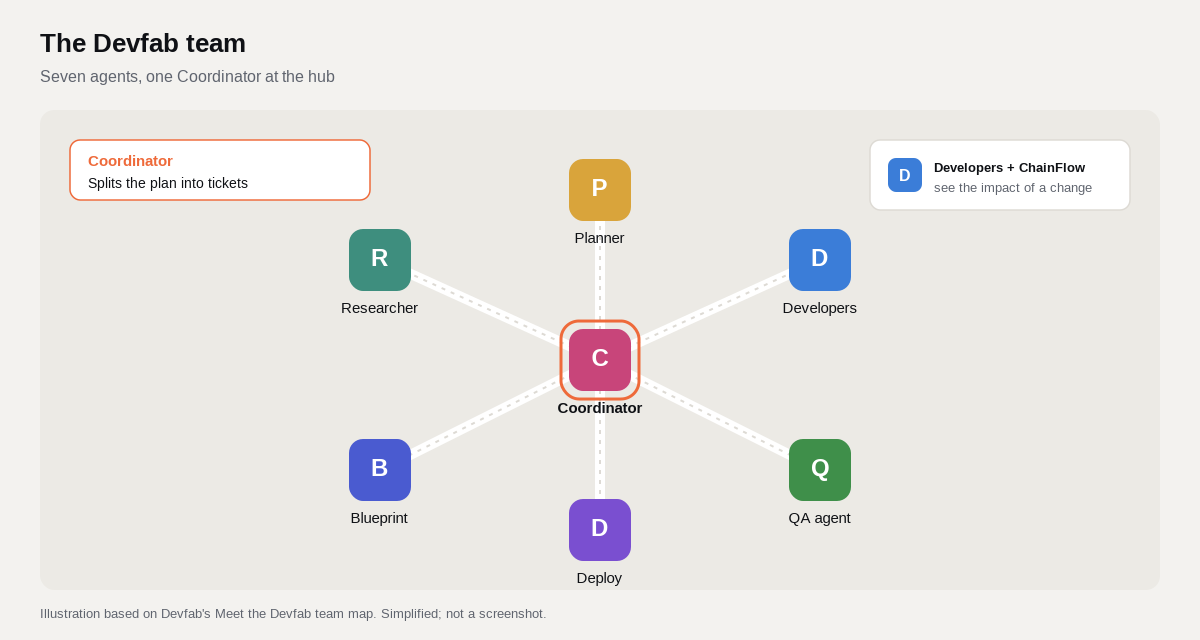
Devfab is an AI software factory. It doesn't replace your editor; it runs the project around it. Seven agents share the work:
- Researcher: learns the client's industry first, with key terms, best practices and competitors, then suggests a prototype.
- Planner and Coordinator: the Planner publishes a plan, a person approves it, and the Coordinator creates tickets and assigns dev agents.
- Developers with ChainFlow: ChainFlow maps which functions and APIs call each other and what is deployed, so a change doesn't break connected features.
- Blueprint, QA agent and Deploy: screens, then UI, flow and logic tests, then shipping to your own server.
Coding agents automate the developer. Devfab automates the development lifecycle.
Switching triggers
| Trigger | Zed | Devfab | Source |
|---|---|---|---|
| Business team needs SSO | "SSO, SAML, and SCIM are planned but not currently available" | Roles and workspace permissions | Zed pricing |
| Clients and PMs can't join in an editor | Desktop app only; no web version yet | Non-developers approve plans and read QA reports in a workspace | GitHub |
| App must be hosted and deployed | Editor only; no hosting or deploy features described | Ship to production on your own server; custom domain optional | Zed |
| Admin controls must cover all AI use | Business controls apply only to Zed's hosted services | Choose the model for each agent or keep Devfab's default | Zed pricing |
| Every agent change needs a developer | Diffs are accepted or rejected by the developer | Approve the plan; QA agent can review before Done | Zed agentic |
Cost model by team size
| Team size | Zed | Devfab |
|---|---|---|
| 1 person | Free Personal plan (your own keys or outside agents, no hosted AI), or Pro monthly with unlimited edit predictions, a small included token credit and hosted usage at API list price plus 10% | Cost logged per task and per project (Beta) |
| 5 people | Business per seat, no minimum seat count; hosted AI at standard usage rates, or bring your own keys | Cost logged per task and per project (Beta) |
| 25 people | Business per seat, with order forms at 25+ seats; SSO, SAML and SCIM not yet available | Cost logged per task and per project (Beta) |
Zed's pricing model as of November 2026, from Zed's pricing page. Check it for current amounts. Devfab: predictable cost; cost is logged after each run, per task and per project; Devfab is in Beta.
Moving from Zed to Devfab
You don't leave Zed. It stays your editor, and Devfab works on the same repository.
- Push the repo to GitHub. Zed's Git integration works with any remote; Devfab needs a repository in your own GitHub account or your organization's.
- In Devfab, choose "Work on an existing project" and pick the repository.
- Leave the change box empty. ChainFlow maps the code first and suggests three small first tickets.
- Approve the plan. The Planner publishes it with a "Your turn" banner; the Coordinator then creates tickets.
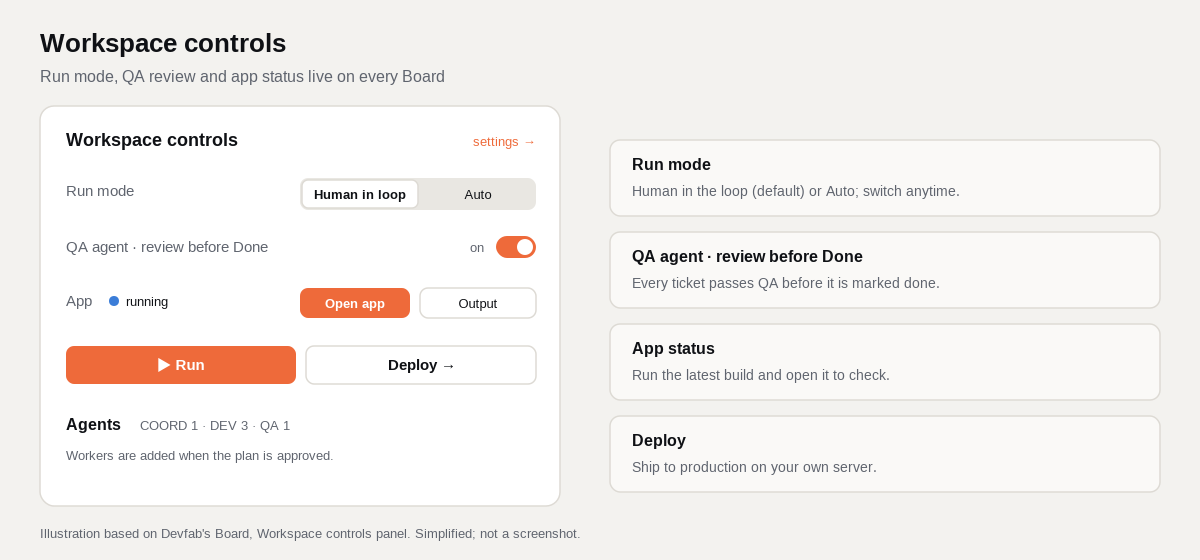
- Switch on "QA agent · review before Done". The QA agent runs UI, flow and logic tests on each ticket.
- Pull and review in Zed. Developers keep reading and editing the code in their editor.
Where Zed is the better choice
- You code by hand every day and want a fast native editor where AI is optional.
- Open source matters: a GPL editor plus open-weight edit predictions.
- You want any agent or model: bring-your-own-key, local models, or outside agents through ACP.
- Pair programming in real time between people, and people and agents, in one editor.
- You need a debugger and SSH remoting in the same tool as your AI.
Where Devfab is the better choice
- Research before the plan. The Researcher learns the client's domain before tickets exist.
- A plan that someone outside engineering approves, turned into tickets with Kanban and Gantt views.
- Impact checks on existing apps. ChainFlow shows which functions, APIs and deployed parts a change touches.
- Separate QA. UI and flow tests click through screens and user journeys; logic tests check rules.
- Delivery to the client's server, with code in your GitHub account or theirs, plus blueprints and user manuals.
- Cost per project, logged after each run, per task and per project.
Devfab's honest limits: it is new and in Beta, with a smaller community and fewer integrations than Zed. It is not an editor, has no debugger and no real-time pair editing. It is not open source, and it needs a GitHub account.
FAQ
Is Devfab a code editor like Zed?
No. Zed is a native code editor for macOS, Linux and Windows with an agent panel, edit predictions and real-time collaboration. Devfab is a software factory: it runs research, an approved plan, tickets, a QA agent and deployment around a repository in your own GitHub account. Developers can keep Zed as their editor on the same repo.
Zed can host Claude Agent, Codex and other agents. Why add Devfab?
Zed's Agent Client Protocol lets you run outside agents, several in parallel, inside the editor. Each one still works on what a developer asks for. Devfab adds the steps around the code: domain research, a plan a person approves, a Coordinator that turns it into tickets, UI and flow tests by a QA agent, and deployment to your own server.
Does Zed support SSO for business teams?
Not yet. Zed's pricing page says SSO, SAML and SCIM are planned but not currently available. The Business plan does offer org-wide AI policies, spend visibility and role-based access for Zed's hosted services.
What is Delta, and does it change this comparison?
Delta is a separate app from the Zed team, built on DeltaDB, that keeps agent conversations and code edits together between git commits, with cloud runners and shared threads. It entered private beta on August 12, 2026. It is still a developer tool, so the comparison with a delivery lifecycle holds.
Read next
- What is an AI software factory?
- Zed vs Cursor: which should your team use in 2026?
- AI IDE vs CLI coding agent: which fits how you work?
- Open-source vs commercial AI coding agents: how to choose
Keep your editor. Let Devfab run the project. Book a Devfab demo
Sources (checked November 13, 2026): Zed homepage; Zed pricing; Zed agentic editing; Zed is 1.0 (Zed blog, Apr 29, 2026); Introducing Delta (Zed blog, Aug 12, 2026); zed-industries/zed on GitHub.
Frequently asked questions
Is Devfab a code editor like Zed?
No. Zed is a native code editor for macOS, Linux and Windows with an agent panel, edit predictions and real-time collaboration. Devfab is a software factory: it runs research, an approved plan, tickets, a QA agent and deployment around a repository in your own GitHub account. Developers can keep Zed as their editor on the same repo.
Zed can host Claude Agent, Codex and other agents. Why add Devfab?
Zed's Agent Client Protocol lets you run outside agents, several in parallel, inside the editor. Each one still works on what a developer asks for. Devfab adds the steps around the code: domain research, a plan a person approves, a Coordinator that turns it into tickets, UI and flow tests by a QA agent, and deployment to your own server.
Does Zed support SSO for business teams?
Not yet. Zed's pricing page says SSO, SAML and SCIM are planned but not currently available. The Business plan does offer org-wide AI policies, spend visibility and role-based access for Zed's hosted services.
What is Delta, and does it change this comparison?
Delta is a separate app from the Zed team, built on DeltaDB, that keeps agent conversations and code edits together between git commits, with cloud runners and shared threads. It entered private beta on August 12, 2026. It is still a developer tool, so the comparison with a delivery lifecycle holds.