Short answer: Choose an AI IDE (Cursor, Zed, JetBrains with Junie, Kiro) when you want inline suggestions, visual diffs and a debugger while you code. Choose a CLI coding agent (Claude Code, Codex CLI, OpenCode, Aider) when you want to script the agent, run it in CI or on a server, and review its work as diffs or pull requests.
You read one thread saying the terminal won, and another saying nobody serious leaves the editor. Both camps have a point, and in 2026 most vendors sell both surfaces anyway. The real question is not which tool is smarter. It is where you review the agent's work, and where the agent has to run.
In this guide, you'll learn:
- Definitions
- Side by side
- When to choose an AI IDE
- When to choose a CLI coding agent
- Where an AI software factory fits
Here's how the two compare, with sources.
Definitions
AI IDE. A code editor with AI built in: completions, chat and an agent that edits files while you watch. Cursor pairs its desktop editor with an agent, Plan Mode and cloud agents. Zed calls itself "The world's fastest IDE. Open source. AI optional." Its agent panel shows changes in an editable unified diff that you accept or reject. JetBrains Junie works inside all JetBrains IDEs and uses the IDE's semantic index, build configurations, test runners and debugger. Kiro offers an IDE built around specs: requirements, design and tasks before the code.
CLI coding agent. An agent you run in a terminal. You give it a task; it reads the codebase, edits files, runs commands and reports back. Claude Code's CLI does this and also stages changes, writes commit messages and opens pull requests. OpenCode is an MIT-licensed agent with a terminal UI and 200+ model providers. Aider edits files in your local git repo and commits changes automatically. The OpenAI Codex CLI is open source under Apache-2.0.
The line is blurry now. Cursor ships a CLI that runs headless in CI. Claude Code has VS Code and JetBrains extensions, a desktop app and a web version. Junie has a CLI that runs without an IDE. Kiro is offered as an IDE, a CLI, web and mobile. GitHub Copilot runs in IDEs, in Copilot CLI and in a desktop app. So you are often choosing a surface, not a vendor.
Side by side
| Aspect | AI IDE | CLI coding agent |
|---|---|---|
| Where you review changes | On screen as diffs you accept or reject (Zed's editable diff) | In the terminal, then as git diffs or pull requests |
| Inline completions | Yes: Cursor's editor, Zed's Zeta edit predictions "at keystroke granularity" | No; works task by task |
| Runs in CI or headless | Through the vendor's separate CLI | Built for it: Gemini CLI outputs text, JSON or stream-JSON; Cursor CLI and Cline CLI run headless |
| Scripting and automation | Limited to the editor's features | Pipe, script and schedule (Claude Code cloud scheduled tasks) |
| Debugging | IDE debugger; Junie's Debug mode sets breakpoints and inspects runtime state | Reads logs and test output |
| Remote servers | Zed supports SSH remoting | Runs anywhere you have a shell |
| Context | IDE index and open files (Junie uses the semantic index) | Repo maps (Aider) and project files such as CLAUDE.md or GEMINI.md |
| Getting started | Familiar for most developers | Assumes terminal comfort; a 2026 review calls OpenCode's learning curve steeper than Claude Code's |
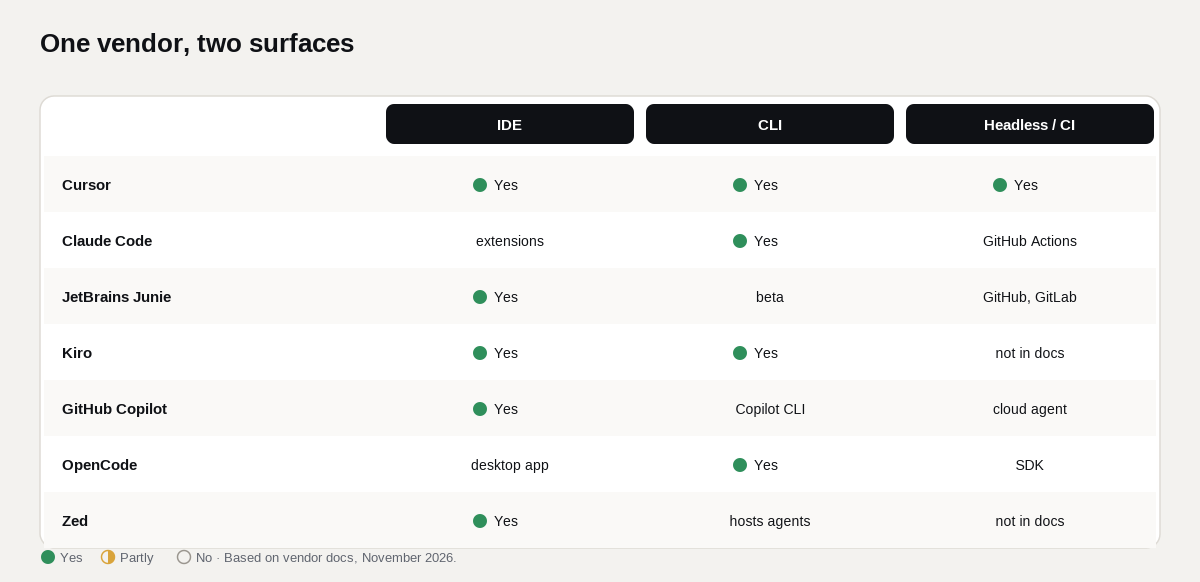
A bridge worth knowing: the Agent Client Protocol (ACP). Zed can host Claude Agent, Codex, OpenCode and Cursor as external agents, and Cline runs in Zed and Neovim through ACP. You can keep your editor and swap the agent.
When to choose an AI IDE
An AI IDE is the better choice when:
- You write a lot of code by hand. Completions and next-edit predictions (Cursor's editor, Zed's Zeta) help between agent tasks, which a CLI agent doesn't offer.
- You want to see every change before it lands. Zed shows agent edits as an editable unified diff you accept or reject before committing.
- You debug with breakpoints. Junie's Debug mode starts debug sessions, sets breakpoints and inspects runtime state, in IntelliJ IDEA Ultimate.
- You work in a JetBrains or VS Code shop. Junie uses the IDE's test runners and index; Cursor lists JetBrains and Xcode among its integrations.
- You pair with other people. Zed has real-time multiplayer collaboration in the editor.
- Your team is new to agents. An editor is a familiar place to watch what the agent does.
When to choose a CLI coding agent
A CLI coding agent is the better choice when:
- The agent must run in CI or on a schedule. Claude Code integrates with GitHub Actions and GitLab CI/CD; Gemini CLI has a GitHub Action for PR reviews and issue triage; Junie CLI runs from GitHub and GitLab issues.
- You want to script it. Headless modes and structured output let you pipe an agent into your own tools.
- You work on servers or in containers. A terminal agent runs wherever you have a shell, without a desktop editor.
- You use a different editor. Aider's watch mode responds to AI comments you add in any editor, and OpenCode works alongside whatever you already use.
- You want open source and model freedom. OpenCode (MIT), Aider and the Codex CLI (Apache-2.0) are open source. OpenCode and Aider work with many providers, including local models.
- You run several tasks in parallel. OpenCode supports multiple parallel agents on one project; Claude Code has subagents and background agents.
One caution: CLI tools can change under you. Google moved individual Gemini CLI users to its Antigravity CLI in 2026, and since June 18, 2026 Gemini CLI no longer serves Google AI Pro or Ultra users. Aider's last release was in February 2026.
Many teams use both
A common setup: an AI IDE on each developer's laptop for daily coding, and a CLI agent in CI for repeat jobs such as pull request review, issue triage and fixing failing tests. Claude Code and Junie cover both patterns from one vendor, and Cursor pairs its editor with a headless CLI. If you use one vendor for both surfaces, check that project instructions carry over. Claude Code reads CLAUDE.md (or AGENTS.md) wherever it runs, and Kiro supports AGENTS.md too.
Where an AI software factory fits
IDE or terminal, both put an agent next to one developer working on one task. Neither plans the project, tests user journeys across the app, or deploys and documents it. Coding agents automate the developer. Devfab automates the development lifecycle.
Devfab is an AI software factory, and it works alongside either surface on the same repository in your own GitHub account:
- Research before the plan. The Researcher maps the domain (key terms, best practices, competitors), then the Planner writes a plan a person approves.
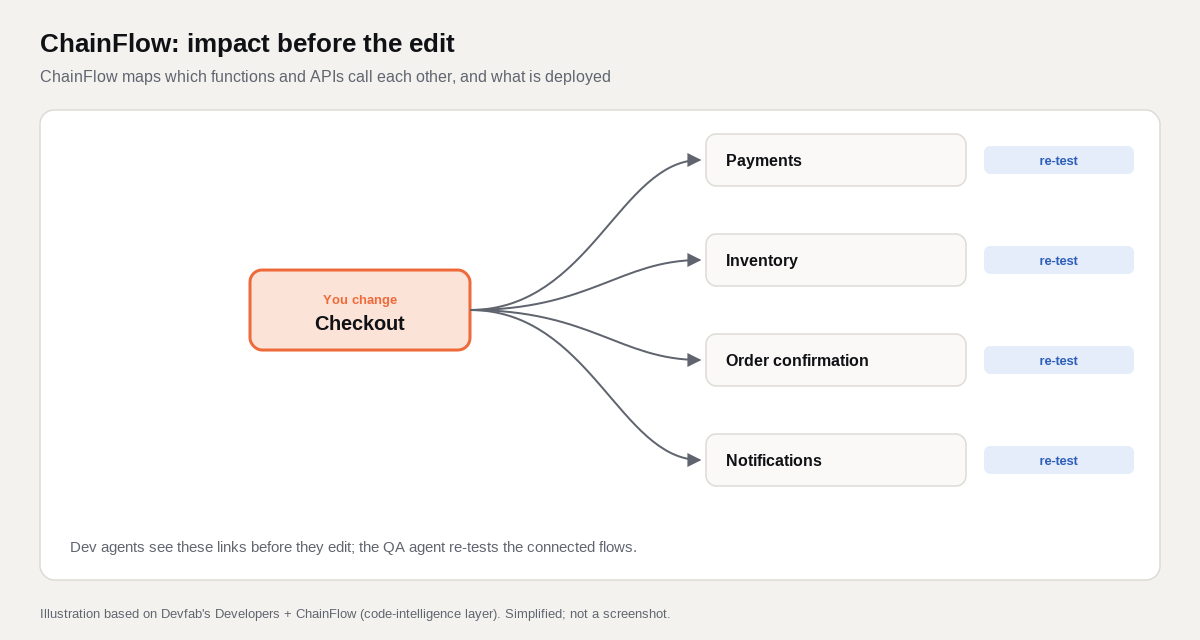
- ChainFlow. Devfab maps which functions and APIs call each other and what is deployed. A change to checkout can affect payments, inventory, order confirmation and notifications, and dev agents see that before they edit.
- QA agent. A separate agent runs UI and flow tests (screens and user journeys clicked end to end) plus logic tests.
- Deploy and docs. Ship to production on your own server, with blueprints, prototypes and user manuals.
You can choose the model for each agent or keep Devfab's default, and cost is logged after each run, per task and per project. Honest limits: Devfab is new and in Beta, with a smaller community and fewer integrations. It is neither an IDE nor a CLI, so developers keep their editor or terminal agent for hands-on work, and it needs a GitHub account.
FAQ
What is the difference between an AI IDE and a CLI coding agent?
An AI IDE puts the agent inside a code editor, where you see suggestions, diffs and the debugger on screen. A CLI coding agent runs in the terminal: you give it a task, it reads and edits files and runs commands, and you review the result as a diff or pull request. Many vendors now offer both.
Is a CLI coding agent better than an AI IDE?
Not in general. A CLI agent is better for scripting, running in CI and working on remote servers. An AI IDE is better for inline completions, visual diff review and debugging. Pick by how you review changes and where the agent must run.
Can I use a CLI agent inside my editor?
Often, yes. Zed hosts Claude Agent, Codex, OpenCode and Cursor through the Agent Client Protocol, Cline can run in Zed and Neovim through the same protocol, and Claude Code has VS Code and JetBrains extensions.
Which CLI coding agents are open source?
OpenCode (MIT), Aider (Apache-2.0), the OpenAI Codex CLI (Apache-2.0) and Gemini CLI (Apache-2.0) are open source. Note that Google is moving individual Gemini CLI users to its Antigravity CLI, which it says won't be open source.
Read next
- What is an AI software factory?
- AI software factory vs AI coding tools: which does your team need?
- Cursor vs Claude Code
- Zed vs Cursor
- OpenCode vs Claude Code
- Gemini CLI alternatives
Keep your editor or your terminal. Add the lifecycle around it. Try Beta
Sources (checked November 13, 2026): Cursor docs; Cursor Plan Mode; Zed homepage; Zed agentic editing; Zed is 1.0 (Zed blog); Junie agent help; Junie out of beta (JetBrains blog); Junie product page; Kiro; Kiro spec concepts; Claude Code overview; GitHub Copilot features; OpenAI Codex docs; openai/codex on GitHub; OpenCode; anomalyco/opencode on GitHub; OpenCode research note (rywalker.com); Aider documentation; aider-chat on PyPI; google-gemini/gemini-cli on GitHub; Transitioning Gemini CLI to Antigravity CLI (Google Developers Blog); Gemini CLI and Antigravity (FOSS Force); Cline docs overview.
Frequently asked questions
What is the difference between an AI IDE and a CLI coding agent?
An AI IDE puts the agent inside a code editor, where you see suggestions, diffs and the debugger on screen. A CLI coding agent runs in the terminal: you give it a task, it reads and edits files and runs commands, and you review the result as a diff or pull request. Many vendors now offer both.
Is a CLI coding agent better than an AI IDE?
Not in general. A CLI agent is better for scripting, running in CI and working on remote servers. An AI IDE is better for inline completions, visual diff review and debugging. Pick by how you review changes and where the agent must run.
Can I use a CLI agent inside my editor?
Often, yes. Zed hosts Claude Agent, Codex, OpenCode and Cursor through the Agent Client Protocol, Cline can run in Zed and Neovim through the same protocol, and Claude Code has VS Code and JetBrains extensions.
Which CLI coding agents are open source?
OpenCode (MIT), Aider (Apache-2.0), the OpenAI Codex CLI (Apache-2.0) and Gemini CLI (Apache-2.0) are open source. Note that Google is moving individual Gemini CLI users to its Antigravity CLI, which it says won't be open source.