Short answer: Zoho Creator wins when a business wants low per-user pricing, native mobile apps for every internal app, and tight links to Zoho CRM or Books. Devfab wins when an agency or IT team must deliver a custom app as code in its own GitHub, researched, plan-approved, tested on UI and user flows, and deployed to its own server.
Your client asked for a permit tracker. Zoho Creator could have a first version up quickly. Then the client asks who owns the code, and whether it can run on their own servers.
One camp says low-code is the sensible default for business apps. The other says client work should end in a repository the client controls. This page compares both honestly, using Zoho's pages checked in November 2026.
In this comparison:
- What each tool is built for
- Switching triggers
- Cost model by team size
- Where Zoho Creator is the better choice
- Where Devfab is the better choice
The answer depends on who maintains the app next year.
What each tool is built for
Zoho Creator
Zoho Creator is Zoho's low-code platform for business apps, workflows and AI agents, built with prompts, visual tools or code. Status: active. Zoho claims 6M+ users and 7M+ apps (Zoho Creator).
- AI agents across the build. Zia builds from natural-language requests. A Plan Agent writes a business requirement document, a Build Agent adds modules and workflows with review of each change, and a Test Agent generates and runs test cases and is described as self-healing broken tests (same source).
- Native mobile by default. Every app gets native iOS and Android versions (same source).
- Flexible hosting. Apps can run on Zoho Cloud, AWS, Azure, GCP, on-premise or hybrid (same source).
- Model choice. Zoho's native GenAI, or bring your own key for OpenAI, Google or Anthropic, plus MCP access (same source).
- Security. Roles and permissions, MFA, encryption and an audit trail; SAML SSO is an add-on (Zoho Creator pricing).
- AI history. CoCreator, announced in May 2025, added idea-to-app from text, voice or requirement docs at no extra fee to subscribers (IT Brief).
It is built for businesses, especially those already on Zoho, that want many internal apps without owning a codebase.
Devfab
Devfab is an AI software factory in the Autonomous Software Lifecycle category. Seven agents run each project: Researcher, Planner, Coordinator, Developers, Blueprint, QA agent and Deploy.
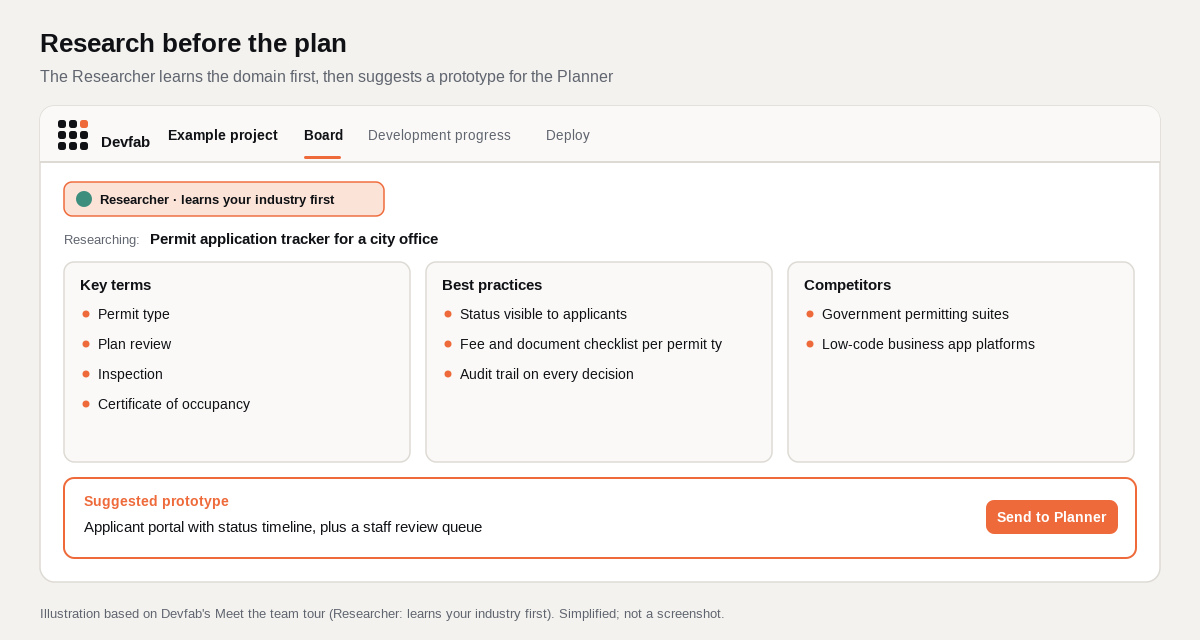
- The Researcher maps the domain before any plan: for a permit tracker, the key terms, best practices for permit workflows, and comparable products. Then it suggests a prototype.
- The Planner publishes a plan, and a person approves it before the Coordinator creates tickets.
- Developers work with ChainFlow, which maps which functions and APIs call each other and what is deployed, so a change doesn't break connected features.
- The QA agent runs UI and flow tests (screens, buttons and user journeys clicked end to end) plus logic tests. Deploy ships to your own server.
Coding agents automate the developer. Devfab automates the development lifecycle. The output is code in your own GitHub account or your organization's.
Switching triggers
| Trigger | Zoho Creator | Devfab | Source |
|---|---|---|---|
| Custom app outgrows templates | Capterra reviewers cite a template-based feel for niche or highly custom apps | Custom codebase planned from research | Capterra |
| Team doesn't want to learn a platform language | Reviewers call Deluge scripting slow to learn | Standard stack picked to fit, e.g. Next.js + TypeScript; you can choose languages | Capterra |
| Complexity grows beyond simple apps | Reviewers cite a steeper learning curve | ChainFlow maps the impact of each change | Capterra |
| Support quality | Reviewers report inconsistent support | Beta, smaller community | Capterra |
| Entry plan limits | Standard allows 1 app | Plan limits not stated (Beta) | Zoho Creator pricing |
| SSO required | SAML SSO is an add-on | Roles and workspace permissions; SSO not stated | Zoho Creator pricing |
Cost model by team size
| Team size | Zoho Creator | Devfab |
|---|---|---|
| 1 person | Free Edition; Standard USD 8 per user per month billed annually (USD 12 monthly), 1 app | Cost logged per task and per project (Beta) |
| 5 people | Professional USD 20 per user per month billed annually (USD 30 monthly), unlimited apps | Cost logged per task and per project (Beta) |
| 25 people | Enterprise USD 25 per user per month billed annually (USD 37 monthly), or a custom Flex plan | Cost logged per task and per project (Beta) |
Zoho Creator prices as of November 2026 from Zoho Creator pricing. Zoho bills per user, so cost grows with app users. Devfab offers predictable cost: cost is logged after each run, per task and per project, and Devfab is in Beta.
Moving from Zoho Creator to Devfab
Zoho Creator apps run on Zoho's platform, and a code export path is not covered in the pages we checked. Plan a rebuild, not a copy.
- Write down what the app does. List forms, reports, workflows, roles and Deluge scripts. Export your records so the new app can load them.
- Create the GitHub repository in your own account or your organization's.
- Open Devfab and choose "Start a new project". Describe the app in "What should we build?" and attach your notes and screenshots.
- Let the Researcher map the domain, then review the suggested prototype.
- Approve the plan. The Coordinator creates tickets only after a person approves.
- Turn on "QA agent · review before Done" so the QA agent runs UI, flow and logic tests before tickets close.
- Deploy to your own server, with a custom domain if you want one.
For later changes to the same repo, use "Work on an existing project" and leave the change box empty: ChainFlow maps the code first and suggests three small first tickets.
Where Zoho Creator is the better choice
- You want low, predictable per-user pricing for many small internal apps.
- Every app needs a native mobile version without extra work.
- You already run Zoho CRM or Books and want apps inside that suite.
- Business users should build and change the app themselves in a visual tool, without a repo.
- You need hosting choice inside one platform, from Zoho Cloud to on-premise.
Where Devfab is the better choice
- The client must own the code. It lives in your GitHub account or theirs, and runs on your own server.
- You want research before the plan. The Researcher maps the domain and competitors before anyone writes tickets.
- A person should approve the plan before agents build.
- Changes must not break connected features. ChainFlow shows the impact across functions, APIs and deployed code.
- You need proof the screens work. The QA agent clicks through user journeys and runs logic tests.
- You want docs and cost per project: blueprints, user manuals and cost logged per task.
Devfab's honest limits: it is new and in Beta, with a smaller community and fewer integrations than Zoho's suite. It is not a visual builder or an editor for hands-on coding. It needs a GitHub account. Native mobile apps are not stated as a Devfab feature.
FAQ
Is Devfab a low-code platform like Zoho Creator?
No. Zoho Creator is a platform you build on, with prompts, visual tools or Deluge code, and apps that run on Zoho's stack. Devfab has no visual builder. Its agents research, plan, build, test and deploy a normal codebase in your own GitHub account, after a person approves the plan.
Zoho Creator now has Plan, Build and Test agents. How is that different from Devfab?
They look alike on paper. Zoho's Plan Agent writes a business requirement document, the Build Agent adds modules and workflows, and the Test Agent generates and runs test cases. Devfab adds a research step before the plan, ChainFlow impact mapping on existing code, UI and flow tests, and deployment of the code to your own server.
Which is cheaper for an internal app?
For a simple internal app with a known number of users, Zoho Creator is easy to budget: as of November 2026, Standard is USD 8 per user per month billed annually. Devfab has no per-user price; it offers predictable cost, logged after each run per task and per project, and is in Beta.
Can an agency use Devfab for client work that would otherwise go on Zoho Creator?
Yes, when the client wants to own the code and host it themselves. If the client already runs on Zoho CRM or Books and wants a quick internal app inside that suite, Zoho Creator is usually the faster fit.
Read next
- What is an AI software factory?
- Zoho Creator alternatives
- Low-code vs AI software factory
- 311 service request portal, built with Devfab
See Devfab run a client app from research to your server. Book a Devfab demo
Sources (checked November 2026): Zoho Creator; Zoho Creator pricing; IT Brief: Zoho unveils advanced AI for Creator (May 2025); Capterra: Zoho Creator reviews.
Frequently asked questions
Is Devfab a low-code platform like Zoho Creator?
No. Zoho Creator is a platform you build on, with prompts, visual tools or Deluge code, and apps that run on Zoho's stack. Devfab has no visual builder. Its agents research, plan, build, test and deploy a normal codebase in your own GitHub account, after a person approves the plan.
Zoho Creator now has Plan, Build and Test agents. How is that different from Devfab?
They look alike on paper. Zoho's Plan Agent writes a business requirement document, the Build Agent adds modules and workflows, and the Test Agent generates and runs test cases. Devfab adds a research step before the plan, ChainFlow impact mapping on existing code, UI and flow tests, and deployment of the code to your own server.
Which is cheaper for an internal app?
For a simple internal app with a known number of users, Zoho Creator is easy to budget: as of November 2026, Standard is USD 8 per user per month billed annually. Devfab has no per-user price; it offers predictable cost, logged after each run per task and per project, and is in Beta.
Can an agency use Devfab for client work that would otherwise go on Zoho Creator?
Yes, when the client wants to own the code and host it themselves. If the client already runs on Zoho CRM or Books and wants a quick internal app inside that suite, Zoho Creator is usually the faster fit.