Short answer: Google AI Studio wins when you want a free starting point for Gemini-powered prototypes, native Android apps, Google Workspace data and deployment to Cloud Run, with two-way sync to an existing repo. Lovable wins when a team builds a hosted web app together, with roles, per-person drafts, a managed backend, security scans and SSO.
You want to build an app by describing it, and you have heard both names. Google AI Studio costs nothing to start, which makes paid Lovable look hard to justify. But free and team-ready are different things. In 2026 Google rebuilt AI Studio's Build mode and folded Firebase Studio into it. Here is the referee's view, from each vendor's docs.
In this comparison:
- Google AI Studio and Lovable at a glance
- Feature comparison
- Cost model by team size
- Where Google AI Studio wins and where Lovable wins
- Switching from one to the other
The sections below take each question in turn.
Google AI Studio and Lovable at a glance
Changes in 2026
- Google AI Studio launched full-stack "vibe coding" on March 18, 2026, rebuilt around the Antigravity coding agent, with a Firebase backend, multiplayer apps, secrets and Next.js support. On March 19, Firebase announced it is built into AI Studio and that Firebase Studio is being sunset. Apps built before May 14, 2026 move to server-side key handling when next edited.
- Lovable moved new apps to TanStack Start on May 13, 2026, and unified its credits on June 1. From September 9, 2026, Free and Pro data may be used for model training unless users opt out; Business and Enterprise are excluded by default.
Google AI Studio (Build mode)
Build mode lives inside Google AI Studio, Google's Gemini developer console. It builds "web apps with full-stack runtimes" and "native Android apps with Kotlin and Jetpack Compose." The Antigravity agent manages multiple files and keeps context across prompts. React is the default; Next.js and Angular are options, with a Node.js server runtime. After your approval, the agent can set up Firestore and Firebase Authentication. API keys sit in a Secrets Manager and are "never included in client-side code." Google Workspace (Gmail, Sheets, Docs, Drive, Calendar) connects with OAuth handled for you.
Lovable
Lovable is a browser-based AI app builder for people with no coding experience and for developers who edit the generated code. Build mode changes the project, Plan mode writes a plan for approval, and Chat mode answers questions without touching code. Apps get a built-in backend (managed PostgreSQL, login, file storage) or Supabase. Publish deploys to a URL with HTTPS, and a quick security scan runs on every publish. "Lovable does not offer a choice of framework or database." Lovable holds SOC 2 Type II and ISO 27001:2022.
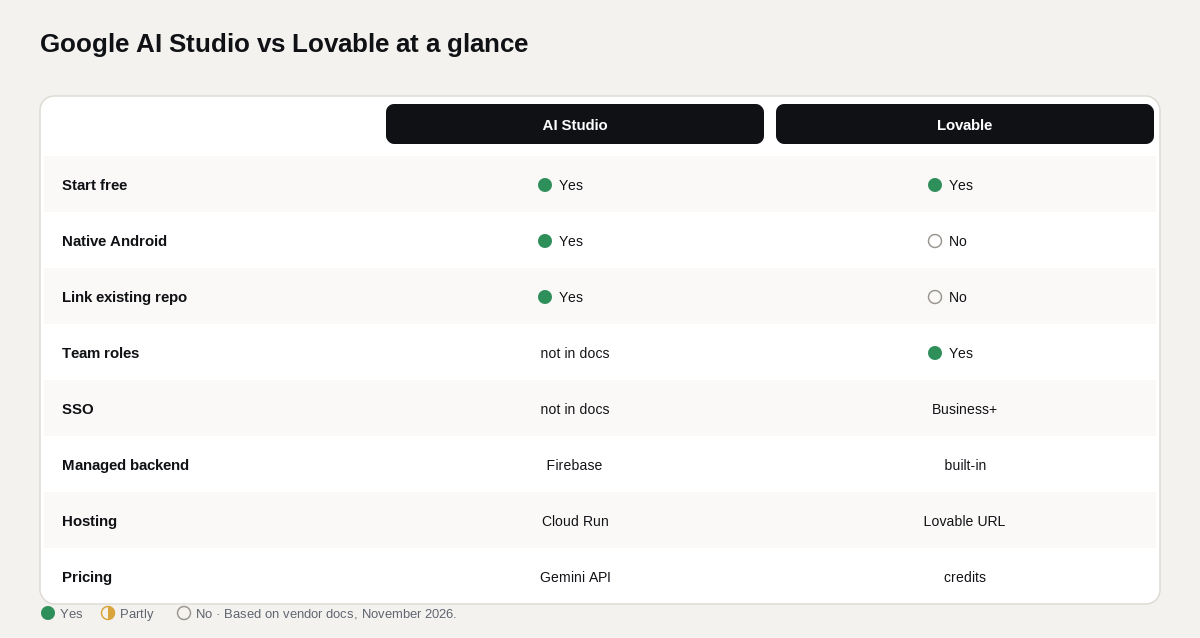
Feature comparison
| Aspect | Google AI Studio | Lovable | Source |
|---|---|---|---|
| Where it runs | Browser, inside Google AI Studio | Web app; mobile app for building from a phone | AI Studio Build; Lovable FAQ |
| What it builds | Full-stack web apps; native Android (Kotlin, Compose) | Web apps only; fixed stack | AI Studio Build; Lovable FAQ |
| Planning / approval | Agent provisions Firestore and Auth after approval | Plan mode writes a plan for approval | AI Studio Build; Lovable FAQ |
| Testing / security | Secrets kept server-side; apps auto-reviewed for policy | Browser and frontend tests when asked; scans on publish | AI Studio Build; Lovable FAQ |
| Deploy / hosting | Cloud Run (Cloud Run pricing may apply); Play Store internal testing | Publish to a URL with HTTPS; custom domains on paid plans | AI Studio Build; Lovable FAQ |
| Code and Git | Two-way sync with a new or existing repo; ZIP export | Git sync creates a new repo; one branch; ZIP on paid plans | AI Studio Build; Lovable GitHub |
| Team / admin | Private by default; viewers can fork, editors modify; no real-time co-editing | Roles, per-person drafts; SSO from Business; SCIM, audit logs on Enterprise | AI Studio Build; Lovable collaboration |
| Model choice | Gemini features added as "AI Chips" | Lovable picks the model | AI Studio Build; Lovable FAQ |
| Pricing model | Gemini API Free plan with limits; paid models and Cloud Run may cost | Monthly credits, not seats | Gemini API pricing; Lovable plans |
Cost model by team size
| Team size | Google AI Studio | Lovable |
|---|---|---|
| 1 person | Gemini API Free plan, with usage limits; Cloud Run charges may apply when you deploy | Free plan builds and publishes (5 daily build credits, capped at 30 a month); Pro adds credits that roll over |
| 5 people | Same model; API calls from shared apps count toward the owner's usage; collaborate through GitHub | Credits, not seats: collaborators spend the owner workspace's credits; SSO from Business |
| 25 people | Team, SSO or role features were not described in the Build mode docs we checked | Enterprise by contract: SCIM, audit logs, approval-gated publishing |
Check the Gemini API pricing page and Lovable's plans page as of November 2026. For reference, Devfab (Beta) logs cost after each run, per task and per project.
Where Google AI Studio wins
- You want to start free. Access is part of the Gemini API Free plan.
- You are prototyping Gemini features. Image generation and the Live API plug in as AI Chips.
- You need Android. Native Kotlin and Jetpack Compose apps, publishable to Play Store internal testing.
- You already have a repo. Two-way sync works with an existing repository, with a conflict dialog.
- Your company runs on Google. Workspace data, Firestore, Google sign-in and Cloud Run.
Where Lovable wins
- A team builds together. Roles plus per-person drafts accepted into the project.
- You need enterprise controls. SSO, SCIM, audit logs and approval-gated publishing.
- You want hosting handled. Publish to a URL with HTTPS, backend included, scans on every publish.
- You want a plan first. Plan mode writes a plan you approve before changes.
Mind the limits on both. AI Studio apps run in a Cloud Run container, so storage must be connected externally, and apps may be removed for policy violations. Lovable's terms don't allow protected health information or payment card data.
Switching from one to the other
Lovable to Google AI Studio. Sync Lovable to GitHub; Git sync creates a new repo. AI Studio's docs describe two-way sync with an existing repo. Whether Build mode runs a TanStack Start project was not covered in the docs we checked; its listed frameworks are React, Next.js and Angular. Expect to rebuild the backend on Firestore.
Google AI Studio to Lovable. Harder. Lovable's Git sync "always creates a new repository and cannot link an existing one," and importing outside code was not covered in the Lovable docs we checked. Plan to rebuild from a prompt and your spec.
Where Devfab fits
Both tools turn a prompt into a working app. Shipping it for a client takes more: research on the domain, a plan someone approves, tests on the user journeys that matter, and an app on the client's own server.
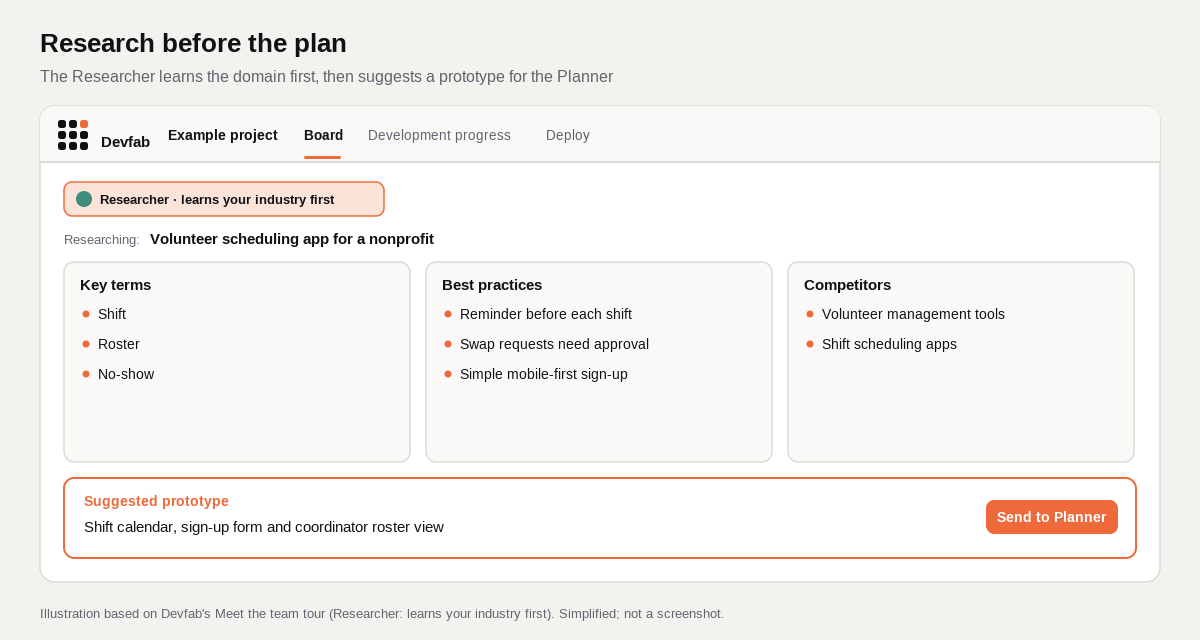
App builders automate the first version. Devfab automates the development lifecycle. Devfab's Researcher learns your industry first: key terms, best practices and competitors, then suggests a prototype. A person approves the plan. The QA agent runs UI, flow and logic tests. Code lives in your own GitHub account (or your organization's), and Deploy ships to your own server. You can choose the model for each agent or keep Devfab's default.
Devfab's honest limits: it is new and in Beta, with a smaller community and fewer integrations. It is not an editor for hands-on coding, and it needs a GitHub account. For a free Gemini demo or an Android prototype, AI Studio is the simpler start. See Devfab vs Google AI Studio.
FAQ
Is Google AI Studio really free for building apps?
Access is part of the Gemini API Free plan, with usage limits. Paid models may incur costs, deploying to Cloud Run may add Cloud Run charges, and API calls from apps you share count toward your usage as the owner.
What happened to Firebase Studio?
On March 19, 2026, Firebase announced that Firebase is built into Google AI Studio and that Firebase Studio is being sunset. Google AI Studio's Build mode is the named migration target.
Can several people edit one app at the same time?
In Lovable, yes: each person works in their own draft, which is then accepted into the project, with Viewer, Editor, Admin and Owner roles. Google AI Studio's docs say there is no real-time collaborative editing; they suggest GitHub, and shared users can view, fork or edit.
Which one can build a mobile app?
Google AI Studio builds native Android apps with Kotlin and Jetpack Compose and can publish them to Play Store internal testing. Lovable builds web apps only and does not support React Native projects.
Read next
- What is an AI software factory?
- Devfab vs Google AI Studio
- Firebase Studio alternatives
- Lovable vs Bolt.new
- Prototype vs MVP vs production app
Prototype works? Ship the real thing. Try Devfab Beta
Sources (checked November 13, 2026): Build apps in Google AI Studio; Gemini API pricing; Google blog: full-stack vibe coding in AI Studio (Mar 18, 2026); Firebase blog: AI Studio integration (Mar 19, 2026); Lovable FAQ; Lovable for Enterprise; Lovable GitHub Git sync; Lovable plans and credits; Lovable subscription plans; Lovable collaboration.
Frequently asked questions
Is Google AI Studio really free for building apps?
Access is part of the Gemini API Free plan, with usage limits. Paid models may incur costs, deploying to Cloud Run may add Cloud Run charges, and API calls from apps you share count toward your usage as the owner.
What happened to Firebase Studio?
On March 19, 2026, Firebase announced that Firebase is built into Google AI Studio and that Firebase Studio is being sunset. Google AI Studio's Build mode is the named migration target.
Can several people edit one app at the same time?
In Lovable, yes: each person works in their own draft, which is then accepted into the project, with Viewer, Editor, Admin and Owner roles. Google AI Studio's docs say there is no real-time collaborative editing; they suggest GitHub, and shared users can view, fork or edit.
Which one can build a mobile app?
Google AI Studio builds native Android apps with Kotlin and Jetpack Compose and can publish them to Play Store internal testing. Lovable builds web apps only and does not support React Native projects.