Short answer: v0 wins when you want a Next.js web app that lives in your GitHub repo through pull requests, deploys to Vercel and has team plans with roles and SSO. Google AI Studio wins when the app leans on Gemini, needs Firestore and Google sign-in, runs on Cloud Run or must ship as a native Android app.
You type the same prompt into both: a picking app for warehouse staff that scans orders and confirms each pick. v0 hands back a polished Next.js screen. AI Studio offers a Kotlin app for the handheld scanners. Both are reasonable answers to the same request.
That is the real split. These two builders are not competing on quality so much as on which cloud and which device your app ends up on. This page lays out both lanes from each vendor's docs, checked in November 2026, so you can pick the one that matches where you already run.
In this comparison:
- v0 and Google AI Studio at a glance
- Feature comparison
- Cost model by team size
- Where v0 wins
- Where Google AI Studio wins
First, what each one is in late 2026.
v0 and Google AI Studio at a glance
v0 is Vercel's AI agent that builds Next.js apps and agents from prompts at v0.app. It has a live preview, a built-in VS Code-style editor and an iOS app (v0 docs). Its audience runs from PMs and designers to engineers and founders. The stack is Next.js, React, TypeScript, Tailwind CSS and shadcn/ui, with the AI SDK for AI features (v0 FAQs). Status: active; the older Premium plan is being phased out (v0 FAQs).
Google AI Studio's Build mode is the "vibe coding" part of Google's Gemini developer console. It was rebuilt in March 2026 around the Antigravity coding agent, with a Firebase backend, multiplayer apps, secrets handling and Next.js support (Google blog, Mar 18, 2026). It builds "web apps with full-stack runtimes" and "native Android apps with Kotlin and Jetpack Compose" (AI Studio Build mode). It is also Google's named migration target for Firebase Studio, which shuts down on March 22, 2027 (Firebase blog).
Feature comparison
| Aspect | v0 | Google AI Studio (Build mode) | Source |
|---|---|---|---|
| Output | Next.js web apps and agents | Full-stack web apps (React default; Next.js, Angular) and native Android | v0 FAQs; AI Studio |
| Agent | Web search, site inspection, error fixing, tool integration | Antigravity Agent manages many files and keeps project context | v0 docs; AI Studio |
| Backend | Previews run server code, API routes and DB connections | Provisions Firestore and Firebase Auth after approval; Node.js runtime | v0 FAQs; AI Studio |
| Secrets | Your own API keys or Vercel AI Gateway | Secrets Manager; keys injected server-side, never in client code | v0 AI models; AI Studio |
| Integrations | External tools; MCP (some desktop-only) | Gmail, Sheets, Docs, Drive, Calendar with OAuth handled | v0 FAQs; AI Studio |
| GitHub | Branch, PRs, merges; never pushes to main | Two-way sync with conflict dialog; ZIP export | v0 GitHub; AI Studio |
| Deploy | One-click Vercel; export to deploy elsewhere | Cloud Run; Play Store internal testing for Android | v0 docs; AI Studio |
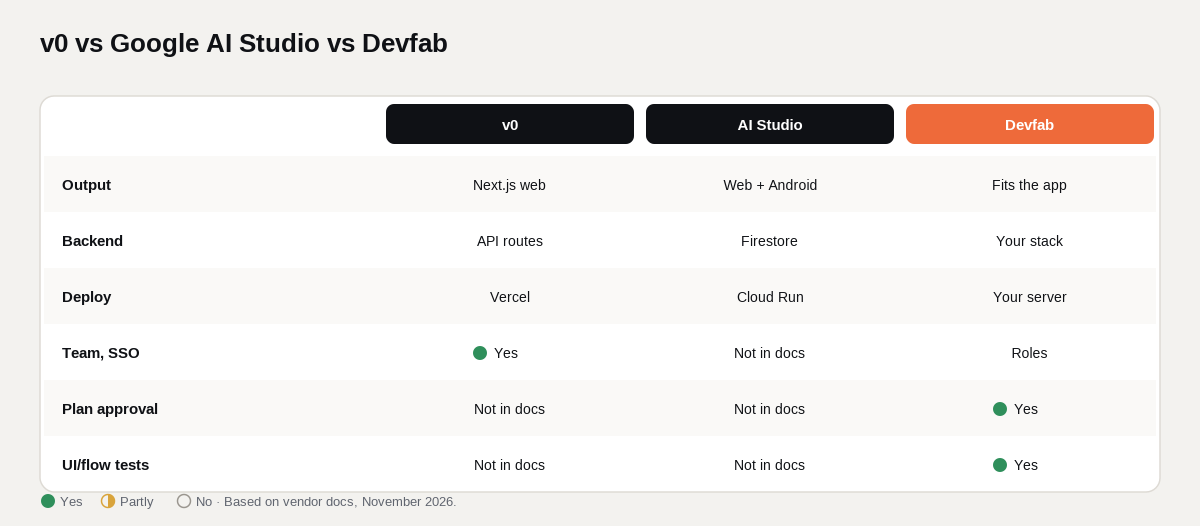
| Team and admin | Vercel teams, roles and SAML SSO on Enterprise | No team, SSO or role features described; share as viewer or editor | v0 Teams; AI Studio |
| Training on your content | Business opt-out by default; Enterprise excluded | Free tier content may be used to improve products; paid tier not | v0 pricing; Gemini API pricing |
| Pricing model | Per-user plans with monthly credits, token-metered | Free tier, then pay per 1M tokens; Cloud Run billed separately | v0 pricing; Gemini API pricing |
Cost model by team size
| Team size | v0 | Google AI Studio | Devfab |
|---|---|---|---|
| 1 person | Free (7 messages a day) or Plus USD 30 per user per month | Free tier with usage limits; paid tier per 1M tokens | Cost logged per task and per project (Beta) |
| 5 people | Plus USD 30 or Business USD 100 per user per month, shared credit pool | Usage-based per token; no seat plans described for Build mode | Cost logged per task and per project (Beta) |
| 25 people | Business, or Enterprise (custom) with SAML SSO and RBAC | Enterprise (custom) on the Gemini API | Cost logged per task and per project (Beta) |
v0 prices as of November 2026 from v0 pricing. Gemini API pricing shows no monthly plan prices, only a Free tier, a Paid tier billed per 1M tokens and a custom Enterprise tier; Cloud Run pricing may apply to deployed apps, and calls from shared apps count toward the owner's usage. Devfab is in Beta and offers predictable cost: cost is logged after each run, per task and per project.
Where v0 wins
- A team builds together. Shared credit pools, roles and SAML SSO exist; AI Studio's Build mode docs describe none.
- Changes arrive as pull requests. v0 works on a branch, gives each branch a Vercel preview and never pushes to
main(v0 GitHub). - Designers tune the UI. Design Mode edits styles in the live preview and writes them back to code (v0 Design Mode).
- You already run on Vercel and Next.js.
- Data terms are clearer for business plans. Business is opted out of training by default (v0 pricing).
Where Google AI Studio wins
- You need a native Android app. Kotlin and Jetpack Compose, with Play Store internal testing.
- The app is built around Gemini. Image generation and the Live API are added through "AI Chips" (AI Studio).
- You live in Google Workspace. Gmail, Sheets, Docs, Drive and Calendar connect with OAuth handled for you.
- You want Firestore and Google sign-in without wiring a backend yourself.
- You want a free start. Access is part of the Gemini API Free plan.
Limits to weigh: AI Studio apps run in a Cloud Run container, so storage must be connected externally, and apps are auto-reviewed and can be removed for policy violations (AI Studio). v0's docs warn output "may be incomplete" and agents can fail repeatedly while using credits (v0 FAQs).
Switching from one to the other
From AI Studio to v0. Turn on GitHub sync (or export a ZIP and push it), then import the repo in v0. This works best for React or Next.js web apps; v0's stack is Next.js, so Angular or Android projects won't carry over cleanly.
From v0 to AI Studio. Export the code from v0, which "doesn't own the code generated" (v0 FAQs). Connect AI Studio's two-way GitHub sync to the same repo and choose Next.js in Settings, then redeploy to Cloud Run.
Where Devfab fits
Back to the warehouse picking app. Either builder gets you screens. In the docs we checked, neither researches warehouse picking practice before planning, asks a person to approve a plan, or clicks through a picker's journey from order to confirmed pick as a test step.
App builders automate the first version. Devfab automates the development lifecycle. The Researcher maps the domain first, the Planner writes a plan a person approves, and ChainFlow maps which functions and APIs call each other, so changing pick confirmation doesn't break stock counts or packing slips. The QA agent runs UI, flow and logic tests, and Deploy ships to your own server, not a vendor's cloud. Devfab is in Beta, with a smaller community and fewer integrations, and it needs a GitHub account. See Devfab vs Google AI Studio.
FAQ
Can Google AI Studio build mobile apps?
Yes, for Android. Build mode supports native Android apps with Kotlin and Jetpack Compose, and they can be published to the Play Store internal testing track. v0 builds web apps; it has its own iOS app for building, but native mobile output is not covered in v0's docs.
Is Google AI Studio free to use for building apps?
It starts free. AI Studio access is part of the Gemini API Free plan, with usage limits. Paid models can incur costs, calls from apps you share count toward your usage, and deploying to Cloud Run may add Cloud Run charges. On the free tier, content may be used to improve Google's products.
Which one works better with GitHub?
Both sync with GitHub. v0 imports a repo, works on a branch with per-branch previews, opens and merges pull requests and never pushes directly to main. AI Studio offers two-way sync with a new or existing repo, with a conflict-resolution dialog, plus ZIP export.
Does v0 or AI Studio have team features?
v0 does: Plus links to a Vercel team with a shared credit pool, and Enterprise adds Viewer and Creator roles and SAML SSO. AI Studio's Build mode docs describe no team, SSO or role features; apps can be shared with viewers or editors, and real-time co-editing goes through GitHub.
Read next
- What is an AI software factory?
- Google AI Studio alternatives
- v0 alternatives
- Google AI Studio vs Lovable
Want research, an approved plan and flow tests before launch? Try Beta
Sources (checked November 2026): v0 docs; v0 FAQs; v0 pricing; v0 GitHub; v0 Design Mode; v0 AI models; v0 Teams; Google AI Studio Build mode; Gemini API pricing; Google blog: full-stack vibe coding in AI Studio (Mar 18, 2026); Firebase blog: AI Studio integration (Mar 19, 2026).
Frequently asked questions
Can Google AI Studio build mobile apps?
Yes, for Android. Build mode supports native Android apps with Kotlin and Jetpack Compose, and they can be published to the Play Store internal testing track. v0 builds web apps; it has its own iOS app for building, but native mobile output is not covered in v0's docs.
Is Google AI Studio free to use for building apps?
It starts free. AI Studio access is part of the Gemini API Free plan, with usage limits. Paid models can incur costs, calls from apps you share count toward your usage, and deploying to Cloud Run may add Cloud Run charges. On the free tier, content may be used to improve Google's products.
Which one works better with GitHub?
Both sync with GitHub. v0 imports a repo, works on a branch with per-branch previews, opens and merges pull requests and never pushes directly to main. AI Studio offers two-way sync with a new or existing repo, with a conflict-resolution dialog, plus ZIP export.
Does v0 or AI Studio have team features?
v0 does: Plus links to a Vercel team with a shared credit pool, and Enterprise adds Viewer and Creator roles and SAML SSO. AI Studio's Build mode docs describe no team, SSO or role features; apps can be shared with viewers or editors, and real-time co-editing goes through GitHub.