Short answer: Noloco wins when outside clients must log in and see only their own records, with field-level permissions, your branding and a flat team price. Airtable wins when the work is the database itself: your own staff editing records, building views and automations, with Omni 2.0 building interfaces from prompts.
A small law firm tracks every matter in an Airtable base: deadlines, filings, billing notes. Clients keep emailing for status updates, and paralegals copy answers out of the base by hand. Someone suggests giving clients Airtable access. Someone else says put Noloco in front of it.
This is not really an either-or. Noloco can sit on top of Airtable. The question is where your clients should land and what you pay for each login. Here is how the two compare on pages checked in November 2026.
In this comparison:
- Noloco and Airtable at a glance
- Feature comparison
- Cost model by team size
- Where Noloco wins
- Where Airtable wins
The ownership change at Airtable comes first.
Noloco and Airtable at a glance
Airtable changed owners in 2026. Bending Spoons closed its acquisition in early September 2026. On October 12, Airtable announced layoffs of much of the pre-acquisition team and said plans and pricing were unchanged (Airtable newsroom). Product work continued: the October 21 Fall Release brought Omni 2.0 to all plans, Airtable Canvas in open beta, a bigger MCP server and agent audit logs (Fall Release).
Airtable is a no-code database and app platform. Its Omni assistant creates tables, fields, records, automations, dashboards and interface pages from plain language (Airtable support).
Noloco is active, and its homepage calls it "The AI portal builder for teams running complex operations" (Noloco). It builds client portals and internal apps on existing data, for professional services, agencies, law and accounting firms, field services and construction. Its AI builder, Nola, sets up tables, pages, permissions and workflows from plain language.
A note on sources: Noloco publishes its own "Noloco vs Airtable" page. We cite it only for Noloco's claims and label it as vendor material.
Feature comparison
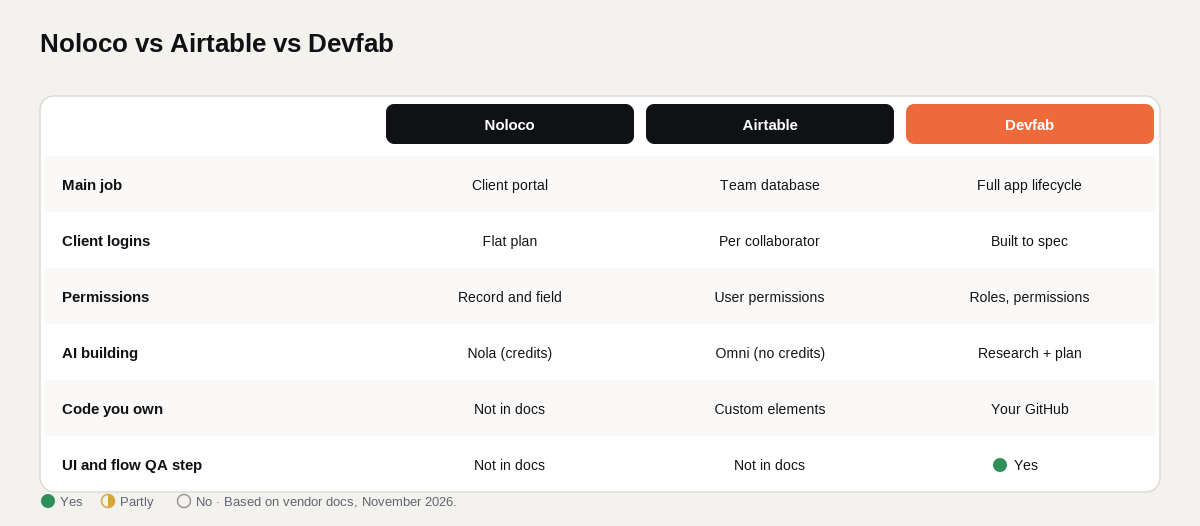
| Aspect | Noloco | Airtable | Source |
|---|---|---|---|
| What it is | Portal and app builder on your data | Database and app platform | Noloco; Airtable newsroom |
| AI building | Nola builds tables, pages, permissions, workflows; uses AI credits | Omni builds tables, automations, interfaces; building does not use credits | Noloco pricing; Airtable AI billing |
| Human checks | Not covered in the pages we checked | Omni confirms before deletions; publishing and turning on automations stay with the user | Airtable support |
| Data sources | Noloco Tables, Airtable, Sheets, Postgres, SmartSuite; more on paid plans | Airtable bases; Omni can't set up syncs | Noloco pricing; Airtable support |
| Permissions | Role, table, page, record and field; SSO on Enterprise | Omni respects user permissions; agent permissions "coming soon" | Noloco; Fall Release |
| Custom code | Canvas pages from a description | Custom elements with editable, downloadable source; SDK on paid plans | Noloco; Airtable custom elements |
| Outside AI tools | MCP server for Claude, ChatGPT or Cursor | MCP for Claude, ChatGPT, Gemini and Cursor; can be switched off org-wide | Noloco; Fall Release |
| Hosting | AWS in Ireland; audited against ISO/IEC 27001 | Canvas unavailable for HIPAA or non-US-data organizations | Noloco; Fall Release |
| Pricing model | Flat Build plan with included seats, clients, records and runs | Per billable collaborator, with pooled AI credits | Noloco pricing; Airtable plans |
Cost model by team size
| Team size | Noloco | Airtable |
|---|---|---|
| 1 person | Free USD 0: 2,000 records, 50 active clients, 30 AI credits per month | Free USD 0, with caps on records, automation runs and editors |
| 5 people | Build USD 79 per month (USD 65 billed annually), 10 seats included | Team USD 20 per user per month, billed annually |
| 25 people | Build plus USD 5 per seat beyond 10, plus overages; or Enterprise custom | Team USD 20 or Business USD 45 per user per month, billed annually; or Enterprise Scale |
Prices as of November 2026 from Noloco pricing and Airtable pricing. Noloco's Build plan caps records at 250,000 even with add-ons. Noloco's own comparison page claims Airtable's external seat pricing "scales poorly" and that client access means extra seats or a Portals add-on; that is a vendor claim we did not verify on Airtable's pages (Noloco vs Airtable).
Where Noloco wins
- Clients log in and see only their matters. Permissions by record and field, without writing auth code.
- Many client logins on a flat plan. Active clients are counted per plan, not as per-user seats.
- Several data sources in one app. Airtable, Postgres and HubSpot can feed the same portal.
- Your brand. Noloco's own page claims full custom domain and branding.
- EU hosting on AWS in Ireland.
Where Airtable wins
- The team works in the data all day. Grid views, records and automations are the product.
- AI building at no credit cost. Building apps, agents and bases with Omni does not use credits; Q&A does.
- Omni 2.0 reads your files. It builds data models from spreadsheets, PDFs and images.
- Custom elements with code. AI-generated elements have source you can download, with an SDK for IDE builds.
- Org controls for AI tools. MCP can be switched off org-wide, and Enterprise gets agent audit logs.
Airtable has gaps too: Omni can't create new views, set up syncs or export data, and custom elements are not viewable on mobile (Airtable support; custom elements).
Switching from one to the other
The easy path is adding, not switching. Connect your Airtable base to Noloco as a data source and build the client portal on top; Noloco says the sync is live and two-way. To move data from Noloco Tables into Airtable, export each table to CSV with Noloco's Export Button and import it into a base (Noloco guides).
Where Devfab fits
Noloco and Airtable both keep the app on their platform. That is right for most firms. It stops fitting when the portal becomes a product: e-signatures, billing, a client mobile app, and a codebase the firm owns.
Coding agents automate the developer. Devfab automates the development lifecycle. Its Researcher maps the domain before planning (matters, conflicts checks, retainer rules, how other legal client portals work) and suggests a prototype. A person approves the plan. The QA agent runs UI and flow tests (screens, buttons and user journeys clicked end to end) plus logic tests, and the code lives in your GitHub account. Devfab is in Beta and is not a tool for staff to edit records. See Devfab vs Noloco and Devfab vs Airtable.
FAQ
Can Noloco and Airtable work together?
Yes. Airtable is one of Noloco's data sources on every plan, and Noloco describes a live, two-way sync with no migration needed. Many teams keep working in Airtable and put Noloco in front of it for clients.
What happened to Airtable in 2026?
Bending Spoons completed its acquisition of Airtable in early September 2026. On October 12, 2026, Airtable announced layoffs of much of the pre-acquisition team, while stating plans and pricing were unchanged. The October Fall Release still shipped Omni 2.0 and Canvas in beta.
Which is cheaper when many clients need to log in?
Usually Noloco. As of November 2026, its Build plan is USD 79 per month (USD 65 billed annually) with 10 seats and a set number of active clients included. Airtable bills per collaborator, USD 20 per user per month on Team billed annually.
Which has the better AI builder?
Airtable's Omni 2.0 builds data models from spreadsheets, PDFs and images, sets up Field Agents and writes automation scripts, and building with Omni does not use credits. Noloco's Nola builds tables, pages, permissions and workflows for a portal, and uses AI credits.
Read next
When the portal becomes a product you own: Try Beta
Sources (checked November 2026): Noloco homepage; Noloco pricing; Noloco vs Airtable (Noloco's own page); Noloco guides: export data; Airtable pricing; Back to bases (Airtable newsroom, Oct 12, 2026); Fall Release: Omni 2.0, Canvas, MCP (Oct 21, 2026); AI-generated custom elements out of beta (Apr 14, 2026); Using Omni AI in Airtable; Airtable AI billing; Airtable plans overview; The AI-native Airtable (Jun 24, 2025).
Frequently asked questions
Can Noloco and Airtable work together?
Yes. Airtable is one of Noloco's data sources on every plan, and Noloco describes a live, two-way sync with no migration needed. Many teams keep working in Airtable and put Noloco in front of it for clients.
What happened to Airtable in 2026?
Bending Spoons completed its acquisition of Airtable in early September 2026. On October 12, 2026, Airtable announced layoffs of much of the pre-acquisition team, while stating plans and pricing were unchanged. The October Fall Release still shipped Omni 2.0 and Canvas in beta.
Which is cheaper when many clients need to log in?
Usually Noloco. As of November 2026, its Build plan is USD 79 per month (USD 65 billed annually) with 10 seats and a set number of active clients included. Airtable bills per collaborator, USD 20 per user per month on Team billed annually.
Which has the better AI builder?
Airtable's Omni 2.0 builds data models from spreadsheets, PDFs and images, sets up Field Agents and writes automation scripts, and building with Omni does not use credits. Noloco's Nola builds tables, pages, permissions and workflows for a portal, and uses AI credits.