Short answer: Noloco wins when a service business wants a branded client portal on its existing Airtable, Sheets or Postgres data, built and changed by non-technical staff. Devfab wins when your team ships client work as code: research first, an approved plan, UI and flow tests, the repo in GitHub and the app on the client's own server.
Your agency just won a job from a construction subcontractor. They want a portal where general contractors see job status, upload change orders and sign off on punch lists. Their project manager has seen a Noloco demo and liked it. Their owner asks a different question: who owns this thing if we part ways?
Both answers are valid. One gives the client a portal on a platform. The other gives the client a codebase. This page compares Noloco and Devfab on pages checked in November 2026.
In this comparison:
- What each tool is built for
- Switching triggers
- Cost model by team size
- Where Noloco is the better choice
- Where Devfab is the better choice
Start with the owner's question in mind.
What each tool is built for
Noloco
Status, November 2026: active. Noloco's homepage calls it "The AI portal builder for teams running complex operations" and shows a "New: build with Claude, ChatGPT and more" banner for its MCP server (Noloco).
Noloco is a no-code platform for client portals and internal apps on existing data. Its audience is non-technical teams in exception-heavy work: professional services, agencies, law and accounting firms, field services, construction and non-profits.
- Nola, the AI builder, sets up tables, pages, permissions and workflows from plain language. Canvas pages come from a description. Both use AI credits (Noloco pricing).
- Data stays where it is. Noloco Tables, Airtable, Google Sheets, Postgres and SmartSuite, with Xano, Stripe, Supabase, HubSpot and MySQL on paid plans and Salesforce on Enterprise.
- Permissions go deep: by role, table, page, record and field, with 2FA. SSO and SAML are Enterprise-only.
- Workflows run on a data change, a schedule or a button, with branching, record updates and emails (Noloco).
- AI in the app. AI columns for summaries and classification (open beta), and "App MCP" gives each user an assistant scoped to their role.
- Hosting is on AWS in Ireland. Noloco says it is audited against ISO/IEC 27001; the homepage does not claim SOC 2.
Devfab
Devfab is an AI software factory. You start a project, and seven agents carry it through the lifecycle: Researcher, Planner, Coordinator, Developers, Blueprint, QA agent and Deploy.
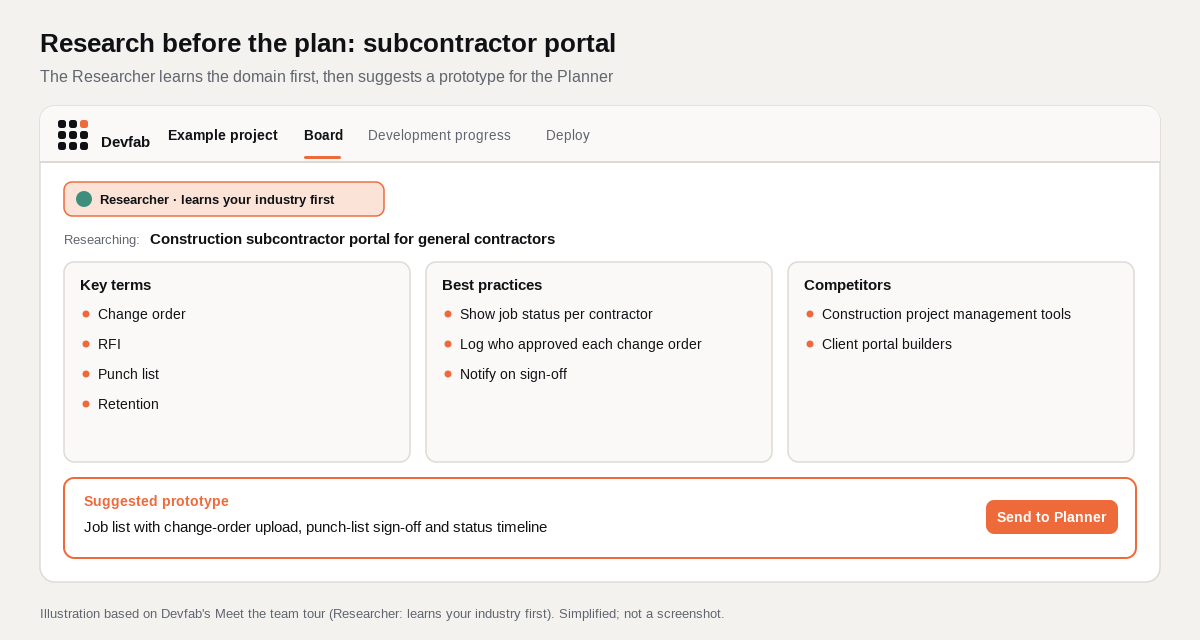
- Research comes before the plan. For the subcontractor portal, the Researcher maps terms like change orders, RFIs and punch lists, best practices for contractor portals, and competing products. Then it suggests a prototype.
- A person approves the plan. The Planner publishes it; after approval the Coordinator creates tickets and assigns dev agents.
- ChainFlow maps which functions and APIs call each other and what is deployed, so a change to change-order approval shows its effect on invoices, notifications and job status.
- The QA agent runs UI and flow tests (screens, buttons and user journeys clicked end to end) plus logic tests.
- You own the result. Code in your GitHub account or your client's organization; Deploy ships to your own server.
Coding agents automate the developer. Devfab automates the development lifecycle.
Switching triggers
| Trigger | Noloco | Devfab | Source |
|---|---|---|---|
| Client wants to own the code | Code export not covered in the pages we checked; data exports as CSV | Code lives in your or your client's GitHub | Noloco guides |
| Data outgrows the plan | Build caps records at 250,000, even with add-ons | Your own database on your own server | Noloco pricing |
| Client needs SSO | SSO and SAML on Enterprise only | Scoped in the plan a person approves; the app is your own code | Noloco pricing |
| Hosting rules | Data hosted on AWS in Ireland | Deploy to the client's own server | Noloco |
| AI building costs | Nola and Canvas consume AI credits; Free has 30 per month | Cost logged per task and per project (Beta) | Noloco pricing |
| Proof the portal works | Testing not covered in the pages we checked | QA agent runs UI, flow and logic tests | Noloco |
Cost model by team size
| Team size | Noloco | Devfab |
|---|---|---|
| 1 person | Free USD 0: 2,000 records, 50 active clients, 100 workflow runs, 30 AI credits per month | Cost logged per task and per project (Beta) |
| 5 people | Build USD 79 per month, or USD 65 per month billed annually, 10 seats included | Cost logged per task and per project (Beta) |
| 25 people | Build plus USD 5 per seat beyond 10, plus overages for clients, records and runs; or Enterprise custom | Cost logged per task and per project (Beta) |
Noloco prices as of November 2026 from Noloco pricing. Build includes set numbers of active clients, records and workflow runs with paid overages; AI credit packs are extra; there is a free Build trial and 50% off for non-profits. Devfab is in Beta and offers predictable cost: cost is logged after each run, per task and per project.
Moving from Noloco to Devfab
A Noloco app is not a Git repository, so moving means rebuilding from a clear spec while the data comes with you.
- Keep or export the data. If the portal runs on Airtable, Google Sheets or Postgres, the data is already outside Noloco. For Noloco Tables, turn on the Export Button in Build Mode and download each table as CSV (Noloco guides).
- Write down the rules. List roles, record and field permissions, workflows and the screens clients use most. Screenshot them.
- In Devfab, choose "Start a new project". Under "What should we build?", describe the portal and attach the rules and screenshots.
- Review the research and the suggested prototype, then let the Planner write the plan.
- Approve the plan. The Coordinator creates tickets only after a person approves.
- Turn on "QA agent · review before Done" so tickets get UI, flow and logic tests, then deploy to the client's server.
Later changes start from "Work on an existing project". Pick the repo, leave the change box empty, and ChainFlow maps the code and suggests three small first tickets.
Where Noloco is the better choice
- The client's staff will run and change the portal. No developers, no repo, no deploy step.
- Record- and field-level client permissions without writing auth code.
- Data already lives in Airtable or Sheets and should stay there.
- A flat team price. Ten seats are included on Build, with a low extra-seat price.
- EU hosting in Ireland suits European service firms.
Where Devfab is the better choice
- The client must own the app. Code in GitHub and deployment to their server mean no platform dependency after handover.
- The domain is complex. Research before the plan surfaces terms and edge cases, like retention on change orders, before anyone builds.
- The portal will keep growing. ChainFlow shows the impact of each change on connected features.
- You need test evidence for the client. The QA agent clicks through screens and journeys and runs logic tests.
- Delivery reporting. Roles, workspace permissions and a Team Delivery Report support agency handover; cost is logged per task and per project.
Honest limits: Devfab is in Beta, with a smaller community and fewer integrations than mature platforms. It is not an editor for hands-on coding or a builder for non-technical staff, and it needs a GitHub account.
FAQ
Is Noloco good for agencies building client portals?
Yes, when the client is happy for the portal to live on Noloco. Noloco targets agencies, professional services, law and accounting firms, field services and construction, and it sets permissions by role, table, page, record and field without code.
Can I export my app from Noloco to code?
Code export is not covered in the Noloco pages we checked. Noloco's guides describe exporting data as CSV from table views. If your data already lives in Airtable, Google Sheets or Postgres, it stays there, and the app itself is rebuilt elsewhere.
How much does Noloco cost compared with Devfab?
As of November 2026, Noloco's Build plan is USD 79 per month, or USD 65 per month billed annually, with 10 seats included and USD 5 per extra seat. Devfab is in Beta with predictable cost: cost is logged after each run, per task and per project.
Does Devfab replace a no-code tool for non-technical staff?
No. Devfab is not a drag-and-drop builder that staff edit themselves. Its agents research, plan, build, test and deploy a normal codebase. A person approves the plan, and later changes go through Devfab or your developers.
Read next
- What is an AI software factory?
- AI software factory vs AI coding tools
- Noloco alternatives
- Noloco vs Softr
- Build a client portal with Devfab
Delivering a portal your client will own? Try Beta
Sources (checked November 2026): Noloco homepage; Noloco pricing; Noloco guides: export data.
Frequently asked questions
Is Noloco good for agencies building client portals?
Yes, when the client is happy for the portal to live on Noloco. Noloco targets agencies, professional services, law and accounting firms, field services and construction, and it sets permissions by role, table, page, record and field without code.
Can I export my app from Noloco to code?
Code export is not covered in the Noloco pages we checked. Noloco's guides describe exporting data as CSV from table views. If your data already lives in Airtable, Google Sheets or Postgres, it stays there, and the app itself is rebuilt elsewhere.
How much does Noloco cost compared with Devfab?
As of November 2026, Noloco's Build plan is USD 79 per month, or USD 65 per month billed annually, with 10 seats included and USD 5 per extra seat. Devfab is in Beta with predictable cost: cost is logged after each run, per task and per project.
Does Devfab replace a no-code tool for non-technical staff?
No. Devfab is not a drag-and-drop builder that staff edit themselves. Its agents research, plan, build, test and deploy a normal codebase. A person approves the plan, and later changes go through Devfab or your developers.