Short answer: Noloco wins when you need a branded client portal on top of Airtable, Google Sheets or Postgres, with permissions down to the record and field, at a flat team price. Glide wins when your operations already run on Excel or Google Sheets and staff want internal apps, workflows and an AI agent built from those files.
You manage rental buildings. Tenants email maintenance requests, owners ask for monthly reports, and the whole operation lives in a shared spreadsheet. One adviser says build a portal so tenants and owners see only their own records. Another says turn the spreadsheet into an app your own staff use first. Both are right about something. Noloco and Glide sit on opposite sides of that choice, and this page acts as the referee, using vendor pages checked in November 2026.
In this comparison:
- Noloco and Glide at a glance
- Feature comparison
- Cost model by team size
- Where Noloco wins
- Where Glide wins
The first section covers a status change that makes older reviews of Glide unreliable.
Noloco and Glide at a glance
Glide relaunched as GlideOS in 2026. Glide announced "an entirely new version of our product, built from the ground up for the AI age" on March 5, 2026, and staff said "we're now live with the new platform" on June 4 (Glide community). The launch event followed on August 3. The previous product continues as Glide Classic (Glide blog), with its own page and no stated sunset date (Glide Classic). GlideOS is a separate subscription, and there is no migration tool from Classic yet (Glide pricing).
GlideOS turns the spreadsheets a business runs on into internal apps, workflows and AI agents. It targets operations and back-office teams in supply chain, manufacturing, retail, real estate, hospitality and professional services (Glide). Its SheetSense feature scans an uploaded spreadsheet for formulas, macros, pivot tables and charts and asks you to confirm before it builds. Its second-generation agent builds the app, then can operate it, query data and run code (GlideOS launch recap).
Noloco is active and now calls itself "the AI portal builder for teams running complex operations" (Noloco). It builds client portals and internal apps on existing data. Its AI builder, Nola, sets up tables, pages, permissions and workflows from plain language. The homepage names professional services, agencies, law and accounting firms, field services, construction and non-profits as its audience.
In short: Glide starts from the spreadsheet and the staff who use it. Noloco starts from the outside user, the client who must see only their own records.
Feature comparison
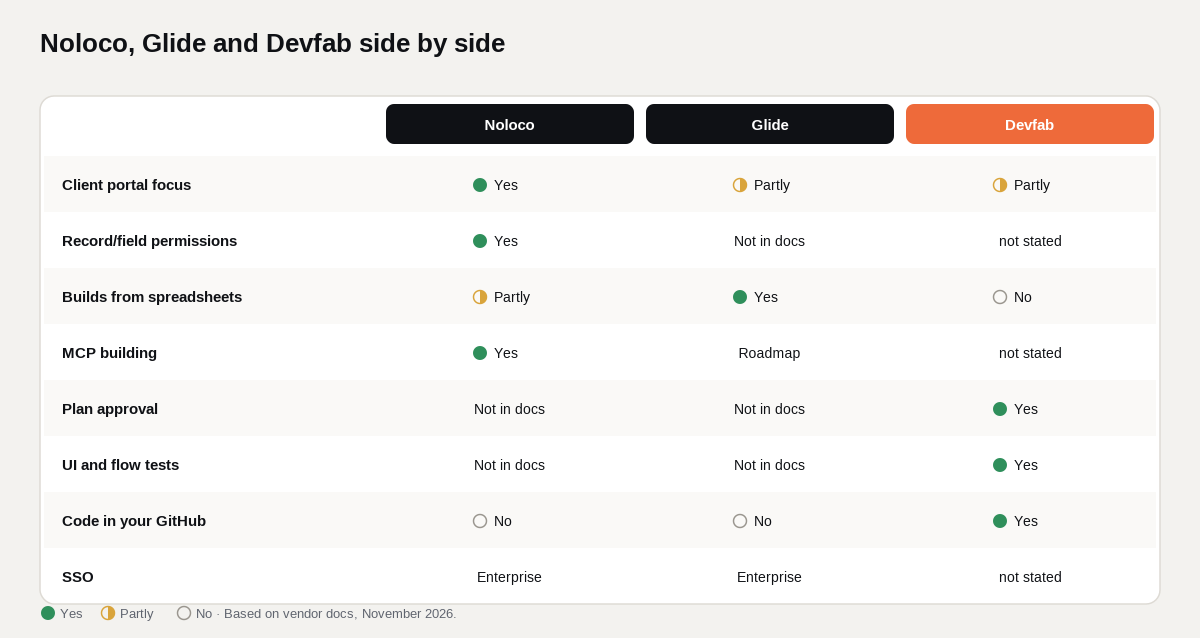
| Aspect | Noloco | Glide (GlideOS) | Source |
|---|---|---|---|
| Main job | Client portals and internal apps on existing data | Internal apps, workflows and agents built from spreadsheets | Noloco; Glide |
| AI building | Nola builds tables, pages, permissions and workflows; Canvas pages from a description; both use AI credits | Glide's agent builds and then operates the app; SheetSense reads your spreadsheet first | Noloco pricing; GlideOS recap |
| Outside agents (MCP) | MCP server to build from Claude, ChatGPT or Cursor | Homepage mentions MCP; "Build with MCP" was a Q3 roadmap item at launch | Noloco; GlideOS recap |
| Data sources | Noloco Tables, Airtable, Google Sheets, Postgres, SmartSuite; more on paid plans | Excel, Google Sheets, Airtable, Notion, Snowflake; about 150 integrations shown | Noloco pricing; Glide |
| Permissions | By role, table, page, record and field; 2FA | Apps private to the company by default | Noloco; Glide |
| Workflows | Triggered by data change, schedule or button, with branching | Workflows included; lower tiers cap enabled workflows | Noloco; Glide pricing |
| Testing | Not covered in the pages we checked | Not covered in the pages we checked | — |
| Team and admin | SSO/SAML on Enterprise only | AI spend budgets by team and model; SSO on Enterprise only | Noloco pricing; Glide pricing |
| Hosting and security | AWS in Ireland; audited against ISO/IEC 27001 | Hosted; Enterprise can choose its LLM provider | Noloco; Glide |
| Pricing model | Free plan; Build plan with included seats, active clients, records and runs, plus overages | Credits that meter LLM token use; Free cannot publish apps | Noloco pricing; Glide pricing |
Cost model by team size
| Team size | Noloco | Glide (GlideOS) |
|---|---|---|
| 1 person | Free USD 0: 2,000 records, 50 active clients, 100 workflow runs and 30 AI credits per month | Free USD 0, but Free cannot publish apps; Basic USD 25 per month |
| 5 people | Build USD 79 per month (USD 65 per month billed annually), 10 seats included | Plus USD 50 per month, or Pro USD 125 per month (starts at 5 members, 50 credits per member) |
| 25 people | Build plus USD 5 per extra seat beyond 10, or Enterprise (custom) | Pro scaled by seat count, or Enterprise (custom) |
Prices as of November 2026 from Noloco pricing and Glide pricing. Noloco's Build plan caps records at 250,000 even with add-ons. Glide's lower tiers cap team members, published apps and enabled workflows, and extra credits are for paid plans only.
The bigger cost question is predictability. In a Glide community thread from June 2026, users said GlideOS credit costs are hard to predict and that agent mistakes still use credits; Glide staff later called credit transparency "one of the biggest pieces of feedback" (Glide community). Noloco's model is easier to forecast on paper because the Build plan bundles seats and clients, but its AI building also draws on credits.
Where Noloco wins
- Outside users must see only their own data. Permissions by record and field let a tenant see their requests and an owner see their buildings, without writing auth code.
- You need a portal at a flat team price. Build includes 10 team seats, with active clients counted separately.
- Your data stays where it is. Noloco sits on Airtable, Google Sheets, Postgres or SmartSuite, with Xano, Stripe, Supabase, HubSpot and MySQL on paid plans.
- You want EU hosting. Data is hosted on AWS in Ireland.
- You already work in Claude or ChatGPT. Noloco's MCP server is live, and "App MCP" gives each app user an assistant scoped to their role.
Where Glide wins
- Your business runs on complex spreadsheets. SheetSense reads formulas, macros and pivot tables before building, so the app reflects how the sheet already works.
- Staff, not clients, are the main users. GlideOS is built for internal apps on desktop and phone, private to the company by default.
- You want an agent that runs the app, not only builds it. Glide's agent can operate the app, query data and run code, and Ask Glide answers questions from live business data.
- You want ready-made systems. The App Store offers pre-built multi-app systems that are free to copy.
- You need wide integrations. Glide shows about 150, including Salesforce, NetSuite, HubSpot, Shopify and Jira.
Switching from one to the other
From Glide to Noloco. If your data sits in Google Sheets or Airtable, connect the same source to Noloco and rebuild pages and permissions with Nola. App screens do not carry over; neither vendor documents an importer from the other in the pages we checked.
From Noloco to Glide. Export or connect the underlying tables (Glide reads Excel, Google Sheets and Airtable), then let SheetSense scan the data before the agent builds. If you are on Glide Classic, note that moving to GlideOS is also a rebuild, since there is no migration tool yet.
Where Devfab fits
Both tools are strong when the app is a layer over data you already have. They stop short when the project needs custom logic, code you own in Git and tests on every user journey. In the pages we checked, neither describes a research step before building, a plan a person approves, or a QA step that clicks through flows.
Coding agents automate the developer. Devfab automates the development lifecycle. Devfab's Researcher maps the domain first, a person approves the plan, the QA agent runs UI, flow and logic tests, and the code lands in your own GitHub account with deployment to your own server. Devfab is in Beta, with a smaller community and fewer integrations, and it needs a GitHub account. See Devfab vs Noloco and Devfab vs Glide.
FAQ
Is Noloco or Glide better for a client portal?
Noloco, in most cases. It calls itself an AI portal builder, prices its Build plan around team seats and active clients, and sets permissions by role, table, page, record and field. Glide's GlideOS is aimed at internal apps for operations teams, and its apps are private to the company by default.
What happened to the old Glide?
Glide rebuilt its product as GlideOS. It was announced on March 5, 2026, went live in June and had a launch event on August 3, 2026. The previous product continues as Glide Classic with no stated sunset date. GlideOS is a separate subscription, and Glide says there is no migration tool from Classic yet.
Which is cheaper for a team of five?
On list price, Noloco. As of November 2026, Noloco Build is USD 79 per month (USD 65 billed annually) with 10 team seats included. Glide Basic is USD 25 per month and Plus USD 50 per month, but lower tiers cap team members and published apps, and Pro at USD 125 per month starts at 5 members. Check both pricing pages for your caps.
Can I build Noloco or Glide apps with Claude or ChatGPT?
Noloco says yes: its MCP server lets you build from Claude, ChatGPT or Cursor. Glide's homepage says you can connect outside agents over MCP, but at the August 2026 launch Glide listed Build with MCP as a Q3 roadmap item rather than a shipped feature. Test it before you rely on it.
Read next
Need a portal with custom logic, tested flows and code you own? Try Beta
Sources (checked November 2026): Noloco homepage; Noloco pricing; Glide homepage; Glide pricing; GlideOS launch recap (Glide blog, Aug 4, 2026); Glide Classic; Introducing a new Glide, built for the AI age (Glide community, Mar 5, 2026); Pricing issues with GlideOS (Glide community, Jun 2026).
Frequently asked questions
Is Noloco or Glide better for a client portal?
Noloco, in most cases. It calls itself an AI portal builder, prices its Build plan around team seats and active clients, and sets permissions by role, table, page, record and field. Glide's GlideOS is aimed at internal apps for operations teams, and its apps are private to the company by default.
What happened to the old Glide?
Glide rebuilt its product as GlideOS. It was announced on March 5, 2026, went live in June and had a launch event on August 3, 2026. The previous product continues as Glide Classic with no stated sunset date. GlideOS is a separate subscription, and Glide says there is no migration tool from Classic yet.
Which is cheaper for a team of five?
On list price, Noloco. As of November 2026, Noloco Build is USD 79 per month (USD 65 billed annually) with 10 team seats included. Glide Basic is USD 25 per month and Plus USD 50 per month, but lower tiers cap team members and published apps, and Pro at USD 125 per month starts at 5 members. Check both pricing pages for your caps.
Can I build Noloco or Glide apps with Claude or ChatGPT?
Noloco says yes: its MCP server lets you build from Claude, ChatGPT or Cursor. Glide's homepage says you can connect outside agents over MCP, but at the August 2026 launch Glide listed Build with MCP as a Q3 roadmap item rather than a shipped feature. Test it before you rely on it.