Short answer: Bubble wins when you are building a custom product, such as a marketplace or SaaS app, with its own logic, database and companion mobile app, and you accept that it only runs on Bubble. Glide wins when your operations already live in Excel or Google Sheets and staff need internal apps over that data.
You run operations on spreadsheets, and the spreadsheets are starting to crack. Pickers in your warehouse need a phone app. Your sales lead wants a customer-facing portal. Some people tell you Bubble can build anything. Others say Glide gets an app out of your sheets without a single developer. Both tools changed a lot in 2026, so older reviews mislead. This page puts the current versions side by side.
In this comparison:
- Bubble and Glide at a glance
- Feature comparison
- Cost model by team size
- Where Bubble wins
- Where Glide wins
Each section answers one question a buyer actually asks.
Bubble and Glide at a glance
Glide relaunched in 2026. On March 5, 2026, Glide announced "an entirely new version of our product, built from the ground up for the AI age"; staff said it was live on June 4, 2026 (Glide community). The new product is GlideOS. The old one continues as Glide Classic, with no stated sunset date (Glide Classic). GlideOS is a separate subscription, and there is no migration tool from Classic yet (Glide pricing).
GlideOS turns the spreadsheets a business runs on into internal apps, workflows and AI agents. SheetSense scans uploaded spreadsheets for formulas, macros, pivot tables and charts, and asks you to confirm before it builds (GlideOS launch recap). Glide targets supply chain, manufacturing, retail, real estate, hospitality and professional services teams (Glide).
Bubble is a hosted no-code platform for web apps plus iOS and Android apps that share data and workflows with the web app (Bubble). Its AI Agent (beta) builds a full app from a description; you then keep chatting with it or switch to the visual editor (Bubble AI). Bubble pitches itself at "first-time founders and Fortune 500s." Apps run only on Bubble (Bubble manual).
Feature comparison
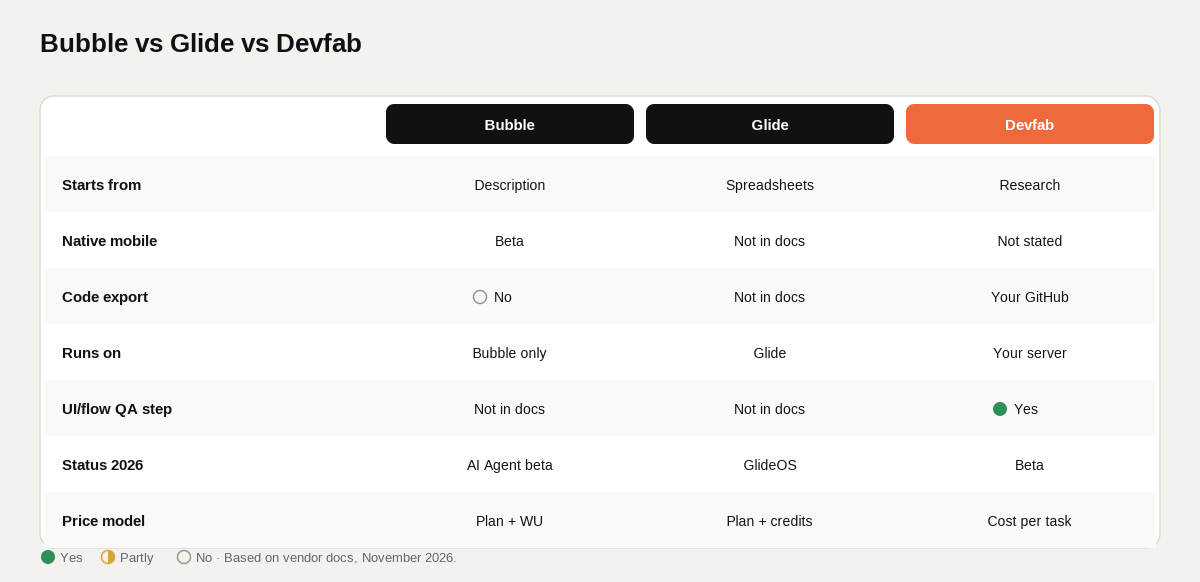
| Aspect | Bubble | Glide (GlideOS) | Source |
|---|---|---|---|
| Where it runs | Hosted web apps, plus native iOS and Android (mobile in beta) | Hosted apps for desktop and phone | Bubble; Glide |
| Starting point | A description to the AI Agent, then the visual editor | Your spreadsheets, analyzed by SheetSense | Bubble AI; GlideOS recap |
| Planning | The AI Agent "plans your app with you" | SheetSense asks you to confirm before building | Bubble blog; GlideOS recap |
| AI agents | Build and edit agent; Bubble MCP (beta) for outside agents | Agent builds, then operates apps and queries data; Ask Glide answers from live data | Bubble blog; Glide |
| Data | Built-in database | Excel, Google Sheets, Airtable, Notion, Snowflake and about 150 integrations | Bubble; Glide |
| Code ownership | No code export; data as CSV or via API | Code export not covered in the pages we checked | Bubble manual |
| Team and admin | Team plan branches; Enterprise SSO, isolated instance, region choice | AI spend budgets by team and model; SSO on Enterprise only | Bubble pricing; Glide pricing |
| Compliance | SOC 2 Type II | Apps private to the company by default | Bubble; Glide |
| Pricing model | Plans plus workload units and AI credits | Plans plus credits that meter AI tokens | Bubble pricing; Glide pricing |
Cost model by team size
| Team size | Bubble | Glide (GlideOS) | Devfab |
|---|---|---|---|
| 1 person | Free (no live app); Starter USD 32 per month | Free (can't publish); Basic USD 25 per month | Cost logged per task and per project (Beta) |
| 5 people | Growth USD 119 per month or Team USD 349 per month, depending on editors needed | Plus USD 50 per month, or Pro USD 125 per month (includes team members starting at 5) | Cost logged per task and per project (Beta) |
| 25 people | Team or Enterprise (contact sales) | Pro scaled by seat count, or Enterprise (custom) | Cost logged per task and per project (Beta) |
Prices as of November 2026 from Bubble pricing (web plans, billed annually) and Glide pricing. Bubble also meters workload units; Glide meters credits, and annual plans are "coming soon." Devfab is in Beta and offers predictable cost: cost is logged after each run, per task and per project.
Where Bubble wins
- You are building a product, not an ops tool. Bubble lists marketplaces, SaaS and AI SaaS as use cases.
- You need a web app and a native mobile app on one backend, with direct App Store and Google Play submission.
- You want to keep shaping logic visually. Pages, workflows, database and privacy rules all stay editable in one editor.
- You want a large community. Bubble claims 6 million builders.
- You need isolated hosting on Enterprise, on a Bubble-managed AWS server in a region you choose.
Where Glide wins
- Your business runs on spreadsheets. SheetSense reads formulas, macros and pivot tables before building.
- Ops staff will build and run the app themselves, with no repo or deployment pipeline.
- You need many data sources. Excel, Sheets, Airtable, Notion, Snowflake, Salesforce, NetSuite and more.
- You want AI spend under control. Budgets by team and model, and approved models only.
- You want a head start. The App Store of pre-built multi-app systems is free to copy.
Two cautions on Glide. A community thread from June 2026 says credit costs are hard to predict, and staff called credit transparency "one of the biggest pieces of feedback" (Glide community). On Bubble, workload units mean cost scales with server activity.
Switching from one to the other
From Glide to Bubble. Export your data from the source sheets, create matching data types in Bubble's database, and import the data. Rebuild screens and workflows with the AI Agent or the editor. Expect a rebuild, not a migration.
From Bubble to Glide. Bubble can't export app code, so export data as CSV or through the Bubble API, load it into a sheet or a supported source, and let GlideOS build from there. If you are on Glide Classic, note that GlideOS is a separate subscription with no migration tool yet.
Where Devfab fits
Bubble and Glide both keep your app on their platform. That suits many teams. It stops fitting when a client asks for the source code, or when the app must run on your own server and change through reviewed pull requests.
App builders automate the first version. Devfab automates the development lifecycle. Its Researcher studies the domain, such as warehouse picking terms and rules, before the Planner writes a plan, and a person approves the plan. The QA agent runs UI and flow tests plus logic tests, and the code lives in your own GitHub account and deploys to your own server. Devfab is in Beta, with a smaller community and fewer integrations than mature platforms. See Devfab vs Glide.
FAQ
What is GlideOS, and is Glide Classic going away?
GlideOS is Glide's rebuilt product for the AI age, announced in March 2026 and live since June 2026. The older product continues as Glide Classic, with its own page and no sunset date stated. GlideOS is a separate subscription, and Glide has no migration tool from Classic yet.
Can I export my code from Bubble or Glide?
Not from Bubble: its manual says apps only run on Bubble and can't be exported as code, though you can export data as CSV or through the Bubble API. Glide says GlideOS agents work with full-stack application code, but a code export to your own repo is not covered in the pages we checked.
Which is cheaper for a small business?
As of November 2026, Glide Basic is USD 25 per month and Bubble Starter is USD 32 per month (billed annually). The bills grow differently: Bubble meters workload units for server usage, while Glide meters credits for AI token usage.
Which one builds mobile apps?
Bubble builds web apps plus native iOS and Android apps that share data with the web app, with mobile labeled beta. Glide apps run on desktop and phone as business apps; native app-store publishing is not described in the pages we checked.
Read next
Need the app in your own repo, on your own server? Try Beta
Sources (checked November 2026): Bubble homepage; Bubble pricing: compare plans; Bubble AI app builder; Bubble blog: What is Bubble AI (Aug 19, 2026); Bubble manual: Application and data ownership; Glide homepage; Glide pricing; GlideOS launch recap (Aug 4, 2026); Glide Classic; Glide community: Introducing a new Glide (Mar 5, 2026); Glide community: Pricing issues with GlideOS.
Frequently asked questions
What is GlideOS, and is Glide Classic going away?
GlideOS is Glide's rebuilt product for the AI age, announced in March 2026 and live since June 2026. The older product continues as Glide Classic, with its own page and no sunset date stated. GlideOS is a separate subscription, and Glide has no migration tool from Classic yet.
Can I export my code from Bubble or Glide?
Not from Bubble: its manual says apps only run on Bubble and can't be exported as code, though you can export data as CSV or through the Bubble API. Glide says GlideOS agents work with full-stack application code, but a code export to your own repo is not covered in the pages we checked.
Which is cheaper for a small business?
As of November 2026, Glide Basic is USD 25 per month and Bubble Starter is USD 32 per month (billed annually). The bills grow differently: Bubble meters workload units for server usage, while Glide meters credits for AI token usage.
Which one builds mobile apps?
Bubble builds web apps plus native iOS and Android apps that share data with the web app, with mobile labeled beta. Glide apps run on desktop and phone as business apps; native app-store publishing is not described in the pages we checked.