Short answer: Replit wins when you want a complete cloud workspace where an agent builds, tests the app in a browser and publishes it, with always-on, scheduled or autoscaling hosting. v0 wins when your team builds in Next.js on Vercel and wants UI and features delivered into your repo as pull requests with preview links.
You want a working app from a prompt, and your team has heard both names. One camp says Replit does everything in one place. The other says v0 writes the cleanest front end. Both are right about different jobs. This page is the referee: what each tool does, what it costs by team size, and how to move between them, all from vendor docs.
In this comparison:
- Replit and v0 at a glance
- Feature comparison
- Cost model by team size
- Where Replit wins and where v0 wins
- Switching from one to the other
Start with the section that matches your stack.
Replit and v0 at a glance
Changes in 2026
- Replit launched Agent 4 alongside a USD 400M Series D at a USD 9B valuation (Dealroom, March 11, 2026). Agent 4 combines design and code and runs tasks in parallel: one task at a time on Core, up to 10 on Pro.
- v0 now lives at v0.app. The legacy Premium plan is being phased out and is not available to new users; current plans are Free, Plus, Business and Enterprise.
Replit
Replit is a cloud development platform. Its Agent "takes action" to set up projects, build apps, check its work and fix problems, and it can also produce designs and slides. Plan mode produces a task list for you to approve before Agent changes code or data. Checkpoints let you roll back. App Testing lets Agent click through the app in a real browser. You publish as Autoscale, Reserved VM, Static or Scheduled deployments, with custom domains. Built-in connectors reach BigQuery, Linear, Slack and Notion.
v0
v0 is Vercel's AI agent for building Next.js apps and agents from prompts. It uses Next.js, React, TypeScript, Tailwind CSS and shadcn/ui. The agent does web search, site inspection, error fixing and external tool integration. Design Mode lets you select elements in the live preview, adjust styles and write the edits back to code. Previews run server code, API routes and database connections as in production. v0 is aimed at PMs, designers, engineers, founders and marketing teams.
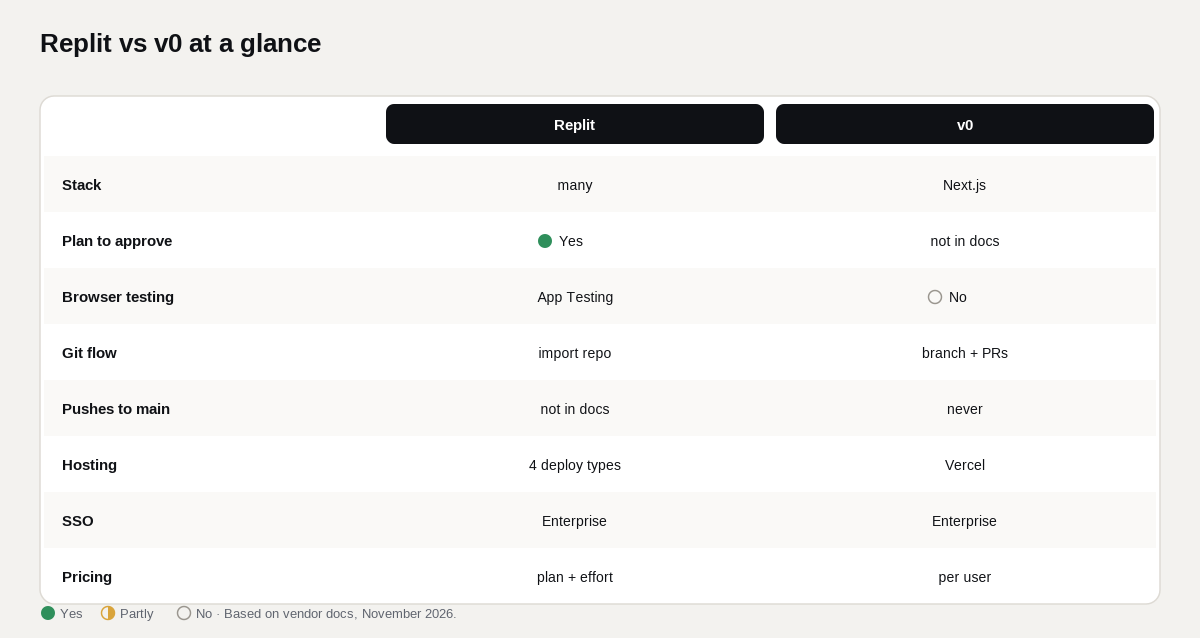
Feature comparison
| Aspect | Replit | v0 | Source |
|---|---|---|---|
| Where it runs | Cloud workspace in the browser | Web app with live preview and a VS Code-style editor; iOS app | Replit Agent; v0 FAQs |
| Stack | Replit detects your app stack on import | Next.js, React, TypeScript, Tailwind, shadcn/ui | Replit import; v0 FAQs |
| Planning / spec | Plan mode: task list to approve before changes | Not covered in the docs we checked | Replit Agent |
| Testing | App Testing clicks through the app in a real browser (JS full-stack, Streamlit) | Agent fixes errors; output "may be incomplete" | Replit App Testing; v0 FAQs |
| Deploy / hosting | Autoscale, Reserved VM, Static, Scheduled; custom domains | One-click deploy to Vercel; per-branch previews | Replit publish; v0 docs |
| Code and Git | Import public or private GitHub repos | Works on a branch, opens and merges PRs, never pushes to main | Replit import; v0 GitHub |
| Team / admin | SAML SSO, SCIM, groups; admin policies on models and publishing | Plus: all Builders; Enterprise: Viewer and Creator roles, SAML SSO | Replit Teams; v0 Teams |
| Model choice | Auto picks a model per paid task; Enterprise model controls | For AI in your app: AI Gateway, marketplace providers or your own keys | Replit Agent; v0 AI models |
| Pricing model | Plans plus effort-based Agent charges, confirmed before work starts | Per user with monthly credits; shared credit pool on team plans | Replit pricing docs; v0 pricing |
Cost model by team size
| Team size | Replit | v0 |
|---|---|---|
| 1 person | Starter (free) with a Free Mode allowance on a rolling limit; Core USD 20 per month with USD 20 of credits | Free (7 messages a day); Plus USD 30 per user per month |
| 5 people | Pro USD 100 per month, up to 15 collaborators, up to 10 parallel Agent tasks | Plus or Business (USD 100 per user per month) with a shared credit pool |
| 25 people | Enterprise (custom): SSO, SCIM, audit logs, single-tenant and private networking options | Enterprise (custom): Viewer and Creator roles, Viewers not paid seats, SAML SSO |
Prices are from Replit's pricing page and v0's pricing page, as of November 2026. Two meters to watch: Replit's Plan mode can incur charges even without changing code, and v0's FAQs warn agents can fail repeatedly and consume credits. Devfab (Beta), for reference, logs cost after each run, per task and per project.
Where Replit wins
- You want one place for everything. Workspace, agent, database and hosting in the browser.
- You want the agent to test. App Testing clicks through your app and fixes what breaks.
- Your app needs different runtimes. Always-on VMs, scheduled jobs or autoscale, without a separate cloud account.
- Internal tools on your SaaS data. Connectors for BigQuery, Linear, Slack and Notion.
Where v0 wins
- Your team is on Next.js and Vercel. v0 writes into your repo as pull requests, with a preview per branch.
- Designers refine the UI. Design Mode edits styles in the preview and writes them back to code.
- You protect main. v0 "never pushes directly to
main." - Training and ownership terms are clear. "Vercel doesn't own the code generated," and Business is opted out of training by default.
Switching from one to the other
v0 to Replit. Connect v0 to GitHub, then use Replit's guided import (replit.com/import). Replit's docs don't mention v0 by name, but they cover Vercel projects: pick the GitHub repo behind the project. Custom domains, Vercel-specific edge or middleware behavior, secrets and database records are not imported.
Replit to v0. Push your Replit project to GitHub, then import the repo in v0. v0 works on a branch and opens pull requests. Expect the best results with Next.js; other stacks were not covered in the v0 docs we checked.
Where Devfab fits
Both tools are strong at turning a prompt into a running app. Teams that ship client work need more around it: research before the plan, a person approving that plan, tested user journeys, and a deploy to a server the client controls.
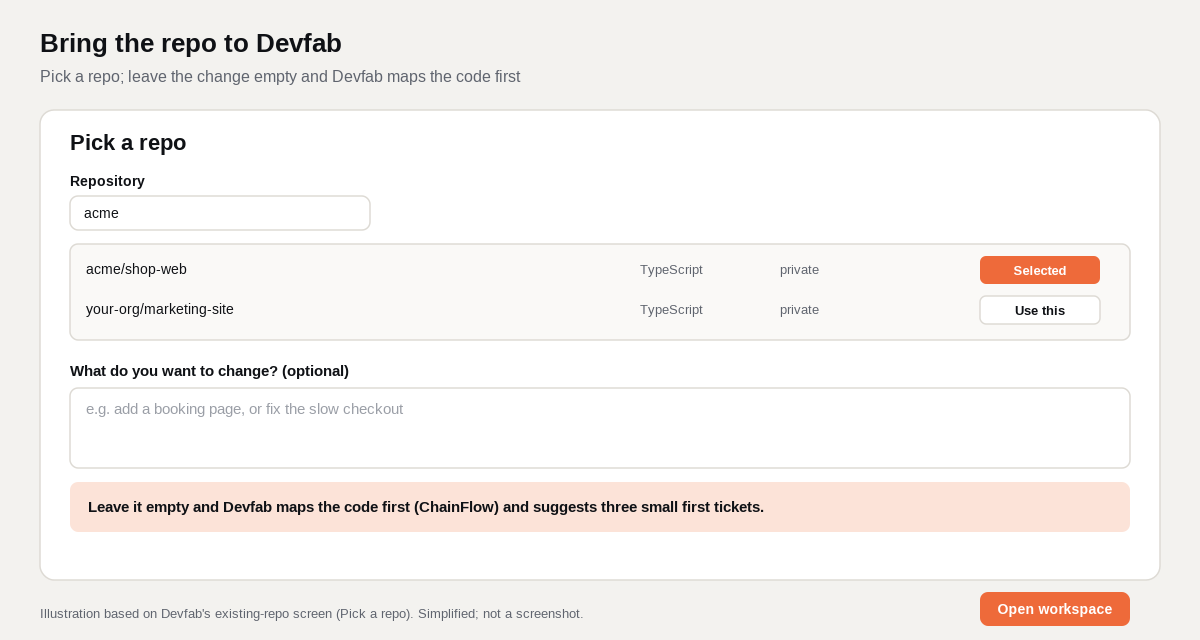
App builders automate the first version. Devfab automates the development lifecycle. Devfab's Researcher maps the domain first: key terms, best practices and competitors. On an existing repo, leave the change box empty and ChainFlow maps the code, then suggests three small first tickets. The QA agent runs UI, flow and logic tests. Code lives in your own GitHub account (or your organization's), and Deploy ships to your own server.
Devfab's honest limits: it is new and in Beta, with a smaller community and fewer integrations. It is not a cloud IDE or an editor for hands-on coding, and it needs a GitHub account. For a quick prototype or a Vercel-native UI, Replit or v0 is the simpler start. See Devfab vs v0.
FAQ
Does v0 work with an existing GitHub repo?
Yes. v0 imports existing repos, works on a branch with per-branch Vercel previews, opens and merges pull requests, and never pushes directly to main. Branch protection rules can block its merges. Replit also imports GitHub repos, public or private, through its guided import.
Which one tests the app for me?
Replit. Its App Testing feature lets Agent click through the app in a real browser and fix issues, for Full Stack JavaScript and Streamlit Python web apps, in Power and Max modes. v0's agent fixes errors it finds, but its FAQs warn output may be incomplete or contain bugs.
Can I deploy a v0 app somewhere other than Vercel?
Yes. v0's FAQs say you can export the code and deploy elsewhere; Vercel is only needed for the full experience. Replit's import docs cover Vercel projects through their GitHub repo, though custom domains and Vercel-specific edge or middleware behavior are not imported.
Which is cheaper for a small team?
It depends on how you build. As of November 2026, v0 Plus is USD 30 per user per month with included credits. Replit Pro is USD 100 per month and allows up to 15 collaborators, with effort-based charges for Agent work. Check both pricing pages.
Read next
- What is an AI software factory?
- Devfab vs v0
- Lovable vs Replit
- Bolt.new vs v0
- Prototype vs MVP vs production app
Taking the prototype to production? Try Devfab Beta
Sources (checked November 13, 2026): Replit Agent overview; Replit pricing and plans (docs); Replit pricing; Replit App Testing; Replit: publish your app; Replit: import from GitHub; Replit Teams; Replit Enterprise; Dealroom: Replit Series D and Agent 4 (Mar 11, 2026); v0 docs introduction; v0 FAQs; v0 pricing; v0 GitHub; v0 Design Mode; v0 AI models; v0 Teams.
Frequently asked questions
Does v0 work with an existing GitHub repo?
Yes. v0 imports existing repos, works on a branch with per-branch Vercel previews, opens and merges pull requests, and never pushes directly to main. Branch protection rules can block its merges. Replit also imports GitHub repos, public or private, through its guided import.
Which one tests the app for me?
Replit. Its App Testing feature lets Agent click through the app in a real browser and fix issues, for Full Stack JavaScript and Streamlit Python web apps, in Power and Max modes. v0's agent fixes errors it finds, but its FAQs warn output may be incomplete or contain bugs.
Can I deploy a v0 app somewhere other than Vercel?
Yes. v0's FAQs say you can export the code and deploy elsewhere; Vercel is only needed for the full experience. Replit's import docs cover Vercel projects through their GitHub repo, though custom domains and Vercel-specific edge or middleware behavior are not imported.
Which is cheaper for a small team?
It depends on how you build. As of November 2026, v0 Plus is USD 30 per user per month with included credits. Replit Pro is USD 100 per month and allows up to 15 collaborators, with effort-based charges for Agent work. Check both pricing pages.