Short answer: Lovable wins when you want to describe a web app and have it hosted with a backend, with no repo or machine to manage. Tempo wins when a product team already has a codebase and wants agents, started from Slack, issues, GitHub or a schedule, to turn feedback and PRDs into reviewed pull requests.
You remember Tempo as a visual React editor that sat next to Lovable on every "vibe coding tools" list. That Tempo is gone. Its web editor was wound down, and the company now ships a desktop app it calls an AI software factory for product teams. So the old comparison is out of date. This page compares the two products as they work in November 2026, from vendor docs.
In this comparison:
- Lovable and Tempo Labs at a glance
- Feature comparison
- Cost model by team size
- Where Lovable wins
- Where Tempo Labs wins
The pivot comes first, because it changes who each tool is for.
Lovable and Tempo Labs at a glance
Tempo pivoted from web editor to desktop app. Tempo's migration guide says the browser-based web editor was wound down "On June 14" (the page does not state the year); app.tempo.build remains as a read-only billing portal, and old repos were kept for a limited period after the wind-down (Tempo migration guide). The homepage now says "Tempo turns customer feedback, issues, and product requirements into reviewed pull requests. AI agents do the work while your team approves key decisions" (Tempo homepage). Releases are frequent: versions v0.0.145 to v0.0.150 shipped in November 2026 alone, adding canvas storyboards and an engineer handoff view (Tempo changelog).
Tempo today is a desktop app for macOS and Windows that requires Git. Each chat session runs in its own git worktree (Tempo quick start). It combines docs (PRDs and specs that agents read as context), a canvas where each frame is a live React route or component, and a Kanban board whose cards link to branches and PRs (Tempo docs).
Lovable is active and unchanged in purpose. It is a browser-based AI app builder that generates and hosts full-stack web apps from plain-language prompts. Build mode changes the project, Plan mode writes a plan for approval first, and Chat mode answers questions (Lovable FAQ). New apps use TanStack Start since May 13, 2026.
Take a building permit tracker for a small city office. In Lovable, a clerk could describe the forms and statuses and get a hosted app. In Tempo, a product team with an existing permit codebase could assign "add an inspection date field" to an agent on the Kanban board and review the pull request it opens.
Feature comparison
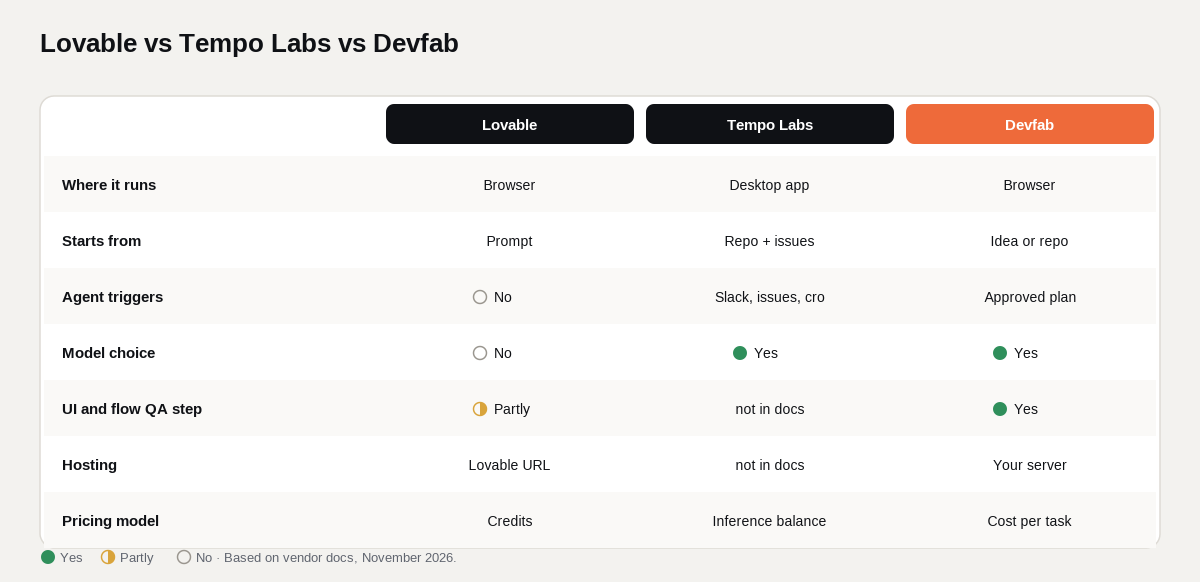
| Aspect | Lovable | Tempo Labs | Source |
|---|---|---|---|
| Where it runs | Browser; mobile app for building | Desktop app (macOS, Windows); agents run on your machine | Lovable FAQ; Tempo agents |
| Starting point | A prompt for a new web app | An existing codebase in Git, plus docs and issues | Lovable FAQ; Tempo quick start |
| Planning and spec | Plan mode writes a plan for approval | Long-form PRDs and specs, read by the chat session every turn | Lovable FAQ; Tempo docs |
| Agent autonomy | Builds when you prompt | Agents are "a standing prompt wired to a trigger": assigned issue, issue events, cron, Slack, GitHub webhook; new agents start disabled | Tempo agents |
| Visual editing | Preview with prompts and code editor | Canvas of live React routes and components that writes back to source; Expo/React Native editing added Jun 2026 | Tempo docs; Tempo changelog |
| Testing | Browser testing and frontend tests when asked; security scan on publish | Not covered in the docs we checked | Lovable FAQ |
| Deploy and hosting | Publish to its own URL; built-in Postgres, login, storage | Output is pull requests; hosting not covered in the docs we checked | Lovable FAQ; Tempo homepage |
| Code ownership | Git sync (new repo only); ZIP on paid plans | Works directly in your Git repo | Lovable GitHub docs; Tempo intro |
| Model choice | Lovable picks the model | Claude Code, Codex, OpenCode or Tempo Inference | Lovable FAQ; Tempo quick start |
| Pricing model | Monthly credits, not seats | Inference dollar balance, or your own Claude or ChatGPT plan | Lovable plans; Tempo billing |
Cost model by team size
| Team size | Lovable | Tempo Labs | Devfab |
|---|---|---|---|
| 1 person | Free (5 daily build credits, capped at 30 a month); Pro USD 25 per month (100 credits) | Inference-balance subscription, or bring your own Claude or ChatGPT plan; no plan prices on the homepage | Cost logged per task and per project (Beta) |
| 5 people | Business USD 50 per month (100 credits, SSO); collaborators spend the owner's credits | Same model; each agent uses the identity of the person whose machine runs it | Cost logged per task and per project (Beta) |
| 25 people | Enterprise, volume-based platform fee (not listed) | Not covered in the pages we checked; see Tempo's site | Cost logged per task and per project (Beta) |
Lovable prices as of November 2026 from Lovable pricing. Tempo says it meters "in dollars of usage, not prompts", bills at break-even API pricing and "does not make any profit on these plans" (Tempo billing); its docs warn that top models on high effort can use up smaller balances fast. Devfab is in Beta and offers predictable cost: cost is logged after each run, per task and per project.
Where Lovable wins
- You don't have a codebase yet. Describe the app, and Lovable builds and hosts it.
- Nobody on the team wants to install anything. Lovable runs in the browser; Tempo needs a desktop app and Git.
- You need hosting, a database and login included. Lovable bundles them under one credit balance.
- You need enterprise paperwork. Lovable lists SOC 2 Type II, ISO 27001:2022, SSO, SCIM and audit logs. Tempo's docs index lists no security or self-host page.
- Work should continue when your laptop is shut. Tempo's agents stop when the app isn't running, though a July 2026 release added Remote Control to run workspaces on another machine.
Where Tempo Labs wins
- You already have a product and a backlog. Tempo's agents pick up issues and open pull requests in your real repo.
- Work starts in Slack or GitHub. Agents trigger on Slack messages, issue events, GitHub webhooks or a schedule.
- You want to choose the model. Use Claude Code, Codex, OpenCode or Tempo's own inference, and reuse subscriptions you already pay for.
- Designers want to edit real components. The canvas edits live React routes and writes changes back to source.
- You want agents on your own machine. Tempo agents use your identity and your machine, not a vendor cloud.
Switching from one to the other
From Lovable to Tempo. Turn on Lovable's Git sync to GitHub (Lovable GitHub docs). Clone that repo locally, install Tempo and open the project; Tempo requires Git and runs each session in its own worktree (Tempo quick start). Plan where the app will be hosted, since Lovable's hosting and built-in backend stay behind.
From Tempo to Lovable. Lovable cannot link an existing repository; its Git sync always creates a new one. Rebuild in Lovable from your PRD and screenshots, and treat it as a new app.
Old Tempo web users. Follow Tempo's migration guide to move to the desktop app.
Where Devfab fits
Tempo and Devfab both use the words "software factory", so it is worth being precise. Tempo turns issues and PRDs into pull requests from agents on your machine. Lovable builds the first version of a web app.
Coding agents automate the developer. Devfab automates the development lifecycle. Devfab's Researcher maps the domain, key terms, best practices and competitors before the Planner writes a plan, and a person approves the plan before tickets exist. ChainFlow maps which functions and APIs call each other, so a change to permit statuses shows its impact on inspections, fees and notifications. The QA agent runs UI, flow and logic tests, and Deploy ships to your own server. Devfab is in Beta, with a smaller community and fewer integrations, it is not an editor, and it needs a GitHub account. See Devfab vs Tempo Labs and Tempo Labs alternatives.
FAQ
Is Tempo Labs still a visual React app builder?
Not in the browser. Tempo wound down its web editor and replaced it with a desktop app for macOS and Windows. It now calls itself an AI software factory for product teams: agents turn feedback, issues and PRDs into reviewed pull requests. A visual canvas still edits live React components and writes changes back to source.
Do I need my own AI subscription for Tempo?
No, but you can use one. Tempo can run Claude Code with a paid Claude plan or an Anthropic API key, Codex with a ChatGPT plan or an OpenAI key, OpenCode, or Tempo's own inference. Tempo's plans are a dollar balance for inference, billed at what Tempo calls break-even API pricing.
Does Lovable or Tempo host my app?
Lovable does. Publish deploys your project to its own URL with HTTPS, and paid plans add custom domains and a built-in backend. Tempo's docs focus on pull requests to your codebase; hosting is not covered in the pages we checked, so you deploy with your own setup.
Which is better for non-technical founders?
Lovable. It is designed for people with no coding experience, needs no local setup and includes hosting, a database and login. Tempo requires Git, runs agents on your machine and is aimed at product teams working on an existing codebase.
Read next
Want research, an approved plan and QA around every change? Try Beta
Sources (checked November 2026): Tempo homepage; Tempo docs; Tempo docs: Introduction; Tempo docs: Quick start; Tempo docs: Agents; Tempo docs: Migrating from web to desktop; Tempo docs: Web prompt credits; Tempo changelog; Tempo docs index; Lovable FAQ; Lovable GitHub Git sync; Lovable plans and credits; Lovable pricing.
Frequently asked questions
Is Tempo Labs still a visual React app builder?
Not in the browser. Tempo wound down its web editor and replaced it with a desktop app for macOS and Windows. It now calls itself an AI software factory for product teams: agents turn feedback, issues and PRDs into reviewed pull requests. A visual canvas still edits live React components and writes changes back to source.
Do I need my own AI subscription for Tempo?
No, but you can use one. Tempo can run Claude Code with a paid Claude plan or an Anthropic API key, Codex with a ChatGPT plan or an OpenAI key, OpenCode, or Tempo's own inference. Tempo's plans are a dollar balance for inference, billed at what Tempo calls break-even API pricing.
Does Lovable or Tempo host my app?
Lovable does. Publish deploys your project to its own URL with HTTPS, and paid plans add custom domains and a built-in backend. Tempo's docs focus on pull requests to your codebase; hosting is not covered in the pages we checked, so you deploy with your own setup.
Which is better for non-technical founders?
Lovable. It is designed for people with no coding experience, needs no local setup and includes hosting, a database and login. Tempo requires Git, runs agents on your machine and is aimed at product teams working on an existing codebase.