Short answer: For teams already on GitHub, GitHub Copilot's cloud agent is the most direct path from issue to pull request. Cursor and Claude Code suit developers who want the same agent locally and in the cloud. OpenHands is the open-source, self-hosted pick. Devfab fits when an issue is part of a larger client project.
Your backlog is full of small issues and nobody has time for them. "Fix the typo on the login page." "Add a CSV export to the reports screen." Each is real work, and none is urgent until a customer complains. AI agents promise to read the issue, write the fix and open a pull request. Some do it from a label or a comment. Others need a prompt. What happens before and after the pull request is where they really differ.
In this guide, you'll learn:
The list covers eight options, with sources for every claim.
How we picked and compared
We looked for agents that can take a GitHub issue, or a task started from one, and return a pull request. We read vendor docs, pricing pages and changelogs in November 2026, plus one dated review where vendor docs were thin. We did not run hands-on tests for this page.
For each agent we checked:
- Trigger: can you start it from the issue itself (a panel, a label, a comment), or only from chat, Slack or a tracker?
- Where it runs: GitHub's cloud, the vendor's cloud, your own machines, or your own VPC.
- What comes back: one PR per task, a branch, or a diff.
- Review and testing: does the agent check its own work, and is there a separate review step?
- Pricing model: seats, credits, usage or self-hosted.
Two status changes first. Google stopped new Jules sessions on November 11, 2026, and Jules shuts down on December 31, 2026; it used to pick up issues with a "jules" label (Jules changelog). Amazon Q Developer let you assign GitHub issues to it (AWS), but new subscriptions were blocked from May 15, 2026, and it reaches end of support on April 30, 2027, with Kiro as the successor (AWS blog). Neither is a good pick for new work, so neither is on the list.
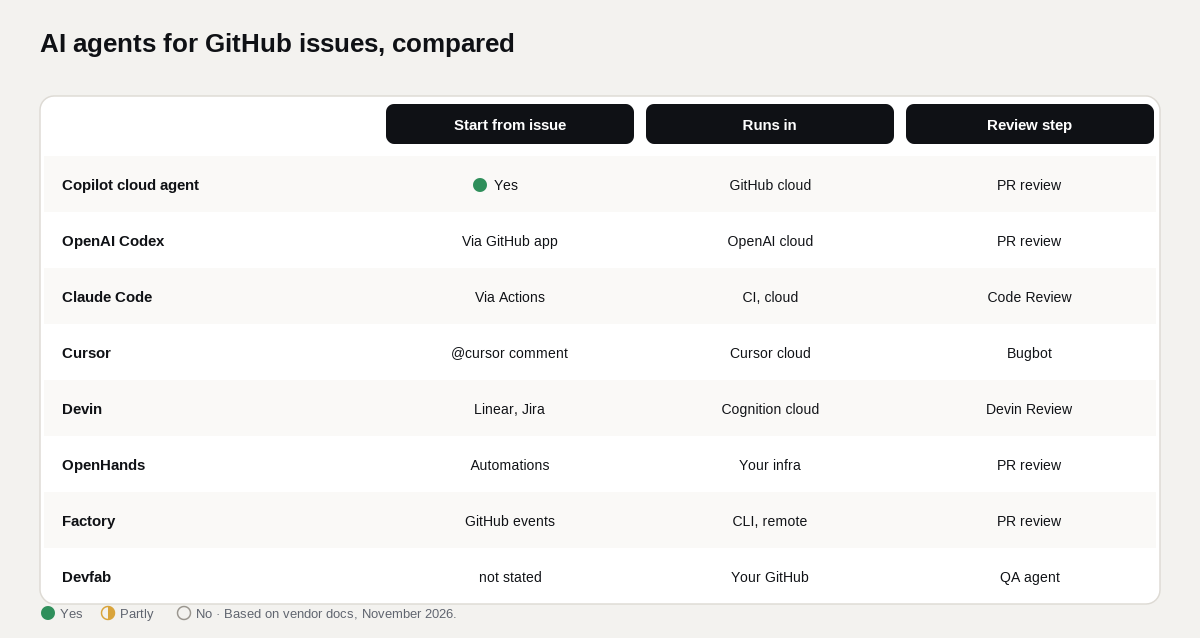
Quick comparison table
| Agent | Start from a GitHub issue | Where it runs | Review and checks | Pricing model (Nov 2026) |
|---|---|---|---|---|
| GitHub Copilot cloud agent | Copilot panel on an issue; Agents tab | GitHub Actions or a cloud sandbox | PR code review on paid plans | Per seat plus AI credits; Business USD 19 per seat |
| OpenAI Codex | GitHub integration and GitHub Action | OpenAI cloud, CLI or IDE | Automatic PR review | Included in ChatGPT plans; Business USD 20 per user (annual) |
| Claude Code | GitHub Actions; cloud tasks triggered by GitHub events | Terminal, desktop, web, CI | Managed Code Review (Team, Enterprise) | Included in paid Claude plans; Team Standard USD 25 per user |
| Cursor cloud agents | @cursor comment on a GitHub issue or PR | Cursor cloud (isolated VMs) | Bugbot PR review | Teams USD 30+ per user |
| Devin | Linear, Jira, Slack, Teams, web, API | Cognition cloud | Devin Review | Teams USD 80 per month plus USD 40 per dev seat |
| OpenHands | Issue-to-PR automations | Local, Docker, VMs, Kubernetes, your VPC | PR review automations | Free self-hosted; Teams USD 500 per month for 10 users |
| Factory | Automations triggered by GitHub events; Slack, Linear, Jira | CLI, desktop app, IDEs, remote computers | Inline PR review | Teams USD 60 per team plus USD 40 per user |
| Devfab | Not stated; works from an approved plan and turns user feedback into tickets | Devfab, on your GitHub repo | Separate QA agent: UI, flow and logic tests | Cost logged per task and per project (Beta) |
Prices as of November 2026 from each vendor's official pricing page, linked in the sections below.
The agents, one by one
GitHub Copilot cloud agent
Best for: teams whose code, issues and reviews already live on GitHub.
Copilot's cloud agent works "in a cloud development environment, rather than your local IDE." You can start a task from the Copilot panel on a file, issue or pull request, from a repository's Agents tab, from GitHub Mobile, the IDE, the CLI, the Copilot app or code scanning alerts (GitHub Docs). It can research the repository and draft an implementation plan before changing code (Copilot features). An Actions-based session changes only the one repository named at the start, works on one branch and opens one PR per task, within a maximum session length set in GitHub's docs. Cloud sandboxes can work across repositories in one organization.
Admins get Enterprise AI Controls and an agent control plane, generally available since February 26, 2026, with actor_is_agent in audit logs (GitHub changelog). Models come from OpenAI, Anthropic, Google, Microsoft, Moonshot AI and xAI.
Limits: it only works with GitHub-hosted repositories, branch protection rules can block it unless granted a bypass, and GitHub warns it "can produce incorrect or suboptimal code." The cloud agent and PR review are not on the Free plan.
Pricing: Pro USD 10, Pro+ USD 39 and Max USD 100 per user per month; Business USD 19 and Enterprise USD 39 per granted seat per month, with usage metered in AI credits (Copilot plans).
OpenAI Codex
Best for: teams already on ChatGPT who want one agent across cloud, CLI, IDE and GitHub.
Codex runs in the ChatGPT desktop app, web and mobile, the Codex CLI, an IDE extension, Codex Cloud environments, a GitHub integration and GitHub Action, and Slack (Codex docs). A cloud task creates a container, checks out your repo at a branch or commit, runs a setup script and returns a diff or PR, with internet access off by default (Codex cloud environment). Cloud tasks keep running after you close your laptop, multiple agents can run in parallel, and Codex checks its own work with computer and browser tools (OpenAI Codex). Automatic PR review is included. The CLI is open source under Apache-2.0 (GitHub).
Status: on July 9, 2026, OpenAI folded the Codex desktop app into a combined ChatGPT desktop app; Codex remains the coding product (The New Stack).
Limits: if you use an API key instead of a ChatGPT plan, cloud features such as GitHub code review and Slack are not available. Usage limits vary by model and task size and "are not fixed message limits."
Pricing: Plus USD 20 per month; Pro from USD 100 per month; Business USD 20 per user per month billed annually or USD 25 monthly; Enterprise via sales (Codex pricing).
Claude Code
Best for: developers who want a strong agent in the terminal that also runs in CI and the cloud.
Claude Code runs in the terminal, VS Code and JetBrains, a desktop app, the web and mobile. It integrates with GitHub Actions, GitLab CI/CD and Slack, where @Claude turns a bug report into a PR (Claude Code docs). It creates branches, writes commit messages and opens pull requests. Cloud scheduled tasks run while your computer is off and can trigger on API calls or GitHub events. Plan mode explores the codebase and proposes an approach for approval before editing (Claude Code costs). Managed Code Review runs several agents on each PR and posts severity-ranked comments, but never approves or blocks a PR (Code Review docs).
Limits: Claude models only. Code Review is Team and Enterprise only, GitHub only, and reads the diff without running it; Anthropic notes that a clean review "doesn't mean your code is error-free or secure."
Pricing: Pro USD 20 per month; Max USD 100; Team Standard USD 25 per user per month (USD 20 annual); Enterprise USD 20 per seat per month billed annually plus usage at API rates (Claude pricing).
Cursor cloud agents
Best for: teams in the Cursor editor that want to start agents from issue comments, Slack or Linear.
Cursor's cloud agents run in isolated VMs and can be started from the iOS app, cursor.com/agents, Cursor Desktop, Slack, @cursor in GitHub or Bitbucket PR and issue comments, Linear or the API (Cursor cloud agents). Bugbot "reviews pull requests and identifies bugs, security issues, and code quality problems," and Autofix can spawn a cloud agent to push fixes (Bugbot).
Status: Cursor's maker, Anysphere, is now a wholly owned subsidiary of SpaceX; Cursor says the deal closed in its August 14, 2026 post (Cursor blog).
Limits: an April 2026 review found inconsistent output that needed line-by-line review, cloud agents working best on well-scoped tasks, and "opaque" credit pricing (DEV Community).
Pricing: Free; Plus USD 8 per month; Premium USD 30 per month; Teams USD 30+ per user per month; Enterprise custom (Cursor pricing).
Devin
Best for: engineering teams that hand off scoped backlog tickets from Linear or Jira.
Cognition describes Devin as "an autonomous AI software engineer that can write, run and test code." You start it from the web app, Slack, Microsoft Teams, the Devin for Terminal CLI or the API (Devin docs). Good fits Cognition lists include parallel tickets from Linear or Jira, migrations, PR review, bug reproduction and unit tests. Each session has a shell, IDE and browser, and you can watch and take over. Long tasks can be split across subagents, each opening its own PRs, with built-in Devin Review (Devin Desktop).
Limits: Cognition says Devin handles "most tasks, excluding extremely difficult tasks," and results depend on clear prompts with explicit completion criteria. Devin's "brain" always runs in Cognition's cloud, even in dedicated deployments (Devin deployment docs).
Pricing: Free; Pro USD 20 per month; Max USD 200 per month; Teams USD 80 per month plus USD 40 per full dev seat; Enterprise by quote (Devin pricing).
OpenHands
Best for: teams that want open source and agents running in their own environment.
OpenHands is MIT-licensed. Its main interface since June 16, 2026 is Agent Canvas, a self-hostable workspace (OpenHands blog). Agents run locally, in Docker, on remote VMs, Kubernetes, Modal or an enterprise VPC. Scheduled and event-triggered automations cover PR reviews, issue triage and issue-to-PR, and September 2026 releases added automation templates and Docker runtimes per conversation (OpenHands, Sep 2026). It integrates with GitHub, GitLab, Bitbucket, Jira, Linear and Slack, supports bring-your-own-key and open-weight models, and can run Claude Code or Codex through the Agent Client Protocol (OpenHands).
Limits: you run and govern the agents yourself: models, keys and sandboxes. Automations can be disabled automatically after repeated dispatch failures. The Teams plan "is capped at 5,000 sessions per month."
Pricing: Open Source USD 0 (self-hosted); Teams USD 500 per month for 10 users plus USD 50 per extra seat; Enterprise custom (OpenHands pricing).
Factory
Best for: larger engineering organizations that want agents across CLI, CI, chat tools and trackers.
Factory's Droid runs as a CLI (including headless droid exec for CI/CD), a desktop app, in IDEs, and through Remote Control. You can delegate from Slack, Linear, Jira, Microsoft Teams and Google Chat (Factory docs). Automations can trigger on GitHub events, and Factory offers inline PR review (Factory). "Factory 2.0," announced June 15, 2026, added Missions that split complex work into parallel tracks, Droid Computers for persistent remote execution, and a model Router (Factory news). Docs cover self-hosted GitHub Enterprise Server and GitLab, and airgapped deployment.
Status: Factory's canonical domain is now factory.com; factory.ai redirects there.
Limits: the pricing page shows usage only relative to Pro, with no token or credit amounts.
Pricing: Free (bring your own inference); Pro USD 20 per user per month; Teams USD 60 per team per month plus USD 40 per user, up to 10 seats; Business and Enterprise via sales (Factory pricing).
Also worth a look: Tempo, a desktop app whose agents can pick up issues from its own Kanban board or a GitHub webhook and open a PR, using your machine and your Claude or ChatGPT plan (Tempo agents).
Devfab, with honest limits
Best for: agencies and teams where the issue is one piece of a client project that also needs a plan, tests and a deploy.
Coding agents automate the developer. Devfab automates the development lifecycle. The agents above are good at "this issue, this PR." Devfab is an AI software factory, and its unit of work is the project.
- Research before the plan. The Researcher maps the domain, key terms, best practices and competitors before the Planner writes a plan. A person approves the plan, and the Coordinator turns it into tickets for dev agents.
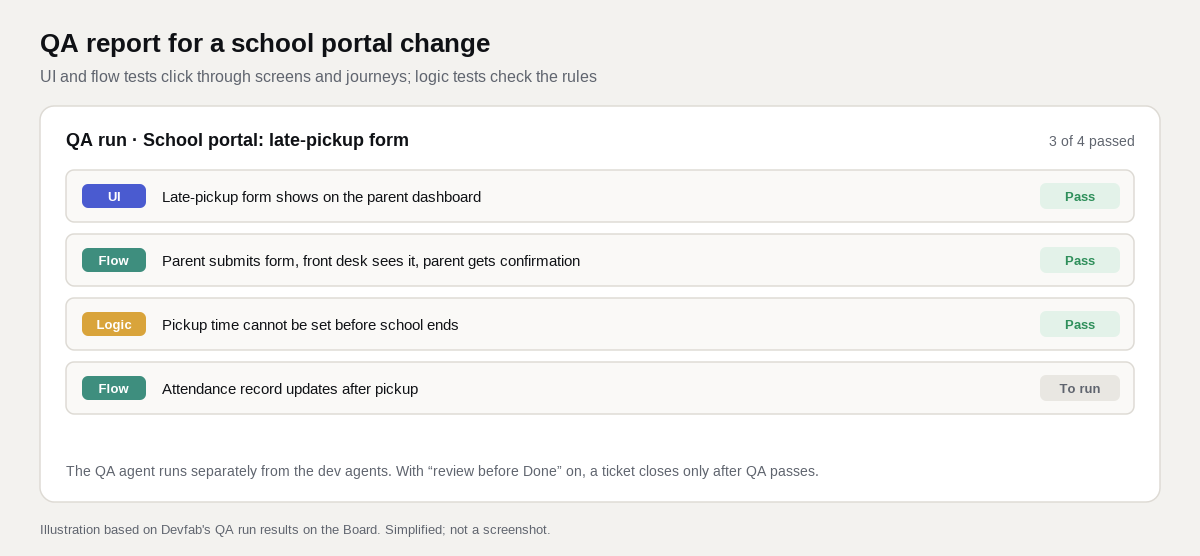
- Impact before the change. ChainFlow maps which functions and APIs call each other and what is deployed. Take a school portal issue such as "add a late-pickup form": ChainFlow shows dev agents that it also touches attendance records, parent notifications and the front-desk dashboard.
- QA that clicks through. The QA agent runs UI and flow tests, clicking screens, buttons and user journeys end to end, plus logic tests.
- Feedback into tickets. A feedback module turns user reports into tickets and notifies the people who reported them.
- Ownership and cost. Code lives in your own GitHub account or your organization's, Deploy ships to your own server, and cost is logged after each run, per task and per project. You can choose the model for each agent or keep Devfab's default.
Limits: Devfab is in Beta, with a smaller community and fewer integrations than mature tools. Picking up work straight from a GitHub issue label is not something we can confirm today. It is not an editor for hands-on coding, and it needs a GitHub account. If all you want is quick PRs for small issues, a coding agent from the list above is the simpler choice.
How to choose
| If you… | Start with |
|---|---|
| Live on GitHub and want issue-to-PR with the least setup | GitHub Copilot cloud agent |
| Already pay for ChatGPT and want cloud tasks plus PR review | OpenAI Codex |
| Want a terminal agent that also runs in GitHub Actions | Claude Code |
Work in Cursor and want @cursor on issues and Slack | Cursor cloud agents |
| Hand off scoped tickets from Linear or Jira | Devin |
| Need open source and your own infrastructure | OpenHands |
| Run many agents across CI, chat and trackers at scale | Factory |
| Ship client projects that need research, approval, QA and deploy | Devfab |
Whatever you pick, set three rules before the first agent PR lands:
- Keep branch protection on. Agents open PRs; people merge them.
- Write issues an agent can finish. Clear steps, expected behavior, and what "done" means.
- Track cost per issue. Credits and usage add up. Compare the cost of each fix with its value.
FAQ
Which AI agent can I assign a GitHub issue to?
GitHub Copilot's cloud agent can be started from the Copilot panel on an issue and opens a pull request. Cursor's cloud agents start from an @cursor comment on a GitHub issue or PR. OpenHands has issue-to-PR automations. Claude Code and Codex connect through GitHub integrations and Actions.
What happened to Google Jules and Amazon Q Developer?
Google stopped new Jules sessions on November 11, 2026, and Jules shuts down on December 31, 2026. Amazon Q Developer, which could take assigned GitHub issues, stopped new subscriptions on May 15, 2026 and reaches end of support on April 30, 2027; AWS points users to Kiro.
Should an AI agent be allowed to merge its own pull requests?
Most teams say no. Keep branch protection on, require a human review, and let CI run. GitHub notes that rulesets and branch protection can block Copilot from creating or updating pull requests unless you grant a bypass, so decide the rules before you turn agents on.
Which agent is cheapest for a team of five?
Open source is cheapest to start. OpenHands is free to self-host with your own model keys. Among paid options, as of November 2026, GitHub Copilot Business is USD 19 per granted seat per month and Codex comes with ChatGPT Business at USD 20 per user per month billed annually.
Do these agents test the code before opening a pull request?
Some check their own work. Codex checks its work with computer and browser tools, and Devin's sessions include a shell, IDE and browser. None of that replaces your CI and a person's review. Devfab adds a separate QA agent that runs UI, flow and logic tests.
Read next
- What is an AI software factory?
- GitHub Copilot vs OpenAI Codex
- Devfab vs GitHub Copilot
- Devfab vs Devin
- OpenHands alternatives
Issues are tickets. Projects need a plan, QA and a deploy. Try Beta
Sources (checked November 2026): GitHub Docs: About Copilot cloud agent; GitHub Docs: Copilot features; GitHub Copilot plans; GitHub changelog: Enterprise AI controls GA (Feb 26, 2026); OpenAI Codex; Codex docs; Codex cloud environment; Codex pricing; openai/codex on GitHub; The New Stack: Codex in ChatGPT desktop (Jul 2026); Claude Code overview; Claude Code costs; Claude Code Code Review; Claude pricing; Cursor cloud agents; Cursor Bugbot; Cursor pricing; Cursor blog: Joining SpaceX; DEV Community: Cursor 3 review (Apr 2026); Devin docs; Devin Desktop; Devin deployment docs; Devin pricing; OpenHands; OpenHands pricing; OpenHands: Introducing Agent Canvas; OpenHands: New in Agent Canvas, Sep 2026; Factory; Factory pricing; Factory docs index; Factory: Software factory (Jun 15, 2026); Tempo docs: Agents; Jules changelog; AWS: Amazon Q Developer build; AWS: Amazon Q Developer end of support.
Frequently asked questions
Which AI agent can I assign a GitHub issue to?
GitHub Copilot's cloud agent can be started from the Copilot panel on an issue and opens a pull request. Cursor's cloud agents start from an @cursor comment on a GitHub issue or PR. OpenHands has issue-to-PR automations. Claude Code and Codex connect through GitHub integrations and Actions.
What happened to Google Jules and Amazon Q Developer?
Google stopped new Jules sessions on November 11, 2026, and Jules shuts down on December 31, 2026. Amazon Q Developer, which could take assigned GitHub issues, stopped new subscriptions on May 15, 2026 and reaches end of support on April 30, 2027; AWS points users to Kiro.
Should an AI agent be allowed to merge its own pull requests?
Most teams say no. Keep branch protection on, require a human review, and let CI run. GitHub notes that rulesets and branch protection can block Copilot from creating or updating pull requests unless you grant a bypass, so decide the rules before you turn agents on.
Which agent is cheapest for a team of five?
Open source is cheapest to start. OpenHands is free to self-host with your own model keys. Among paid options, as of November 2026, GitHub Copilot Business is USD 19 per granted seat per month and Codex comes with ChatGPT Business at USD 20 per user per month billed annually.
Do these agents test the code before opening a pull request?
Some check their own work. Codex checks its work with computer and browser tools, and Devin's sessions include a shell, IDE and browser. None of that replaces your CI and a person's review. Devfab adds a separate QA agent that runs UI, flow and logic tests.