Short answer: Pick FlutterFlow for native iOS and Android apps with store submission built in. Pick Anything or Emergent if you are non-technical and want web and mobile from one prompt. Pick DronaHQ for internal field apps that work offline. Pick Devfab when the mobile app is one part of a larger system that needs planning, QA and your own servers.
You have an idea for a dog-walking booking app, or your gym wants members to book classes from their phones. Every AI builder now says "mobile." Yet some produce a native app ready for the stores, some produce a responsive website, and some produce a prototype you preview on your phone. The difference shows up the day you try to publish. This list sorts the builders by what they actually ship, using vendor docs re-checked in November 2026.
In this guide, you'll learn:
- How we picked and compared
- The quick comparison table
- Each builder's strengths and limits
- How to choose
Start with the table if you already know your target platform.
How we picked and compared
We included builders whose own docs say they produce native or cross-platform mobile apps from prompts, or that serve mobile as a first-class target. We excluded tools that only make responsive websites; Base44, for example, describes apps that are responsive on mobile, tablet and desktop, with no native mobile apps described (Base44).
For each tool we checked five things in the vendor's docs and pricing pages: the mobile output (Flutter, React Native with Expo, Kotlin), the path to the App Store and Google Play, whether you get the code, how testing works, and the pricing model. Prices appear only where the official pricing page shows them, "as of November 2026." We did not run hands-on builds for this version of the page.
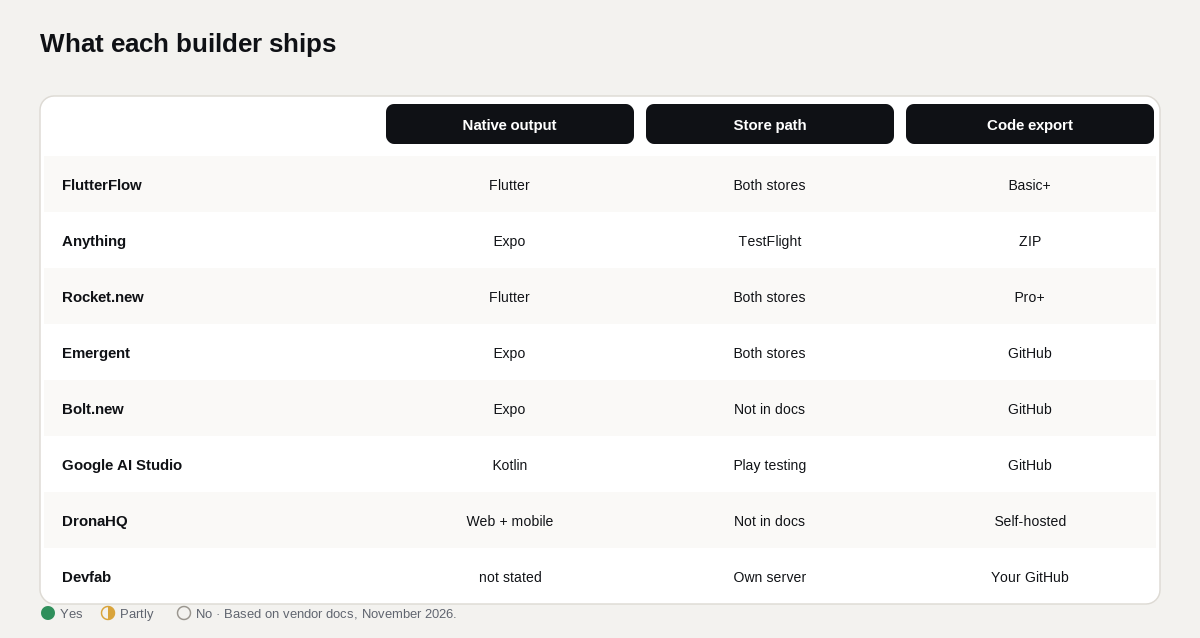
Quick comparison table
| Builder | Mobile output | App store path | Code export | Testing described | Pricing (as of November 2026) |
|---|---|---|---|---|---|
| FlutterFlow | Native iOS and Android (Flutter) | App Store and Google Play, built in | Download from Basic; GitHub on Pro and Max | Preview, test sign-in, builds to testers | Free; Basic USD 39 per month; Pro USD 80; Max USD 150 |
| Anything | Expo (React Native) for iOS and Android, plus web | TestFlight; Google Play in beta | ZIP; GitHub sync coming soon | Browser test agent on Max | Paid plan required to build; Pro 20k USD 19 per month |
| Rocket.new | Flutter for iOS and Android; Next.js for web | APK, Google Play, App Store | ZIP on Pro and above; GitHub sync for Next.js | Not covered in the docs we checked | Free (one-time credits); Pro USD 25 per month |
| Emergent | React Native with Expo | App Store and Google Play via Expo EAS | Save to GitHub from Standard | Unit, integration and E2E smoke tests | Free; Standard USD 20 per month; Pro USD 200 |
| Bolt.new | Native apps via Expo | Not covered in the docs we checked | GitHub sync | Not covered in the docs we checked | Free; Pro USD 25 per month; Teams USD 30 per member |
| Google AI Studio | Native Android (Kotlin, Jetpack Compose) | Google Play internal testing | Two-way GitHub sync; ZIP | Not covered in the docs we checked | Gemini API Free tier; paid usage per token |
| DronaHQ | One build for web and mobile | Not covered in the docs we checked | Git on self-hosted only | Not covered in the docs we checked | No free plan; Cloud Starter USD 140 per month |
| Devfab | Not stated | Deploy to your own server | Code in your own GitHub account | QA agent: UI, flow and logic tests | Cost logged per task and per project (Beta) |
The builders
1. FlutterFlow
Best for: native iOS and Android apps where store release is the main job.
Status: FlutterFlow restructured on November 3–4, 2026. The classic visual builder became "FlutterFlow Studio," and the name "FlutterFlow" now refers to a new AI-agent mobile builder; one subscription covers both (FlutterFlow community). CEO Abel Mengistu said, "We learned that people wanted a conversational way of building" (HackerNoon).
- The new FlutterFlow targets iOS and Android from one project, with backend, sign-in, file storage, analytics and store submission built in (FlutterFlow).
- The agent builds inside "threads" on a copy of the app, and a Proposal card "waits for your approval before the agent builds it" (FlutterFlow agent docs).
- It submits to the App Store and Google Play and releases updates from the platform (FlutterFlow docs).
- Code and APK download start on Basic; push to GitHub is on Pro and Max only (FlutterFlow pricing).
- Pricing as of November 2026: Free USD 0; Basic USD 39 per month (USD 29 billed yearly); Pro USD 80 per month; Max USD 150 per month; Enterprise through sales (same source).
Limits: the new FlutterFlow is iPhone and Android only, so web output needs Studio. A Studio project cannot move into the new FlutterFlow. The agent cannot push on its own, connect store accounts or submit for review (FlutterFlow community; FlutterFlow agent docs).
2. Anything
Best for: non-technical founders who want a consumer app on web and mobile, with payments, from one prompt.
Status: Create.xyz relaunched as Anything in August 2025 (Neon blog). Apple removed the Anything iOS app on March 26, 2026, citing guideline 2.5.2, restored it on April 3, then removed it again (TechCrunch). That affects building from an iPhone, not the apps it generates.
- Mobile apps are "Expo (React Native) code," with a Postgres database on Neon and serverless functions (Anything docs).
- Agent modes include Plan, which writes "a step-by-step plan before the agent makes any changes" (same source).
- It submits to the App Store via TestFlight and to Google Play in beta, to the internal testing track, with payments via Stripe and RevenueCat (same source).
- The Max plan adds a browser agent that tests your app and fixes issues (Anything subscriptions).
- "Building an app requires a paid plan"; Pro 20k is USD 19 per month as of November 2026 (Anything pricing).
Limits: code export is a ZIP from the Code tab, and "GitHub sync is coming soon" (Anything export docs). The web preview does not support camera or GPS, so you test those on a device through Expo Go (Anything docs).
3. Rocket.new
Best for: founders who want research and a PRD before the build, then Flutter mobile and Next.js web apps.
- iOS and Android apps use Flutter; web apps use Next.js (Rocket docs).
- Its Solve mode validates ideas, runs market research and writes PRDs before Build plans the architecture (same source).
- Mobile ships via web preview, Android APK, Google Play and the Apple App Store (Rocket build overview).
- Paid plans include unlimited team members (Rocket pricing).
- Pricing as of November 2026: Free USD 0 (20 one-time credits); Pro USD 25 per month; Rocket USD 50 per month; Booster USD 250 per month; prices are per plan, not per user (same source).
Limits: ZIP download needs Pro or above and works only in the web browser; mobile clients cannot download code (Rocket code editor). GitHub import supports Next.js plus TypeScript only, so it does not cover Flutter projects (Rocket from GitHub).
4. Emergent
Best for: non-developers who want one tool for a web app and a store-ready mobile app, with tests during the build.
- Mobile apps use React Native with Expo, and Emergent builds and submits them to the App Store and Google Play via Expo EAS (Emergent FAQ).
- Agents run unit, integration and basic end-to-end smoke tests during the build, plus a pre-publish health check (same source).
- You can bring your own OpenAI, Anthropic or Google keys or use its Universal LLM Key (same source).
- Business adds RBAC, SSO and shared workspaces; Enterprise adds audit logs and deployment to your own cloud (Emergent pricing).
- Pricing as of November 2026: Free USD 0 (10 credits per month); Standard USD 20 per month; Pro USD 200 per month; Business and Enterprise custom (same source).
Limits: you need your own Apple and Google developer accounts. Hosted apps consume credits every month while published, and there is no ZIP download button (Emergent deployment; Emergent FAQ).
5. Bolt.new
Best for: quick Expo-based mobile prototypes without installing a local toolchain.
- Bolt runs the whole dev environment in the browser on StackBlitz WebContainers, "so you don't have to install anything" (Bolt intro).
- Native mobile apps come through the Expo integration (same source).
- A Plan mode works through strategy without generating code (Bolt glossary).
- Bolt auto-commits each non-breaking change to GitHub (Bolt Git).
- Pricing as of November 2026: Free USD 0 (1M tokens per month); Pro USD 25 per month; Teams USD 30 per member per month; Enterprise custom (Bolt pricing).
Limits: the docs we checked do not describe app store submission. Bolt projects stay on main and cannot switch branches (Bolt Git).
6. Google AI Studio
Best for: quick native Android prototypes in Kotlin from a prompt, at low cost.
- Build mode supports "native Android apps with Kotlin and Jetpack Compose" (Google AI Studio).
- Android apps get Firebase AI Logic and App Check, and the agent can provision Firestore and Firebase Authentication after approval (same source).
- Android apps can be published to the Play Store internal testing track (same source).
- Two-way GitHub sync and ZIP export are built in (same source).
- AI Studio access is part of the Gemini API Free plan, with paid usage billed per token (Gemini API pricing).
Limits: Android only on the mobile side; no team, SSO or role features are described in the Build mode docs; apps are auto-reviewed and may be removed for policy violations (Google AI Studio). Note that Google is sunsetting Firebase Studio on March 22, 2027 and points users here (Firebase Studio migration).
7. DronaHQ
Best for: internal apps for field teams that need the same app on web and offline-capable mobile.
- One build serves web and mobile, with offline mobile access on Enterprise (DronaHQ; DronaHQ pricing).
- Prompt-based app generation, with a "Vibe code SWE Agent" in beta on request (DronaHQ).
- Cloud, dedicated cloud with data residency, or self-hosted (same source).
- SOC 2 Type II, ISO 27001, SSO/SAML, RBAC and audit trails; HIPAA via the self-hosted version (same source).
- Pricing as of November 2026: Cloud Starter USD 140 per month (USD 100 billed annually); Cloud Business USD 700 per month; no permanent free plan (DronaHQ pricing).
Limits: built for internal tools, not consumer apps; the pages we checked do not describe app store submission. Git source control is on the self-hosted version only.
8. Devfab
Best for: teams where the mobile experience is one part of a larger system, such as a booking backend, a staff admin portal and notifications, that needs research, an approved plan, tests and deployment to your own server.
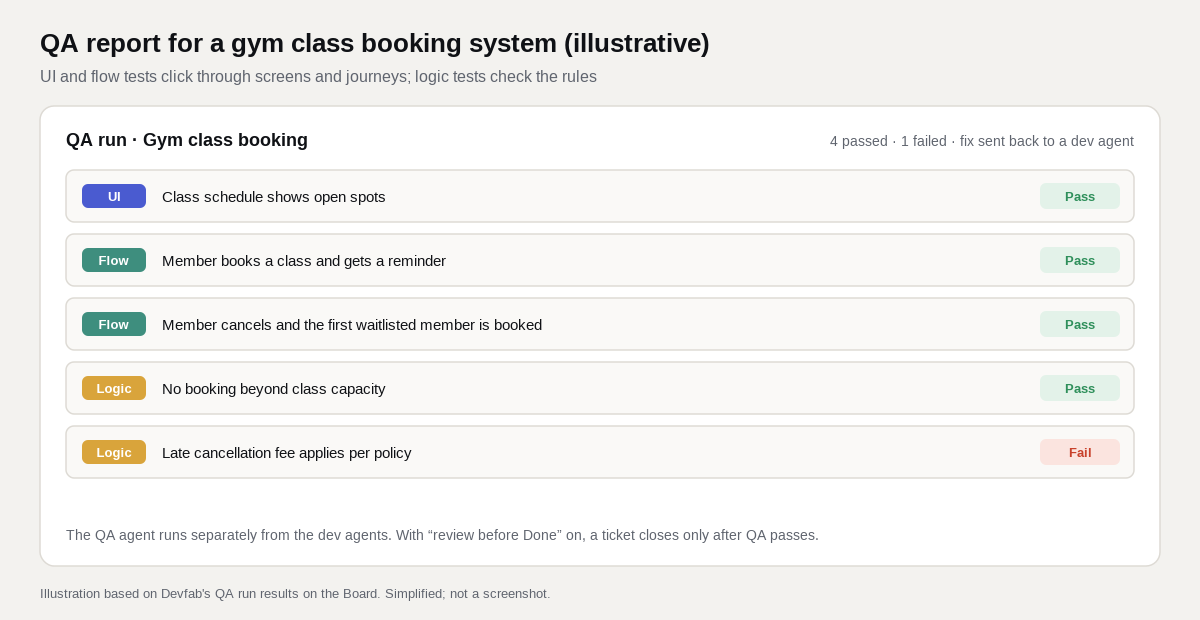
Devfab is a Software Factory, not a mobile builder. Coding agents automate the developer. Devfab automates the development lifecycle. Its Researcher maps the domain first, such as booking rules, cancellation policies and competitor apps for a gym class system, then suggests a prototype. The Planner writes a plan a person approves. Dev agents build with ChainFlow, which maps which functions and APIs call each other, so a change to class booking shows its effect on payments, waitlists and reminder notifications. The QA agent runs UI and flow tests, with screens, buttons and user journeys clicked end to end, plus logic tests. The code lives in your own GitHub account and deploys to your own server. Cost is logged after each run, per task and per project.
Limits, stated plainly: native mobile output is not stated. By default Devfab picks a stack that fits, such as Next.js and TypeScript for web apps, and you can choose languages. Devfab is in Beta, has a smaller community and fewer integrations than mature platforms, is not an editor for hands-on coding, and needs a GitHub account. If a store-ready iOS app is the whole job, choose a builder above.
How to choose
- You need a native app in both stores and want to stay in one tool: FlutterFlow.
- You are non-technical and want web plus mobile with payments: Anything or Emergent. Emergent describes tests during the build; Anything's test agent is on Max.
- You want research and a PRD before building: Rocket.new.
- You want a quick Expo prototype to show investors: Bolt.new.
- Android only, low budget: Google AI Studio.
- Internal field app, offline, self-hosted: DronaHQ.
- The app is part of a bigger system you must plan, test and run on your own servers: Devfab.
Ask every vendor the same three questions before you pay: can I get the code, who submits to the stores, and what tests run before release?
FAQ
What is the best AI mobile app builder in 2026?
For native iOS and Android apps with store submission built in, FlutterFlow is the most complete on the pages we checked, after its November 2026 relaunch as an agent-first builder. Anything and Emergent suit non-technical founders who want web and mobile from one prompt. DronaHQ suits internal field apps that must work offline.
Can an AI app builder publish to the App Store and Google Play?
Several can. FlutterFlow submits to the App Store and Google Play and releases updates. Anything submits to the App Store through TestFlight and publishes to Google Play in beta, to the internal testing track. Rocket and Emergent list both stores, and Emergent needs your own developer accounts.
Which AI mobile app builders give you the code?
Most, with conditions. FlutterFlow offers code download from Basic and GitHub push on Pro and Max. Anything offers a ZIP download, with GitHub sync coming soon. Rocket needs Pro or above for ZIP download, Emergent saves to GitHub from Standard, and Bolt and Google AI Studio sync with GitHub.
Does Devfab build native mobile apps?
Native mobile output is not stated in what we can confirm about Devfab. By default it picks a stack that fits, such as Next.js and TypeScript for web apps, and you can choose languages. If your main deliverable is a store-ready iOS or Android app, a dedicated mobile builder on this list is the safer pick.
Read next
- What is an AI software factory?
- FlutterFlow vs Anything
- Devfab vs FlutterFlow
- FlutterFlow alternatives
- Best AI full-stack app builders
Building the system behind the app, not only the app? Try Beta
Sources (checked November 2026): FlutterFlow homepage; FlutterFlow pricing; FlutterFlow docs (new FlutterFlow); FlutterFlow: what the agent can do; FlutterFlow community: two ways to build (Nov 2026); HackerNoon: FlutterFlow launches AI-native app builder (Nov 5, 2026); Anything pricing; Anything docs: subscriptions; Anything docs: export; Anything full docs; Neon blog: Anything (Aug 7, 2025); TechCrunch: Anything booted from the App Store twice (Apr 14, 2026); Rocket docs: introduction; Rocket docs: build overview; Rocket docs: pricing plans; Rocket docs: code editor; Rocket docs: from GitHub; Emergent FAQs; Emergent pricing; Emergent: deployment; Intro to Bolt; Bolt glossary; Bolt Git integration; Bolt pricing; Build apps in Google AI Studio; Gemini API pricing; Firebase Studio migration guide; DronaHQ homepage; DronaHQ pricing; What is Base44.
Frequently asked questions
What is the best AI mobile app builder in 2026?
For native iOS and Android apps with store submission built in, FlutterFlow is the most complete on the pages we checked, after its November 2026 relaunch as an agent-first builder. Anything and Emergent suit non-technical founders who want web and mobile from one prompt. DronaHQ suits internal field apps that must work offline.
Can an AI app builder publish to the App Store and Google Play?
Several can. FlutterFlow submits to the App Store and Google Play and releases updates. Anything submits to the App Store through TestFlight and publishes to Google Play in beta, to the internal testing track. Rocket and Emergent list both stores, and Emergent needs your own developer accounts.
Which AI mobile app builders give you the code?
Most, with conditions. FlutterFlow offers code download from Basic and GitHub push on Pro and Max. Anything offers a ZIP download, with GitHub sync coming soon. Rocket needs Pro or above for ZIP download, Emergent saves to GitHub from Standard, and Bolt and Google AI Studio sync with GitHub.
Does Devfab build native mobile apps?
Native mobile output is not stated in what we can confirm about Devfab. By default it picks a stack that fits, such as Next.js and TypeScript for web apps, and you can choose languages. If your main deliverable is a store-ready iOS or Android app, a dedicated mobile builder on this list is the safer pick.