Short answer: The best no-code app builder depends on where your data already lives. Pick Glide for apps on spreadsheets, Softr for client portals, Airtable for data-heavy team work, Power Apps for Microsoft 365, Zoho Creator for Zoho shops, Quickbase for operations, and Bubble for a full custom product. Pick Devfab when you need the code itself.
You run operations, not a dev team. The work lives in spreadsheets, inboxes and a dozen forms. You need a real app: a field-service tracker, a client portal, a stock count tool. And you'd like it this quarter, without hiring developers.
This year, every no-code builder added an AI agent, and three of them changed shape completely. Softr relaunched on November 9. Airtable was sold. Glide rebuilt itself as GlideOS. This list compares eight options using vendor pages and reviews checked in November 2026.
In this guide, you'll learn:
The table is the fast route; the tool sections hold the detail.
How we picked and compared
We looked for tools that let a non-developer build a working business app: data, screens, roles and workflows. We did not run hands-on builds for this page. Every fact below comes from the vendor's own pages or a dated review, checked in November 2026, and linked where it appears.
We compared each tool on:
- Where your data lives: built-in database or your existing sheets and systems.
- How the AI helps: does it plan, build, test or only answer questions?
- Mobile: native apps, or a web app on a phone.
- Ownership and lock-in: can you export code, or only data?
- Admin: roles, SSO and governance.
- Pricing model: per user, per workspace, credits or workload, with prices only from official pricing pages.
Three status changes shape this list. Softr relaunched as "the new Softr" on November 9, 2026, with AI building the whole app, including a custom frontend (Softr blog). Airtable was acquired by Bending Spoons, closing in early September 2026, with layoffs announced on October 12 and plans and pricing stated as unchanged (Airtable newsroom). Glide relaunched as GlideOS, live since June 2026, with the old product continuing as Glide Classic (Glide blog).
Quick comparison table
| Builder | Best for | Data | Native mobile | Code export | Pricing model (as of November 2026) |
|---|---|---|---|---|---|
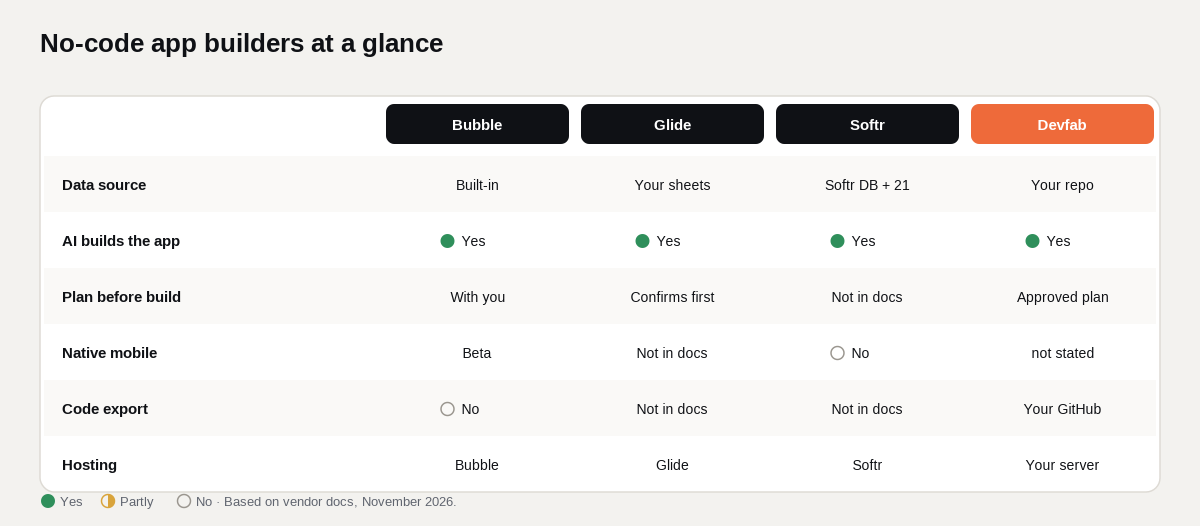
| Bubble | Custom web products without code | Built-in database | iOS and Android (beta) | No; data only | Free; Starter USD 32 per month; plans meter workload units |
| Glide | Apps on Excel or Google Sheets | Your sheets plus about 150 integrations | Apps for desktop and phone | Not covered in the pages we checked | Free; Basic USD 25 per month; credit-based |
| Softr | Client portals and internal tools | Softr Databases plus 21+ sources | No native store publishing (per review) | Not covered in the pages we checked | Workspace plans with user caps; see pricing page |
| Airtable | Data-heavy team workflows | Airtable bases | Not covered in the pages we checked | Custom element source only | Free; Team USD 20 per user per month (annual) |
| Microsoft Power Apps | Microsoft 365 organizations | Dataverse and Microsoft connectors | Not covered in the pages we checked | Not covered in the pages we checked | Premium USD 20 per user per month (annual) |
| Zoho Creator | Zoho customers and SMBs | Zoho, with flexible hosting | Native iOS and Android for every app | Not covered in the pages we checked | Standard USD 8 per user per month (annual) |
| Quickbase | Operations teams | Built-in, 350+ connectors (Pave) | Mobile-ready | Not covered in the pages we checked | Pave Free; Launch USD 20 per month; core platform USD 500 per month (annual) |
| Devfab | Apps you must own as code | Your own repo and server | not stated | Code in your own GitHub | Cost logged per task and per project (Beta) |
The builders, one by one
Bubble
Best for: founders and teams building a custom web product, plus a companion phone app, entirely without code.
- Visual all the way down. "Every component is visual, including the backend," and hosting, database, security and auto-scaling are included (Bubble).
- AI Agent (beta). Describe an idea and the Agent builds a full app, then keep chatting with it or switch to visual editing (Bubble AI). It "plans your app with you" before building pages, workflows, database and privacy rules (Bubble blog, Aug 2026).
- Web plus native mobile. iOS and Android apps share data and workflows with the web app, with direct store submission; mobile is labeled beta (Bubble).
- Enterprise. SSO, an isolated instance on a Bubble-managed AWS server in a chosen region, and SOC 2 Type II (Bubble pricing; Bubble for Enterprise).
- Pricing. Free; Starter USD 32 per month; Growth USD 119 per month; Team USD 349 per month (billed annually), as of November 2026. Plans meter workload units, and a paid plan is needed for a live app (Bubble pricing).
Limits: "Bubble apps can only be run on the Bubble platform; there's no way of exporting your application as code" (Bubble manual). Bubble's own guide says native mobile generation "is still evolving" and that its MCP "can't deploy your app yet."
Glide
Best for: operations teams whose business runs on Excel or Google Sheets.
- GlideOS. Announced in March 2026 as "an entirely new version of our product," live since June (Glide community).
- Reads your spreadsheets. SheetSense scans formulas, macros, pivot tables and charts and asks you to confirm before building (Glide blog).
- Agent that builds and runs. Glide's second-generation agent builds apps, then can operate them, query data and run code (same source).
- Integrations and governance. Excel, Google Sheets, Airtable, Notion, Snowflake and about 150 others; AI spend budgets by team and model; apps private to the company by default (Glide).
- Pricing. Free; Basic USD 25 per month; Plus USD 50 per month; Pro USD 125 per month (starting at 5 team members); Enterprise custom, as of November 2026. Free cannot publish apps (Glide pricing).
Limits: community users report credit costs are hard to predict and agent mistakes still use credits; Glide staff called credit transparency "one of the biggest pieces of feedback" (Glide community, Jun–Jul 2026). GlideOS is a separate subscription from Classic, with no migration tool yet.
Softr
Best for: client portals and internal tools on data you already keep in Airtable, Google Sheets or Notion.
- The new Softr. Since November 9, 2026, AI creates the database, roles and permissions, workflows, integrations and a custom frontend. "We vibe code your frontend. We don't vibe code your backend." Existing apps keep working (Softr blog).
- Data sources. Softr Databases plus 21+ external sources; Airtable, Google Sheets, Notion and REST API on every plan (Softr).
- Permissions. User groups control visible pages, blocks and buttons, with record-level restrictions and preview as any user (same source).
- Agents with approval. Workflows run on buttons, forms, schedules or record changes, and AI agents can wait for human approval before acting (same source). Softr MCP lets Claude, ChatGPT, Cursor and Codex build apps, on every plan (Softr MCP).
- Pricing. Workspace plans (Free, Basic, Pro, Business, Enterprise) with set numbers of builders and app users, monthly workflow limits and AI credits (Softr docs). Plan prices did not load in our check; see Softr pricing.
Limits: a competitor's review lists capped app users, metered records and workflow actions, limited design flexibility and no native App Store or Google Play publishing (Jet Admin, Sep 30, 2026).
Airtable
Best for: teams whose "app" is mostly structured data, views and workflows.
- Omni builds apps. Omni creates tables, fields, records, automations, dashboards and interface pages (Airtable support).
- Omni 2.0 (October 2026, all plans). Builds data models from spreadsheets, PDFs and images, sets up Field Agents and writes automation scripts (Airtable Fall Release).
- Safeguards. Omni asks before deletions and leaves publishing interfaces and turning on automations to you (Airtable support).
- Custom elements. AI-generated interface elements are out of beta, with source code you can edit or download (Airtable community).
- Pricing. Free; Team USD 20 per user per month; Business USD 45 per user per month (billed annually); Enterprise Scale custom, as of November 2026 (Airtable pricing). Building with Omni doesn't use AI credits; Q&A does (Airtable AI billing).
Limits: Omni can't create new views, set up syncs or export data; custom elements aren't viewable on mobile (Airtable support). Under its new owner, watch the roadmap after the October layoffs.
Microsoft Power Apps
Best for: organizations standardized on Microsoft 365, Dataverse and Entra.
- Describe the app. Users "describe what they need in natural language and generate rich, custom app experiences" (Power Apps).
- Plans workspace. AI agents act as requirements analyst, data modeler and solution architect before generating assets (The New Stack).
- Outside AI tools allowed. The app-builder skill lets tools such as GitHub Copilot CLI and Claude Code build model-driven apps, "creating nothing until the user approves the build plan" (Power Platform, Sep 2026).
- Governance. IT can "Centralize policies for environments, data loss prevention, access, and auditing" (Power Apps).
- Pricing. Developer Plan free; Premium USD 20 per user per month, paid yearly; Dataverse capacity add-on USD 40 per GB per month, as of November 2026 (Power Apps pricing).
Limits: premium, on-premises and custom connectors need a standalone license beyond Microsoft 365 rights, and several AI building pieces are still in preview (licensing FAQ). Strictly, Power Apps is low-code; its generated and no-code paths put it on this list.
Zoho Creator
Best for: small and mid-size businesses, especially those already on Zoho CRM or Books.
- AI agents across the build. A Plan Agent writes a business requirement document, a Build Agent adds modules and workflows, and a Test Agent generates and runs test cases (Zoho Creator).
- Native mobile for every app. iOS and Android versions are included (same source).
- Hosting choice. Zoho Cloud, AWS, Azure, GCP, on-premise or hybrid (same source).
- Model choice. Zoho's GenAI or your own key for OpenAI, Google or Anthropic (same source).
- Pricing. Standard USD 8 per user per month (annual; 1 app); Professional USD 20; Enterprise USD 25, as of November 2026; Free Edition available (Zoho Creator pricing).
Limits: 2026 Capterra reviewers cite a steeper learning curve beyond simple apps, a template-based feel for niche apps, slow-to-learn Deluge scripting and inconsistent support (Capterra). Compare it with code ownership in Devfab vs Zoho Creator.
Quickbase
Best for: field, construction and manufacturing teams that need governed operational apps.
- Pave. Launched April 28, 2026: a prompt-first AI builder that includes data, permissions and hosting (Quickbase press release).
- What Pave includes. Data model, roles and permissions, workflows with escalations and reminders, draft/publish, version rollback and 350+ connectors; "Your data never trains the AI" (Pave).
- Core platform. Up to 50 custom apps on the entry tier, automations, sync, API and a developer sandbox, with no limit on users (Quickbase pricing).
- Identity. Okta and OneLogin, LDAP or SAML, and two-step authentication (same source).
- Pricing. Pave Free (1 app); Launch USD 20 per month for 120 credits; core platform entry tier USD 500 per month billed annually, as of November 2026 (Pave pricing; Quickbase pricing).
Limits: Pave's API access and custom agents are "coming soon," and a competitor's review cites a platform minimum that raises starting cost (Pave pricing; Blaze).
Devfab, with honest limits
Best for: agencies and IT teams that must deliver a business app as code they own, tested and running on their own server.
Devfab is not a no-code builder in the usual sense, but it starts the same way: you describe the app in plain words. The difference is what comes out. App builders automate the first version. Devfab automates the development lifecycle.
- Research before the plan. The Researcher maps the domain first. For a field-service app, that means terms like work orders, dispatch and service windows, best practices, and comparable products. Then it suggests a prototype.
- A person approves the plan. The Planner publishes it; the Coordinator creates tickets only after approval.
- ChainFlow on every change. Dev agents see which functions and APIs call each other and what is deployed, so a change to job scheduling doesn't break invoicing or notifications.
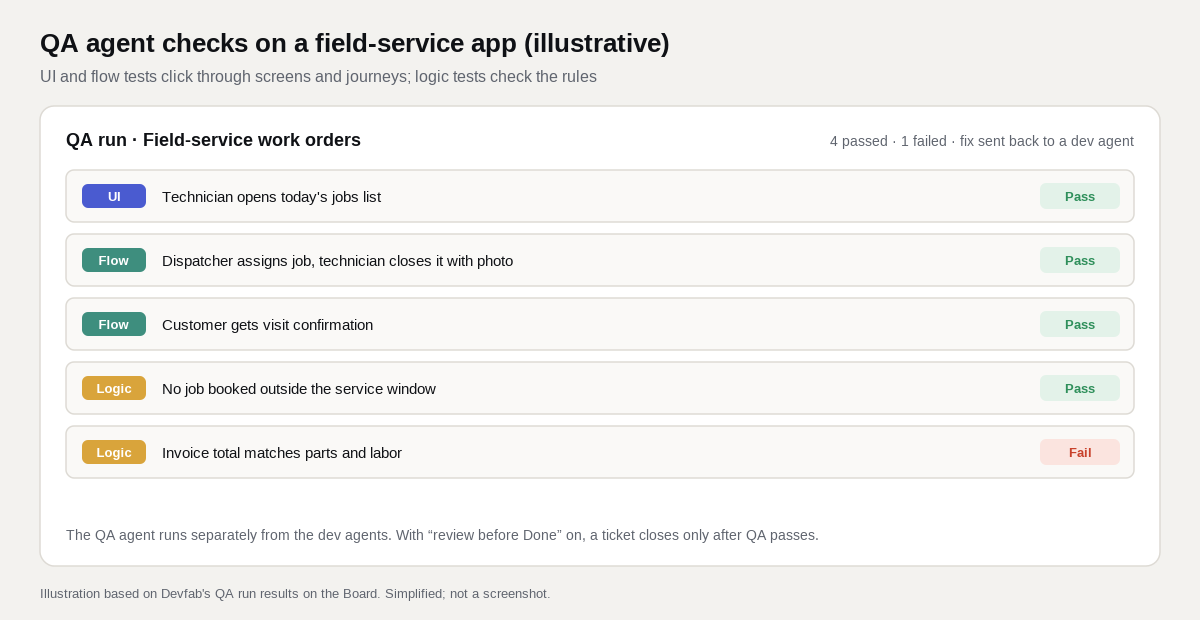
- QA agent. It runs UI and flow tests, clicking screens, buttons and user journeys end to end, plus logic tests.
- Ownership. Code lives in your own GitHub account or your organization's, and Deploy ships to your own server. Docs include blueprints and user manuals.
- Predictable cost. Cost is logged after each run, per task and per project.
Limits: Devfab is new and in Beta, with a smaller community and fewer integrations than the platforms above. There is no visual editor, and it is not an editor for hands-on coding. It needs a GitHub account. If a business user must keep changing the app by hand, a no-code builder is the better fit.
How to choose
Start with your data and your users, not the feature list.
- Your data lives in spreadsheets. Glide reads them first; Softr and Airtable also connect to sheets.
- Clients need to log in. Softr's user groups and record-level permissions are built for portals.
- You are a Microsoft or Zoho shop. Power Apps or Zoho Creator keep apps inside the identity and data you already run.
- Field and operations teams with many users. Quickbase's core platform has no user limit; Zoho Creator gives every app native mobile.
- You are building a product, not a tool. Bubble gives the most design and logic freedom without code, with lock-in as the trade.
- The app must leave the platform. If a client needs the code, its own server or a security review of the source, use Devfab.
Before you commit, check two things: how cost grows as app users grow, and what you can take with you if you leave. For a deeper look at the categories, read No-code vs AI app builder. For two head-to-heads, see Bubble vs Glide and Devfab vs Softr.
FAQ
What is the best no-code app builder for business apps?
It depends on where your data lives. Glide for apps on Excel or Google Sheets, Softr for client portals, Airtable for data-heavy team workflows, Power Apps inside Microsoft 365, Zoho Creator inside Zoho, Quickbase for operations, and Bubble for a full custom web and mobile product without code.
Can I export my code from a no-code app builder?
Usually not. Bubble's manual says apps can only run on Bubble and cannot be exported as code; you can export data. Airtable lets you download the source of AI-generated custom elements. If owning the full codebase matters, use a tool that writes code to your own repository, such as Devfab.
Do no-code app builders use AI now?
Yes, all of the tools on this list do. Bubble has an AI Agent, Glide relaunched as GlideOS around its own agent, Softr's new version generates the whole app, Airtable has Omni, Power Apps generates apps from plain language, Zoho Creator has Plan, Build and Test agents, and Quickbase launched Pave.
What do no-code app builders cost?
Models differ: per user (Power Apps, Zoho Creator, Airtable), per workspace plan with user caps (Softr), credits (Glide, Quickbase Pave), or plan tiers metered by server workload (Bubble). Check how cost grows with app users before you build, not after.
Is Devfab a no-code app builder?
Not in the usual sense. You describe the app in plain words, as you would in a no-code tool, but Devfab's agents research, plan, build, test and deploy a normal codebase in your own GitHub account. A person approves the plan, and there is no visual editor.
Read next
- What is an AI software factory?
- No-code vs AI app builder
- Bubble vs Glide
- Devfab vs Softr
- Devfab vs Zoho Creator
Need the app as code you own, on your own server? Try Beta
Sources (checked November 2026): Bubble; Bubble pricing; Bubble AI app builder; Bubble for Enterprise; Bubble manual: Application and data ownership; Bubble blog: What is Bubble AI (Aug 19, 2026); Glide; Glide pricing; GlideOS launch recap (Aug 4, 2026); Glide community: new Glide (Mar 5, 2026); Glide community: pricing issues (Jun 2026); Softr; Softr blog: Beyond building blocks (Nov 9, 2026); Softr MCP; Softr pricing; Softr docs: Pricing and plans; Jet Admin: Softr review (Sep 30, 2026); Airtable newsroom: Back to bases (Oct 12, 2026); Airtable Fall Release (Oct 21, 2026); Airtable custom elements (Apr 14, 2026); Airtable support: Omni; Airtable AI billing; Airtable pricing; Power Apps; Power Apps pricing; Power Platform licensing FAQ; Power Platform September 2026 update; The New Stack: Power Apps Plans (May 19, 2025); Zoho Creator; Zoho Creator pricing; Capterra: Zoho Creator reviews; Quickbase: Pave press release (Apr 28, 2026); Quickbase Pave; Pave pricing; Quickbase pricing; Blaze: Quickbase review (Sep 10, 2026).
Frequently asked questions
What is the best no-code app builder for business apps?
It depends on where your data lives. Glide for apps on Excel or Google Sheets, Softr for client portals, Airtable for data-heavy team workflows, Power Apps inside Microsoft 365, Zoho Creator inside Zoho, Quickbase for operations, and Bubble for a full custom web and mobile product without code.
Can I export my code from a no-code app builder?
Usually not. Bubble's manual says apps can only run on Bubble and cannot be exported as code; you can export data. Airtable lets you download the source of AI-generated custom elements. If owning the full codebase matters, use a tool that writes code to your own repository, such as Devfab.
Do no-code app builders use AI now?
Yes, all of the tools on this list do. Bubble has an AI Agent, Glide relaunched as GlideOS around its own agent, Softr's new version generates the whole app, Airtable has Omni, Power Apps generates apps from plain language, Zoho Creator has Plan, Build and Test agents, and Quickbase launched Pave.
What do no-code app builders cost?
Models differ: per user (Power Apps, Zoho Creator, Airtable), per workspace plan with user caps (Softr), credits (Glide, Quickbase Pave), or plan tiers metered by server workload (Bubble). Check how cost grows with app users before you build, not after.
Is Devfab a no-code app builder?
Not in the usual sense. You describe the app in plain words, as you would in a no-code tool, but Devfab's agents research, plan, build, test and deploy a normal codebase in your own GitHub account. A person approves the plan, and there is no visual editor.