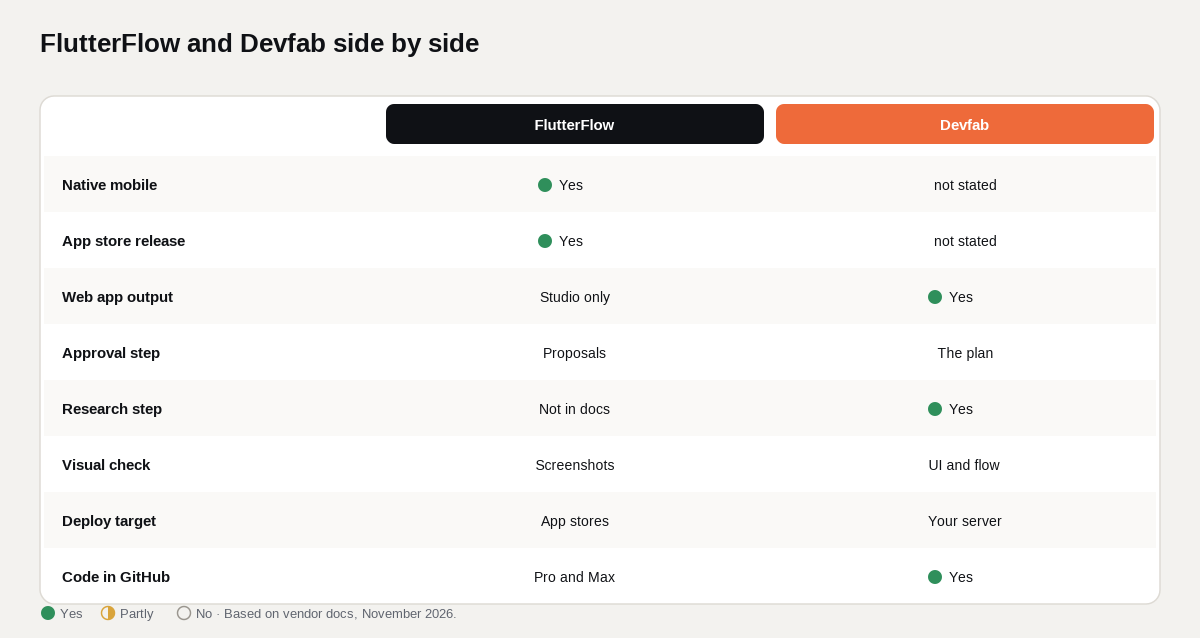
Short answer: FlutterFlow wins when the deliverable is a native iOS or Android app, with backend, sign-in and app store submission bundled in one place. Devfab wins when you deliver web apps, portals and APIs for clients and need domain research, an approved plan, a QA agent, deployment to your own server and cost per project.
You built client apps in FlutterFlow for years. This month, the product you knew got a new name. The classic builder is now FlutterFlow Studio, and an AI agent took over the FlutterFlow name. If you are rethinking your stack anyway, it is fair to ask what else fits your agency.
One camp says a visual builder with an agent covers most client work. The other says client projects need a delivery process and code in your own repo. Here are the facts on both.
In this comparison:
- What each tool is built for
- Switching triggers
- Cost model by team size
- Where FlutterFlow is the better choice
- Where Devfab is the better choice
The status change comes first.
What each tool is built for
FlutterFlow
Status, November 2026: on November 3–4, 2026, FlutterFlow restructured. The classic visual builder was renamed FlutterFlow Studio, and the name FlutterFlow now means a new AI-agent builder for mobile apps. One subscription covers both (FlutterFlow community). CEO Abel Mengistu said, "We learned that people wanted a conversational way of building" (HackerNoon, Nov 5, 2026).
What each part does:
- New FlutterFlow: targets iOS and Android from one project, with backend, sign-in, file storage, analytics and store submission built in (FlutterFlow).
- The agent: builds and changes the app in "threads" on a copy of the app; changes reach the app only when you push. It checks the code it changed for errors and can screenshot screens to verify (FlutterFlow docs).
- Approval: the agent asks with Question, Choice or Proposal cards, and a Proposal "waits for your approval before the agent builds it" (FlutterFlow docs).
- Testing and release: preview, a "What changed" review, test sign-in, sending builds to testers, and App Store and Google Play submission (FlutterFlow docs).
- FlutterFlow Studio: a visual builder for mobile, web and desktop apps, with Firebase and Supabase integrations, custom code, branching and development environments (Studio docs).
- Code export: code and APK download on Basic and above, push to GitHub on Pro and Max (FlutterFlow pricing); Studio offers "Export clean Flutter whenever you want" (FlutterFlow).
- Reach: the site says 3.3 million people have built on FlutterFlow (vendor claim) (FlutterFlow).
FlutterFlow's main users are people who want mobile apps without heavy coding, and teams who want visual control over Flutter.
Devfab
Devfab is an AI software factory. It works on a repository in your own GitHub account and runs the project around the code. The Researcher maps the client's domain before planning. The Planner publishes a plan a person approves. The Coordinator creates tickets, Developers build with ChainFlow so changes don't break connected features, Blueprint produces screens, the QA agent runs UI, flow and logic tests, and Deploy ships to your own server. By default Devfab picks the stack that fits, such as Next.js and TypeScript for web apps or Node or Python for an API, and you can pick languages.
App builders automate the first version. Devfab automates the development lifecycle.
Switching triggers
| Trigger | FlutterFlow | Devfab | Source |
|---|---|---|---|
| Classic projects can't use the new agent | A Studio project cannot be moved into the new FlutterFlow (different architecture) | Works on any repo in your GitHub; ChainFlow maps it first | FlutterFlow community |
| Client also needs a web app | New FlutterFlow is iPhone and Android only; web output requires Studio | Web apps and APIs are its default stacks | FlutterFlow community |
| AI allowance runs out mid-project | Running out pauses messages and pushes; long threads use more | Cost logged after each run, per task and per project | FlutterFlow docs |
| Code must live in GitHub | Push to GitHub on Pro and Max only | Code lives in your own GitHub account from day one | FlutterFlow pricing |
| Client needs SSO and audit logs | SSO, audit logs and private cloud on Enterprise only | Roles, workspace permissions, Team Delivery Report | FlutterFlow pricing |
Cost model by team size
| Team size | FlutterFlow | Devfab |
|---|---|---|
| 1 person | Free tier; Basic adds code and APK download; Pro adds GitHub push; free year for eligible students and educators | Cost logged per task and per project (Beta) |
| 5 people | Pro or Max: real-time collaboration, centralized billing and project-level access; extra editor seats are paid add-ons; one AI allowance shared across FlutterFlow and Studio, with refills | Cost logged per task and per project (Beta) |
| 25 people | Enterprise adds SSO, audit logs and private cloud options | Cost logged per task and per project (Beta) |
FlutterFlow's pricing model as of November 2026, from FlutterFlow's pricing page. Check it for current amounts. Devfab: predictable cost; cost is logged after each run, per task and per project; Devfab is in Beta.
Moving from FlutterFlow to Devfab
Be clear about scope first. If the job is a store-ready mobile app, keep it in FlutterFlow. Move the web and server work.
- Export what you need. On Pro or Max, push the code to GitHub; on Basic, download it. Studio exports Flutter code.
- Split the project. Keep the iOS and Android app where it is. Plan the web admin portal, API or client dashboard in Devfab.
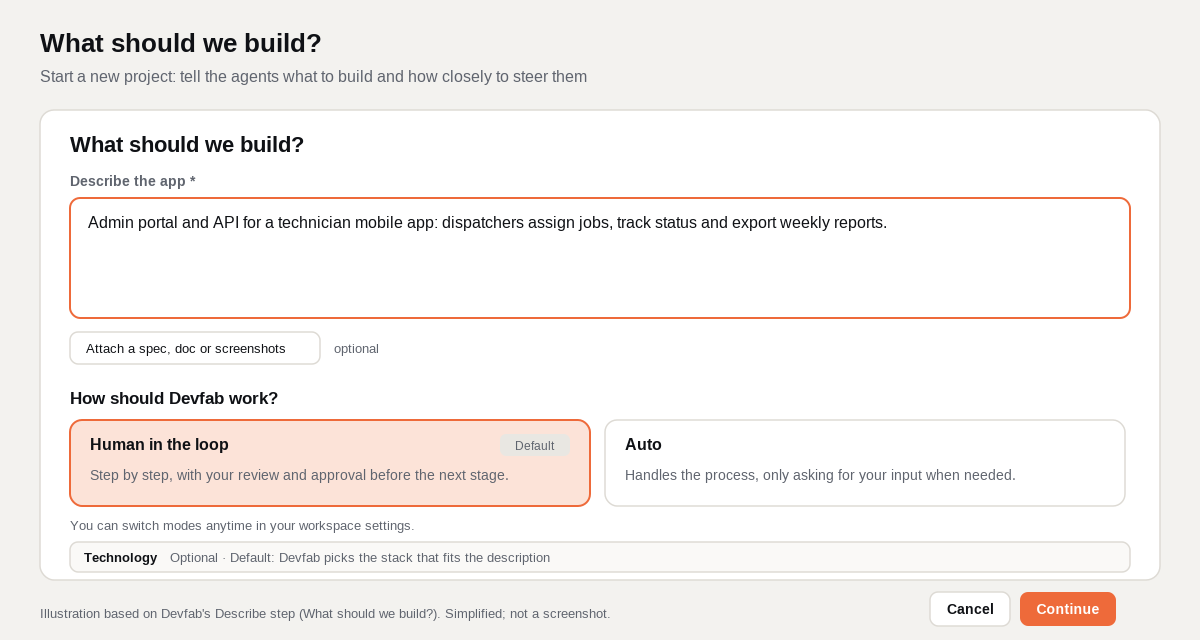
- For new web or API work, choose "Start a new project". Describe it in "What should we build?" and attach screenshots of the mobile app as reference.
- For an existing web or API repo, choose "Work on an existing project" and leave the change box empty. ChainFlow maps the code and suggests three small first tickets.
- Approve the plan. The Coordinator creates tickets after a person approves.
- Let the QA agent test and Deploy ship to your own server, with a custom domain if needed.
Where FlutterFlow is the better choice
- Native iOS and Android apps are the main deliverable, and app store release is part of the job.
- You want backend, sign-in and store submission bundled, with no repo or CI to manage.
- Your team knows Flutter and wants a visual editor plus exportable Flutter code (Studio).
- Builds need to reach testers quickly through the platform's tester and release tools.
- A non-developer will maintain the app in a visual tool after launch.
Where Devfab is the better choice
- The client app is a web app, portal or API, delivered as a project with clear stages.
- Research before the plan, so the plan reflects the client's industry and competitors.
- A person approves the plan, not just individual agent proposals, before tickets exist.
- QA beyond screenshots. The QA agent runs UI and flow tests end to end, plus logic tests.
- The app runs on the client's server, with code in your GitHub account or theirs from the first commit.
- Docs and cost records: blueprints, user manuals, and cost logged per task and per project.
Devfab's honest limits: it is new and in Beta, with a much smaller community and fewer integrations than FlutterFlow. It does not offer app store submission or a visual mobile builder in the material here. It is not an editor for hands-on coding, and it needs a GitHub account.
FAQ
What changed at FlutterFlow in November 2026?
FlutterFlow split into two products under one subscription. The classic visual builder is now called FlutterFlow Studio, and the name FlutterFlow now refers to a new AI-agent builder for native iOS and Android apps. A Studio project cannot be moved into the new FlutterFlow because it uses a different architecture.
Can Devfab build the same mobile apps as FlutterFlow?
Not in the way FlutterFlow does. The new FlutterFlow builds native iOS and Android apps with backend, sign-in and app store submission built in. Devfab picks the stack that fits by default, such as Next.js and TypeScript for web apps and Node or Python for an API, and deploys to your own server. For app-store-first projects, FlutterFlow is the better fit.
Can I get my code out of FlutterFlow?
Yes, depending on plan. FlutterFlow's pricing page lists code and APK download on Basic and above, and push to GitHub on Pro and Max. FlutterFlow Studio advertises exporting clean Flutter code whenever you want.
When would an agency use both?
When a client needs a mobile app plus the web and server parts around it. FlutterFlow can handle the store-ready iOS and Android app, while Devfab runs the web admin portal or API as a project: research, an approved plan, tickets, QA and deployment to the client's server.
Read next
- What is an AI software factory?
- FlutterFlow alternatives for teams that ship to production (2026)
- FlutterFlow vs Lovable: which should your team use in 2026?
- Build a field service work order app with AI agents
Plan the web side of your next client app with us. Book a Devfab demo
Sources (checked November 13, 2026): FlutterFlow homepage; FlutterFlow pricing; FlutterFlow docs (new FlutterFlow); What the agent can do (FlutterFlow docs); FlutterFlow Studio docs; Two ways to build. One FlutterFlow. (FlutterFlow community, Nov 2026); FlutterFlow launches AI-native app builder for iOS and Android (HackerNoon, Nov 5, 2026).
Frequently asked questions
What changed at FlutterFlow in November 2026?
FlutterFlow split into two products under one subscription. The classic visual builder is now called FlutterFlow Studio, and the name FlutterFlow now refers to a new AI-agent builder for native iOS and Android apps. A Studio project cannot be moved into the new FlutterFlow because it uses a different architecture.
Can Devfab build the same mobile apps as FlutterFlow?
Not in the way FlutterFlow does. The new FlutterFlow builds native iOS and Android apps with backend, sign-in and app store submission built in. Devfab picks the stack that fits by default, such as Next.js and TypeScript for web apps and Node or Python for an API, and deploys to your own server. For app-store-first projects, FlutterFlow is the better fit.
Can I get my code out of FlutterFlow?
Yes, depending on plan. FlutterFlow's pricing page lists code and APK download on Basic and above, and push to GitHub on Pro and Max. FlutterFlow Studio advertises exporting clean Flutter code whenever you want.
When would an agency use both?
When a client needs a mobile app plus the web and server parts around it. FlutterFlow can handle the store-ready iOS and Android app, while Devfab runs the web admin portal or API as a project: research, an approved plan, tickets, QA and deployment to the client's server.