Short answer: FlutterFlow wins when you want native iOS and Android apps with a visual builder to fall back on, Flutter code export, GitHub push and team seats. Anything wins when a non-coder wants web plus mobile from one prompt, with a hosted Postgres backend, Stripe or RevenueCat payments and a browser agent that tests the app.
Any FlutterFlow comparison written before November 2026 is now out of date. That month FlutterFlow split in two: an AI agent took the FlutterFlow name, and the visual builder became FlutterFlow Studio. That puts it much closer to Anything than it used to be.
Take a running club that wants an app for paid memberships, race sign-ups and a weekly leaderboard. A year ago, FlutterFlow meant dragging widgets and Anything meant typing a prompt. Today both start from a description. The real differences are the framework, the safety net for code, and who pays for what. This page compares them from vendor docs and press, checked in November 2026.
In this comparison:
- FlutterFlow and Anything at a glance
- Feature comparison
- Cost model by team size
- Where FlutterFlow wins
- Where Anything wins
The status change comes first, because it changes the answer.
FlutterFlow and Anything at a glance
FlutterFlow. Status: active, restructured on November 3 and 4, 2026. The classic visual builder was renamed FlutterFlow Studio, and FlutterFlow now refers to a new AI-agent mobile app builder; one subscription covers both (FlutterFlow community). CEO Abel Mengistu said, "We learned that people wanted a conversational way of building" (HackerNoon, Nov 5, 2026). A Studio project cannot be moved into the new FlutterFlow because the architecture differs (community post). The site claims 3.3M people have built on FlutterFlow (FlutterFlow).
Anything is the former Create.xyz, relaunched in August 2025 (Neon blog). It generates web and Expo mobile apps on a shared backend and targets nontechnical people (TechCrunch, Sep 29, 2025). Apple removed Anything's own iOS builder app twice in spring 2026; Anything answered with an iMessage builder (TechCrunch, Apr 14, 2026).
Feature comparison
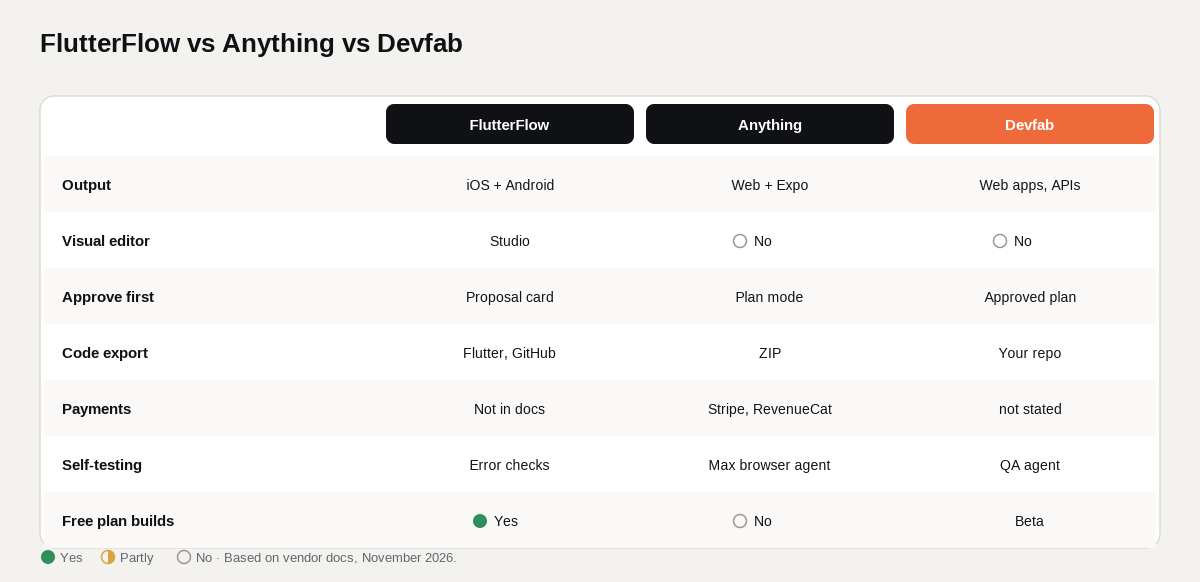
| Aspect | FlutterFlow | Anything | Source |
|---|---|---|---|
| Where it runs | Browser; new FlutterFlow plus Studio under one subscription | Hosted web builder; iMessage builder | FlutterFlow; TechCrunch |
| Output | New FlutterFlow: iOS and Android; Studio: iOS, Android, web | Web plus Expo (React Native) iOS and Android | Community post; Anything docs |
| Planning | Question, Choice and Proposal cards; a Proposal "waits for your approval before the agent builds it" | Plan mode gives a step-by-step plan before changes | FlutterFlow agent; Anything docs |
| Agent autonomy | Works in threads on a copy; changes reach the app only when you push | Max mode "builds and tests and fixes on its own" | Same as above |
| Testing | Checks changed code for errors, screenshots screens; preview, "What changed", send builds to testers | Max plan browser agent tests and fixes | FlutterFlow agent; FlutterFlow docs; Anything subscriptions |
| Backend | Backend, sign-in, storage, analytics built in; Studio adds Firebase and Supabase | Postgres via Neon; serverless functions; auth and storage | FlutterFlow; FlutterFlow Studio docs; Anything docs |
| Deploy | App Store and Google Play submission and updates | Custom domains; TestFlight; Google Play (beta) | FlutterFlow docs; Anything docs |
| Code ownership | Code and APK download on Basic+; GitHub push on Pro and Max; Studio exports clean Flutter | ZIP from Code tab; GitHub sync "coming soon" | FlutterFlow pricing; Anything export |
| Team and admin | Real-time collaboration and project access control on Pro and Max; SSO and audit logs on Enterprise | Not covered in the pages we checked | FlutterFlow pricing |
| Pricing model | Tiers with editors per project; one AI allowance across both products | Credit subscriptions; paid plan to build | FlutterFlow pricing; Anything subscriptions |
Cost model by team size
| Team size | FlutterFlow | Anything |
|---|---|---|
| 1 person | Free USD 0 (1 editor); Basic USD 39 per month (USD 29 billed yearly) with code download | Paid plan needed; Pro 20k listed at USD 19 per month (see note) |
| 5 people | Max USD 150 per month (about USD 113 yearly), seats 2–5 at USD 85 per month each | Higher credit tiers; team features not covered |
| 25 people | Enterprise ("Talk to sales"): SSO, audit logs, private cloud | Not covered in the pages we checked |
FlutterFlow prices as of November 2026 from FlutterFlow pricing. Pro is USD 80 per month (USD 60 yearly) with a second seat at USD 55 per month. Running out of the shared AI allowance pauses agent messages and pushes (FlutterFlow agent). Anything's pricing page does not say whether its prices are monthly or annual, so read them as indicative.
Where FlutterFlow wins
- You want a visual fallback. If the agent gets stuck, Studio offers a canvas, widgets, custom code and branching on the same subscription.
- Native Flutter matters. Teams that know Flutter can export clean Flutter and Dart code from Studio.
- Changes are reviewed before they land. The agent works on a copy, Proposals wait for approval, and nothing reaches the app until you push.
- The team is growing. Paid seats, real-time collaboration, project-level access control, and SSO and audit logs on Enterprise.
- Free to start. The Free plan has one editor; Anything needs a paid plan to build.
Where Anything wins
- You need web and mobile together. The new FlutterFlow is iPhone and Android only; Anything outputs web plus mobile on one backend.
- Memberships are paid. Stripe and RevenueCat are built in.
- React Native over Flutter. Expo code fits JavaScript teams.
- A testing agent. On Max, a browser agent tests the app and fixes issues.
- One tool, no second product. There is no Studio-vs-agent choice to make, and no migration wall between them.
Switching from one to the other
From Anything to FlutterFlow. Download the ZIP for reference. Expo (React Native) code will not import into a Flutter tool, so describe the app to the FlutterFlow agent and approve its Proposal. Note that the agent cannot connect store accounts or submit for review on its own (FlutterFlow agent).
From FlutterFlow to Anything. Export code (Basic or above) or push to GitHub (Pro or Max) to keep a copy. The Anything docs we checked describe no import, so rebuild from a description in Plan mode and move data into Postgres. More options: FlutterFlow alternatives and Anything alternatives.
Where Devfab fits
Both tools are built around the app store. Devfab's strength is elsewhere: web applications and APIs built as a full codebase, with a lifecycle around them. Native mobile output is not stated for Devfab, so for an app-store-first product, pick one of these two.
App builders automate the first version. Devfab automates the development lifecycle. When the running club also needs a web back office for race entries and refunds, Devfab's Researcher maps the domain first, a person approves the plan, and the QA agent runs UI and flow tests plus logic tests. Code goes to your own GitHub, and Deploy ships to your own server. Devfab is in Beta and needs a GitHub account. See Devfab vs FlutterFlow.
FAQ
What changed at FlutterFlow in November 2026?
On November 3 and 4, 2026, FlutterFlow split into two products under one subscription. The name FlutterFlow now means a new AI agent that builds native iOS and Android apps. The classic visual builder continues as FlutterFlow Studio. Studio projects cannot be moved into the new FlutterFlow.
Can FlutterFlow or Anything build a web app too?
Anything generates web apps alongside Expo mobile apps with a shared backend. The new FlutterFlow is iPhone and Android only; web output requires FlutterFlow Studio, which targets iOS, Android and web.
Which one gives me the source code?
FlutterFlow offers code download on Basic and above and push to GitHub on Pro and Max; Studio says you can export clean Flutter whenever you want. Anything offers a ZIP download from the Code tab and says GitHub sync is coming soon.
Can I start for free?
FlutterFlow has a Free plan with one editor. Anything's docs say building an app requires a paid plan, and downgrading to Free pauses building.
Read next
- What is an AI software factory?
- FlutterFlow alternatives
- Devfab vs FlutterFlow
- Devfab vs Anything
- Bubble vs FlutterFlow
App in the store? Build the back office as code you own. Try Beta
Sources (checked November 2026): FlutterFlow homepage; FlutterFlow pricing; FlutterFlow docs (new FlutterFlow); What the agent can do; FlutterFlow Studio docs; Two ways to build. One FlutterFlow.; HackerNoon (Nov 5, 2026); Anything pricing; Anything subscriptions; Anything export docs; Anything full docs; Neon blog (Aug 7, 2025); TechCrunch (Sep 29, 2025); TechCrunch (Apr 14, 2026).
Frequently asked questions
What changed at FlutterFlow in November 2026?
On November 3 and 4, 2026, FlutterFlow split into two products under one subscription. The name FlutterFlow now means a new AI agent that builds native iOS and Android apps. The classic visual builder continues as FlutterFlow Studio. Studio projects cannot be moved into the new FlutterFlow.
Can FlutterFlow or Anything build a web app too?
Anything generates web apps alongside Expo mobile apps with a shared backend. The new FlutterFlow is iPhone and Android only; web output requires FlutterFlow Studio, which targets iOS, Android and web.
Which one gives me the source code?
FlutterFlow offers code download on Basic and above and push to GitHub on Pro and Max; Studio says you can export clean Flutter whenever you want. Anything offers a ZIP download from the Code tab and says GitHub sync is coming soon.
Can I start for free?
FlutterFlow has a Free plan with one editor. Anything's docs say building an app requires a paid plan, and downgrading to Free pauses building.