Short answer: If you want to stay with Flutter, choose Rocket.new. If you want web and mobile from one visual tool and accept no code export, choose Bubble. For prompt-to-app mobile with Expo code you can download, choose Anything. For web apps planned, tested and deployed to your own server from your GitHub, try Devfab.
You logged into FlutterFlow in November and the name meant something new. The visual builder you know is now FlutterFlow Studio. "FlutterFlow" is an AI agent that builds iPhone and Android apps from a description. Your Studio projects can't move across. Nothing broke. But a split like this is a natural moment to ask whether either half is still the right tool for you.
In this guide, you'll learn:
- Why teams leave FlutterFlow after the split
- The quick comparison of six alternatives
- Where FlutterFlow is still the better choice
- How to choose by app type and code ownership
Here's how each one compares.
Why teams leave FlutterFlow
The status change. On November 3 to 4, 2026, FlutterFlow announced "two ways to build." The existing visual builder is now FlutterFlow Studio, which "isn't going away, and it isn't being replaced." The name FlutterFlow now means an AI-first builder where an agent handles the work. One subscription covers both, and pricing is unchanged (FlutterFlow community). CEO Abel Mengistu said, "We learned that people wanted a conversational way of building" (HackerNoon).
How the two halves work. The new FlutterFlow targets iOS and Android from one project, with backend, sign-in, file storage, analytics and store submission built in (FlutterFlow). Its agent works in "threads" on a copy of your app, and a Proposal "waits for your approval before the agent builds it" (FlutterFlow docs). Studio is the visual Flutter builder for mobile, web and desktop, with Firebase and Supabase, custom code, branching and Flutter code export (Studio docs). The site claims 3.3 million people have built on FlutterFlow.
The switching triggers:
- No path between the halves. A Studio project cannot be moved into the new FlutterFlow because the architecture is different.
- Web is Studio-only. The new FlutterFlow is iPhone and Android only.
- Agent limits. The agent can't push on its own, connect services or store accounts, submit for review, add testers or check store status. Long threads use more allowance, and running out pauses messages and pushes.
- One shared AI allowance. AI usage is one allowance across both products, shown as a percentage, with refills on Pro and Max (FlutterFlow pricing).
- Gated ownership and admin. Code and APK download start at Basic, but push to GitHub is Pro and Max only. SSO, audit logs and private cloud are Enterprise only.
Quick comparison
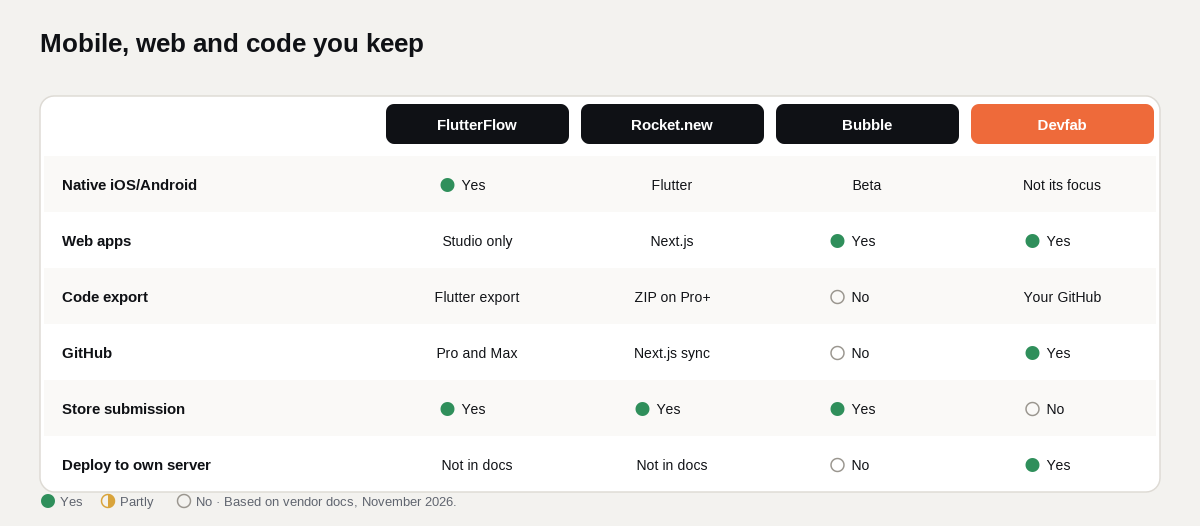
| Tool | Output | Native iOS/Android | Code you can take | Pricing model |
|---|---|---|---|---|
| FlutterFlow (baseline) | Studio: Flutter mobile, web; new: iOS/Android | Yes | Flutter export (Studio); GitHub push on Pro and Max | Free, Basic, Pro, Max, Enterprise; shared AI allowance |
| Rocket.new | Next.js web; Flutter mobile | Yes, with store publishing | ZIP on Pro and above; GitHub sync for Next.js | One credit pool across Build, Solve, Intelligence |
| Bubble | Web plus iOS and Android (beta) | Yes, beta | No code export | Plans with workload units and AI credits |
| Anything | Web plus Expo (React Native) mobile | Yes | ZIP download; GitHub sync "coming soon" | Credit-based subscriptions |
| Lovable | Web apps only | No | Two-way GitHub sync; ZIP on paid plans | Monthly credits, not seats |
| Devfab | Web apps and APIs in your stack | Not its focus | Code in your own GitHub from day one | Cost logged per task and per project (Beta) |
| Glide | Internal apps for desktop and phone | No app-store build in sources | Not covered in sources we checked | Credit-based; seats on Pro |
The alternatives
1. Rocket.new
Verdict: the closest fit for teams that want to keep Flutter on mobile. Best for: founders who also want research and a PRD before the build. Trade-off: GitHub import supports Next.js with TypeScript only, and only the default branch's latest state (Rocket docs). Pricing: one credit pool; Free has a one-time grant; paid tiers get monthly credits (Rocket pricing).
- Web apps use Next.js; iOS and Android apps use Flutter (Rocket docs).
- Publishing covers web with custom domains, Android APK, Google Play and the Apple App Store (Rocket docs).
- Source download as a ZIP requires Pro or above and works only in the web browser (Rocket docs).
2. Bubble
Verdict: the pick for non-developers who want web and mobile in one visual tool. Best for: founders who will keep editing visually and never touch code. Trade-off: no code export; "Bubble apps can only be run on the Bubble platform" (Bubble manual). Pricing: Free to build; Starter, Growth, Team and Enterprise with workload units, AI credits and a set number of editors (Bubble pricing).
- Builds web apps plus iOS and Android apps that share data and workflows, with direct store submission; mobile is labeled beta (Bubble).
- The AI Agent (beta) plans the app with you, then builds pages, workflows, database and privacy rules (Bubble blog).
- Compare the two in Bubble vs FlutterFlow.
3. Anything
Verdict: the pick for prompt-to-app mobile with code you can download. Best for: non-technical founders building consumer apps with payments. Trade-off: Apple removed Anything's own iOS app twice in spring 2026 over guideline 2.5.2 (TechCrunch); GitHub sync is not available yet. Pricing: credit-based Pro and Max subscriptions; building needs a paid plan (Anything docs).
- Generates iOS, Android and web apps from one prompt; mobile apps are Expo (React Native) code (Anything docs).
- Plan mode writes a step-by-step plan before the agent changes anything.
- Source downloads as a ZIP from the Code tab (Anything docs).
4. Lovable
Verdict: the pick for Studio users whose real product was the web app. Best for: teams that want hosted web apps with GitHub sync. Trade-off: web apps only; no React Native, and no choice of framework, database or model (Lovable FAQ). Pricing: Free, Pro, Business and Enterprise, priced by monthly credits rather than seats.
- Plan mode writes a plan for approval before changes.
- Two-way GitHub sync on one branch; Git sync always creates a new repository (Lovable docs).
- See FlutterFlow vs Lovable.
5. Devfab
Verdict: the pick when the app is a web product or portal that must live in your GitHub and on your server. Best for: agencies and teams handing apps to clients. Trade-off: new and in Beta; native store apps are not its focus. Pricing: predictable cost: cost is logged after each run, per task and per project.
See Where Devfab fits and Devfab vs FlutterFlow.
6. Glide
Verdict: the pick for internal operations apps used on phones and desktops. Best for: ops teams whose data lives in Excel or Google Sheets. Trade-off: users in Glide's community forum report that credit costs are hard to predict (Glide community). Pricing: credit-based Free, Basic, Plus, Pro and Enterprise; Free cannot publish apps (Glide pricing).
- GlideOS (live June 2026) turns spreadsheets into internal apps, workflows and agents that run "for desktop and phone" (Glide).
- SheetSense scans formulas, macros and pivot tables and asks you to confirm before it builds (Glide blog).
Where Devfab fits
FlutterFlow's agent builds the first version of a mobile app. Devfab runs the whole lifecycle of a web app. App builders automate the first version. Devfab automates the development lifecycle.
- Research before the plan. Devfab's research step maps the domain first: key terms, best practices for that kind of app, and competitors. Then it suggests a prototype.
- A plan a person approves. FlutterFlow's Proposal cards approve one change. Devfab's Planner publishes the whole plan: "Your turn: the Planner published the plan. Approve it so the Coordinator can create the tickets."
- ChainFlow. Maps which functions and APIs call each other and what is deployed, so a change to one screen or API doesn't break connected features.
- QA agent. FlutterFlow's agent checks the code it changed and can screenshot screens. Devfab's QA agent runs UI and flow tests (screens, buttons and user journeys clicked end to end) plus logic tests.
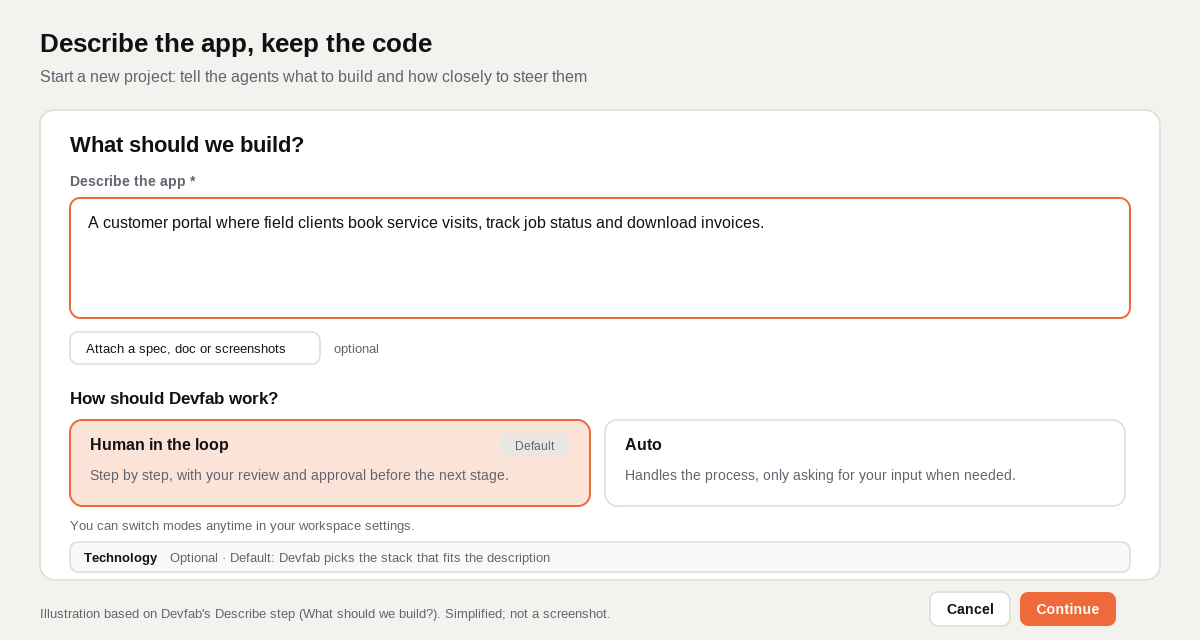
Code is in your own GitHub account (or your organization's) from the first commit, not behind a plan tier. You deploy to your own server. By default Devfab picks the stack that fits, for example Next.js and TypeScript for web apps, and you can choose languages. You can choose the model for each agent or keep Devfab's default.
Devfab's honest limits:
- It's new and in Beta, with a much smaller community than FlutterFlow's.
- It doesn't submit apps to the App Store or Google Play in the sources we have; FlutterFlow, Rocket.new and Anything do.
- It isn't a visual canvas or code editor.
- It has fewer integrations, and it needs a GitHub account.
Where FlutterFlow is still the better choice
- Native iOS and Android apps with store release as the main job. The new FlutterFlow bundles backend, sign-in, analytics and store submission.
- Teams that know Flutter. Studio gives a visual editor plus clean Flutter export and custom code.
- Solo builders who want no repo or CI to manage. Backend, sign-in and store submission come bundled.
- Existing Studio projects. Studio continues, so there's no forced migration.
How to choose
- Want Flutter on mobile, plus a Next.js web app? Rocket.new.
- Non-developer, want web and mobile visually, fine without code export? Bubble.
- Consumer mobile app from a prompt, with code you can download? Anything.
- The product is really a web app? Lovable for speed, or Devfab for an approved plan, UI and flow tests and deploy to your own server.
- Internal ops app on phones over spreadsheet data? Glide.
New to the categories? No-code vs AI app builder explains the split.
FAQ
What changed at FlutterFlow in November 2026?
On November 3 to 4, 2026, FlutterFlow renamed its visual builder FlutterFlow Studio and gave the FlutterFlow name to a new AI-agent app builder for iOS and Android. One subscription covers both, and existing Studio projects cannot move to the new FlutterFlow.
Is FlutterFlow Studio going away?
No. FlutterFlow's announcement says Studio isn't going away and isn't being replaced. Studio still builds iOS, Android and web apps, with custom code and Flutter code export.
What is the best FlutterFlow alternative that still uses Flutter?
Rocket.new builds iOS and Android apps in Flutter and web apps in Next.js, with Google Play and App Store publishing. Code download as a ZIP needs a Pro plan or above, and GitHub sync covers Next.js projects.
Can Devfab build native mobile apps like FlutterFlow?
Devfab picks the stack that fits, by default web apps (for example Next.js with TypeScript) and APIs, and you can choose languages. If store-ready iOS and Android apps are the main job, FlutterFlow, Rocket.new or Anything are closer fits. Devfab fits web apps and portals you want in your own GitHub and on your own server.
Read next
- What is an AI software factory?
- Devfab vs FlutterFlow
- Bubble vs FlutterFlow
- FlutterFlow vs Lovable
- No-code vs AI app builder
Building a web app or portal you want to own? Try the Devfab Beta
Sources (checked November 13, 2026): FlutterFlow community: Two ways to build, one FlutterFlow (Nov 2026); HackerNoon: FlutterFlow launches AI-native app builder (Nov 5, 2026); FlutterFlow homepage; FlutterFlow pricing; FlutterFlow docs: What the agent can do; FlutterFlow Studio docs; Rocket docs: Introduction; Rocket docs: Build overview; Rocket docs: From GitHub; Rocket docs: Code editor; Rocket docs: Pricing plans; Bubble homepage; Bubble pricing; Bubble blog: What is Bubble AI; Bubble manual: Application and data ownership; Anything docs: Subscriptions; Anything docs: Export; Anything full docs; TechCrunch: Anything and the App Store (Apr 14, 2026); Lovable FAQ; Lovable: GitHub sync; Glide homepage; Glide pricing; Glide blog: GlideOS launch recap; Glide community: Pricing issues with GlideOS.
Frequently asked questions
What changed at FlutterFlow in November 2026?
On November 3 to 4, 2026, FlutterFlow renamed its visual builder FlutterFlow Studio and gave the FlutterFlow name to a new AI-agent app builder for iOS and Android. One subscription covers both, and existing Studio projects cannot move to the new FlutterFlow.
Is FlutterFlow Studio going away?
No. FlutterFlow's announcement says Studio isn't going away and isn't being replaced. Studio still builds iOS, Android and web apps, with custom code and Flutter code export.
What is the best FlutterFlow alternative that still uses Flutter?
Rocket.new builds iOS and Android apps in Flutter and web apps in Next.js, with Google Play and App Store publishing. Code download as a ZIP needs a Pro plan or above, and GitHub sync covers Next.js projects.
Can Devfab build native mobile apps like FlutterFlow?
Devfab picks the stack that fits, by default web apps (for example Next.js with TypeScript) and APIs, and you can choose languages. If store-ready iOS and Android apps are the main job, FlutterFlow, Rocket.new or Anything are closer fits. Devfab fits web apps and portals you want in your own GitHub and on your own server.