Short answer: For a hosted web prototype from a prompt, Lovable and Bolt.new lead. v0 suits Next.js teams on Vercel, and Google AI Studio suits Gemini and Android work. Replit adds browser testing, Dyad runs locally, and FlutterFlow builds native mobile. Devfab researches the domain before suggesting a prototype you can take to production.
You have an app idea, and a slide deck won't convince anyone. A clickable prototype will. AI tools now turn a paragraph into a working app, but they differ in what happens next: who hosts it, who owns the code, and whether it can grow into the real thing. Two well-known options also left the market this year. This guide compares eight tools that are live in November 2026.
In this guide, you'll learn:
- How we picked and compared
- All eight in one table
- Each tool, with best uses and limits
- How to choose for your project
Pick the section that matches your next step.
Two tools you can cross off
GitHub Spark is discontinued. It stopped accepting new users and new apps on August 4, 2026; the export window ended August 31, 2026, and deployed apps keep running (GitHub changelog).
Firebase Studio is sunsetting. New workspaces and sign-ups were disabled on June 22, 2026, and it shuts down on March 22, 2027. Google points users to Google AI Studio or Google Antigravity (Firebase docs). That is why Google AI Studio is on this list.
How we picked and compared
We picked tools that turn a plain-language description into a working app you can click through, not just mockups. We compared them on six points: what you can build, how the AI plans, testing, hosting, code ownership and pricing model. Facts come from vendor pages, docs and dated reviews, checked in November 2026. We did not run hands-on tests for this page. Prices are copied from each official pricing page.
Quick comparison table
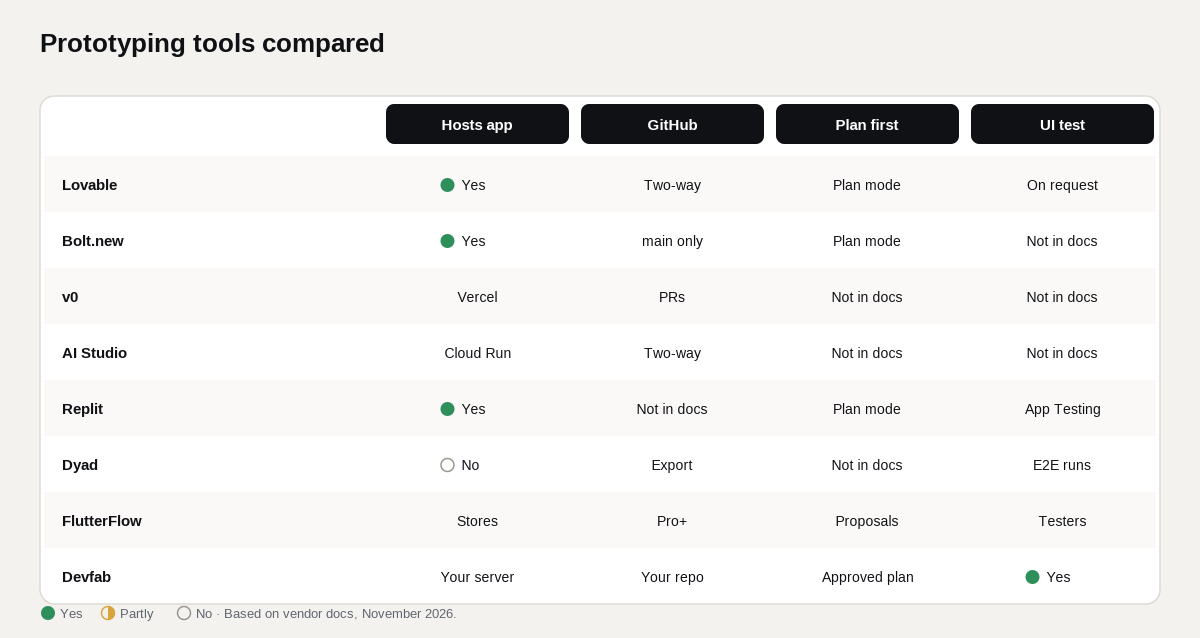
| Tool | Builds | Plans before code | Testing | Hosting | Code and GitHub | Entry paid price (Nov 2026) |
|---|---|---|---|---|---|---|
| Lovable | Web apps | Plan mode | Browser tests on request; security scan on publish | Yes | Two-way GitHub sync; ZIP on paid plans | Pro USD 25 per month |
| Bolt.new | Web and mobile (Expo) | Plan mode | Version history | Bolt Cloud | GitHub sync on main | Pro USD 25 per month |
| v0 | Next.js web apps | Not covered here | Previews run server code | Vercel | Branches and PRs; never pushes to main | Plus USD 30 per user per month |
| Google AI Studio | Web and native Android | Not covered here | Not covered here | Cloud Run | Two-way GitHub sync; ZIP | Pay per token (no plans) |
| Replit | Web apps | Plan mode | App Testing in a real browser | Yes | Not covered here | Core USD 20 per month |
| Dyad | Next.js web apps | Not covered here | Security scan; parallel E2E runs | No (deploy to Vercel or your cloud) | Standard code on your computer | Pro USD 20 per month |
| FlutterFlow | Native iOS and Android | Proposal cards wait for approval | Builds to testers | App stores | GitHub push on Pro and Max | Basic USD 39 per month |
| Devfab | Web apps and APIs | Researcher, then Planner; a person approves | QA agent: UI, flow and logic tests | Deploy to your own server | Your own GitHub account | Cost logged per task (Beta) |
The tools, one by one
Lovable
Best for: founders and product teams who want a hosted, full-stack web prototype they can share by link.
- Builds and hosts full-stack web apps from prompts, with a built-in backend (managed PostgreSQL, login, file storage) or Supabase (Lovable FAQ).
- Build mode changes the project directly; Plan mode writes a plan for approval first; Chat mode only answers questions.
- Git sync to GitHub, GitLab or Bitbucket, with two-way GitHub sync on one branch (Lovable GitHub docs).
- New apps since May 13, 2026 use TanStack Start; Lovable offers no choice of framework, database or model.
- Pricing, as of November 2026: Free; Pro USD 25 per month; Business USD 50 per month; priced by credits, not seats (Lovable pricing).
Limits: web only. Git sync always creates a new repository and can't link an existing one. From September 9, 2026, Free and Pro data may be used for model training unless you opt out.
Bolt.new
Best for: zero-setup prototypes in a browser tab, especially from a Figma design.
- Runs the full dev environment in the browser on StackBlitz WebContainers (Bolt docs).
- Starts from a prompt, a Figma frame, Google Stitch designs, a GitHub repo or a Lovable project.
- Plan mode works through strategy without generating code (Bolt glossary).
- Bolt Cloud bundles hosting, databases, auth, storage, server functions and Stripe (Bolt Cloud); native mobile comes via Expo.
- Pricing, as of November 2026: Free (1M tokens a month); Pro USD 25 per month; Teams USD 30 per member per month (Bolt pricing).
Limits: projects stay on main and can't switch branches; when hosting usage runs out, the site stops displaying publicly until it resets.
v0
Best for: teams already on Next.js and Vercel who want prototypes as pull requests.
- Builds Next.js apps with React, TypeScript, Tailwind CSS and shadcn/ui (v0 FAQ).
- Design Mode lets you select elements in the live preview and write style edits back to code (v0 Design Mode).
- Works on a branch with per-branch previews, opens and merges PRs, and "never pushes directly to
main" (v0 GitHub). - "Vercel doesn't own the code generated," and you can export and deploy elsewhere.
- Pricing, as of November 2026: Free (7 messages a day); Plus USD 30 per user per month; Business USD 100 per user per month (v0 pricing).
Limits: v0 says output "may be incomplete" and may contain bugs, and agents can fail repeatedly and consume credits.
Google AI Studio
Best for: prototypes that use Gemini features, Google Workspace data or native Android.
- Build mode creates full-stack web apps and native Android apps with Kotlin and Jetpack Compose (AI Studio docs).
- Rebuilt on March 18, 2026 around the Antigravity agent, with Firebase backend, multiplayer and secrets (Google blog).
- Connects to Gmail, Sheets, Docs, Drive and Calendar with OAuth handled for you.
- Two-way GitHub sync with a new or existing repo, plus ZIP export; deploy to Cloud Run.
- Pricing: part of the Gemini API free tier; the paid tier bills per token; no monthly plans (Gemini pricing).
Limits: no real-time collaborative editing, no team or SSO features in the Build mode docs, and free-tier content may be used to improve Google products.
Replit
Best for: prototypes you want the agent to click through and fix before you show them.
- Agent sets up projects, builds apps, checks its work and fixes problems in Replit's cloud workspace (Replit Agent).
- Plan mode produces a task list to approve before the Agent changes code or data.
- App Testing clicks through the app in a real browser, for Full Stack JavaScript and Streamlit apps (App Testing).
- Checkpoints let you roll back; publishing supports Autoscale, Reserved VM, Static and Scheduled deployments.
- Pricing, as of November 2026: Starter free; Core USD 20 per month; Pro USD 100 per month (Replit pricing).
Limits: App Testing is off in Free Mode, and Plan mode can incur charges even without changing code (Replit pricing docs).
Dyad
Best for: solo builders who want a free, local prototype with their own model keys.
- Free, open-source desktop app for macOS, Windows and Linux; projects stay on your computer (Dyad).
- Works with OpenAI, Anthropic, Google or local models through Ollama or LM Studio, including fully offline.
- One-click Supabase or Neon for databases and auth; a built-in security scan; parallel E2E test runs since v1.23.0.
- Exports standard Next.js code with "zero lock-in."
- Pricing, as of November 2026: Free (bring your own key); Pro USD 20 per month; Max USD 79 per month.
Limits: no shared cloud workspace for teams, desktop only, and output quality "depends heavily on which model you point it at" (ToolDirectory.ai, Sep 2026).
FlutterFlow
Best for: native mobile prototypes that may go to the App Store and Google Play.
- Since November 4, 2026, "FlutterFlow" is an AI-agent builder for native iOS and Android; the classic visual builder is "FlutterFlow Studio" (FlutterFlow community).
- The agent asks through Question, Choice or Proposal cards, and a Proposal waits for your approval (FlutterFlow agent).
- It builds in threads on a copy of the app and can screenshot screens to verify its changes.
- Preview, test sign-in, builds to testers and store submission are built in (FlutterFlow docs).
- Pricing, as of November 2026: Free; Basic USD 39 per month; Pro USD 80 per month (FlutterFlow pricing).
Limits: the new FlutterFlow is iPhone and Android only, and Studio projects can't move into it.
Devfab, with honest limits
Best for: agencies and product teams whose prototype has to become production software, and who want to see the app before they commit.
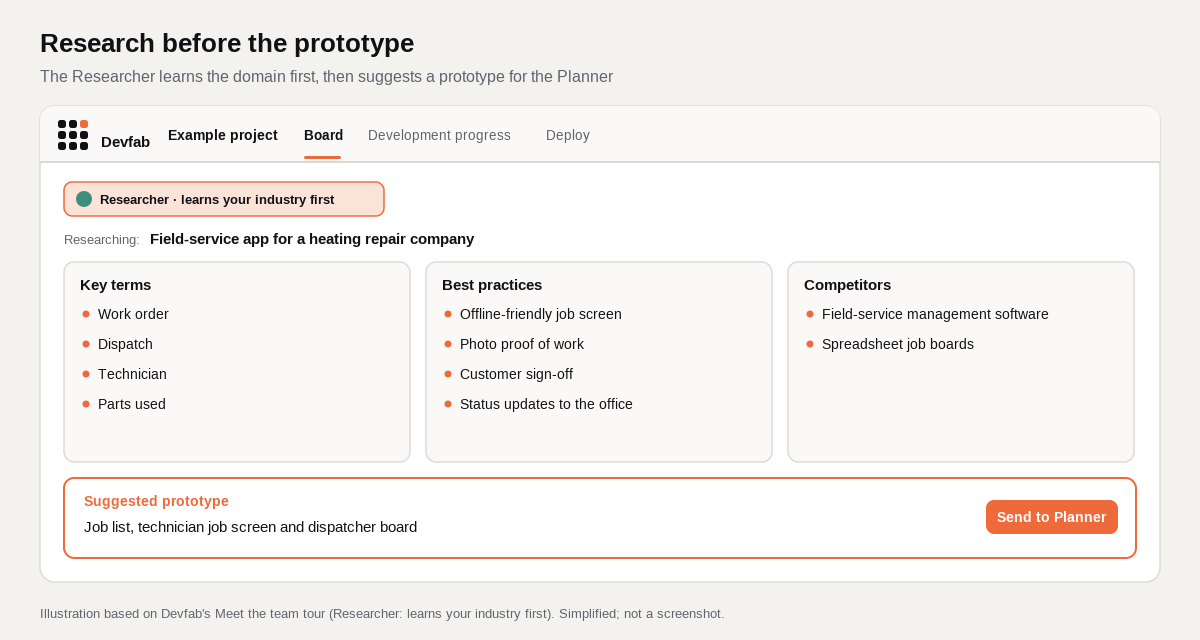
Most tools above start from your prompt. Devfab starts with research. Its Researcher maps the domain first: key terms, best practices for that kind of app, and competitors. Then it suggests a prototype. For a field-service app, that might be a job list, a technician job screen and a dispatcher board. The Planner then writes a plan, and a person approves it. Blueprint produces screens, and the QA agent runs UI and flow tests (screens, buttons and user journeys clicked end to end) plus logic tests. The code lives in your own GitHub account and deploys to your own server.
Coding agents automate the developer. Devfab automates the development lifecycle. Cost is predictable: it is logged after each run, per task and per project. You can choose the model for each agent or keep Devfab's default.
Limits: Devfab is in Beta, with a smaller community and fewer integrations than mature platforms. It is not an editor for hands-on coding, and it needs a GitHub account. For a quick throwaway demo, the tools above are lighter.
How to choose
- Is it a phone app? FlutterFlow for iOS and Android; Google AI Studio for native Android.
- Do you want it hosted and shareable by link, with no setup? Lovable or Bolt.new.
- Is your team on Next.js and Vercel? v0.
- Should the AI test the clicks for you? Replit's App Testing.
- Must everything stay on your laptop? Dyad.
- Will the prototype become the product? Devfab, or any tool with GitHub sync plus your own test and release process.
Whichever you pick, read prototype vs MVP vs production app before you promise a launch date.
FAQ
What is the best AI prototyping tool for a non-technical founder?
Lovable or Bolt.new. Both build and host a working web app from plain language, and both have a free plan. Lovable's Plan mode writes a plan for approval first; Bolt.new can start from a Figma frame. Pick FlutterFlow instead if the prototype must be a native phone app.
Which AI prototyping tools are free?
As of November 2026, Lovable, Bolt.new, v0, Replit, Dyad and FlutterFlow all have free plans with limits, and Google AI Studio's Build mode is part of the Gemini API free tier. Dyad Free has no sign-up but needs your own model API key.
What happened to GitHub Spark and Firebase Studio?
GitHub Spark stopped accepting new users and apps on August 4, 2026, and its export window closed August 31; deployed apps keep running. Firebase Studio disabled new workspaces on June 22, 2026 and shuts down on March 22, 2027, with users told to move to Google AI Studio or Google Antigravity.
Can an AI prototype become the production app?
Sometimes. Tools with GitHub sync, such as Lovable, v0, Bolt.new and Google AI Studio, let developers keep working on the code. Before launch you still need a plan for tests, security review and hosting. Some teams rebuild from the prototype as a spec instead.
Which tool is best for a mobile app prototype?
FlutterFlow, for native iOS and Android apps with store submission. Google AI Studio's Build mode also creates native Android apps with Kotlin and Jetpack Compose, and Bolt.new builds mobile apps through its Expo integration.
Read next
Start with research, end with a prototype you can ship. Try Beta
Sources (checked November 2026): GitHub changelog: Deprecation of GitHub Spark (Aug 4, 2026); Firebase Studio sunset and migration; Lovable FAQ; Lovable GitHub integration; Lovable pricing; Intro to Bolt; Bolt glossary; Bolt Cloud; Bolt pricing; v0 FAQ; v0 Design Mode; v0 GitHub; v0 pricing; Google AI Studio Build mode; Google blog: Full-stack vibe coding in AI Studio (Mar 18, 2026); Gemini API pricing; Replit Agent; Replit App Testing; Replit pricing; Replit pricing and plans; Dyad; ToolDirectory.ai: Dyad review (Sep 13, 2026); FlutterFlow community: Two ways to build; FlutterFlow agent docs; FlutterFlow docs; FlutterFlow pricing.
Frequently asked questions
What is the best AI prototyping tool for a non-technical founder?
Lovable or Bolt.new. Both build and host a working web app from plain language, and both have a free plan. Lovable's Plan mode writes a plan for approval first; Bolt.new can start from a Figma frame. Pick FlutterFlow instead if the prototype must be a native phone app.
Which AI prototyping tools are free?
As of November 2026, Lovable, Bolt.new, v0, Replit, Dyad and FlutterFlow all have free plans with limits, and Google AI Studio's Build mode is part of the Gemini API free tier. Dyad Free has no sign-up but needs your own model API key.
What happened to GitHub Spark and Firebase Studio?
GitHub Spark stopped accepting new users and apps on August 4, 2026, and its export window closed August 31; deployed apps keep running. Firebase Studio disabled new workspaces on June 22, 2026 and shuts down on March 22, 2027, with users told to move to Google AI Studio or Google Antigravity.
Can an AI prototype become the production app?
Sometimes. Tools with GitHub sync, such as Lovable, v0, Bolt.new and Google AI Studio, let developers keep working on the code. Before launch you still need a plan for tests, security review and hosting. Some teams rebuild from the prototype as a spec instead.
Which tool is best for a mobile app prototype?
FlutterFlow, for native iOS and Android apps with store submission. Google AI Studio's Build mode also creates native Android apps with Kotlin and Jetpack Compose, and Bolt.new builds mobile apps through its Expo integration.