Short answer: Claude Code and the OpenAI Codex CLI are the strongest all-round AI coding CLIs in 2026. OpenCode is the best free, open-source pick with the widest model choice. Kiro CLI suits AWS teams, Aider suits careful solo work, and Devfab suits teams that need the whole lifecycle, not only a terminal agent.
You do your best work in a terminal window, not a chat sidebar. You want an agent you can pipe, script and run in CI. The trouble is that this market changed more in 2026 than in any year before. Gemini CLI handed individuals to a new tool. The Q Developer CLI became Kiro CLI. Continue's CLI closed with the rest of the product.
Most "best CLI" lists were written before those changes. This one was checked against vendor docs on November 20, 2026.
In this guide, you'll learn:
- How we picked and compared
- Quick comparison table
- The CLI tools, one by one
- Devfab, with honest limits
- How to choose
Each tool gets its own short section, so you can jump to the ones you are weighing.
How we picked and compared
We looked for agents that run in a terminal, read and edit a real repository, and run commands. Then we checked each one against its own docs, pricing page and recent changelog. We did not run hands-on benchmarks for this page; every claim links to a source, and prices are only from official pages.
Status changes you should know first:
- Gemini CLI is "transitioning" to Antigravity CLI. Since June 18, 2026, it no longer serves Google AI Pro and Ultra users or free Code Assist individuals; enterprise and paid API-key users keep access (Google Developers Blog).
- Amazon Q Developer CLI was succeeded by Kiro CLI, which is backward compatible with the
qcommand (Kiro docs). Q Developer itself reaches end of support on April 30, 2027 (AWS). - goose moved from Block to the Agentic AI Foundation at the Linux Foundation (goose blog).
- Continue, whose
cnCLI some teams used in CI, was acquired by Cursor and discontinued in June 2026 (The New Stack). - Kilo Code, which also ships a CLI, was acquired by Anaconda, announced July 15, 2026; Anaconda says there are no changes to existing products for now (Anaconda).
- Amp became an independent company, split from Sourcegraph (Sourcegraph).
Quick comparison table
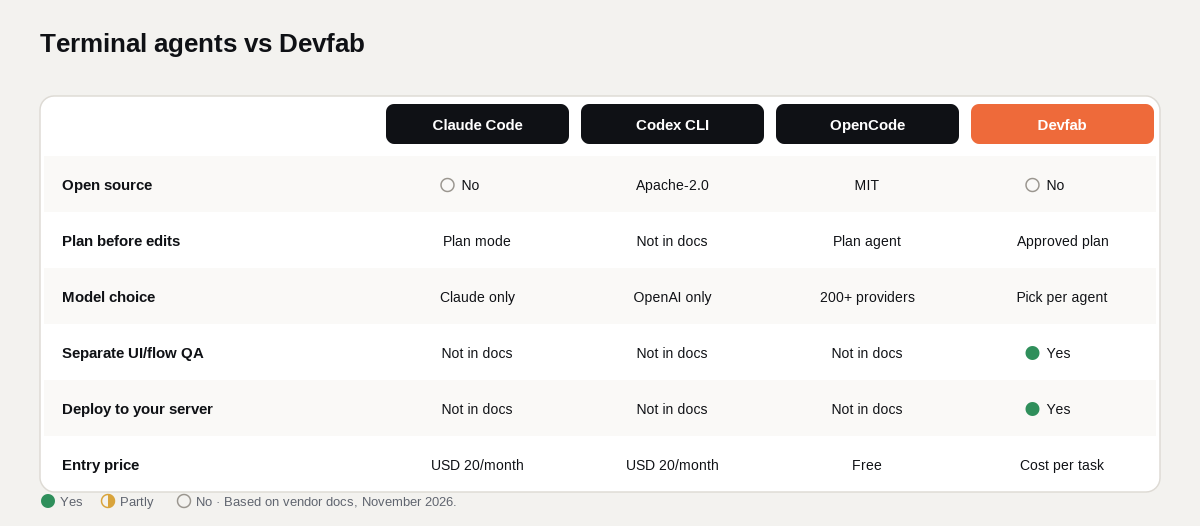
| Tool | Status (Nov 2026) | Open source | Model choice | Scripts and CI | Starting price (Nov 2026) |
|---|---|---|---|---|---|
| Claude Code | Active | No | Claude models only | GitHub Actions, GitLab CI/CD, Agent SDK | Included from Pro, USD 20 per month |
| OpenAI Codex CLI | Active | Yes, Apache-2.0 | OpenAI GPT models | GitHub Action | Included in ChatGPT plans; Plus USD 20 per month |
| GitHub Copilot CLI | Active | Not covered in the docs we checked | Six model providers | Cloud agent tasks from the CLI | Free USD 0; Pro USD 10 per user per month |
| Kiro CLI | Active; replaced Q Developer CLI | Not covered in the docs we checked | Claude, GPT, open-weight, Auto | Hooks on events | Free USD 0 (50 credits); Pro USD 20 per user per month |
| OpenCode | Active | Yes, MIT | 200+ providers, local models | SDK for scripts and CI | Agent free; Go from USD 10 per month |
| Amp | Active, independent company | No | Several vendors, picked per task | amp --no-tui on servers and CI | Hobby free; Individual USD 20 per month |
| Aider | Active, slow releases | Yes, Apache-2.0 | Almost any LLM, local too | Not covered in the docs we checked | Free; you pay your model provider |
| goose | Active, now at the Linux Foundation | Yes, Apache-2.0 | 15+ providers, local too | YAML recipes run in CI | Free; you pay your model provider |
| Gemini CLI | Individuals moved to Antigravity CLI | Yes, Apache-2.0 | Gemini only | Headless mode, GitHub Action | Paid API key or Code Assist license |
| Devfab | Beta | No | Choose per agent or keep the default | Not a CLI | Cost logged per task and per project |
The CLI tools, one by one
Claude Code
Best for: developers who want a general-purpose agent they can script, pipe and run in CI, plus enterprises that must keep inference inside their own cloud.
Limits: Claude models only. The desktop app needs a paid plan, and agent teams use far more tokens than standard sessions (Claude Code costs).
Pricing: included in Pro at USD 20 per month, Max at USD 100 per month, and Team Standard at USD 25 per user per month; not in Free, as of November 2026 (Claude pricing).
- Runs in the terminal, VS Code, JetBrains, a desktop app, the web and mobile (Claude Code docs).
- Plan mode explores the codebase and proposes an approach for approval before editing (costs docs).
- Subagents, background agents and experimental agent teams; stages changes, writes commits and opens PRs (overview).
- CLAUDE.md or AGENTS.md instructions, hooks, skills and MCP servers (same source).
- Inference through Anthropic, Amazon Bedrock, Google Cloud or Microsoft Foundry, with LLM gateways supported (enterprise docs).
OpenAI Codex CLI
Best for: teams already paying for ChatGPT who want an open-source CLI at no extra seat cost.
Limits: OpenAI models only. With an API key instead of a plan, cloud features such as GitHub code review and Slack are not available (Codex pricing docs).
Pricing: included in ChatGPT plans: Free USD 0 and Go USD 8 per month with limited access, Plus USD 20 per month, Business USD 25 per user per month billed monthly, as of November 2026 (Codex pricing docs).
- The
openai/codexrepo is public under Apache-2.0, installable via npm, Homebrew or binaries (GitHub). - AGENTS.md, MCP, sandboxing (including Windows), and agent approvals and permissions are documented (Codex docs).
- Runs multiple agents in parallel and checks its own work with computer and browser tools (OpenAI).
- Cloud tasks keep running after you close your laptop (same source).
- The Codex desktop app was folded into the ChatGPT desktop app on July 9, 2026 (The New Stack).
GitHub Copilot CLI
Best for: teams whose code, issues and reviews already live on GitHub.
Limits: the cloud agent "only works with repositories hosted on GitHub," and the coding agent is not on the Free plan (GitHub Docs; plans).
Pricing: Free USD 0; Pro USD 10 per user per month; Pro+ USD 39; Business USD 19 per granted seat per month, as of November 2026 (GitHub Copilot plans).
- Copilot CLI sits beside IDEs, GitHub.com, Windows Terminal and a desktop app for parallel agent sessions (GitHub Docs).
- You can start cloud agent tasks from the CLI (GitHub Docs).
- Models from OpenAI, Anthropic, Google, Microsoft, Moonshot AI and xAI (supported models).
- MCP servers, custom instructions, agent skills and custom agents (features).
- Chat and agent work consume AI credits at USD 0.01 each; completions do not (plans).
Kiro CLI
Best for: AWS-centric teams, and anyone leaving the Amazon Q Developer CLI.
Limits: spec-driven development is available only in the Kiro IDE, not the CLI (Kiro docs). Spec tasks and premium models use credits faster (Kiro pricing).
Pricing: Free USD 0 with 50 credits; Pro USD 20 per user per month; Teams USD 20 per seat per month with pooled credits, as of November 2026 (Kiro pricing).
- "Kiro CLI is the next update of the Q CLI," backward compatible with
q, and new features ship only in Kiro CLI (Kiro docs). - Latest release Kiro CLI 3.5.0 on November 17, 2026 (Kiro changelog).
- Agent hooks run shell commands or prompts on events such as file save or before tool use (Kiro hooks).
- Claude, GPT and open-weight models such as DeepSeek and Qwen, or Auto routing (Kiro).
- Enterprise Management (preview) applies one AWS-console policy across the IDE, CLI and web (Kiro changelog).
OpenCode
Best for: terminal-first developers who want a free, MIT-licensed agent and maximum model choice.
Limits: a dated review reports high memory use by the TUI, releases that sometimes break features, permissive default permissions and immature enterprise compliance (rywalker.com, Jun 2026).
Pricing: the agent is free; OpenCode Go starts at USD 10 per month for curated open-weight models, as of November 2026 (OpenCode).
- MIT license, with about 225.7k GitHub stars; the repo moved to anomalyco/opencode (GitHub).
- Built-in "build" agent with full access and a read-only "plan" agent that asks before bash commands (same source).
- 200+ providers including local models, and it can use existing ChatGPT or Copilot subscriptions (OpenCode).
- Parallel agents, MCP, plugins, custom agents, skills and undo/redo (same source).
- Kilo Code's VS Code extension is now built on the OpenCode server (Kilo blog).
Amp
Best for: experienced developers who want many unsupervised agents in cloud sandboxes while still working in their own repo.
Limits: use beyond subscription limits needs paid credits or a linked ChatGPT subscription; the free daily allowance was reduced for more users in May 2026 (Amp news; Amp Free).
Pricing: Hobby free; Individual USD 20 per month; Enterprise custom, as of November 2026 (Amp pricing).
- The CLI runs locally, in an editor terminal or from scripts, alongside web, desktop and mobile apps (Amp manual).
- "Orbs" are cloud sandboxes where agents keep working after you close your laptop;
amp syncpulls their changes locally (Amp). - Automations wake agents on a schedule or on events such as failing CI (same source).
- Model usage at provider API prices with no markup for individuals and non-enterprise workspaces (Amp pricing).
- Teams adds SSO, permissions and self-hosted orbs; Enterprise adds SCIM and audit logs (same source).
Aider
Best for: solo developers who want a light, free pair programmer with a clean git history, including on local models.
Limits: not autonomous, since you confirm each step; no native MCP; no team features; a single-maintainer risk (CodeMySpec review). The latest PyPI release is still 0.86.2 from February 12, 2026 (PyPI).
Pricing: free and open source; you pay your model provider (PyPI).
- Builds a repo map of your git repository for context (Aider docs).
- Commits changes to git automatically (GitHub).
- Lints and tests after each change and fixes errors (Aider docs).
- Code, architect, ask and help modes, plus voice input (same source).
- Works with OpenAI, Anthropic, Gemini, DeepSeek, Bedrock, Ollama, LM Studio and any OpenAI-compatible API (same source).
goose
Best for: developers who want a free, local, open-source agent for coding and other terminal workflows, under neutral governance.
Limits: a September 2026 review notes no default sandbox per run, no built-in model and community-only support (PromptQuorum).
Pricing: open source with no vendor pricing; you pay your model provider or run local models (goose docs).
- Desktop app, CLI and an API for embedding, built in Rust, under Apache 2.0 (goose README).
- 15+ providers, including Anthropic, OpenAI, Google, Ollama and Bedrock (same source).
- 70+ extensions through MCP (same source).
- Workflows saved as YAML recipes you can share or run in CI, plus parallel subagents (goose docs).
- Releases v1.58 to v1.59 in November 2026 added a context window viewer and resumable subagents (releases).
Gemini CLI
Best for: enterprises already licensed for Gemini Code Assist Standard or Enterprise that want an open-source agent in CI.
Limits: individuals on Google AI Pro, Ultra or free Code Assist lost access on June 18, 2026. Google says Antigravity CLI won't have "1:1 feature parity right out of the gate" (Google Developers Blog).
Pricing: paid Gemini API key with usage billing, or a Code Assist or Vertex AI license (GitHub).
- Apache-2.0, with about 107k GitHub stars (same source).
- Headless mode for scripts outputs text, JSON or stream-JSON (same source).
- MCP support, GEMINI.md context files, checkpointing and sandboxing (same source).
- The
run-gemini-cliGitHub Action handles PR reviews and issue triage (same source). - FOSS Force called the move to a closed Antigravity CLI a "bait and switch" (FOSS Force).
Devfab, with honest limits
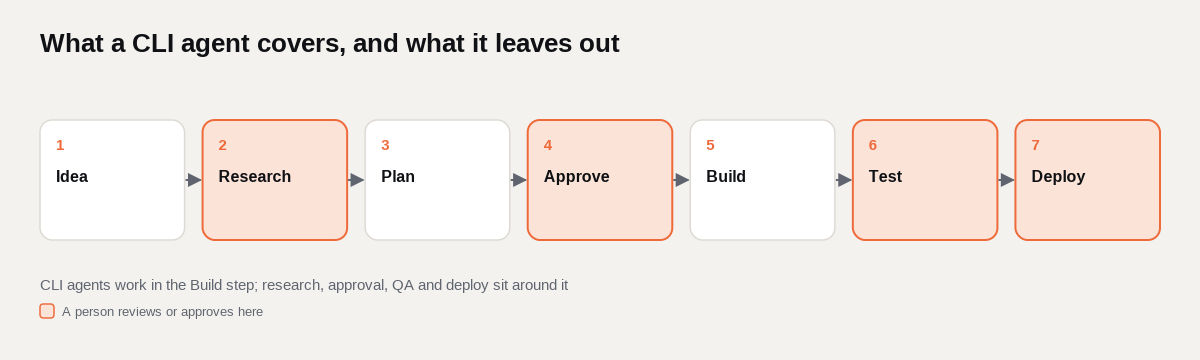
Devfab is not a CLI. It is on this list because many teams shopping for a terminal agent are really trying to fix something bigger: work that starts without research, plans nobody approved, and releases nobody tested end to end.
Coding agents automate the developer. Devfab automates the development lifecycle.
- Research before the plan. The Researcher maps key terms, best practices and competitors for the kind of app you are building, then suggests a prototype.
- A person approves the plan. The Coordinator only creates tickets once someone approves.
- ChainFlow. Devfab maps which functions and APIs call each other and what is deployed, so dev agents see that a change to checkout can affect payments, inventory, order confirmation and notifications.
- QA agent. It runs UI and flow tests, clicking screens, buttons and user journeys end to end, plus logic tests.
- Deploy and ownership. Code lives in your own GitHub account, and Deploy ships to your own server.
- Cost. Predictable cost: cost is logged after each run, per task and per project. You can choose the model for each agent or keep Devfab's default.
Honest limits: Devfab is new and in Beta, with a smaller community and fewer integrations than mature platforms. It is not an editor or a terminal tool for hands-on coding, and it needs a GitHub account. Many teams will keep a CLI agent for quick fixes and use Devfab for planned project work on the same repo.
How to choose
- You already pay for Claude or ChatGPT: start with Claude Code or the Codex CLI. Compare them in Claude Code vs OpenAI Codex.
- You want free and open source: OpenCode for breadth, Aider for careful single-repo edits, goose for general automation. See Aider vs Claude Code and best open-source AI coding agents.
- Your company runs on AWS: Kiro CLI.
- Your code lives on GitHub and you want PRs from issues: GitHub Copilot CLI with the cloud agent.
- You need many agents running while you sleep: Amp's orbs or Codex cloud tasks.
- You need research, approval, QA and deployment as one process: Devfab, alongside any CLI above.
FAQ
What is the best AI coding CLI in 2026?
For most professional developers, Claude Code or the OpenAI Codex CLI, since both plan, edit, run commands and open pull requests, and both come with existing paid plans. For a free, open-source agent with the widest model choice, OpenCode. For teams on AWS, Kiro CLI, which replaced the Amazon Q Developer CLI.
Is Gemini CLI still free?
Not for most individuals. Since June 18, 2026, Gemini CLI no longer serves requests for Google AI Pro and Ultra users or free Gemini Code Assist for individuals, who are moved to Antigravity CLI. Enterprise Code Assist customers and paid Gemini API key users keep access.
Which AI coding CLI tools are open source?
Among the tools here, OpenCode (MIT), Aider (Apache-2.0), goose (Apache-2.0), the Codex CLI (Apache-2.0) and Gemini CLI (Apache-2.0) publish their source. Google says Antigravity CLI, Gemini CLI's successor for individuals, won't be open source.
Can an AI coding CLI replace a development team's process?
No. A CLI agent works on tasks a developer gives it inside a repo. It does not research the domain, get a plan approved by a client, run a separate QA step on user journeys, or deploy the app. Those steps still need a person or a lifecycle tool.
Do I need a paid plan to use these CLIs?
Not always. OpenCode, Aider and goose are free, and you pay your model provider. Claude Code needs a paid Claude plan, Codex is included in ChatGPT plans including Free with limits, and Kiro has a free tier with 50 credits a month, as of November 2026.
Read next
Keep your favorite CLI. Add the research, approval, QA and deploy steps around it. Try Beta
Sources (checked November 2026): Claude Code docs: Overview; Claude Code docs: Costs; Claude Code docs: Enterprise deployment; Claude pricing; OpenAI Codex; ChatGPT + Codex docs; Codex pricing docs; openai/codex on GitHub; The New Stack: Codex joins ChatGPT desktop app; GitHub Copilot plans; GitHub Docs: Copilot features; GitHub Docs: Copilot cloud agent; GitHub Docs: Supported models; Kiro; Kiro pricing; Kiro changelog; Kiro hooks; Kiro: Upgrading from Q CLI; Kiro: Migrating from Q Developer; AWS: Q Developer end of support; OpenCode; anomalyco/opencode on GitHub; OpenCode research note (Jun 2026); Kilo blog: new Kilo for VS Code; Anaconda acquires Kilo Code; Amp manual; Amp; Amp pricing; Amp subscriptions; Amp Free is ad-free; Sourcegraph: Amp becomes independent; Aider docs; Aider on GitHub; aider-chat on PyPI; CodeMySpec: Aider review; goose docs; goose moves to AAIF; goose README; goose releases; PromptQuorum: goose review; Gemini CLI on GitHub; Google Developers Blog: Gemini CLI to Antigravity CLI; FOSS Force: Gemini CLI and Antigravity; The New Stack: Cursor acquires Continue.
Frequently asked questions
What is the best AI coding CLI in 2026?
For most professional developers, Claude Code or the OpenAI Codex CLI, since both plan, edit, run commands and open pull requests, and both come with existing paid plans. For a free, open-source agent with the widest model choice, OpenCode. For teams on AWS, Kiro CLI, which replaced the Amazon Q Developer CLI.
Is Gemini CLI still free?
Not for most individuals. Since June 18, 2026, Gemini CLI no longer serves requests for Google AI Pro and Ultra users or free Gemini Code Assist for individuals, who are moved to Antigravity CLI. Enterprise Code Assist customers and paid Gemini API key users keep access.
Which AI coding CLI tools are open source?
Among the tools here, OpenCode (MIT), Aider (Apache-2.0), goose (Apache-2.0), the Codex CLI (Apache-2.0) and Gemini CLI (Apache-2.0) publish their source. Google says Antigravity CLI, Gemini CLI's successor for individuals, won't be open source.
Can an AI coding CLI replace a development team's process?
No. A CLI agent works on tasks a developer gives it inside a repo. It does not research the domain, get a plan approved by a client, run a separate QA step on user journeys, or deploy the app. Those steps still need a person or a lifecycle tool.
Do I need a paid plan to use these CLIs?
Not always. OpenCode, Aider and goose are free, and you pay your model provider. Claude Code needs a paid Claude plan, Codex is included in ChatGPT plans including Free with limits, and Kiro has a free tier with 50 credits a month, as of November 2026.